Ever wondered why the WordPress admin dashboard sometimes looks a little different? It might be the admin colors at play.
Admin colors in WordPress are not just about aesthetics; they can change how you feel and work when managing your website. Imagine logging into your dashboard and feeling instantly energized or calm, just by the colors you see. This isn’t just about preference; it’s about how colors can influence your mood and productivity.
Curious about how these colors can make a difference for you? Stick around, because understanding admin colors could revolutionize the way you interact with your WordPress site. Dive in to discover how these colors can transform your daily tasks into a more engaging and enjoyable experience.
Admin Color Scheme Options
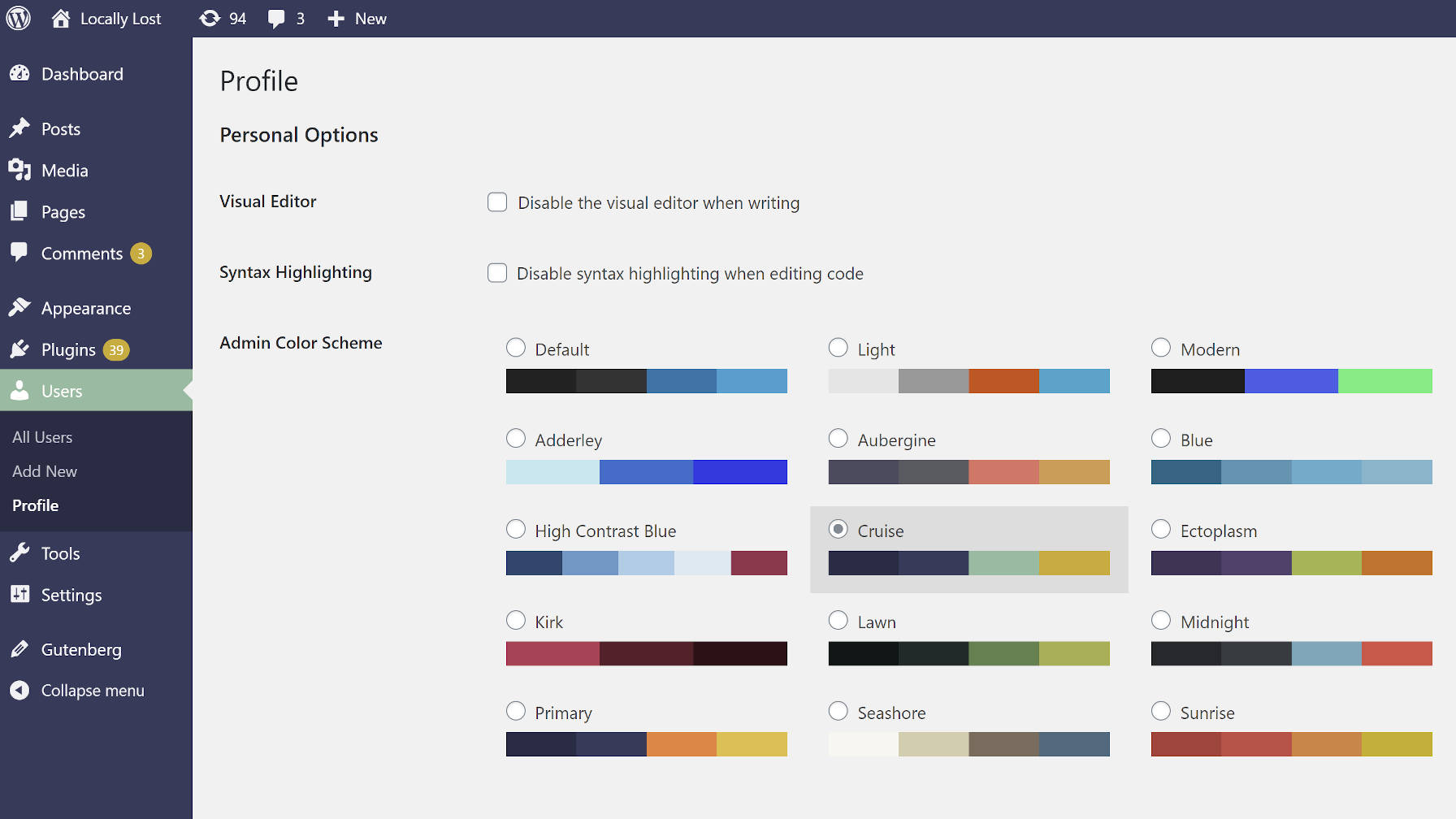
WordPress offers several color schemes for admin panels. Each scheme has its own unique colors. The default palette is basic and simple. It includes blue, gray, and white. These colors are easy on the eyes. They provide a clean look. Users can switch to this palette anytime.
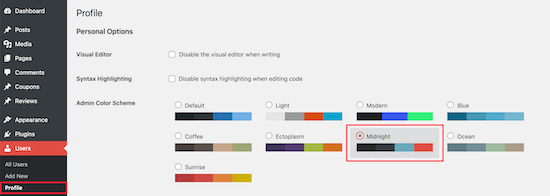
Other themes are available too. Sunrise uses warm tones like orange and red. Midnight is darker with black and purple. These themes add style and personality. Ocean is cool with shades of blue. Each theme has its own mood and feel. Users can choose a theme based on preference.

Credit: wptavern.com
Customizing Admin Colors
First, log into your WordPress dashboard. Go to the top right corner. Click your profile name. The page will show your profile settings. Look for the section named Admin Color Scheme. You will see different color options. Each option changes the look of the admin area. Choose a color scheme you like. The colors will update right away.
- Log in to WordPress.
- Click your name in the top right.
- Find Admin Color Scheme.
- Choose your favorite color.
- Click Update Profile.
The colors will change instantly. This makes your admin area look fresh. Bright colors make it fun to use. Dark colors make it calm. Choose what makes you happy.
Impact On User Experience
Admin colors make WordPress easy to use. Bright and clear colors help users see better. They make reading text easier. For people with eye problems, these colors are vital. Bright colors help them read without stress. With the right colors, everyone can enjoy using WordPress.
Keeping colors the same is key. When the colors match your brand, it feels nice. Users feel at home with consistent colors. They know they are in the right place. This makes WordPress look professional. It also helps in building trust. A familiar color can make users come back.
Credit: www.wpbeginner.com
Admin Color Plugins
Many plugins help change the look of the admin panel. Users can make their dashboard fun. Some popular options include Admin Color Scheme and Slate Admin Theme. These plugins offer many colors. They make the site more personal. Admins can choose colors to suit their mood.
Installing a plugin is easy. First, go to the WordPress dashboard. Click on Plugins. Select Add New. Search for the desired plugin. Click Install and then Activate. After activation, visit the settings. Choose your favorite colors.
Configuration helps set up the plugin. Users can customize their experience. Follow the instructions given by the plugin. Settings allow for changes. Enjoy a fresh new look!
Troubleshooting Color Issues
Some users face color display issues in WordPress admin. These problems can confuse. Often, they are due to browser settings or plugin conflicts. First, check your browser. Clear the cache and cookies. This can solve many issues. If colors still don’t show right, check your plugins. Deactivate them one by one. This helps find which plugin causes the problem. Sometimes, themes can also affect colors. Try switching themes to see if it helps.
Contact support if problems persist. WordPress has a helpful community. Use the WordPress forums for advice. Many users share solutions there. You can also check the WordPress Codex. It offers detailed guides. If nothing works, consider hiring a professional. They can fix complex issues. Always keep your WordPress updated. Updates fix many bugs and problems.
Credit: wptavern.com
Frequently Asked Questions
What Are WordPress Admin Color Schemes?
WordPress admin color schemes let users personalize the dashboard appearance. They can choose from several preset colors. This feature enhances user experience by allowing customization. Access it through the user’s profile settings. Personalized colors can help improve focus and engagement.
How To Change Admin Colors In WordPress?
To change admin colors, go to your profile settings in WordPress. Scroll down to the “Admin Color Scheme” section. Choose a preferred color scheme from the available options. Save your changes, and your dashboard will reflect the new colors immediately.
Do Admin Colors Affect Site Appearance?
Admin colors only affect the dashboard, not the site’s appearance. They enhance user experience by allowing personalization. The front-end of your site remains unchanged. This customization is purely for user convenience and better navigation within the admin panel.
Can I Customize Admin Color Schemes?
WordPress offers predefined admin color schemes, but custom plugins allow more personalization. These plugins let users create and apply unique color schemes. They enhance dashboard usability and match personal preferences. This customization can make managing your site more enjoyable.
Conclusion
Exploring WordPress admin colors can enhance your website experience. Colors help differentiate sections, making navigation easier. Customizing your admin panel can reflect your brand’s identity. It’s a simple way to improve your workflow. Different color schemes suit different preferences. Experiment to find what feels right for you.
Personalizing your admin area can boost productivity. It’s a small change with big benefits. Keep your WordPress experience colorful and organized. Enjoy the creative freedom it offers. Dive in and see the difference today!