
Are you ready to transform your data into a dynamic, interactive experience? Creating a web map can seem like a daunting task, but it doesn’t have to be.
Imagine being able to share geographical insights that captivate your audience, whether you’re showcasing travel routes, business locations, or environmental data. By the end of this guide, you’ll have the skills to host your own web map, making your data visually appealing and easily accessible.
Dive in and discover how you can turn complex data into engaging maps that speak volumes, offering a new perspective that’s just a click away. Let’s make mapping simple and impactful!
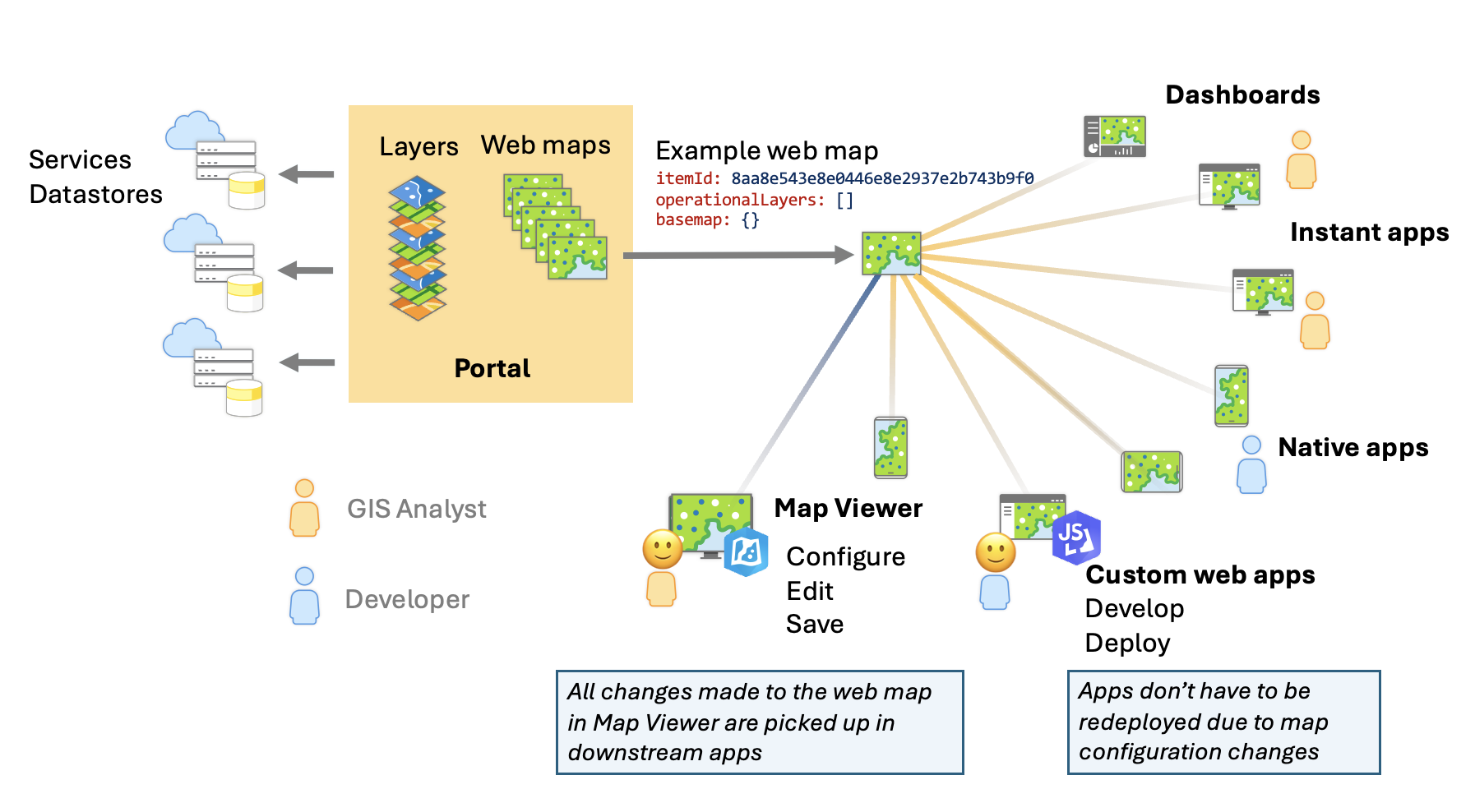
Credit: www.esri.com
Choosing Mapping Tools
Open source tools are free to use. They often have a big community. This means lots of help when stuck. Examples are Leaflet and OpenLayers. They are great for beginners. On the other hand, commercial options cost money. They often have more features. Esri ArcGIS and Mapbox are popular choices. They offer support and updates. Decide based on your needs and budget.
Maps should be easy to use. They need to be fast. People don’t like waiting. Interactive features make maps fun. Zooming and clicking are important. Customization helps make maps unique. You can change colors or shapes. Data integration is key. This means adding data from different places. Make sure your map can do this well.
Data Collection And Preparation
Picking the right geospatial data is key. Start with a clear goal. Consider what you need to show on your map. Choose data that fits your purpose. Use sources like government sites. They often have good data. Make sure the data is up-to-date. Check if it covers the area you need. Large datasets can be hard to manage. Begin with a small dataset. This makes things easier.
Data often has mistakes. Cleaning data is important. Look for missing information. Fill in gaps if possible. Remove duplicate entries. They can cause errors. Check for wrong data. Correct them or remove them. Use tools like spreadsheets to help. Always save a copy before changes. This protects your original data. Clean data leads to better maps.
Designing The Map Interface
A good map is easy to use. It should be simple and clear. Users should find information fast. Use big and clear text. Make buttons large and easy to click. Colors should be bright and different. This helps users see better. Navigation should be smooth and quick. Users should feel happy and not confused.
Visual style is important. Images should be clear and high quality. Use icons for important places. Lines and borders should be neat. This keeps the map clean. Background color should not be too bright. It should make the map stand out. Fonts need to be easy to read. They should not be too fancy.
Setting Up Hosting Solutions
Cloud hosting is a smart choice for web maps. It offers flexibility and scalability. You can choose from many platforms like AWS, Google Cloud, or Azure. These platforms provide reliable services. They help you manage your web map with ease. Costs can vary, so pick what’s best for your budget. With cloud hosting, you can access your map from anywhere. It’s also easy to update your map. Ensure your data is secure and backed up.
Configuring a server is important for hosting. First, install the necessary software. This includes a web server like Apache or Nginx. Ensure your server has enough RAM and storage. This helps your map run smoothly. Set up a firewall for security. Regularly update your server to keep it safe. Test your server before going live. Make sure everything works well. A well-configured server ensures a fast and efficient web map.
Implementing Interactive Features
Use layers to show different map parts. Each layer can show roads, buildings, or rivers. Markers are small icons on the map. They show important places. For example, a marker can show a school or a park. To add a layer, choose the right data. It should match the map’s theme. To add a marker, pick a good icon. It should be easy to see. Layers and markers make maps more fun and useful.
User input makes maps interactive. Users can click on the map. They can type in search boxes. This helps them find places. User input can add or change markers. It can also show different layers. Maps become personal with user input. It feels like magic. It’s fun to explore maps this way.

Credit: m.youtube.com
Testing And Debugging
Creating a web map requires careful testing and debugging to ensure smooth functionality. Identify errors early to fix them efficiently. Focus on user experience by resolving issues that impact loading speed and interactive features.
Common Issues And Fixes
Web maps often face loading errors. Check if all map files are uploaded. Missing files cause maps to break. Incorrect file paths also lead to errors. Ensure paths are accurate. Browser compatibility is another issue. Some maps work on one browser, but not another. Test your map on different browsers. Slow performance occurs due to large map data. Compress data to improve speed. Broken links confuse users. Verify all links before going live.
User Feedback Integration
User feedback helps improve web maps. Add a simple feedback form on your site. Ask users if they faced any issues. Monitor responses regularly. Fix common problems quickly. Engage with users through comments or emails. Show appreciation for their feedback. Update your map based on user suggestions. Keep users informed about changes. Continuous improvements make your map user-friendly. Happy users will visit again.
Launching And Maintaining The Map
Check the map’s speed regularly. Slow maps frustrate users. Use tools to see how fast your map loads. Look for any errors or bugs. Fix them quickly. This keeps the map working well. A stable map makes users happy.
Keep your map updated. This helps it stay secure. Old maps can have security holes. Regular updates close these holes. Update the map’s data often. This makes sure users get the best information. Use strong passwords to protect the map. Change passwords often. This keeps it safe from bad people.
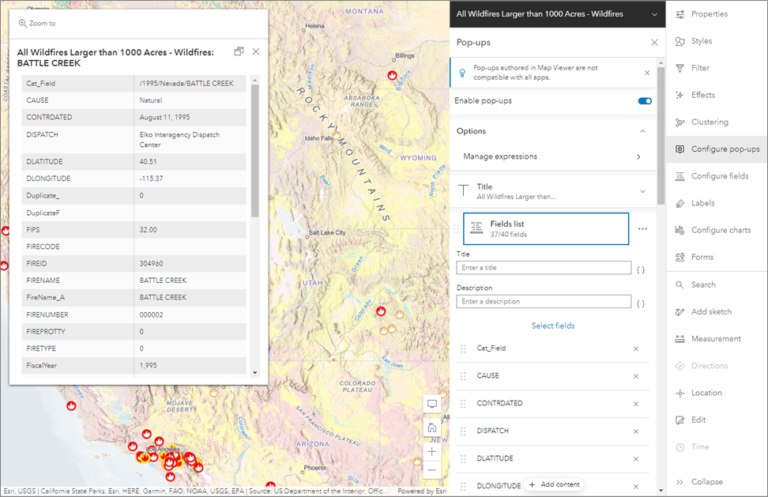
Credit: geospatialtraining.com
Frequently Asked Questions
How Do I Create A Web Map?
Use tools like Google My Maps or ArcGIS Online. Sign up, create a new map, and add locations. Customize with markers, lines, and layers. Save and share your web map link.
Is There A Free Arcgis?
ArcGIS offers a free trial version for a limited period. ArcGIS Online provides free access with basic features. Explore ArcGIS for personal use at no cost with ArcGIS for Home Use, available for non-commercial purposes. Students can also access ArcGIS for free through educational institutions.
What Does Hosted Mean In Arcgis?
Hosted in ArcGIS refers to storing data and services on ArcGIS Online or Enterprise. It enables cloud-based access, sharing, and collaboration, enhancing geospatial data management.
How To Embed Arcgis Web Map?
Go to your ArcGIS map, click “Share” and select “Embed in Website. ” Customize the size and appearance. Copy the provided HTML code and paste it into your website’s HTML editor. Adjust settings as needed for optimal display. Ensure your map is publicly accessible for viewers.
Conclusion
Creating a web map hosted online is a straightforward process. Follow the steps, and you will have a map ready. Start with choosing the right tools. Next, gather your map data carefully. Design your map with user-friendly features. Host your map on a reliable platform.
Ensure it is accessible on various devices. Keep it updated with new data. Test your map for any errors or issues. Share your map with your audience effortlessly. You can make a helpful web map. Enjoy the benefits of an interactive map online.


