
Imagine this: You’re browsing through your WordPress site, excited about the fresh content you’ve just published. But suddenly, you notice something’s off.
Your beautiful layout is acting up, and a few pages aren’t displaying correctly. What’s going on? HTML errors might be the culprit. These sneaky little errors can disrupt your site’s functionality and even drive away visitors. You might wonder how such errors pop up and what they mean for your site.
Understanding HTML errors is crucial, not just for fixing them but also for preventing them in the future. They can affect your site’s performance, SEO, and user experience. But don’t worry—this article will guide you through identifying, understanding, and resolving these pesky issues. By the end, you’ll feel empowered to tackle HTML errors head-on and ensure your WordPress site runs smoothly. Curious to find out more? Let’s dive in!

Credit: passwordprotectwp.com
Common Html Errors
Tags are like building blocks in HTML. Each tag starts with “<” and ends with “>”. A missing tag can break your page. Unclosed tags confuse browsers. Always check each tag pair. It helps pages look correct.
Attributes give extra info about elements. They must be written correctly. Incorrect attributes can cause errors. Use proper attribute names. Check their values. This helps keep your site functional.
Nesting is placing tags inside other tags. Like a box inside another box. Improper nesting leads to display issues. Follow correct order for tags. Check and fix nesting errors. This keeps your design neat.
Impact Of Html Errors
HTML errors can hurt a website’s SEO performance. Search engines might struggle to read the site properly. This can lead to lower rankings in search results. Errors can confuse the search engine bots. This confusion affects how they index the site.
HTML mistakes can make a site look broken. Visitors may see weird layouts or missing elements. This can frustrate users, leading to them leaving the site. A poor experience can make them not return. Happy users stay longer and explore more.
Errors in HTML can slow down a website. A slow site can annoy visitors. Long loading times may cause visitors to leave. A fast site keeps users happy. Fixing errors can make the site load quicker.
Identifying Html Errors
Open your website in a browser. Right-click and select “Inspect” to use Developer Tools. Look for red lines in the code. These lines show errors or warnings. Fixing these can make your site better.
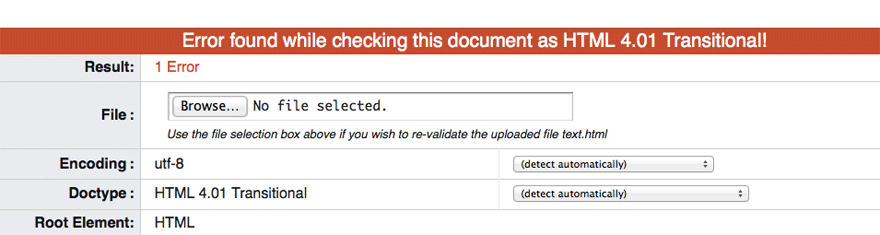
Use online tools to check your HTML. These tools find common HTML errors. They help you correct them. This keeps your site running smoothly. The W3C Validator is a popular choice. It shows mistakes in your code.
WordPress keeps error logs. These logs show what went wrong. Access them from your WordPress dashboard. Logs help you find and fix HTML issues. This keeps your site healthy and functional.
Fixing Html Errors
HTML syntax must be correct. Tags should open and close properly. Attributes need quotes. A missing bracket can break a page. Check every line for mistakes. Use a tool to find errors. Online validators can help. They catch common mistakes. Fix errors fast for better results.
Plugins and themes need regular updates. Old versions cause errors. They might not fit with new WordPress. Check for updates often. Go to the dashboard. Click “updates.” Install them quickly. This keeps your site healthy. Fewer errors mean a happier site.
Look at your code closely. Errors hide in plain sight. Check every line. Focus on nested tags. They often break. Use a simple editor. It highlights errors. Fix one error at a time. Test changes right away. This keeps the site stable.
Preventing Future Errors
Check your site often. Look for errors and broken links. Use tools to scan your site. Fix any problems you find. Keep your site running smoothly. This helps your site stay healthy. A healthy site is a happy site.
Choose themes and plugins wisely. Pick ones with good ratings and reviews. Update them regularly. Old plugins can cause problems. Reliable tools keep your site safe. They help avoid errors. Always use trusted sources.
Write clean code. Keep it simple. Avoid complex scripts. Use clear names for your variables. Test your code often. Fix bugs as soon as you find them. Good coding keeps your site fast and efficient.
Credit: cheapsslweb.com
Tools For Html Error Management
HTML validators check your code for mistakes. They find missing tags and wrong attributes. These tools keep your site clean and functional. Popular choices include the W3C Validator and HTML5 Validator. They help ensure your pages display correctly.
WordPress has many plugins to find HTML errors. They scan your site for problems. Some plugins offer real-time error checking. These tools are handy for keeping your site error-free. They make it easier to fix issues quickly.
Some code editors have built-in validation features. They highlight errors as you type. Editors like Sublime Text or Visual Studio Code help developers catch mistakes early. These editors are great for writing clean code.
Credit: winningwp.com
Frequently Asked Questions
What Causes Html Errors In WordPress?
HTML errors in WordPress often stem from incorrect coding, plugin conflicts, or theme issues. They can also result from improper customization or outdated plugins. Regularly updating themes and plugins, and validating HTML code can prevent these errors.
How Do I Fix Html Errors In WordPress?
To fix HTML errors, first validate your code using online tools. Update your themes and plugins regularly. Check for plugin conflicts and deactivate any problematic ones. Ensure correct coding practices are followed in custom modifications.
Can Plugins Lead To Html Errors?
Yes, plugins can cause HTML errors if they conflict with other site components. Outdated or poorly coded plugins might generate errors. Always ensure plugins are updated and compatible with your WordPress version.
Are Html Errors Harmful To Seo?
HTML errors can negatively impact SEO by affecting site structure and user experience. Search engines may struggle to crawl your site effectively. Fixing these errors ensures better indexing and improves overall site performance.
Conclusion
Finding and fixing HTML errors on your WordPress site is crucial. It keeps your site running smoothly. Visitors will appreciate a well-functioning site. Errors can hurt your site’s visibility and ranking. Regular checks can prevent issues before they grow. Use tools and plugins to help identify problems.
Many solutions are simple, requiring basic knowledge. Don’t ignore small errors; they can lead to bigger issues. Stay proactive and maintain your site regularly. A clean site enhances user experience and boosts credibility. Your site deserves attention and care. Keep it error-free for lasting success.


