
Are you diving into the world of WordPress and feeling a bit lost about the concept of Pages? You’re not alone.
Navigating the differences between Pages and Posts in WordPress can be confusing, especially if you’re new to the platform. But understanding Pages is crucial for building a well-structured and user-friendly website. We will simplify the concept of Pages for you, illustrating why they’re essential and how they can enhance your website’s functionality and aesthetics.
Stick around to discover how mastering Pages can be the key to transforming your WordPress site into a professional and engaging online space.
Pages Vs Posts
Pages and posts are two types of content on WordPress. Pages are static and don’t change often. They are ideal for timeless content like “About Us” or “Contact.” Posts are dynamic and appear on your blog. They are perfect for news and updates. Pages are usually listed in menus. Posts appear in a timeline format.
Pages do not have a published date. Posts show the date they were published. Pages do not have categories or tags. Posts can be organized using categories and tags. Pages have a hierarchy. Posts are usually listed by date or category.
Use pages for important information that changes rarely. This includes information like company history. Use posts for regular updates and stories. This is useful for news and events. Pages help users find key information easily. Posts keep users informed about recent activities.

Credit: wordpress.org
Creating Pages
WordPress pages offer a way to create static content on your site. They are ideal for timeless information. Examples include About Us, Contact, and Services.
Step-by-step Guide
Start by logging into your WordPress dashboard. Click on Pages in the sidebar. Select Add New. Type the title of your page. Write your content in the text box. Use the toolbar for formatting. Click Save Draft if you want to edit later. Use Preview to see how it looks. Once happy, click Publish.
Essential Elements
Every page needs a title. Make sure it’s clear. Add a feature image to catch eyes. Use headings to separate sections. Include links to other pages. Add a contact form if needed. Ensure it’s mobile-friendly. Check SEO settings to help search engines. Proofread for any errors. Keep it simple. Update when necessary.
Customizing Pages
Themes change the look of a WordPress page. They have different colors and styles. Templates help in laying out the page. Some templates come with themes. Others are custom-made. Choosing the right theme is important. It makes the website stand out. Templates can be basic or advanced. Simple templates are easy to use. Advanced templates offer more features. Both are useful for different needs. Always check if the theme is responsive. Responsive themes look good on all devices. They are popular among users.
Page builders make creating pages easy. They have drag-and-drop features. Users can add text, images, and buttons. No coding skills are needed. Page builders save time. They offer many design options. Some builders are free. Others have a cost. The choice depends on the need. Builders help in customizing pages fast. Popular page builders include Elementor and Divi. These tools are easy to learn. They offer many templates and styles. Builders give flexibility in design. They are useful for beginners and experts.
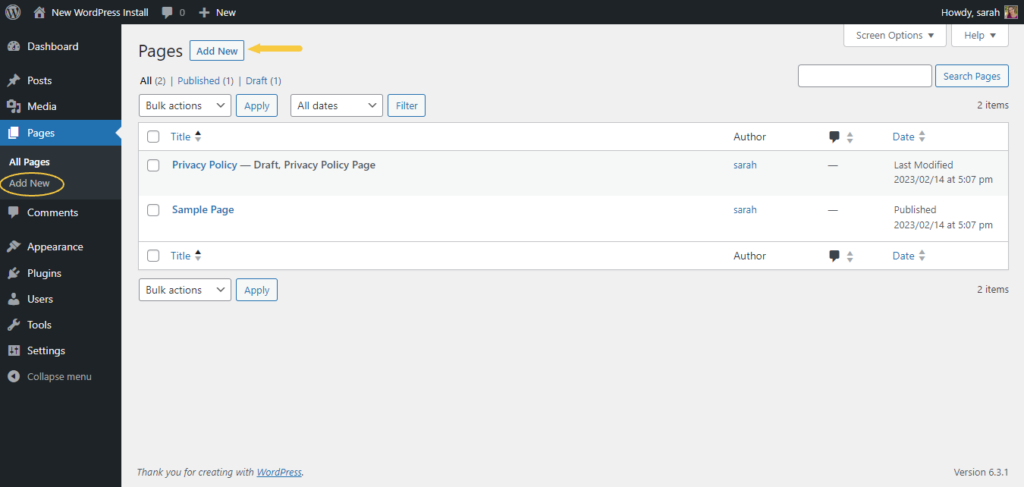
Credit: solidwp.com
Seo For Pages
Use clear and simple words for your page. Short sentences are best. Visitors should understand quickly. Make your content easy to read. Add keywords that are important. But do not use too many. Keep it natural. Headings are useful. They make your page look neat. Use them wisely.
Each page should have a unique title. Titles help search engines. Descriptions are important too. They tell what the page is about. Each page needs its own description. Add links to other pages. Links help visitors find more. They also help search engines understand your site.
Managing Pages
Organizing Your Site is very important. Pages help keep things tidy. You can create pages for different topics. Each page can have its own content. This makes it easy for visitors to find information. Using menus can help organize pages. You can put pages in order. This helps users navigate your site. Make sure to label pages clearly. This helps users understand what each page is about.
Updating and Maintenance is needed for pages. Check pages for errors. Fix broken links and update old information. This keeps your site fresh. Regular updates make sure pages are accurate. This helps build trust with visitors. Use a schedule for updates. This ensures you don’t miss anything important. Keep pages clean and simple. Visitors like easy-to-read pages. This makes your site more friendly.

Credit: www.elegantthemes.com
Common Mistakes
Many make mistakes with WordPress pages. They use pages for blog posts. This is incorrect. Pages are for static content. Like contact info or about us. Blog posts are for news or updates. It’s crucial to know the difference. Using them right helps with site organization.
Always keep pages simple and clear. Use headings and lists. This makes content easy to read. Add relevant keywords. They help with search engine visibility. Avoid cluttering with too many links. Keep important links only. Regularly update your pages. Fresh content is always better.
Advanced Page Features
WordPress pages serve as static content for websites. They are ideal for timeless information like “About Us” or “Contact” sections. Unlike posts, pages do not follow a chronological order, providing a stable structure for essential site information.
Using Plugins
Plugins add cool features to your pages. You can make pages look unique. Some plugins help add contact forms. Others can create photo galleries. Choosing the right plugin is important. Always check reviews before installing. Some plugins might slow down your site. Keep your site fast and user-friendly.
Interactive Elements
Make pages fun with interactive elements. Add buttons that change color. Use sliders for images. Interactive elements can make learning easier. Quiz plugins can make tests fun. Animation effects catch the eye. Too many effects can be distracting. Balance is key.
Frequently Asked Questions
What Are WordPress Pages Used For?
WordPress Pages are used for static content like About, Contact, or Services. They differ from posts because they aren’t time-sensitive. Pages don’t appear in the blog timeline. They are ideal for evergreen content that remains unchanged over time, providing essential information to visitors.
How Do Pages Differ From Posts In WordPress?
Pages in WordPress are static, while posts are dynamic and time-sensitive. Pages are meant for timeless content like contact information, whereas posts appear in chronological order. Posts are often part of a blog, while Pages are used for permanent content like About or Services.
Can I Customize WordPress Pages?
Yes, you can customize WordPress Pages using themes and plugins. WordPress offers a range of tools to design Pages according to your needs. You can add various elements like images, videos, and widgets to enhance functionality. Advanced users can also use custom CSS for more specific styling.
How To Create A Page In WordPress?
To create a Page in WordPress, go to your dashboard and click “Pages” then “Add New. ” Enter your desired content in the editor. Customize it with various elements like text, images, or videos. Once satisfied, click “Publish” to make it live on your website.
Conclusion
Pages on WordPress provide structure. They organize content efficiently. Understanding pages helps in better site management. Simple to create. Easy to customize. They enhance user experience. Visitors find information quickly. WordPress pages improve site navigation. They are essential for any website.
They offer flexibility and control. No coding skills needed. Just a few clicks. You can create stunning pages. Boost your site’s appeal. Keep your audience engaged. Pages streamline content delivery. They make your site more professional. Explore WordPress pages. Optimize your website today.
Ensure a great user journey.


