
Ever wondered why the links to your WordPress pages and posts look the way they do? Understanding your default permalinks in WordPress is crucial.
They aren’t just random sequences of characters; they play a significant role in how search engines and users perceive your content. If you’ve ever felt puzzled by how URLs are structured in WordPress, you’re not alone. This guide will demystify the default permalinks, empowering you to make informed decisions that can enhance your site’s SEO and user experience.
Ready to unlock the secrets behind your site’s URLs? Let’s dive in and explore what your default permalinks are and how they impact your website.
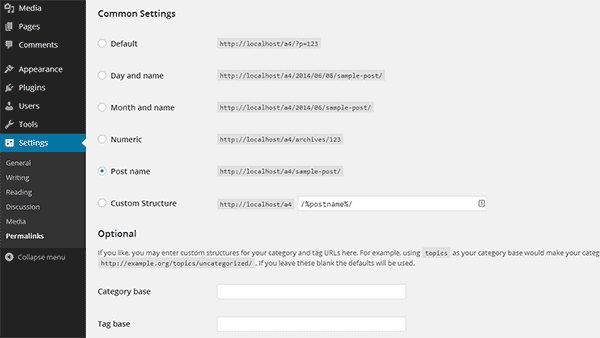
Credit: www.isitwp.com
Default Permalink Settings
WordPress offers different default permalink structures. These decide how your post URLs look. The most basic is the Plain setting. This uses numbers and question marks. It’s not very pretty.
The next option is Day and Name. It shows the post date and title. This is good for blogs that post often. Another choice is Month and Name. It shows the month instead of the day. This works well if you don’t post daily.
Then there is Numeric. It uses numbers for posts. Last is Post Name. This is the cleanest option. It uses just the post title. Search engines like this one best.
Understanding Permalinks
Permalinks are the web addresses for your posts and pages. They help people find your content. A permalink stays the same even if you change your post title. This makes it easy for others to link to your content. Each permalink is unique.
Permalinks make it simple to share content online. They help search engines like Google find your pages. Good permalinks improve your website’s SEO. They also make your links look clean and easy to read. This helps visitors trust your site more.
Types Of Default Permalinks
WordPress offers various default permalink types, including Plain, Day and Name, Month and Name, Numeric, and Post Name. Each structure affects how URLs appear and can impact SEO and user experience. Adjusting permalinks can help make your website more accessible and search engine friendly.
Plain Permalinks
Plain permalinks are simple URLs. They use numbers and symbols. These links do not have keywords. This makes them less SEO-friendly. Search engines prefer keyword-rich links. Plain permalinks are not descriptive. They can be confusing. They don’t show what the page is about. Avoid plain permalinks for better SEO.
Day And Name
Day and Name permalinks include the post date. They show the year, month, and day. After the date, there is the post name. These permalinks are good for news sites. They help readers know when content was published. They are clear and informative.
Month And Name
Month and Name permalinks show the month and year. They also include the post name. These are suitable for blogs. They help categorize posts by month. Month and Name permalinks are neat. They provide context about post timing.
Numeric
Numeric permalinks use numbers only. These are not SEO-friendly. They lack keywords. Numbers don’t describe content. Search engines may ignore these links. Numeric permalinks are not ideal. Use descriptive links instead.
Post Name
Post Name permalinks are the best for SEO. They use the post title in the URL. This makes them keyword-rich. They are clear and descriptive. Post Name permalinks help with search rankings. They improve site visibility. Choose these for better results.

Credit: onesmartsheep.com
Choosing The Right Permalink
Permalinks are important for your website’s SEO. Search engines look at them. They help find out what your page is about. Short links are better than long ones. Include keywords in your links. This helps search engines. It makes your page easy to find. Avoid using numbers and special signs. These can confuse search engines.
Clear permalinks help users. They show what the page is about. Users like simple links. They are easy to read. They help users remember the page. Short links load faster. This makes users happy. They do not like waiting. Easy links make users come back.
Use hyphens between words. This makes links easy to read. Do not change permalinks often. It confuses users and search engines. Test your links before sharing. This avoids broken links. Update links when needed. This keeps your site fresh. Follow these tips for a good site.
Customizing Permalinks
WordPress sets your default permalinks to plain URLs with question marks and numbers. Changing these improves your site’s SEO and readability. Explore the settings to find options like “Post name” or “Month and name” for cleaner, more attractive links.
Using Custom Structures
Many people like to change their permalinks. It can make links look nice. Use custom structures in WordPress. This lets you choose how links appear. You can use words and numbers. For example, use /blog/%postname%/. This shows the post name in the link. It helps users find pages easily.
Common Customizations
There are popular ways to customize permalinks. Use dates in links like /2023/10/15/sample-post/. This shows when a post was made. Use categories too. A link can look like /category/post-title/. It tells what topic the post is about. These changes can help organize your site. They make it easy to find content.
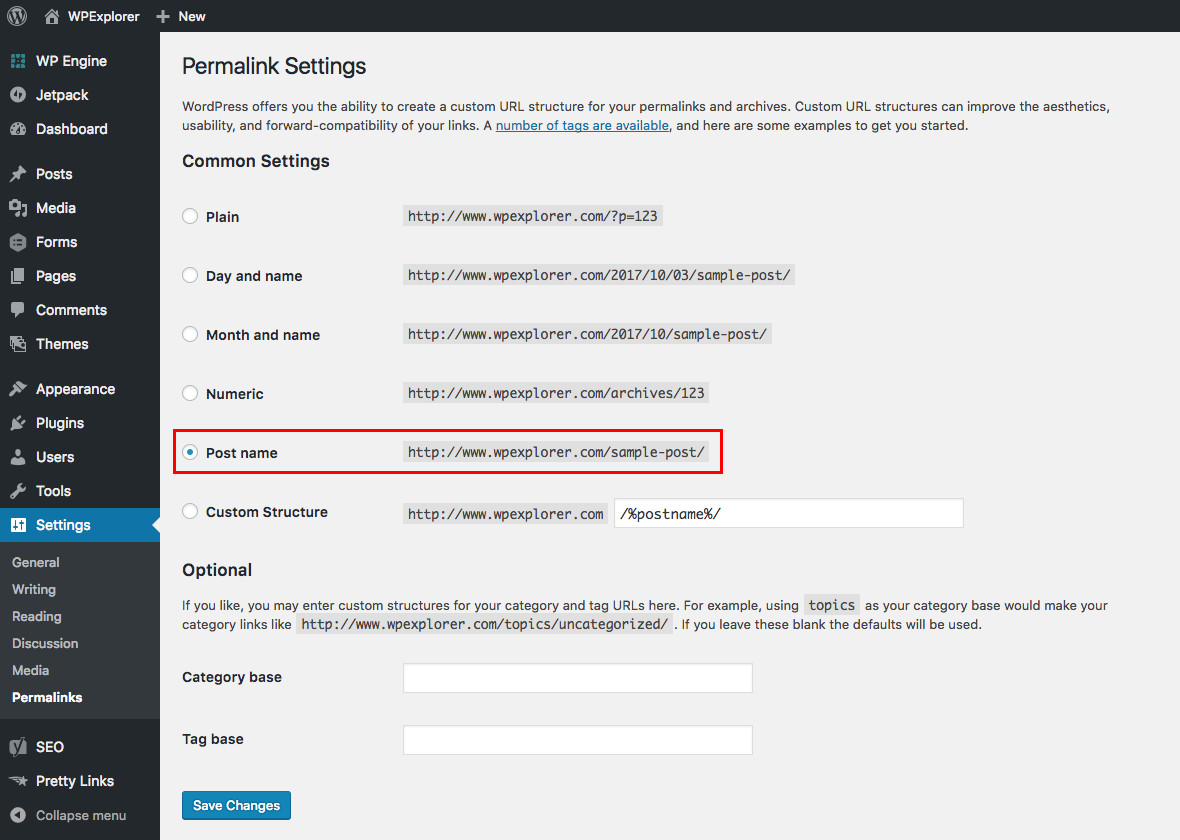
Credit: www.wpexplorer.com
Troubleshooting Permalinks
Permalinks can sometimes be tricky. Often, they cause errors on your site. Some pages might show a 404 error. This means the page is not found. Sometimes, permalinks do not update. This can confuse your site visitors. Old links might not work. This can lead to a poor user experience.
Broken links can be fixed easily. Go to your WordPress settings. Click on Permalinks. Choose a new structure. Save the changes. This often solves the problem. You can also use a plugin. Many plugins can fix broken links. They check all links on your site. They help keep your site healthy.
Frequently Asked Questions
What Are Default Permalinks In WordPress?
Default permalinks in WordPress use plain URLs with query strings. They look like “http://example. com/? p=123”. This structure is not SEO-friendly. It’s the initial setting when WordPress is installed. Changing to a more descriptive structure can improve SEO and user experience.
How Can I Change WordPress Permalinks?
To change permalinks, go to your WordPress dashboard. Navigate to Settings, then Permalinks. Choose a structure that suits your content. Common options include Post Name or Day and Name. Save your changes to update the permalink structure.
Why Are Permalinks Important For Seo?
Permalinks are important for SEO because they affect how search engines index your content. A descriptive permalink provides context to search engines. This can improve your search rankings. It also enhances user experience by making URLs more readable and memorable.
What Is The Best Permalink Structure?
The best permalink structure is often “Post Name”. It makes URLs clear and descriptive. This structure helps search engines understand your content. It also improves click-through rates by providing users with more information upfront. Always choose a structure that aligns with your site’s goals.
Conclusion
Understanding default permalinks in WordPress simplifies website management. These links affect your site’s structure and SEO. Choose wisely to enhance user experience and search visibility. Simple URLs look clean and are easy to remember. Customize permalinks for better performance. This aids in organizing content and improves navigation.
Experiment with different options. Find what suits your site best. Remember, a well-structured link boosts visitor engagement. So, take time to optimize. Your site’s success depends on it. Make the most of WordPress capabilities for effective results. Keep improving for better growth.


