
Ever wonder how you can customize your WordPress site without touching the core files? Meet hooks and filters, your new best friends in the WordPress universe.
If you want to tweak, adjust, or enhance your website’s functionality without diving into complex coding, understanding hooks and filters is crucial. These powerful tools allow you to add features, modify existing ones, or change how your site behaves—all with just a few lines of code.
Imagine having the power to tailor your website exactly to your needs, boosting its performance and user experience. Sound appealing? Keep reading, and you’ll discover how mastering hooks and filters can transform your WordPress site from ordinary to extraordinary.
Credit: learnwoo.com
Hooks In WordPress
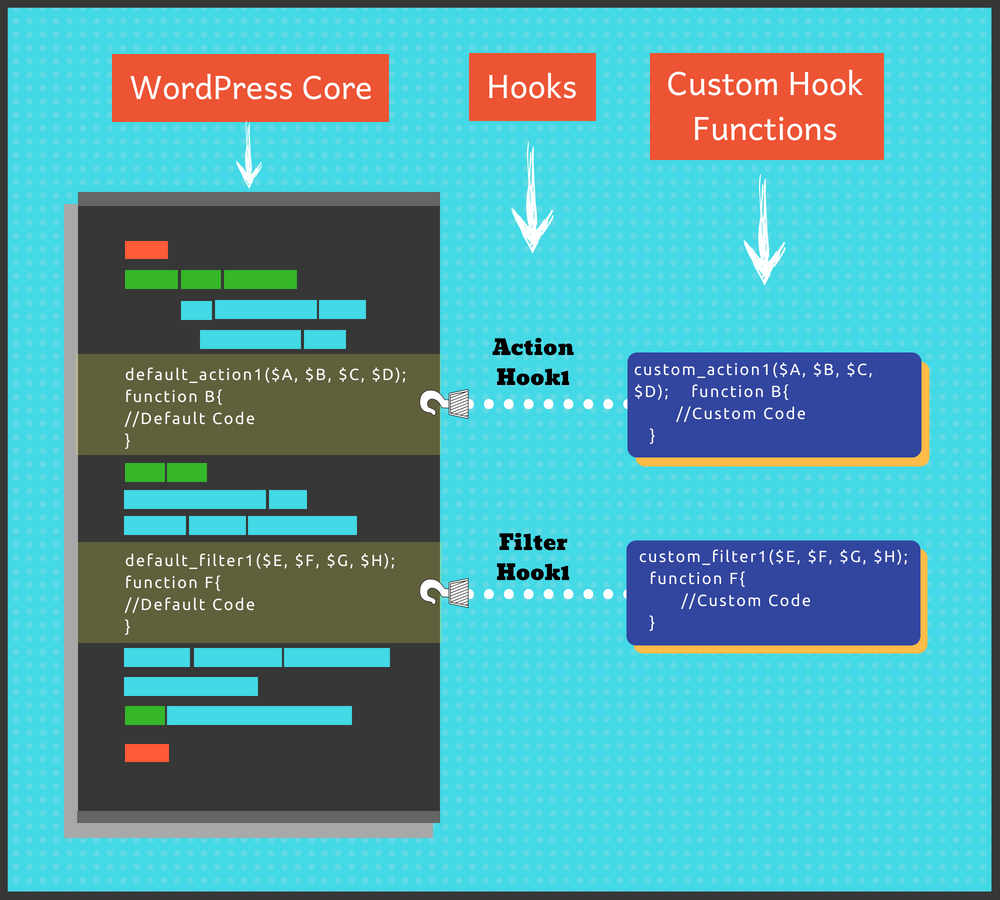
Action Hooks let you add code at certain spots. They are like checkpoints in WordPress. You can create new features or change old ones. For example, add a function when a post is published. This makes WordPress flexible. Developers love using action hooks. They make coding easier. They save time by reusing code. WordPress has many action hooks. Each one does something special. You can find them in WordPress documentation. Easy to use and helpful for making changes.
Filter Hooks are like action hooks but different. They change data before it shows up. For example, change how a post looks. Filters make WordPress content unique. They adjust text, images, and links. Developers can alter content easily. Filters can be used in themes and plugins. You can create custom filters. This makes each site unique. Filters help in improving website appearance. WordPress has many filters. They are easy to find and use. Useful for personalizing websites.

Credit: stackoverflow.com
Using Hooks
Hooks allow users to add their own custom functions to WordPress. These functions can change how WordPress works. When you use hooks, you can create new features. You can also change old features. This makes your website unique. Action hooks run your code at certain times. Filter hooks change data before it is used or shown. Both are important for adding custom functions.
Hooks help you modify the core parts of WordPress. You can change how WordPress behaves. This is done without editing core files. This keeps your changes safe during updates. You can use filters to change text or data. You can use actions to run code at specific times. These tools give you control. Use hooks wisely to keep your site running well.
Filters In WordPress
Hooks and filters in WordPress allow developers to modify how themes and plugins work. Hooks let you insert custom code at specific points, while filters adjust data before it’s displayed. These tools provide flexibility, making it easier to customize WordPress without altering core files.
Modifying Data
Filters change data in WordPress. They let you adjust content. You can use them for text, images, and other elements. Filters work before data shows on your site. They make your site look better and more unique.
Filters help you modify data easily. You can add or remove parts of your content. This makes content more relevant to your audience. Filters allow you to customize without changing the core code. They are easy and safe to use.
Common Use Cases
- Changing text in a post.
- Modifying image sizes.
- Adjusting date formats.
- Altering titles or headings.
- Filtering user comments.
Filters are useful for many tasks. They improve user interaction. They help make your site unique and tailored to your needs.
Implementing Filters
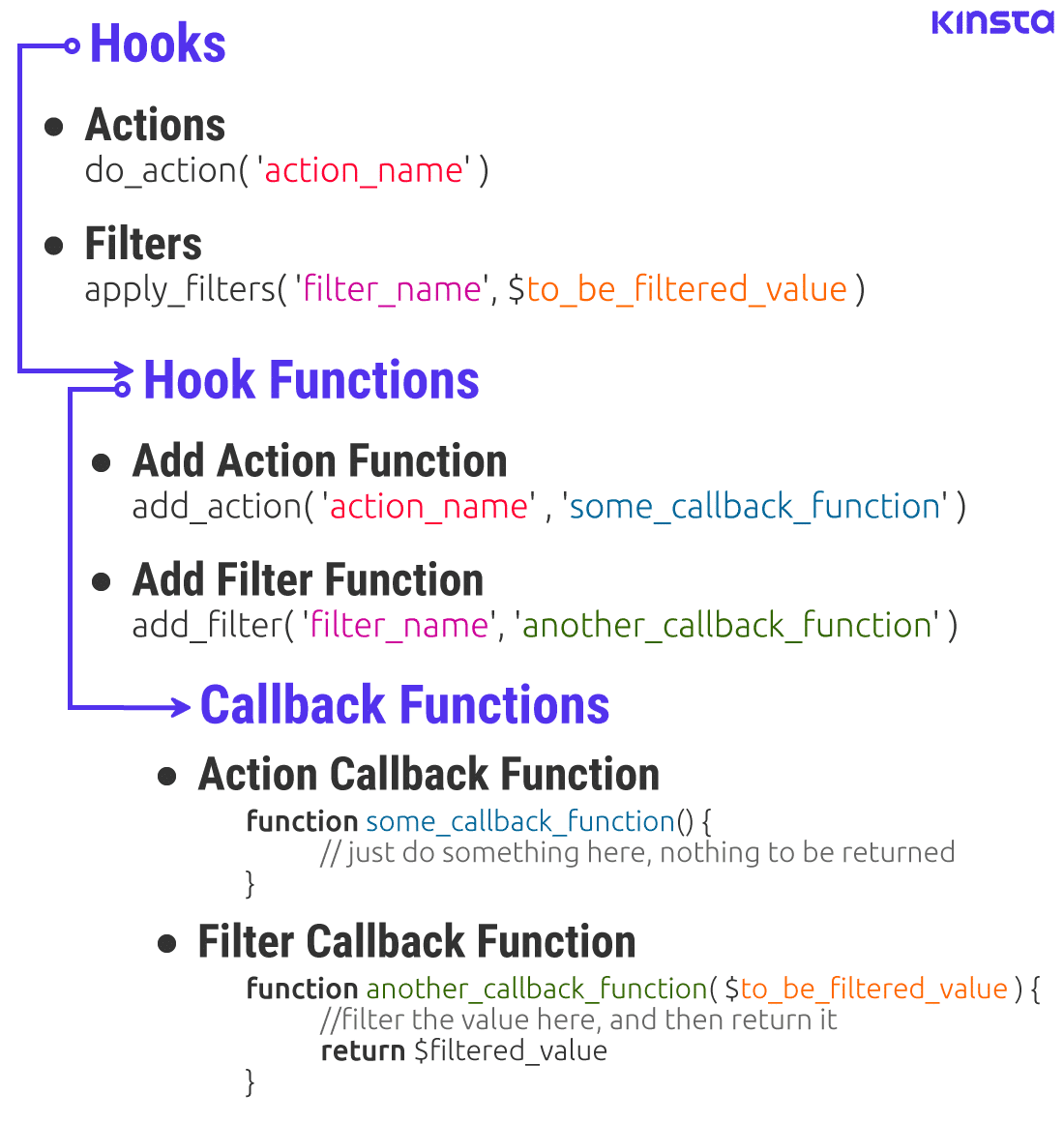
Custom filters help change the output of a function. First, you define a custom filter using the add_filter() function. This function connects your custom function to a WordPress hook. Next, you create a function with your custom logic. This function will change the data. Use clear and simple logic. Finally, test your filter to make sure it works well.
Filters in themes are useful. They help change theme functions. You can add filters to change text or style. Themes often have many filters. Look for filters in the theme’s files. Use the add_filter() function to apply them. Make sure to back up your theme before changes. This keeps your theme safe.
Best Practices
Understanding hooks and filters in WordPress is crucial for customizing websites. Hooks let you add or modify functionality without changing core files. Filters adjust content before it’s displayed, offering flexibility in design and function. Use them wisely to enhance site performance and user experience.
Security Considerations
Hooks and filters can enhance or harm security. Always validate and sanitize data. Malicious code may enter through poorly managed hooks. Ensure that user input is safe. Regularly update plugins and themes. Use trusted sources only. Monitor changes to hooks and filters. Regular audits help catch vulnerabilities. Educate team members on best practices. Share knowledge about security risks. Reduce unauthorized access by controlling permissions. Limit access to sensitive hooks.
Performance Optimization
Optimize hooks and filters for faster load times. Avoid complex operations inside hooks. They slow down the site. Minimize database queries. Excessive queries impact performance. Cache results when possible. This speeds up repeated processes. Prioritize hooks that run often. Review and test changes regularly. Use tools to analyze performance. Adjust filters for better efficiency. Efficient code boosts site speed. Fast websites improve user experience. Regularly update and refine code.
Troubleshooting
Debugging hooks can be tricky. They help find errors in WordPress. Use simple tools to check them. The WordPress Debugging Tool is very helpful. It shows where problems are. Be sure to check your code often. A small mistake can cause big issues. Keep notes of changes made. This helps track errors faster. Also, ask help from WordPress forums. Many users share their solutions.
Filter conflicts happen when plugins clash. They cause errors in WordPress sites. To fix them, disable one plugin at a time. Check which plugin causes the problem. Update all plugins regularly. Updates often fix bugs. Always backup your site. Backups protect your work. If problems persist, contact plugin support. They can provide specific solutions.
Advanced Techniques
Hooks and filters in WordPress allow developers to customize and extend functionality. Hooks let you execute code at specific points, while filters modify data before it is used. Understanding these tools enhances your ability to tailor WordPress to meet specific needs.
Chaining Hooks And Filters
Hooks and filters can be chained together. This creates complex functions. Use multiple hooks for more control. Filters can change output after hooks run. This chain helps manage data easily. Each hook and filter does a specific job. Chaining makes processes smoother and efficient.
Conditional Hooks
Conditional hooks activate under certain conditions. They allow more flexible coding. Hooks only run if specific criteria are met. This saves resources and time. Conditional hooks are smart. They reduce unnecessary operations. Easily manage WordPress tasks. Set conditions carefully for best results.
Credit: kinsta.com
Frequently Asked Questions
What Are Hooks In WordPress?
Hooks in WordPress are functions that allow you to add your custom code. They enable developers to modify WordPress functionality without altering core files. Hooks are divided into actions and filters, offering flexibility to implement changes. Actions execute functions, while filters modify data.
Understanding hooks is essential for effective WordPress customization.
How Do Filters Work In WordPress?
Filters in WordPress modify content before it’s displayed or saved. They allow developers to change data, like post content or titles, by applying custom functions. Filters are often used to tweak existing functionality or add new features. By using filters, you can enhance WordPress without changing core files.
What Is The Difference Between Hooks And Filters?
Hooks and filters serve different purposes in WordPress. Hooks allow you to add custom code at specific points. Filters let you modify data before it’s displayed or saved. Actions are a type of hook that execute functions, while filters adjust content.
Both are crucial for customizing WordPress efficiently.
How Can I Use Hooks In My Theme?
To use hooks in your theme, identify the hook you want to use. Add your custom function to the theme’s functions. php file. Use add_action or add_filter functions to attach your code to the hook. This method allows you to modify or extend theme functionality without altering core files.
Conclusion
Hooks and filters in WordPress empower customization. They let you tweak and modify without touching core files. This flexibility helps maintain upgrades. Developers can create unique functionality. Beginners benefit too. Easy changes enhance your site. Understanding hooks and filters is key.
It opens doors to creative possibilities. Experiment and learn. Start small, then go bigger. Your WordPress site can adapt easily. Make the most of these tools. They offer control, precision, and personalization. Dive into WordPress, explore hooks and filters today.
Your site deserves the best!


