
Have you ever stumbled upon a stunning WordPress website and wondered, “What theme are they using?” You’re not alone.
Discovering the theme behind a beautifully designed website can unlock endless possibilities for your own site. Imagine effortlessly capturing the same aesthetics and functionality, making your online presence just as impressive. You’ll uncover tools that can help you find out what WordPress theme a site is using.
Get ready to transform your website dreams into reality by harnessing the power of these tools. Let’s dive in and unveil the secrets behind those captivating designs.
Why Identify WordPress Themes
Finding a theme can spark new ideas. Themes offer unique designs and layouts. They can show what’s possible for your site. Get inspired by colors, fonts, and styles. Make your site stand out. Create something special.
Knowing a competitor’s theme can be a secret weapon. See what works for them. Learn from their design choices. Understand their strategy better. You can use this info to improve your site. Stay ahead in the market.
Compatibility matters for website performance. Check if a theme works with your plugins. Avoid issues later. Choose themes that fit your needs. This ensures a smooth user experience. Keep your site running efficiently.
Credit: www.greengeeks.com
Popular Tools For Theme Detection
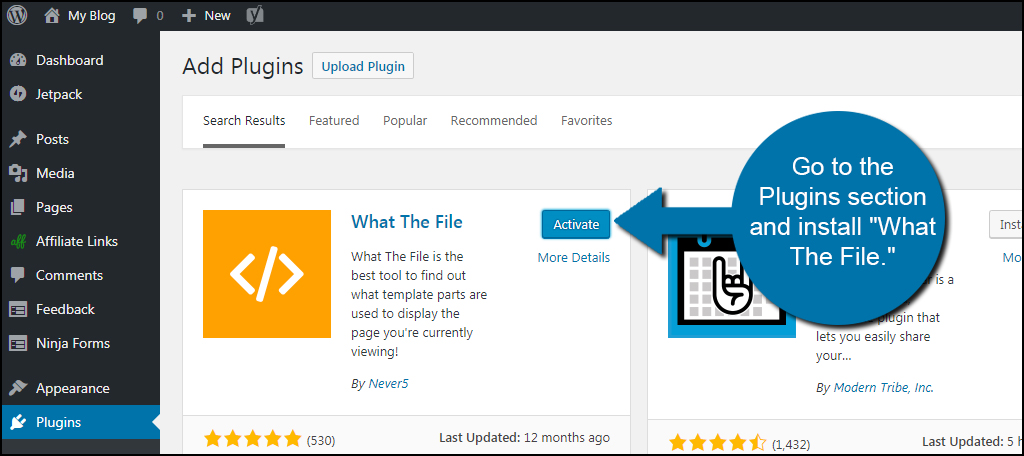
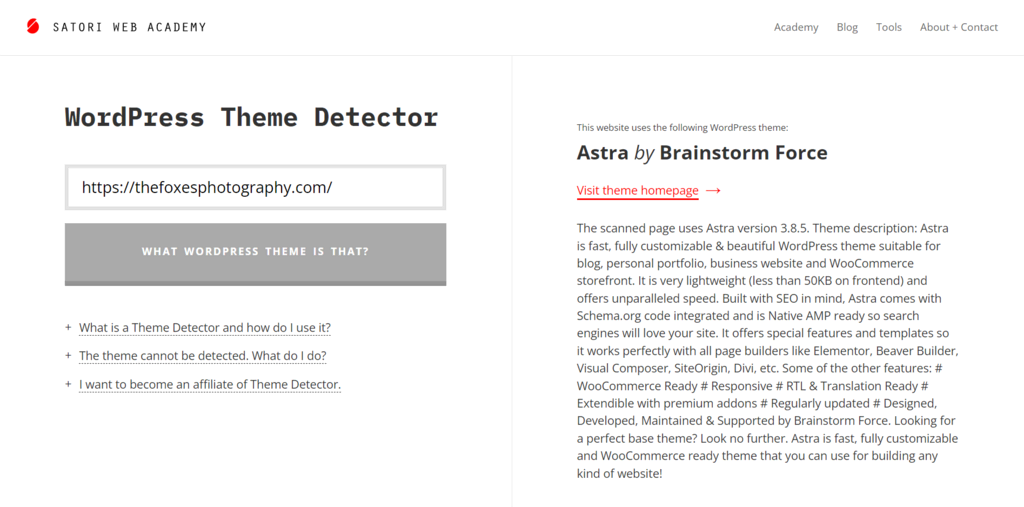
Online tools help find out what WordPress theme a website uses. WP Theme Detector is popular. It gives theme name and details. What WordPress Theme Is That is another choice. It shows plugin information too. These tools are easy to use. Just enter the website URL. Results come quickly. They are great for beginners.
Browser extensions also help detect themes. Wappalyzer is a famous extension. It works on Chrome and Firefox. Wappalyzer shows theme and plugin details. BuiltWith is another extension. It provides insights about website frameworks. These extensions make theme detection fast. Install them once. Use them any time.
Manual techniques require some skill. Check the website’s source code. Look for style.css file. This file often has theme information. Use browser tools like Inspect Element. Check the page source for theme clues. This method takes more time. It is useful for tech-savvy users.
Using Online Tools
First, pick a website you like. Open it in your browser. Right-click and select “Inspect”. This will open a new panel. Look for “Sources” or “Elements”. In this section, search for theme name. Sometimes it’s in a folder named “themes”. If you find it, note down the name. If not, use online tools. They are simple and quick. Enter the website URL. The tool shows the theme in seconds. This is an easy way to find themes.
Online tools save time. They are very easy to use. No special skills needed. These tools work fast. Most of them are free. Yet, they may not show custom themes. Some websites hide their theme info. Always double-check your findings. This ensures accuracy. Using multiple tools can help. It gives you a better result.
Credit: www.hostinger.com
Exploring Browser Extensions
Discover browser extensions that help identify WordPress themes effortlessly. These tools reveal theme details with just a click. Perfect for web enthusiasts curious about site designs.
Installation Process
Browser extensions help find WordPress themes. First, open your browser. Then go to the extension store. Search for the extension name. Click to install it. Wait for the download to finish. After that, click “Add to Browser.” Follow on-screen steps. Now, the extension is ready to use. You can find themes easily.
Features And Benefits
These extensions are very helpful. They show theme names quickly. They save time for users. They work with most websites. You don’t need coding skills. They are easy to use. You can learn about different themes. They help in choosing the right theme. They are free in most cases. Some offer extra features. These help in design and layout.
Manual Inspection Methods
Open the website in your browser. Right-click and select “View Page Source”. Look for the style.css file. This file shows the theme name. You might see “Theme Name” or “Template“. This tells you which theme the site uses.
Style sheets control the look of a website. Inspect the style.css file. It contains theme information. The top lines have important details. They show the Theme Name and Author. This helps to identify the theme quickly.
Factors Influencing Theme Detection
Customizations make theme detection tricky. Themes often get altered by users. These changes include color schemes, fonts, or layouts. Even small tweaks can hide a theme’s identity. A site’s owner might add unique features or remove others. The more changes, the harder it is to spot the original theme. Sometimes, theme names are changed too. This makes identification almost impossible. Tools may struggle to recognize a heavily altered theme. Each customization acts as a disguise. This means the tool might need help identifying it.
Plugins can confuse theme detection. They add features that aren’t from the theme. Many sites use plugins for extra functionality. These include contact forms, galleries, or sliders. Often, plugins change the site’s look and feel. This can make it hard to see the theme beneath. Plugins might also add custom stylesheets. They might override theme styles. This masks the theme’s original design. Some plugins also change HTML structure. This affects the theme’s visible elements. Tools might misidentify themes due to these changes.
Interpreting Results
Discovering the WordPress theme behind a website can be fascinating. Tools simplify the process, revealing theme names and details. Interpreting these results helps understand design choices and functionality, aiding in your own web projects.
Understanding Detected Data
The tool shows the WordPress theme used on a website. It can identify the theme name and version. You might see the theme author too. This helps you know who made the theme. Some tools even display the theme’s description. This tells you what the theme is about.
Sometimes, the tool gives extra details. You might see the theme’s license information. This tells you if the theme is free or paid. The tool may also show the theme’s support options. This can help if you need help with the theme.
Limitations Of Detection
The tool might not find every theme. Some websites hide their theme details. This makes detection hard. Also, custom themes can confuse the tool. These are made just for one website. The tool might not detect them.
Sometimes, themes have parts from other themes. This can mix up the tool. It might show the wrong theme name. Remember, the tool is not perfect. It tries its best, but mistakes happen.
Ethical Considerations
Respecting privacy is key when using tools to identify WordPress themes. Ensure user permissions are considered before accessing website data. Always prioritize transparency and consent to maintain ethical standards.
Respecting Site Privacy
Finding out a site’s WordPress theme can be interesting. But it’s important to respect privacy. Some site owners may want their theme to be private. Always ask permission if unsure. Respect their choice if they say no. Not all information should be taken without asking.
Legal Implications
Using tools to find themes can have legal risks. Some tools may break rules. Always check terms of use before using them. It’s vital to stay within legal limits. Taking content without permission is not right. Be careful not to violate any laws. Understand the rules in your area. Legal trouble can be serious and costly. Stay informed and act responsibly.

Credit: firstsiteguide.com
Frequently Asked Questions
How To Find A WordPress Theme Name?
To find a WordPress theme name, use online tools like WPThemeDetector. These tools scan websites and reveal theme details. Simply enter the website URL, and you’ll get the theme name and additional information. It’s a quick way to identify themes.
Can I Detect A Theme Without Tools?
Yes, you can. Check the website’s source code by right-clicking and selecting “View Page Source. ” Search for “wp-content/themes/” to find the theme folder name. It usually reveals the theme name. This method requires some technical knowledge but is effective.
Why Know The Theme Of A Website?
Knowing a website’s theme helps in understanding its design and functionality. It allows you to replicate similar features for your site. It also provides insights into popular design trends and helps in making informed decisions for your web development projects.
Is It Legal To Find Out A Theme?
Yes, it’s legal to find out a WordPress theme. Themes are open-source and publicly accessible. However, respect copyright laws and use themes ethically. Avoid downloading or using premium themes without purchasing them. Always adhere to the developer’s licensing agreements.
Conclusion
Finding the right WordPress theme doesn’t have to be hard. Use tools to uncover themes used by popular websites. These tools offer insights quickly and save time. Knowing the theme can inspire your own website design. You can create a website that stands out.
Explore different themes and find what suits your style. Remember, design impacts user experience. Choose wisely to attract more visitors. Keep your site fresh and engaging. Always aim for simplicity and clarity. Your website reflects your brand. Make it memorable and user-friendly.
Happy theme hunting!


