
Are you considering a change in your website’s domain name? Whether you’re rebranding, expanding your business, or just want a fresh start, switching your domain name can be a game-changer.
But, let’s be honest—changing your domain name web hosting can seem daunting. You might worry about losing traffic, breaking links, or even disrupting your site’s SEO. Imagine having a clear, step-by-step guide that makes the process smooth and stress-free. Picture your website thriving with a new identity, attracting more visitors, and boosting your online presence.
You’ll discover practical tips and expert insights to help you seamlessly transition to your new domain name. You won’t just learn how to make the switch; you’ll understand how to do it without sacrificing your hard-earned SEO ranking. Ready to unlock the potential of your new domain name? Dive in to ensure your transition is not only successful but also beneficial for your website’s growth.
Choosing A New Domain Name
Choosing a new domain name is important. It must be easy to spell. Short names are often better. Avoid complex words. Make sure it relates to your site. A good name tells what your site is about. Your name should be unique. Avoid names similar to others. Use words people search for. Think about your audience. Kids or adults? What words do they use?
Some names are hard to remember. Others are too long. Avoid special characters like hyphens. Numbers can confuse people. Check for trademarks. You don’t want legal problems. Look for names not taken. This is very important. A new name should be easy to say. Easy to type too. Think simple. Simple works best.
Preparing For Domain Change
Before changing your domain, make a full backup. This keeps your data safe. You need to save all files, databases, and emails. Use your hosting provider’s tools for this. They usually have a backup option. It’s important to check if the backup is complete. Missing data can cause issues later. Store this backup in a safe place. You might need it if something goes wrong. A proper backup gives peace of mind. It ensures your website stays secure during changes.
Changing your domain can affect SEO. Search engines need to learn the new name. Ensure you redirect old links to the new domain. This helps keep your traffic steady. Use 301 redirects for this task. It tells search engines the page has moved. Update your sitemap to reflect the new domain. This helps search engines find your pages. Keep an eye on your analytics. Check if traffic drops after the change. Adjust as needed to keep your SEO strong.
Registering The New Domain
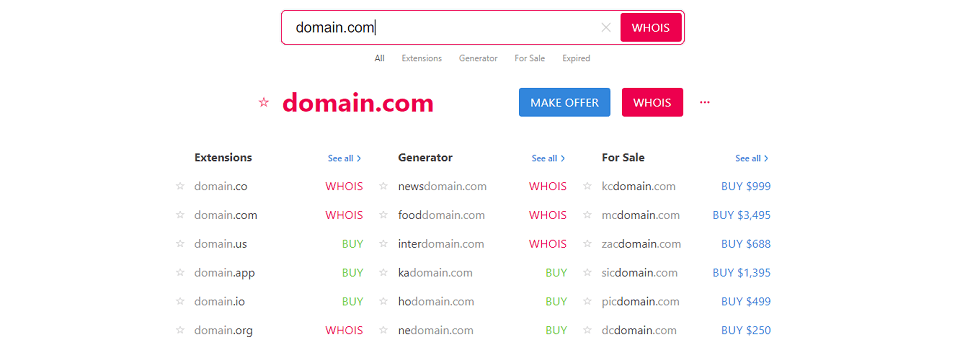
Choosing a domain registrar is the first step. Popular registrars include GoDaddy, Namecheap, and BlueHost. Each offers different features and pricing. It’s important to compare them. Look for user-friendly websites. Check customer reviews. Make sure they offer good support. Some registrars provide extra services. These might include email hosting and website builders. Pick a registrar that fits your needs.
Securing your domain is crucial. Start by creating a strong password. Avoid using common words. Use numbers and symbols. Enable two-factor authentication. This adds an extra layer of security. Always keep your contact information updated. This ensures you receive important alerts. Domain privacy protection is another option. It hides your personal details from public view. Check if your registrar offers this service. Secure your domain to avoid potential risks.
Credit: returnonnow.com
Configuring Dns Settings
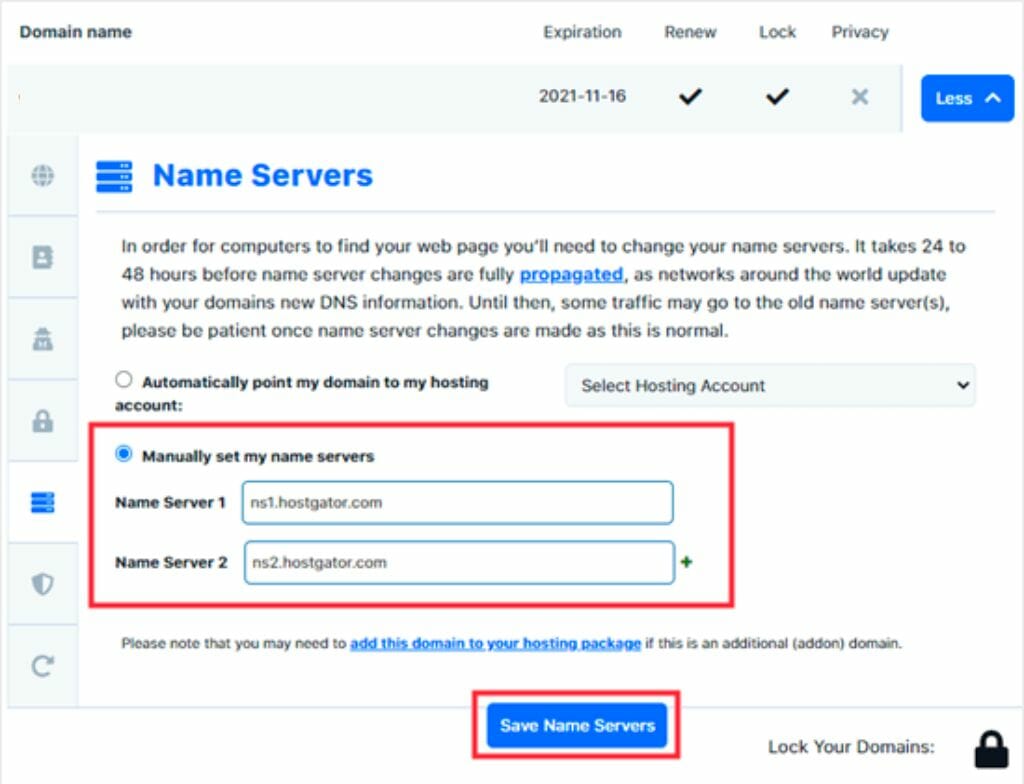
DNS records help computers find websites. They tell the web where a domain points. There are many types of DNS records. A records point to IP addresses. MX records help with email routing. CNAME records are for aliases. Each record has a specific job. Knowing these helps in configuring DNS settings.
To update DNS, log into your domain registrar. Find the DNS settings. Replace old domain records with new ones. It may take time for changes to show. Patience is key. DNS updates can take up to 24 hours. Check if your domain points correctly. Use online tools if unsure.
Migrating Website Content
Moving files is important. It is the first step to change hosting. Use FTP or File Manager. Download your website files. Upload them to the new host. Be sure not to skip any files. Check if all files are there. This keeps your site working.
Databases store your website’s data. You need to move them too. Use phpMyAdmin or similar tools. Export your database from the old host. Import it to the new one. Change the database settings in your website files. This step is very crucial. It ensures your site functions well.

Credit: www.greengeeks.com
Testing The New Domain Setup
Visit your website using the new domain name. Make sure all pages load correctly. Check if images and links are working. Test different browsers. Sometimes they can show different results. Try to use a mobile device too. Websites should look good everywhere.
Emails must work after the domain change. Send a test email to yourself. Reply to it. Make sure you get it. Check your email settings. They might need updates. Ask friends to send emails. Confirm that you receive them properly.
Redirecting Traffic
Changing a domain name in web hosting involves redirecting traffic smoothly to maintain visibility. Properly updating DNS settings ensures users land on the new site without confusion. Ensuring all links point correctly to the new domain helps preserve search engine ranking and user experience.
Setting Up 301 Redirects
Changing your domain name? Use 301 redirects. They help direct old links to new ones. This keeps visitors going to the right place. 301 redirects tell search engines the move is permanent. This keeps your rankings safe. Setting them up is easy.
First, access your web hosting panel. Find the section for redirects. Select 301 from the list. Enter the old URL in one box. Put the new URL in another box. Save changes. Check if it works. Visit the old link. Make sure it goes to the new site.
Preserving Seo Rankings
SEO rankings matter. They bring visitors to your site. A domain change can harm them. Use 301 redirects to keep rankings steady. Search engines understand the switch. They know it’s not temporary. You won’t lose your spot in search results.
Also, update your site maps. Tell search engines about the new domain. Keep your content fresh and relevant. This helps maintain your place. Stay active on social media. Let followers know about the change. Every step helps keep your rankings strong.
Monitoring Post-migration Performance
Changing a domain name requires careful monitoring of website performance after migration. Regular checks ensure the site functions well and maintains search rankings. Address issues like broken links or slow loading times promptly for optimal user experience.
Analyzing Traffic Changes
Observe changes in website traffic after moving to a new domain. Check if the number of visitors has increased or decreased. Use tools like Google Analytics to track visitor behavior. Pay attention to bounce rates and session duration. These metrics can show if users find your content engaging.
Addressing Technical Issues
Technical problems can affect website performance. Ensure all pages load quickly and correctly. Check for broken links and missing images. Fix any 404 errors promptly. Search engines dislike these and might lower your ranking. Regularly check your site’s speed and usability. Tools like GTmetrix can help with this.
Communicating With Users
Tell your users about the change early. Use clear and simple words. Share the news in emails or newsletters. Make sure everyone knows about the new domain. Explain why you are changing it. Users need to understand the benefits. Inform them about the date of change. This helps avoid confusion. Keep your message short and clear.
Update all your marketing materials. Include the new domain name. Check your business cards and flyers. Change the domain on your website too. Don’t forget social media profiles. Use the new domain everywhere. Ensure that all links are correct. This keeps your branding consistent.
Credit: diggitymarketing.com
Frequently Asked Questions
How Do I Change My Web Hosting Domain Name?
To change your web hosting domain name, contact your hosting provider for guidance. Update DNS settings, and ensure your website files are correctly configured with the new domain. Don’t forget to verify your domain registration details and update any necessary links within your website to maintain seamless functionality.
Can You Change The Domain Name Of A Host?
Yes, you can change a host’s domain name. Update DNS settings and inform your registrar. Ensure all links redirect correctly to maintain SEO. Consult your hosting provider for specific instructions.
How Do I Change The Domain Name Of My Website?
To change your website’s domain name, purchase a new domain from a registrar. Update domain settings in hosting account. Ensure DNS records point to new domain. Test thoroughly to confirm functionality. Consider using 301 redirects for SEO.
How Do I Switch My Domain To Another Website?
To switch your domain, update DNS settings to point to the new website’s server. Contact your domain registrar for guidance. Ensure your website files are properly transferred. Double-check links and functionality. Regularly monitor traffic and performance post-switch.
Conclusion
Changing your domain name in web hosting feels daunting. But it isn’t. Follow the steps we’ve discussed. They guide you through each stage clearly. Your new domain will soon be live. Just ensure details align correctly. Double-check every setting for accuracy.
This prevents possible issues later. Patience and precision are key. Your website’s new identity awaits. It’s a fresh start for your online presence. Embrace the change with confidence. Your efforts will pay off. Visitors will enjoy a seamless experience. Keep learning and growing in web management.
Your journey in website hosting continues.


