
Are you ready to take your web service to the next level? Hosting your web service on AWS can open doors to scalability, reliability, and security that are hard to achieve on your own.
Imagine the ease of managing your applications with just a few clicks, and the peace of mind knowing that your data is protected by world-class infrastructure. You’ll learn how to harness the power of AWS to host your web service, making it accessible to users around the globe.
Whether you’re a beginner or looking to optimize your existing setup, this guide will walk you through the steps, ensuring you have all the tools you need to succeed. Get ready to elevate your web service hosting experience—your journey to AWS mastery starts here!
Aws Basics
Creating an AWS account is simple. Visit the AWS website and click on “Create an AWS Account”. Follow the steps to enter your email and create a password. You will need to provide billing information. AWS offers a free tier for new users. This allows you to explore without initial costs. Remember to verify your account through your email. Once verified, you’re ready to use AWS!
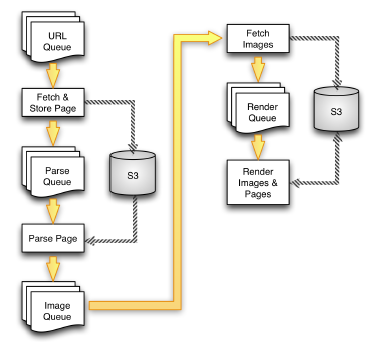
AWS offers many services. Some of the main ones include EC2 for computing power, S3 for storage, and RDS for databases. Each service has a specific use. EC2 is like a virtual computer. S3 stores files safely in the cloud. RDS manages databases easily. Knowing these services helps in making better choices. AWS also provides a management console. This console lets you control all services from one place. Experiment with different services to find what you need.
Credit: aws.amazon.com
Choosing The Right Service
EC2 is great for hosting virtual servers. It’s flexible and scalable. You control the server settings. Pick the right size and type. This service is good for apps needing heavy processing. It offers full control over server resources. You can manage storage and network settings. Choose EC2 for customizable server needs.
Elastic Beanstalk helps with easy app deployment. It manages the infrastructure for you. Just upload your code. It handles scaling and monitoring. This service is perfect for less hands-on management. Focus on coding while it does the heavy lifting. Elastic Beanstalk is good for fast deployment of web apps.
Lambda is ideal for serverless hosting. Run code without managing servers. Pay only for the code run time. It’s great for tasks that need quick execution. Lambda scales automatically. Use it for apps with variable traffic. It’s efficient and cost-effective for simple scripts. Suitable for backend tasks and event-driven processes.
Setting Up Your Environment
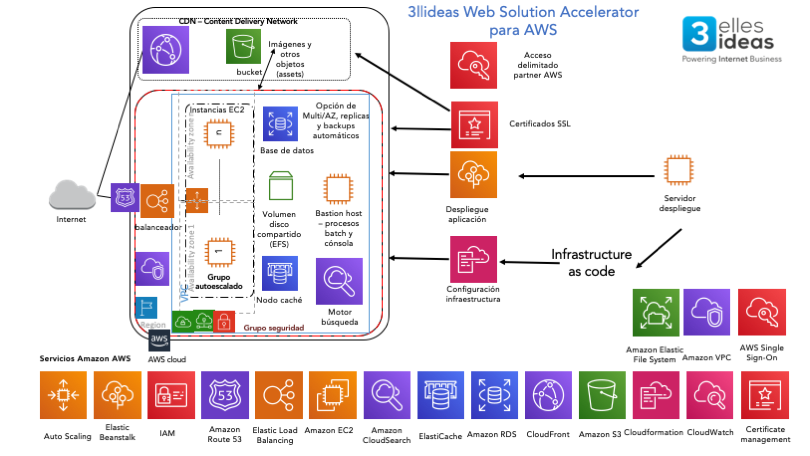
Security Groups act like a virtual firewall. They control traffic for your web service. Create rules to allow traffic to and from your server. Use rules to keep your service safe. Allow traffic only from trusted sources. This helps stop unwanted access. Always check your rules twice for errors.
IAM Roles give permissions to your web service. They control who can access AWS resources. Create a role for your service. Assign permissions needed by your service. Avoid giving too many permissions. This keeps your service secure. Regularly review and update roles as needed.
VPCs are like private networks in AWS. They help you manage your web service’s network. Create a new VPC for your service. Set up subnets and gateways. Connect to the internet securely. Use VPCs to organize and secure your web service. This makes your service reliable.
Credit: www.3llideas.com
Deploying Your Web Service
An EC2 instance is like a virtual computer. It helps run your web service. First, choose an Amazon Machine Image (AMI). Then, select the instance type. Next, configure security settings. Remember, security is important. Finally, launch your instance. Your web service is now ready.
Elastic Beanstalk makes deployment easy. Upload your application code. Elastic Beanstalk handles the rest. It sets up the environment. It scales your service as needed. Monitoring is simple too. Elastic Beanstalk provides tools to track performance. Your web service stays healthy.
AWS Lambda is a serverless option. No need to manage servers. Just write your function code. Lambda runs it when needed. Pay only for time used. This saves money. Great for simple tasks. AWS Lambda is flexible and efficient.
Managing And Monitoring
CloudWatch helps keep track of your services. It watches over your resources. It sends alerts when something goes wrong. CloudWatch stores all data safely. It shows graphs and numbers. These help you understand performance.
Auto Scaling Groups help your service grow. They add more servers when needed. They remove servers when traffic drops. This makes sure services run smoothly. Resources are used wisely with Auto Scaling.
Backup keeps data safe. Recovery brings back lost data. AWS offers tools for backup. It saves copies of your data often. You can restore these copies anytime. This ensures your data is never lost.
Credit: dataengineeracademy.com
Cost Optimization
Explore cost-effective strategies to host web services on AWS. Choose the right instance type for your needs. Optimize expenses by utilizing reserved instances and taking advantage of AWS’s auto-scaling features.
Understanding Pricing Models
AWS has many pricing models. Each model suits different needs. The On-Demand model lets you pay for what you use. It’s flexible. The Reserved Instances model is for long-term savings. You pay upfront. Then, enjoy lower rates. The Spot Instances model offers big discounts. But, it can be stopped anytime. Choose wisely. Match your needs with the right model.
Using Cost Explorer
AWS Cost Explorer helps you track spending. It shows where your money goes. You can see trends over time. Find out which services cost the most. Use this tool to cut unnecessary costs. Set up alerts. Get notified when spending is high. This keeps you within budget.
Implementing Savings Plans
Savings Plans can lower your AWS costs. They offer flexible pricing. You commit to using AWS for one or three years. In return, you get discounts. These plans apply to many services. They work with EC2, Lambda, and Fargate. It’s a smart way to save money.
Best Practices
Keep data safe. Use strong passwords. Enable multi-factor authentication. Limit access to sensitive areas. Monitor network traffic regularly. Always use HTTPS. Encrypt data at rest and in transit. Set up regular security audits.
Improve speed. Choose the right instance type. Use auto-scaling to handle traffic spikes. Cache data for faster access. Optimize database queries. Minimize server load. Reduce latency using CDNs. Regularly monitor performance metrics.
Follow rules. Know industry standards. Use AWS compliance programs. Keep audit trails. Regularly check for compliance updates. Ensure data privacy. Create clear policies. Train staff on compliance requirements. Use IAM roles wisely.
Frequently Asked Questions
How To Deploy A Web Service In Aws?
Deploy a web service in AWS by launching an EC2 instance, configuring security groups, and installing necessary software. Use Elastic IP for consistent access. Optionally, leverage Elastic Beanstalk for simplified deployment. Ensure your environment is scalable and secure for optimal performance.
Regularly update and monitor your services for reliability.
Can I Host A Website On Aws For Free?
Yes, you can host a website for free on AWS using the AWS Free Tier. It offers limited resources for 12 months, perfect for beginners exploring cloud services. Consider resource usage to avoid charges after the free period.
Which Aws Service Will Be Used To Host Web Application?
AWS Elastic Beanstalk and Amazon EC2 are popular services for hosting web applications. Elastic Beanstalk simplifies deployment, while EC2 offers customizable server options. Both provide scalability and reliability for web hosting needs. Choose based on your project’s requirements.
How To Host A Website In Aws S3?
To host a website on AWS S3, create a bucket, enable static website hosting, upload files, and configure permissions. Use the provided endpoint URL to access your site.
Conclusion
Hosting a web service in AWS is manageable and efficient. Follow the steps carefully to ensure success. AWS offers reliable tools for seamless web service deployment. Security features protect your data and applications. Cost-effective solutions cater to different budgets. Explore AWS resources to refine your skills.
Practice makes perfect, so keep experimenting. AWS support is available for guidance and troubleshooting. Remember, every step enhances your understanding. Start your journey with confidence and embrace the learning process. AWS opens doors to endless possibilities for your web services.


