
Are you ready to take your Node.js application live? Hosting your Node.js app on a web server is an exciting step, opening doors to share your creation with the world.
But how do you ensure a smooth and successful deployment? In this guide, you’ll discover a straightforward path to hosting your Node. js application efficiently. You’ll learn the essential steps, avoid common pitfalls, and gain the confidence to manage your web server like a pro.
Whether you’re a beginner or just need a refresher, this guide is designed with you in mind. Let’s dive in and unlock the potential of your Node. js app.
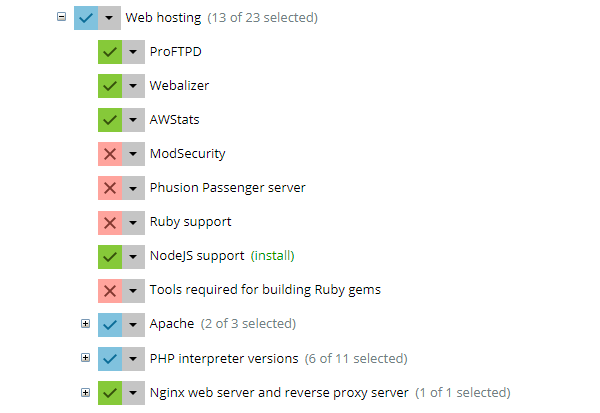
Credit: www.plesk.com
Choosing The Right Web Server
Many web servers can host Node.js. Apache, Nginx, and Express are popular choices. Apache is very common and easy to use. But, it may not be fast enough for Node.js.
Nginx is known for speed and performance. It handles many requests at once. Express is a simple server for Node.js apps. It is lightweight and flexible. Choosing the right server depends on your needs.
Security is very important. Always protect data and keep the server updated. Look for a server that is easy to scale. This means it can grow with your needs. Some servers work better with Node.js than others.
Check server compatibility with Node.js. Make sure they can work together well. Choose a server with good support and resources. This helps solve problems quickly.

Credit: stackoverflow.com
Setting Up Node.js Environment
First, download Node.js from the official website. Choose the LTS version for stability. Once downloaded, open the installer. Follow the simple steps. Make sure to check the option to install npm. npm is a tool that helps manage packages. After installation, verify it by typing node -v in the terminal. This command shows the installed version.
Use environment variables to set up configurations. They help in managing different settings. Create a .env file in your project. Store important settings here. Use a tool like PM2 to run your Node.js app. PM2 keeps your app running smoothly. It also helps in restarting your app if it crashes. Finally, ensure your server has enough resources. This is important for handling user requests.
Deploying Node.js Application
Make sure your Node.js application is ready for the web. Check your code. Remove any bugs. Use tools like NPM to manage packages. Create a package.json file. This helps in tracking dependencies. Compress your files to save space. Use modules wisely. Keep your code clean and organized.
Connect to your web server using FTP. Use software like FileZilla for easy file transfer. Select your files. Drag them to the server folder. Wait for the upload to finish. Use SSH for a secure connection. Set permissions for your files. Ensure the server is ready to run Node.js.
Configuring Web Server
Setting up a reverse proxy is important for Node.js apps. It helps direct web traffic. A common choice is Nginx. First, install Nginx on your server. Next, open the configuration file. You can find it in the /etc/nginx/sites-available directory. Add a server block to this file. This block tells Nginx where to send requests. Point it to your Node.js app’s port. Save and close the file. Finally, restart Nginx. This will apply the changes.
Handling environment variables is crucial for app settings. Create a .env file in your app’s root. Use this file to store variables. These variables might include database URLs or API keys. In your Node.js code, use the dotenv package. This package loads your .env file into process.env. Always keep your .env file secure. Do not share it publicly. This keeps sensitive data safe.
Ensuring Security
SSL/TLS is important for web security. It helps to keep data safe. This tool encrypts the data between users and your server. Without it, data can be stolen. To implement SSL/TLS, you need a certificate. Get one from a trusted provider. Then, install it on your server. Make sure it’s always up to date. Regular updates ensure safety. Now your site is more secure.
Firewalls protect your server. They block bad traffic. Set rules to decide what traffic is allowed. Start by allowing only essential services. Block everything else. Keep your firewall rules simple. Simple rules are easier to manage. Always monitor your firewall. Look for unusual activity. If you see something strange, check it quickly. Regular checks keep your server safe.

Credit: www.ovhcloud.com
Monitoring And Maintenance
Tracking performance is key for a healthy Node.js app. Use tools like New Relic or Prometheus. These tools help you see the app’s speed and usage. Always watch CPU and memory. High usage can slow your app. Set alerts for any unusual activity. This way, you can fix issues quickly.
Logs are also important. They show what happens in the app. Look at logs often. They help find errors and bottlenecks. Keep your app running smoothly by checking these regularly.
Always keep Node.js and dependencies up to date. New updates fix bugs and add features. Check the Node.js website for the latest version. Use the npm update command to update packages. This keeps your app safe and fast. Outdated software can have security risks.
Also, review your code when updating. Some updates may change how your code works. Test the app after updates. Make sure everything runs fine. Keeping updates regular helps avoid big issues later.
Troubleshooting Common Issues
Hosting Node. js on a web server often involves common troubleshooting tasks. Typical issues include server configuration errors and connectivity problems. Ensuring correct port settings and checking firewall permissions can help resolve these challenges effectively.
Debugging Server Errors
Server errors can be confusing. Check your logs for clues. Logs show detailed error messages. Look for syntax mistakes in your code. These can cause crashes. Check your server settings. Wrong settings lead to problems. Node Js needs specific configurations. Double-check them. Review your package versions. Old versions might not work well. Update them if necessary.
Resolving Deployment Problems
Deployment might fail due to incorrect file paths. Verify paths are correct. Check permissions on your server. Files need proper access rights. Environment variables must be set correctly. Wrong values cause issues. Test your server locally first. Local tests catch early errors. Ensure dependencies are installed. Missing dependencies halt deployment.
Frequently Asked Questions
Can Node Js Be A Web Server?
Yes, Node. js can function as a web server. It uses its built-in HTTP module to handle requests. Node. js offers high performance and scalability for web server applications. Its asynchronous nature makes it ideal for real-time applications. Many developers prefer it for creating fast and efficient web servers.
How To Run A Node.js Server Online?
Deploy your Node. js server online using platforms like Heroku, AWS, or DigitalOcean. Install Node. js, upload files, and configure settings. Use a domain name for accessibility. Ensure your server is secure and monitor performance regularly.
How To Setup Node.js On Server?
Install Node. js on your server using the package manager. Download Node. js from the official website. Use the command line to install it. Verify the installation by checking the Node. js version. Deploy your application using a process manager like PM2 for better performance and reliability.
Which Hosting Is Best For Nodejs?
DigitalOcean, Heroku, and AWS are top choices for NodeJS hosting. They offer scalability, reliability, and performance. Select based on your project’s needs and budget. Ensure the provider supports NodeJS versions and has good customer support. Evaluate uptime guarantees and ease of deployment for efficient management.
Conclusion
Hosting Node. js on a web server is straightforward. Follow simple steps for success. Choose a reliable server for smooth performance. Install Node. js correctly. Always keep your server secure. Regular updates protect your application. Test thoroughly before going live.
Use logs to monitor server activity. Troubleshoot issues promptly. Maintain your server for optimal results. These practices ensure your Node. js application runs efficiently. Hosting is a continuous process. Stay informed about new technologies. Enhance your skills for better hosting.
Your Node. js application deserves the best hosting environment. Keep learning and improving for future projects.


