
Have you ever felt stuck with your current web host and wondered how you could transfer your domain to a new one? Switching web hosts might sound daunting, but it’s often the key to unlocking faster speeds, better security, and improved support for your website.
Imagine a world where your site loads in a flash, your data is secure, and technical support is always at your fingertips. This could be your reality with the right web host. In this guide, you’ll learn how to transfer your domain to a new web host without the stress and confusion.
By the end of this article, you’ll feel confident and equipped to make the move smoothly. Ready to discover how you can transform your website’s performance? Let’s dive in!
Preparing For Domain Transfer
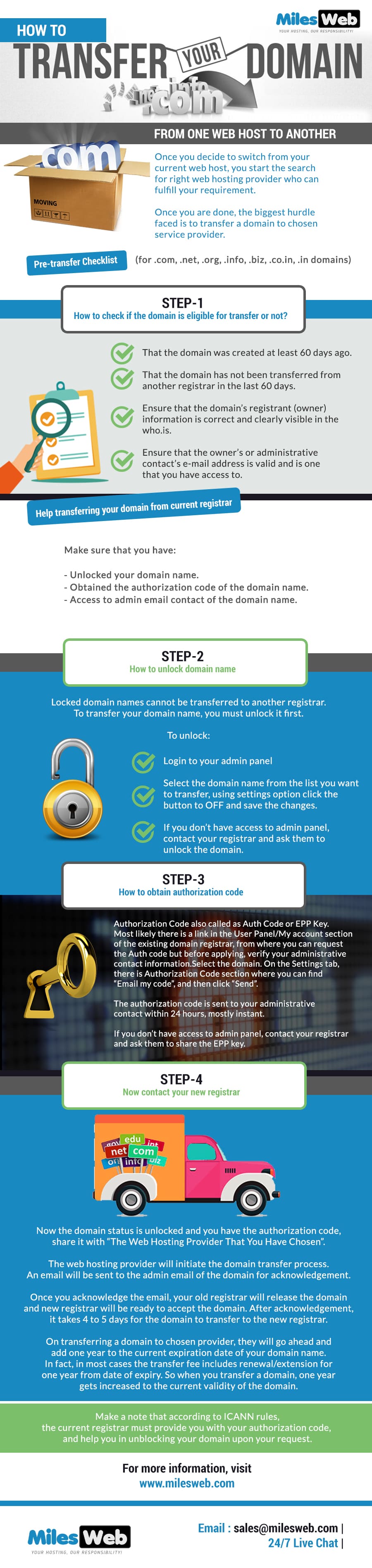
Ensure the domain is at least 60 days old. It should not be expired. Confirm the domain is not in the redemption period. This is important for a smooth transfer. Review any lock settings on your domain.
Visit the domain registrar’s website. Log into your account. Locate your domain management settings. Unlock the domain for transfer. This allows the domain to be moved. Confirm the unlock status in your account settings.
Request the authorization code from the current registrar. This code is needed for the transfer. It is sometimes called an EPP code. The code may be sent to your email. Keep this code safe and ready for the next steps.
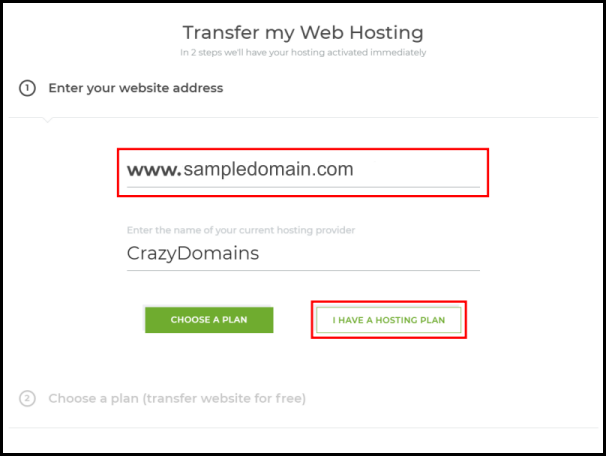
Credit: www.crazydomains.com
Choosing A New Web Host
Understanding your website needs is key. Think about your website size. Will it be big or small? Check if you need special features like email or databases. Consider the traffic your site gets. Lots of visitors need more resources. Also, think about your budget. How much can you spend monthly?
Create a list of hosting providers. Look at what each one offers. Read customer reviews. Check if they have good support. Compare their uptime guarantees. See who has the best security features. Price is important, but so is quality.
Find a plan that fits your needs. Some offer basic plans. Others have advanced plans. Choose one with enough storage. Make sure it handles your traffic well. Look for plans with easy upgrades. This helps as your site grows.
Initiating Domain Transfer
Begin by logging into your domain registrar’s account. Find the section labeled “Domain Management” or “My Domains.” Here, you can see a list of all your domains. Select the domain you want to transfer. Make sure the domain is unlocked for transfer. This step is crucial. An unlocked domain can be transferred easily.
You need an authorization code to transfer your domain. This code is sometimes called an EPP code or transfer key. It acts like a secret password for your domain. Request this code from your current registrar. They might send it to your email. Keep this code safe. You will need it later.
The new registrar will ask you to verify ownership of the domain. They might send an email to the domain’s registered email address. Click the link in the email to confirm. This step ensures that you own the domain. After verifying, your domain transfer can proceed smoothly.
Configuring Domain Settings
DNS records tell the internet where your site is. Access your domain registrar and find the DNS settings. Change the DNS to match your new host. Save the changes to update the records. This step makes sure your website points to the right place.
Setting up email is important. Go to your new host’s email section. Create email accounts using your domain name. This keeps your email professional. Check each account to make sure it works. Send test emails to be sure.
Check your website to ensure it loads correctly. Visit your domain in a browser. Make sure all pages appear. Test links to see if they work. A smooth website means happy visitors. Fix any errors you find.
Post-transfer Considerations
Transferring a domain web host involves updating DNS settings to ensure the website functions correctly. Carefully check email configurations to avoid disruptions. Monitor the domain status to confirm the transfer completion.
Monitor Domain Status
Always check the domain status after transferring. This ensures it’s active and working. Look for any errors or issues. Fix them quickly. This keeps your site running smoothly.
Renew Domain Registration
Domains need regular renewal. Forgetting can cause problems. Set reminders to renew on time. This prevents the domain from expiring. Keep your site accessible to users.
Update Security Settings
Security settings protect your domain. Check and update them often. This prevents unauthorized access. Use strong passwords and security tools. Protect your data and your users’ data.

Credit: www.nexcess.net
Credit: www.milesweb.com
Frequently Asked Questions
Can I Transfer My Domain Name From One Web Host To Another?
Yes, you can transfer your domain name to a different web host. Initiate the transfer with your new hosting provider. Ensure your domain is unlocked and obtain the authorization code from your current registrar. Follow the new host’s instructions to complete the transfer seamlessly.
How Do I Transfer A Web Domain To A New Owner?
Unlock the domain at your registrar. Obtain the authorization code. Initiate the transfer with the new owner’s registrar. Confirm the transfer through the email sent by the registrar. Complete the transfer by following the registrar’s instructions.
How Do I Transfer A Domain To A New Provider?
Unlock your domain and get the authorization code. Update contact information. Initiate the transfer at the new provider. Approve the transfer via email confirmation. Wait for the transfer completion.
Can I Transfer My Domain From Godaddy To Bluehost?
Yes, you can transfer your domain from GoDaddy to Bluehost. First, unlock the domain at GoDaddy. Obtain the EPP code. Initiate the transfer at Bluehost. Follow the instructions provided. Ensure your domain is eligible for transfer. The process may take up to five days.
Conclusion
Transferring your domain to a new host is straightforward. Follow each step carefully. Check compatibility before starting. Ensure your domain is unlocked. Update your domain’s contact details. Backup your site files and databases. Initiate the transfer process. Confirm authorization emails promptly.
Wait for the transfer to complete. Troubleshoot any issues swiftly. Keep your domain secure post-transfer. Remember, patience helps throughout the process. Now, your domain rests safely with its new host. Enjoy exploring new hosting features. Your website journey continues with improved control and reliability.


