
Are you ready to unlock the full potential of your Java applications by hosting your own web service? Imagine seamlessly connecting your software to a world of users, allowing data to flow effortlessly and functionality to expand exponentially.
Whether you’re a seasoned developer or just starting out, learning how to host a Java web service can transform your projects and open up new possibilities. This guide is crafted especially for you, breaking down the process into simple steps that anyone can follow.
Dive in, and discover how easy it can be to get your Java web service up and running, empowering your applications like never before. Don’t miss out on this opportunity to enhance your skills and elevate your software to new heights!
Choosing The Right Server
Apache Tomcat is very popular. It is open-source and free. Many developers use Tomcat. Tomcat supports Java Servlets and JSP. It is light and fast. Perfect for small projects. Easy setup.
GlassFish is powerful. It supports Java EE. GlassFish offers many features. Ideal for enterprise-level apps. It is more complex than Tomcat. But it is very flexible. Good for larger projects.
JBoss is robust. It is used for big applications. JBoss has advanced tools. It supports Java EE. Reliable and secure. Suitable for businesses. It requires more resources. But it is very efficient.
Setting Up The Development Environment
First, download the Java SDK from the official website. Click the download link and follow the steps. Make sure to choose the right version for your system. After downloading, open the installer. Follow the instructions to complete the setup. Check that Java is installed by typing java -version in your command prompt.
Choose an IDE like Eclipse or IntelliJ. Download and install it from their website. Open the IDE and set up a new Java project. Make sure to link the Java SDK to your project. This ensures that your code runs smoothly. You can find the settings in the project preferences.
Some projects need extra libraries. These libraries help with tasks like networking. Go to the library manager in your IDE. Add the required libraries to your project. Make sure the libraries are compatible with your Java version. This step ensures your project has all the tools it needs.
Creating The Web Service
Start by choosing a name for your service. Then, decide the URL where it will live. This is called the endpoint. The endpoint is like a home address. It tells where to find your service. Make sure it’s easy to remember.
This is the brain of your service. It does the real work. Write code that solves a problem. Break tasks into simple steps. Keep the code clean and easy to read. Anyone should understand what it does. This helps in fixing problems later.
Before going live, test your service on your computer. Use tools to check if it works. Fix any errors you find. Make sure everything runs smoothly. Testing helps to avoid problems when others use it. A well-tested service works better for everyone.

Credit: firstsiteguide.com
Deploying On The Server
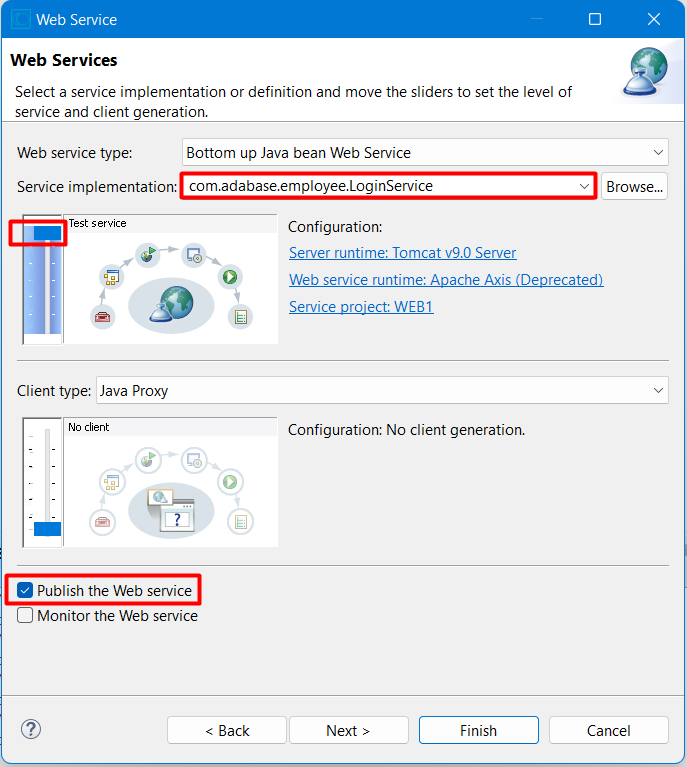
Start by putting your Java files together. Create a WAR file. This is a Web Archive file. It holds all your code, images, and files. Make sure it is neat and tidy. This makes it easy for the server to understand.
Next, upload your WAR file to the server. Use an FTP client. This tool helps you move files from your computer to the server. Make sure the server is ready to accept your file. Once uploaded, the server will handle it.
The Deployment Descriptor is a special file. It tells the server how to run your app. Update this file with your settings. Add details about servlets and filters. This helps your app work smoothly on the server.
Securing The Web Service
Authentication keeps your web service safe. Use usernames and passwords. Tokens help verify users. OAuth provides extra security. Protects sensitive data.
HTTPS encrypts data. Keeps information private. SSL certificates are needed. Secure the connection. Browsers trust HTTPS. Users feel safe.
Firewalls block unwanted access. Control incoming and outgoing traffic. Rules decide what goes through. Protects against hackers. Keeps data safe.
Monitoring And Maintenance
Logs are like a diary for your web service. They help track what happens each day. Errors are like red flags. They show when something is wrong. Always keep an eye on them. Use tools that can help catch errors quickly. This way, you can fix problems fast. Logs and error tracking keep your service healthy. They help prevent big issues.
It’s important to know how fast your service is. Performance monitoring tools help with this. They show if your service is slow or fast. Sometimes, many people use the service at once. This might make it slow. Tools help find these times. Then, you can make the service faster.
Updates keep your web service safe. They make sure everything works well. Regular updates can fix bugs. Bugs are like little mistakes in the service. Updates also bring new features. New features make the service better. Always check for updates. This keeps your service up-to-date and running smoothly.
Scaling The Service
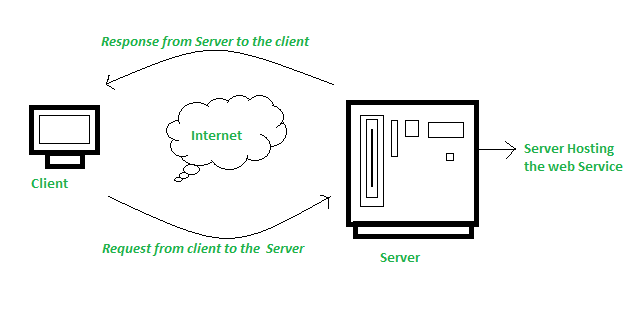
Hosting a Java web service involves setting up a server environment. Ensure compatibility with Java frameworks and libraries. Configure server settings for optimal performance and scalability.
Load Balancing
Servers can get too busy with many requests. A load balancer helps by spreading these requests. This makes sure no server works too hard. It helps the service run faster. Users get quicker responses this way.
Database Optimization
Databases store lots of data. They must be fast and efficient. Use indexing to search data quickly. Remove old or unused data. This keeps the database light and quick. Regular checks make sure everything is smooth.
Caching Strategies
Caching saves time by storing data temporarily. This means the service doesn’t need to fetch data every time. It speeds up the process. Use caching for data that doesn’t change often. It helps reduce load on servers.
Credit: www.geeksforgeeks.org
Credit: blog.devgenius.io
Frequently Asked Questions
How To Host A Java Web Server?
Install Java Development Kit (JDK) on your server. Deploy your Java application using Apache Tomcat or Jetty. Configure server settings for optimal performance. Ensure Java Runtime Environment (JRE) compatibility. Use a domain name and configure DNS settings for public access.
Regularly update and monitor for security.
How To Run A Java Web Service?
Install Java Development Kit (JDK) and Apache Tomcat. Develop your web service using Java. Deploy it on Tomcat server. Ensure your server is running. Test the web service using a client like Postman.
How Do I Host A Web Service?
Select a reliable hosting provider, set up a server, install necessary software, and configure your web service. Ensure security measures are in place. Test the service thoroughly before going live. Regularly update and monitor performance to maintain efficiency and security.
How To Run A Java Program On A Web Server?
Install a Java web server like Apache Tomcat. Deploy your Java application as a WAR file. Configure the server to recognize your application. Start the server to run your Java program. Ensure all dependencies are correctly configured for seamless execution.
Conclusion
Hosting a Java web service can seem complex, but it’s manageable. Start by choosing the right server. Then, set up your environment carefully. Follow each step with attention to detail. This ensures everything runs smoothly. Keep security in mind throughout the process.
Test your service regularly. Troubleshoot issues as they arise. Use reliable resources for guidance. Remember, practice makes perfect. With time, you’ll host services confidently. Your skills will grow. Stay patient and keep learning. Hosting Java web services becomes easier with experience.
Soon, you’ll be a pro at it.


