
You’re about to dive into the world of WordPress plugins, a realm where simplicity meets functionality. Choosing the right plugins can feel like a treasure hunt, but the rewards are worth it.
They transform your site from basic to brilliant, enhancing performance, boosting security, and improving user experience. Imagine having a site that runs smoothly, captivates your audience, and ranks well on search engines. Sounds appealing, right? This isn’t just a dream—it’s within your reach.
By the end of this article, you’ll know exactly which plugins you need to install to make your WordPress site shine. Don’t miss out on these game-changing tools; they’re the secret ingredients to your website’s success. Ready to unlock the full potential of your WordPress site? Let’s get started!
Essential Security Plugins
Firewalls stop harmful traffic from entering your site. They act like a strong shield. Malware protection keeps the bad software away. It scans your website regularly. This helps in catching threats early. Wordfence Security is a popular plugin. It offers both firewall and malware protection. Another good choice is Sucuri Security. It is known for its reliability. These plugins help keep your site safe. It’s like having a guard at your door.
Backing up data is very important. It saves all your hard work. UpdraftPlus is a great plugin for backups. It is easy to use. BackWPup also offers good backup solutions. Regular backups protect your site. They help you recover lost data. Backups are like a safety net for your website. Always have a recent backup available. This can save you from losing everything.
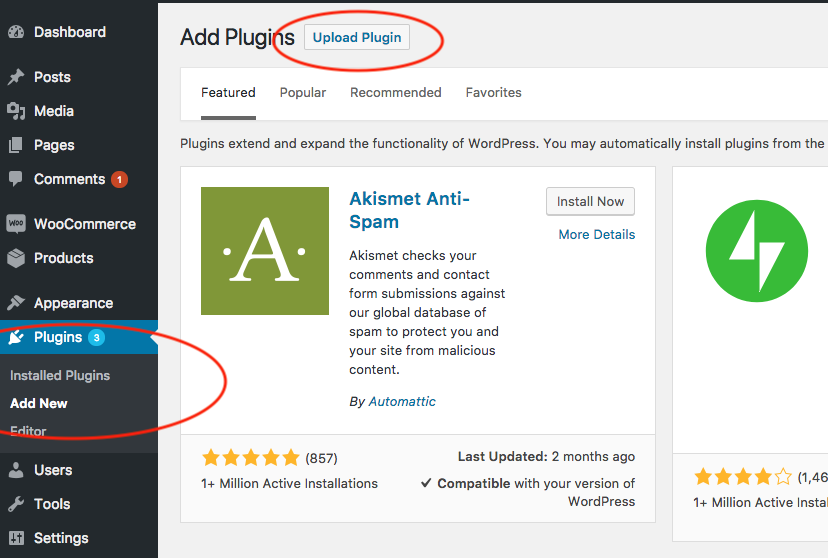
Credit: www.wonderplugin.com
Seo Optimization Plugins
Keywords help people find your site. Keyword Analysis Tools show popular words. They help you choose the best words. These words make your site appear in search results. Some tools suggest new keywords. Others show how often people search them. Using these tools is easy. You enter a word and get results. They help you understand which words work best.
An XML Sitemap is a map of your site. It helps search engines find pages. This makes your site more visible. Sitemaps list all your pages. They update when you add new content. This keeps search engines informed. Plugins can create these maps for you. They make sure all pages are included. Having a sitemap is important for SEO.
Performance Enhancement Plugins
Websites need to load fast. A caching plugin makes this happen. It saves static versions of your site. Visitors get these copies fast. This reduces server load and speeds up your site. Popular plugins like WP Super Cache and W3 Total Cache are good choices. They are easy to use. Your site will be faster, and users will be happy.
Images make websites look nice. But large images slow down sites. Use an image optimization plugin. It makes your images smaller. Smaller images load faster. This helps speed up your site. Plugins like Smush and EWWW Image Optimizer do this job well. They are easy to install. Your site will look good and load quickly.
Design And Layout Plugins
Page builders help make websites look nice. They offer drag and drop features. You can change how pages appear without coding. Elementor and Beaver Builder are popular options. They have many templates. You can create pages quickly. These tools save time. They are easy to use for beginners.
Custom widgets add special features to websites. They make sites interactive. With widgets, you can add buttons and images. SiteOrigin Widgets and Widget Options are useful plugins. They offer many choices. You can customize the look. Widgets improve user experience. They keep visitors engaged. Easy to set up and use.
E-commerce Plugins
WordPress needs a strong shopping cart plugin for selling. WooCommerce is popular. It makes selling easy. You can add products quickly. It also helps track inventory. Easy Digital Downloads is another choice. It works well for digital goods. Both plugins offer great features.
Payment gateways make online payments safe. PayPal is widely used. It’s easy to set up. Many trust it for payments. Stripe is also a good option. It supports many currencies. Both plugins provide secure transactions. Choose one based on your needs.
Social Media Integration Plugins
Selecting the right plugins for WordPress enhances social media integration effectively. Popular choices include Jetpack, Social Snap, and Monarch. These tools simplify sharing content, boost engagement, and improve visibility across various platforms.
Sharing Buttons
WordPress users can add sharing buttons to their site. These buttons help visitors share content. The buttons can link to Facebook, Twitter, and Instagram. They make sharing fast and easy. Sharing buttons can increase site traffic. More shares mean more visitors. It’s a simple way to connect with audiences. Easy access encourages interaction. These plugins are important for social growth.
Social Feeds
Social feeds display posts from social media. They allow visitors to see your updates. Live feeds keep content fresh. Visitors stay informed with latest news. Social feeds can show Facebook posts, tweets, or Instagram pictures. This feature helps in engaging visitors. Regular updates make your site lively. It keeps audience connected and interested. They see your social activity right on the site.
Analytics And Tracking Plugins
Knowing who visits your site is important. Google Analytics is a top tool. It shows how many people visit. You can see where they come from. Jetpack is another good plugin. It gives simple stats right in WordPress. You see daily visitors and popular posts.
Conversion tracking helps you know what works. MonsterInsights is a great plugin for this. It connects with Google Analytics. This shows you how many visitors turn into buyers. HubSpot is also helpful. It tracks emails and forms. You can see which pages get the most sign-ups.
Credit: www.wpzoom.com
User Experience Plugins
Contact forms help visitors reach you easily. They are simple to use. Forms collect names, emails, and messages. This keeps your website organized. Many plugins offer contact forms. Some are free. Others may cost money. Choose one that fits your needs. Make sure it’s easy to use.
Live chat helps users get quick answers. It lets them talk directly with you. This makes them feel important. Many plugins offer live chat. Some have extra features. You can see messages in real-time. This boosts user satisfaction. Pick a plugin that is easy to set up. Test it to ensure it works well.
Content Management Plugins
Editorial Calendars help organize your blog posts. They show what to write and when. This makes planning easier. You can see upcoming posts in one place. Many plugins offer drag-and-drop features. This makes scheduling fun and simple. With clear planning, you never miss a deadline. Your blog stays updated and fresh. These tools are great for busy bloggers. They save time and reduce stress.
Custom Post Types let you create unique content. You can have posts for anything. Think of recipes, reviews, or portfolios. This makes your site more interesting. Readers enjoy varied content. They spend more time on your site. Custom posts keep your blog lively. They give more options to share with your audience. With these, your site stands out. Readers will come back for more.
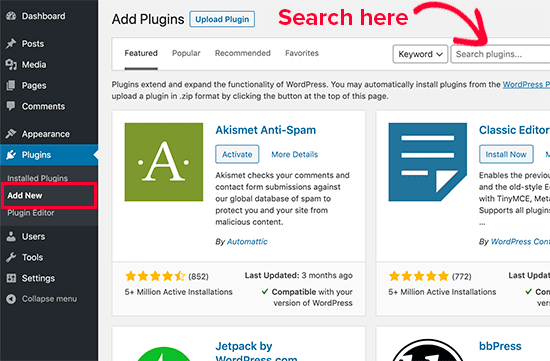
Credit: accessibility-helper.co.il
Frequently Asked Questions
What Are Essential WordPress Plugins?
Essential WordPress plugins enhance functionality and security. Popular choices include Yoast SEO for optimizing content, Akismet for spam protection, and Jetpack for performance improvements. WooCommerce is a top choice for e-commerce sites. These plugins streamline tasks, improve site performance, and protect against threats, making them crucial for any WordPress site.
How Do Plugins Improve WordPress Seo?
Plugins like Yoast SEO optimize content for search engines. They help with meta tags, keyword analysis, and readability scores. These tools ensure your site ranks higher in search results. Proper SEO plugins guide you in crafting content that appeals to both readers and search engines, boosting visibility and traffic.
Are Security Plugins Necessary For WordPress?
Security plugins are vital for WordPress sites. They protect against malware, brute force attacks, and unauthorized access. Plugins like Wordfence and Sucuri provide firewalls, malware scanning, and login security. Implementing security plugins minimizes risks, safeguarding site data and maintaining user trust.
How Do Plugins Enhance WordPress Performance?
Performance plugins optimize loading speeds and server response times. Plugins like WP Super Cache and Autoptimize compress files and manage caching. Faster sites improve user experience and SEO rankings. These tools ensure your site runs smoothly, reducing bounce rates and keeping visitors engaged longer.
Conclusion
Choosing the right WordPress plugins enhances your site’s performance. Focus on essential plugins that improve security, speed, and SEO. Popular options include Yoast SEO, Wordfence, and WP Super Cache. They help optimize your site effectively. Regular updates and maintenance are crucial.
Always test new plugins on a staging site first. This prevents potential issues on your live site. Remember, fewer plugins often mean better performance. Keep your site simple and efficient. Prioritize quality over quantity to ensure a smooth user experience.
Your WordPress site will thrive with the right plugins.


