
Have you ever clicked on a website link and found yourself staring at a blank screen, wondering if the page will ever load? That frustrating pause can make you rethink your visit, right?
This is where a preloader can work wonders. As a WordPress user, you might be curious about enhancing your site’s user experience. Understanding what a preloader is and how it can benefit your website could be a game-changer. It’s like adding a touch of magic to your site, keeping your visitors engaged and reducing bounce rates.
So, what exactly is a preloader in WordPress, and why should you consider it for your site? Stick around, because by the end of this article, you’ll discover how this simple tool can transform your website’s first impression and keep your audience coming back for more.
What Is A Preloader?
A preloader is a small animation on a website. It shows before the main page loads. This helps users know the site is working. It stops users from thinking the site is broken. Preloaders often appear as spinning wheels or bars. They can be any shape or color. Some websites use funny or cute designs. Others use simple shapes.
Preloaders improve user experience. They make waiting less boring. They also help the site look professional. If a page takes time to load, a preloader can make it seem faster. This can keep users on the site longer. Users might leave if they think a page is slow. A preloader can make them stay. Simple, yet effective.
Credit: www.wpbeginner.com
Importance Of Preloaders
Preloaders make websites feel faster. They show a loading animation. This keeps users engaged. Without them, users may think the site is slow. Preloaders improve the user experience. They keep visitors happy while the site loads. This encourages users to stay longer.
A slow loading site can be frustrating. Preloaders help reduce bounce rates. Users are less likely to leave if they see a preloader. This builds trust. Users know the site is working. They are more likely to explore the site.
Preloaders add style to a website. They make it look professional. Aesthetic appeal matters. Users notice and appreciate good design. A well-designed preloader can be eye-catching. It sets the tone for the rest of the site. This makes a positive first impression.
Types Of Preloaders
Preloaders in WordPress are visual elements that indicate loading progress. They come in various types, including spinners, progress bars, and animated graphics. These preloaders enhance user experience by reducing perceived waiting time, keeping visitors engaged while content loads.
Spinners And Loaders
Spinners and loaders show a rotating shape. They tell users the page is loading. They are simple and easy to use. Many websites use them. They come in many colors and sizes. Each website can choose what fits best.
Progress Bars
Progress bars show a moving line. This line gets longer as the page loads. It helps users know how much is left. They can be horizontal or vertical. Users like them because they show progress.
Custom Animations
Custom animations are unique. They match the website’s style. They can be fun and creative. Some sites use logos or characters. These animations make the wait interesting.

Credit: essentialplugin.com
Creating A Preloader In WordPress
Installing a plugin is the easiest way. It requires no coding skills. WordPress has many preloader plugins. These plugins offer different designs. You can choose one that fits your site. Some plugins are free, while others need payment. Always check the plugin’s rating and reviews. This helps ensure quality and safety.
Manual customization gives more control. It involves adding code to your site’s files. This method needs a bit of coding knowledge. CSS and JavaScript are often used. With manual methods, you can design your own preloader. Custom designs make your site unique. This method is more flexible than plugins. It can be challenging for beginners.
Top Plugins For Preloaders
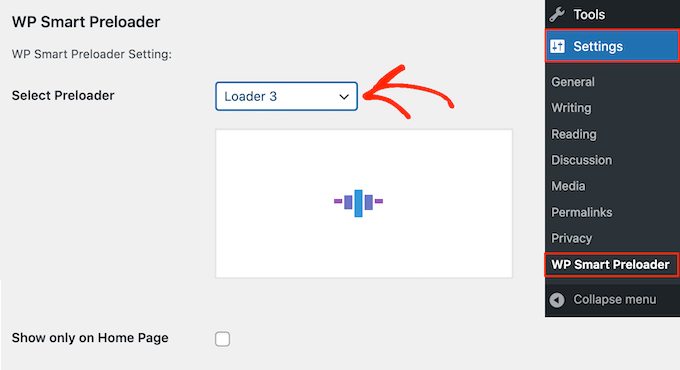
Preloaders in WordPress enhance user experience by displaying an animation while content loads. Popular plugins like WP Smart Preloader and Preloader Plus offer customizable options. These tools help keep visitors engaged during loading times, ensuring smoother navigation and improved site performance.
Popular Options
Preloaders make sites load smoothly. Many plugins offer great choices. WP Smart Preloader is a favorite. It is easy to use and very reliable. PageLoader is another good option. It has many designs to choose from. LoftLoader is popular too. It offers fun animations and is easy to set up.
Features Comparison
| Plugin | Ease of Use | Design Options |
|---|---|---|
| WP Smart Preloader | Very Easy | Limited Designs |
| PageLoader | Easy | Many Designs |
| LoftLoader | Easy | Fun Animations |
Credit: blog.templatetoaster.com
Best Practices
A preloader in WordPress shows a loading animation before your site fully appears. It enhances user experience by reducing perceived waiting time. Preloaders keep visitors engaged, ensuring they don’t leave due to slow page loading.
Optimal Load Time
A preloader helps the website load faster. It shows a visual while the site loads. This keeps users engaged. Fast loading is important for user experience. Slow websites make users leave quickly. The preloader should not last more than a few seconds. This keeps the site efficient and user-friendly. Make sure graphics are simple. Complex designs may slow down loading.
Consistent Branding
Preloaders should match the site’s design. Use brand colors and logos. This creates a cohesive look. Users recognize the brand easily. Consistency builds trust with users. Do not use different styles. Keep it simple and clear. This enhances the overall experience. A well-designed preloader makes the site memorable.
Troubleshooting Common Issues
A slow website can upset visitors. Preloaders should speed things up. But sometimes, they cause load time delays. This happens due to large files or unoptimized images. Check your images. Are they too big? Resize them. Minimize JavaScript. Use lighter code. This can help your site load faster. A fast site keeps visitors happy.
WordPress has many plugins. But not all work well together. Plugin conflicts can cause issues. Some plugins don’t like others. Disable one plugin at a time. See if the problem goes away. This can help find the bad plugin. Update your plugins. New versions fix bugs. Keep your site running smoothly.
Frequently Asked Questions
What Is A Preloader In WordPress?
A preloader in WordPress is a visual element displayed while a website’s content loads. It enhances user experience by reducing perceived loading time. This can be an animation, logo, or progress bar, ensuring visitors remain engaged. Preloaders are particularly useful for sites with heavy content or slow loading times.
Why Use A Preloader On Your WordPress Site?
Using a preloader improves user experience by keeping visitors engaged during loading times. It helps reduce bounce rates by maintaining visitor interest. Preloaders are especially beneficial for content-rich sites. They ensure seamless navigation and a professional appearance, making your site more appealing.
How Do You Add A Preloader In WordPress?
To add a preloader in WordPress, use plugins like “Preloader Plus” or “WP Smart Preloader. ” These plugins offer customizable options for different preloader styles. Alternatively, you can add custom CSS or JavaScript for a unique design. Ensure compatibility with your theme and test across devices.
Can A Preloader Affect Website Performance?
Yes, a preloader can impact website performance if not optimized. Overly complex animations may increase load times. Use lightweight preloaders to ensure quick loading. Optimize images and scripts for best results. Regularly monitor performance to avoid negative impacts on user experience.
Conclusion
Understanding preloaders in WordPress enhances user experience. They make sites load smoothly. Visitors see an engaging animation, not a blank screen. This keeps them interested and reduces bounce rates. Implementing a preloader is simple. It involves choosing the right plugin or code snippet.
An effective preloader reflects your site’s style. It should be fast and visually appealing. Test different options to see what works best. Remember, the goal is to keep users happy. Preloaders can play a big role in achieving that. So, consider adding one to your WordPress site.
It can make a difference.


