Ever landed on a WordPress website that left you in awe, wondering what plugins they used to create such a seamless experience? You’re not alone.
Discovering the right plugins can transform your website from ordinary to extraordinary. But how do you find out which ones are powering that impressive site you admire? We will unveil the secrets to uncovering the plugins behind any WordPress site.
Imagine having the same tools at your fingertips to enhance your website’s performance and functionality. Ready to unlock the mystery and elevate your own WordPress journey? Keep reading, because you’re about to learn how to reveal the hidden gems that could revolutionize your site.
Importance Of Identifying Plugins
Knowing which plugins are active is important for your website. Some plugins can slow down your site. Others may cause errors. Finding out helps you fix problems. You can improve speed. You can enhance security. You can also upgrade features. Plugin conflicts can break your site. Identifying them early saves trouble. It saves time. It saves money.
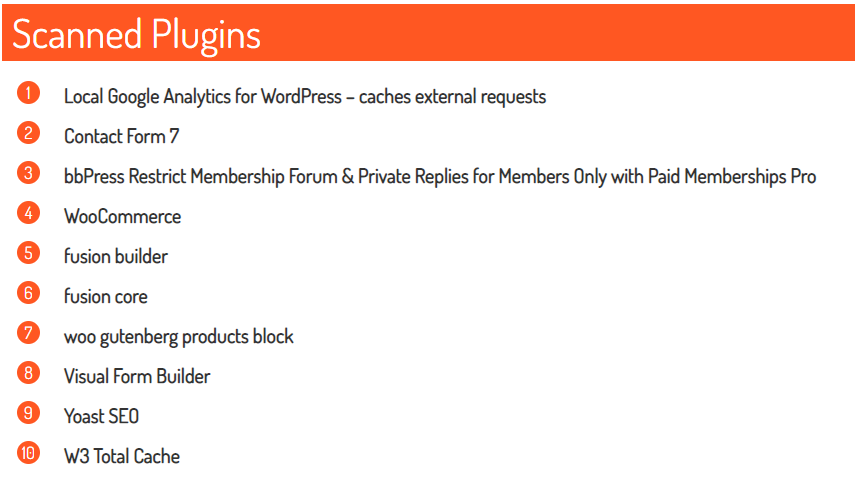
Some plugins are outdated. Others are unsupported. Identifying them lets you replace them. It helps keep your site safe. Your visitors will have a better experience. Identifying plugins is easy. Use tools like WP Plugin Checker. They are simple and fast. They give clear reports. You see all active plugins. Make sure your site runs smoothly.
Credit: www.easywp.com
Common Reasons For Discovering Plugins
Plugins help websites run better. They make pages load fast. Speed keeps visitors happy. Poor performance can drive them away. Plugins fix that. They optimize images. They cache content. These actions improve site speed. They make browsing smooth.
Security is important. Plugins protect sites from hackers. Vulnerable sites are at risk. Good plugins stop threats. They provide firewalls and antivirus tools. Compatibility keeps plugins working well. They match with themes and other plugins. Updates are crucial. They ensure everything works together.
Discovering new plugins inspires creativity. They offer new features and tools. They help learn about web design. Experimenting with plugins teaches skills. Learning from others expands knowledge. It sparks new ideas. New ideas lead to better websites. Creativity shines through plugins.
Manual Methods To Discover Plugins
Check the website’s source code. Right-click on the page and select “View Page Source”. Look for “wp-content/plugins” in the code. It shows the plugin paths. These are clues about the plugins. This method is not always perfect. Some plugins hide their details.
Visit common plugin directories. WordPress.org is a good place to start. Search for popular plugins there. Many websites use well-known plugins. Compare the features listed with the website you are analyzing. This can help guess the plugins in use. Remember, some plugins may not be listed. Always verify your findings.
Using Online Tools To Identify Plugins
Wappalyzer is a simple tool. It tells what plugins websites use. You can use it for free. It works as a browser extension. It shows plugin names in seconds. This tool is easy to use. Even kids can use it.
BuiltWith offers detailed website reports. It shows plugins and other data. This tool is very popular. Some features are free, but not all. Users need to create an account. Then they can explore more.
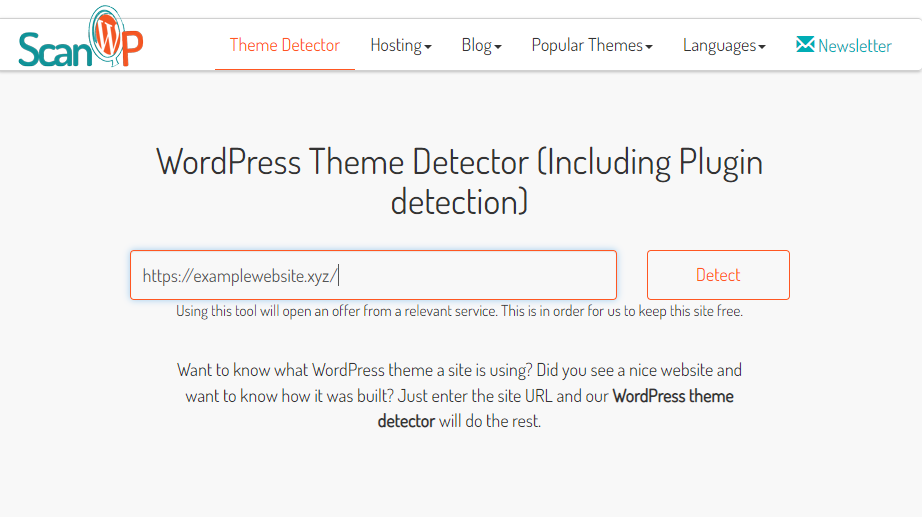
ScanWP is another tool. It finds WordPress plugins. It also shows theme names. You enter a website URL. Then, it scans the site. The tool is fast and easy. It helps to learn more about websites.
Browser Extensions For Plugin Discovery
Finding plugins on WordPress sites is easy with Chrome extensions. WordPress Plugin Detector helps you see installed plugins. Just visit any WordPress site. The extension shows a list of plugins. Some extensions also offer details like version and author name.
Install a Chrome extension from the Chrome Web Store. Activate it by clicking the icon on your browser. Explore different WordPress sites. Discover plugins without asking the site owner. This tool is very helpful for bloggers and web developers. It saves time and effort.

Credit: codecanel.com
Ethical Considerations
Understanding ethical considerations is vital when exploring WordPress plugins. Respect user privacy and avoid unauthorized access to sensitive data. Always seek permission before analyzing or sharing plugin information.
Respecting Website Privacy
Respect for privacy is important. Websites have their own rules. It’s crucial to follow them. Not all sites want their plugins known. Always ask permission. Try not to disturb site owners. They work hard to protect their data. Sneaking around can harm trust. Privacy should be a top priority. It’s about mutual respect. Treat others as you’d like to be treated. Ethical behavior builds strong relationships.
Legal Implications
Using tools can have legal consequences. Laws vary by region. Some actions may be illegal. It’s important to know the rules. Avoid using tools without permission. This can lead to trouble. Always check local laws. Breaking them can result in fines. Protect yourself by staying informed. Ignorance is not an excuse. Compliance is key to safety.
Tips For Plugin Selection And Management
Discovering active plugins in WordPress simplifies management. Start by using tools to list installed plugins. Then, evaluate each plugin’s purpose and performance. Regular checks ensure compatibility and enhance site functionality.
Choosing Reliable Plugins
Always choose plugins from trusted sources. Check the ratings and reviews before installing. High ratings mean users like the plugin. Good reviews show the plugin is reliable. Look for plugins with regular updates. Updated plugins work better and have fewer bugs. Avoid plugins that are rarely updated. They might not work well with your website. Check how many people use the plugin. Many users often mean the plugin is popular and safe.
Regular Updates And Maintenance
Plugins need regular updates to stay safe. Always update plugins when new versions come out. This helps protect your site from hackers. Outdated plugins can cause problems. Regularly check for plugin updates. Update them promptly. Keep a list of your plugins. This helps you track updates easily. If a plugin is no longer needed, remove it. This keeps your site clean and fast. Maintain your plugins well for a smooth-running website.
Credit: www.easywp.com
Frequently Asked Questions
How To Identify WordPress Plugins Used?
To identify WordPress plugins, use online tools like “WPThemeDetector” or browser extensions such as “Wappalyzer. ” These tools analyze websites and display active plugins. Alternatively, view the site’s source code to spot plugin-specific classes or scripts. Accessing the site’s backend can also reveal installed plugins.
Can Plugins Affect Site Performance?
Yes, plugins can impact site performance. Excessive or poorly coded plugins may slow down loading times. Regularly update plugins to ensure optimal performance and security. Choose lightweight plugins and delete unnecessary ones to enhance site speed. Conduct performance tests to monitor plugin impacts.
Are There Tools To Detect WordPress Plugins?
Yes, several tools can detect WordPress plugins. WPThemeDetector and BuiltWith are popular choices. These tools analyze websites and list active plugins. Browser extensions like Wappalyzer also identify plugins. They provide insights into the technologies used on a site, including plugins.
Why Know About Used Plugins?
Knowing used plugins helps ensure site security and performance. It aids in troubleshooting issues and optimizing functionality. Understanding plugins lets you make informed decisions on updates and replacements. It also helps maintain compatibility and enhances user experience.
Conclusion
Discovering WordPress plugins enhances your website’s functionality. With the right tools, your site becomes more efficient and user-friendly. Identifying plugins used by other sites can offer valuable insights. It helps improve your own site. Experiment and find what works best for you.
Stay updated with plugin trends. Keep your site fresh and secure. A well-chosen plugin strategy boosts performance and visitor satisfaction. Remember, simplicity is key. Choose plugins that truly add value. Explore, learn, and adapt. Your WordPress journey becomes smoother with the right plugins.
Happy exploring!