
Have you ever wondered how you can make your WordPress site more powerful and flexible without learning a single line of code? Plugins are the secret ingredient.
They’re like magic tools that can transform your website in countless ways. Whether you want to enhance site security, improve SEO, or add a stylish contact form, plugins have got you covered. Imagine unlocking new features with just a few clicks—sounds enticing, right?
By understanding what plugins do in WordPress, you open the door to endless possibilities for your site. Keep reading to discover how plugins can elevate your website to new heights.
Role Of Plugins
Plugins help make WordPress better. They add new features. Some plugins help with design. Others help with security. Each plugin does something special.
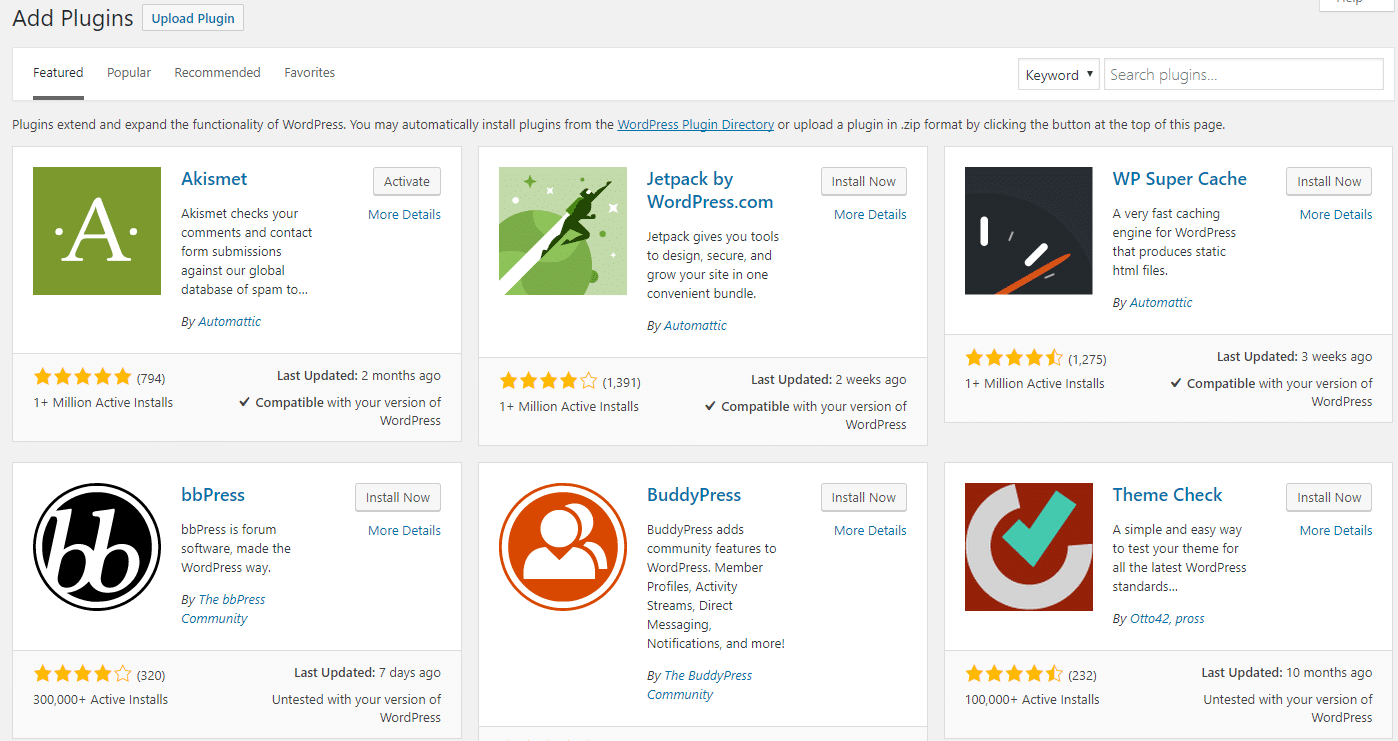
Install plugins to make your site better. WordPress has many plugins. Choose plugins that fit your needs. Some are free. Others cost money.
Plugins are like tools. They make tasks easy. With plugins, you can build a great site. Remember, plugins need updates. Keep them up to date. This helps your site stay safe.
Credit: kinsta.com
Enhancing Functionality
Plugins add custom features to WordPress sites. They help create unique designs. Users can make their sites look special. Plugins provide extra tools for content creators. They make managing sites easier.
Plugins improve user experience. They make sites load fast. Visitors enjoy speedy browsing. Plugins also help with navigation. Users find information quickly. Better experience keeps visitors on the site longer.
Customization And Flexibility
Plugins let you change your website. They make it look unique. You can add new features easily. Want a photo gallery? Use a plugin. Need a contact form? There is a plugin for that too. Plugins help you create a site that fits your needs. They offer endless options for any website.
Plugins work with many themes. They adjust to fit the theme style. This makes your site look smooth. No awkward gaps or misplaced buttons. It all blends together. You can switch themes and still use your favorite plugins. This gives you freedom to change your site’s look anytime.
Plugins improve user experience. They can make your site fast. They make it easy to navigate. With plugins, users find what they need quickly. Visitors enjoy a better browsing time. Happy users return. They might even tell their friends about your site.
Credit: www.hostpapa.com
Security Enhancements
Protection mechanisms help keep your WordPress site safe. These plugins block unwanted access and threats. They guard against hackers and malware. Some plugins offer strong password requirements. Others provide login attempt limits. This keeps bad actors out. Updates also play a big role. They fix security holes quickly. Regular updates make your site safer.
Vulnerability scanning is a key feature in security plugins. This tool checks your site for weak spots. It identifies potential risks. Scanning happens regularly. It finds issues before they become big problems. Many plugins send alerts. These alerts notify you of threats. Quick action can prevent damage. Always keep scanning active. It’s essential for site health.
Seo Optimization
Plugins help with content optimization. They make it easy to use keywords. Plugins suggest changes. They help make content better for search engines. This improves the chance of getting found. They also check for errors. This helps keep content clean and tidy. The tools in plugins are great for making content SEO-friendly.
Plugins boost the speed of a site. They make pages load faster. Faster sites keep visitors happy. They also help with image optimization. This makes images load quickly. Plugins can also help reduce server load. Plugins help sites run smoother.
Credit: www.wpbeginner.com
E-commerce Integration
Shopping Cart Features are important for online stores. Plugins help set up a cart easily. Users can add items and view totals quickly. Discounts and taxes can be calculated by plugins. They make shopping easy and organized.
Payment Gateway Options are vital for money transactions. Plugins offer many payment choices. Credit cards, PayPal, and Stripe are popular options. Secure payments are ensured by these plugins. They make transactions safe and quick for customers.
Maintenance And Updates
Automated Backups are very important for a website. They help save your work. If something goes wrong, you won’t lose everything. Plugins can do this for you. They make copies of your site. These copies are called backups. Backups keep your site safe.
Version Control helps you track changes. You can see what was changed and when. This is useful for fixing mistakes. It also helps if you want to go back to an old version. Plugins can help with version control. They make it easy to manage your site’s updates.
Popular Plugins
Plugins make WordPress powerful. They add extra features to your site. Some plugins help with security. Others speed up your site. Backup plugins save your work. SEO plugins help with search rankings. Choose plugins wisely. Too many can slow your site.
Users love some plugins more than others. Yoast SEO is a favorite. It helps with search engines. WooCommerce is great for online stores. Elementor lets you design pages easily. Akismet fights spam comments. Jetpack offers many features in one. Each plugin has its special use. Pick what your site needs.
Frequently Asked Questions
What Are Plugins In WordPress?
Plugins are tools that enhance WordPress websites. They add features and functionality without altering the core code. Users can install, activate, or deactivate plugins with ease. From SEO optimization to e-commerce, plugins cater to various needs. They help users customize their websites efficiently and extend WordPress capabilities.
How Do WordPress Plugins Work?
WordPress plugins work by integrating with the core software. They are scripts or programs that extend functionality. When activated, they interact with WordPress to perform specific tasks. Users can manage plugins through the WordPress admin panel. This makes it easy to add, remove, or update features.
Are WordPress Plugins Free?
Many WordPress plugins are free, available in the WordPress repository. These free plugins offer basic features for users. However, some plugins have premium versions with advanced functionalities. These paid plugins usually offer better support and updates. Users can choose based on their needs and budget.
How To Install A WordPress Plugin?
Installing a WordPress plugin is simple. First, navigate to the WordPress dashboard. Select ‘Plugins’ and click ‘Add New’. Search for the desired plugin in the search bar. Click ‘Install Now’, and then activate the plugin. It’s a straightforward process that takes just a few minutes.
Conclusion
WordPress plugins enhance website functionality. They add features without altering core code. Easy to install, they save time and effort. Plugins support SEO, security, and design needs. Choosing reliable plugins is crucial. Too many plugins might slow down your site.
Regular updates ensure smooth operation. Always check reviews and ratings before installing. Experiment to find what suits your site best. Plugins make WordPress versatile for any user. Embrace their power wisely for optimal performance. Explore, test, and refine your plugin choices.
Your website’s success depends on informed decisions. Keep learning, keep improving.


