
Have you ever wondered how your favorite apps and websites communicate with each other seamlessly? If you’re using WordPress, the answer might surprise you: it’s the WordPress REST API.
This powerful tool acts like a bridge, connecting your WordPress site with other applications, making them work together smoothly. Imagine being able to update content, manage users, and perform other tasks without even logging into your WordPress dashboard. Sounds intriguing, right?
Understanding the WordPress REST API can unlock a world of possibilities for your site, enhancing its functionality and user experience. Dive into this article to discover how this versatile tool can transform the way you interact with your WordPress site. Ready to unlock the next level of web development? Let’s get started!
WordPress Rest Api Basics
The WordPress REST API lets websites talk to each other. It uses HTTP requests to send and get data. This makes websites work smarter. Developers use it to build cool apps. It also helps to connect different services. Easy sharing of data is possible. This makes website tasks simple and fast.
The REST API has some main parts. Endpoints are like doors. They help data to go in and out. Routes are paths to these doors. Requests ask for data. Responses give back data. Authentication keeps data safe. These parts work together to make the API powerful.
The API works with simple steps. First, a request is sent. This request asks for data. Next, the API finds the right data. Then, it sends back a response. This response gives the data needed. These steps happen fast. This helps websites and apps work quickly.

Credit: wptavern.com
Setting Up The Rest Api
WordPress REST API allows developers to connect with WordPress sites using JSON data. It provides access to site data remotely. Integrating it enables custom applications and seamless site management.
Enabling The Api
To start, access your WordPress dashboard. Navigate to Settings, then click on Permalinks. Make sure you choose any option other than plain. This enables the API. Simple, right? Next, visit the Plugins section. Install and activate the REST API plugin. Your API is now ready to use!
Authentication Methods
Authentication is key. Use Basic Authentication for simplicity. For more security, opt for OAuth. It is a bit complex but safe. Another option is JWT (JSON Web Tokens). Choose what fits your needs. Remember, authentication protects your data.
Security Considerations
Think about security. Always keep your WordPress updated. Use SSL certificates to encrypt data. Limit API access to trusted users. Monitor your API for unusual activity. Protect your site, protect your users. Security matters!
Endpoints And Routes
WordPress REST API has many default endpoints. They help you access data like posts, users, and comments. Each endpoint is a URL. It gives you specific data. For example, use “/wp-json/wp/v2/posts” to see all posts. These endpoints make it easy to get information from your site.
Custom endpoints let you add your own data routes. You can create them to fit your needs. If you need data not in default ones, custom endpoints help. Use them to make your site more flexible. Developers can add them using code. It gives you more control over your site’s data.
Managing routes means controlling how data moves. You decide what data shows up. Routes are like paths. They guide users to the right data. You can change routes using plugins or code. This helps keep your site organized. It also helps you protect sensitive data.
Data Handling
The WordPress REST API helps in getting data from websites. It is like asking questions and getting answers. You can ask for posts, pages, or comments. The API brings back the data you ask for. It uses simple URLs to request information. You need to send these requests in a proper way. This helps in getting correct data.
Changing data is simple with the REST API. You can add new posts or edit old ones. You send data using special messages. These messages tell the website what changes you want. The API makes sure your changes happen safely. It checks if the data you send is good.
The API uses JSON format for data. JSON is easy to read and write. It looks like a list with keys and values. Each key has a specific value. This format helps in sharing data between computers. JSON is flexible and widely used. It makes data handling smooth and efficient.
Integration With Applications
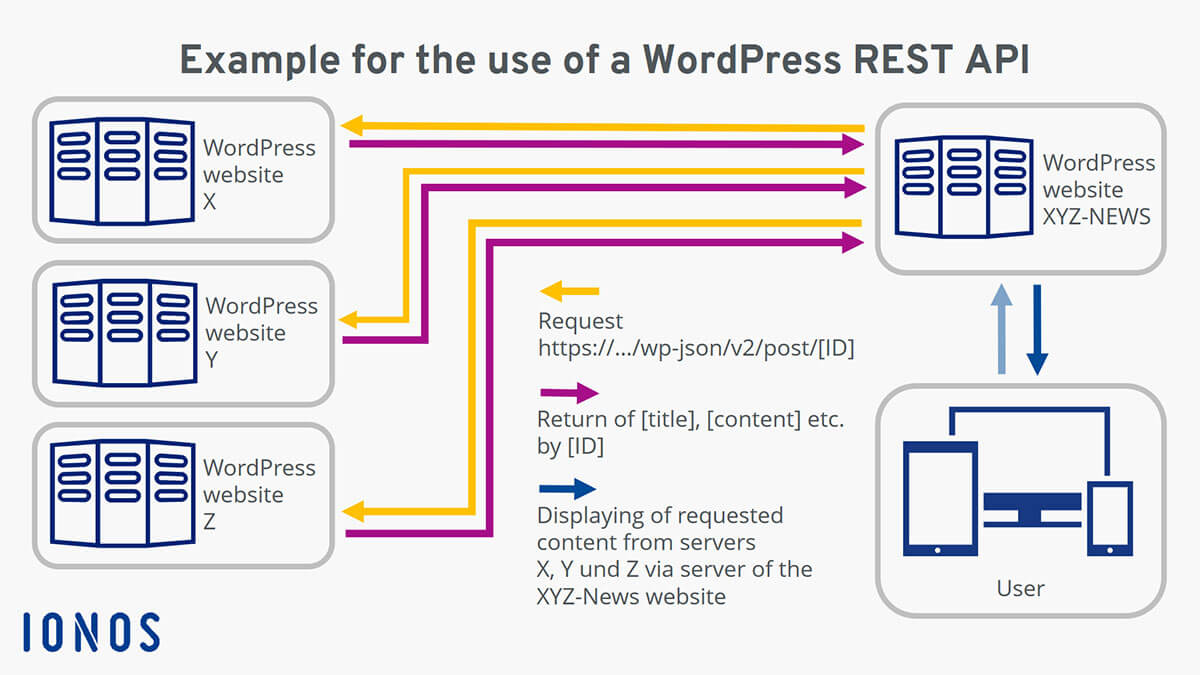
The WordPress REST API helps mobile apps talk to your site. It sends data back and forth. This makes apps work smoothly. Developers use it to get posts, comments, and user info. They can also update content. All this happens without opening a web browser. Mobile apps become more powerful and interactive.
Many tools connect with WordPress using the REST API. Businesses find this useful. It allows them to link different services. For example, payment gateways can use it. Customer data can be shared easily. It enhances the site’s functionality. Developers enjoy the flexibility it offers.
REST API has many use cases. It can create custom dashboards. Users can manage content from apps. Online stores benefit a lot. They can update products fast. It helps in building single-page applications. Websites become more dynamic and responsive. Content can be accessed from anywhere.
Credit: www.ionos.com
Advanced Features
WordPress REST API allows developers to interact with a WordPress site remotely. It offers advanced features, enabling seamless integration with external applications and systems. This API is a powerful tool for creating dynamic websites and applications with WordPress.
Extending Functionality
WordPress REST API allows adding new features easily. Developers can create custom endpoints. These endpoints perform specific tasks. Plugins use this feature to add unique abilities. Extending functionality helps meet user needs. It opens doors for more creativity and innovation.
Performance Optimization
REST API makes websites fast and responsive. It optimizes data transfer between server and client. This reduces load time and improves user experience. Developers can manage resources better. Caching is often used to enhance speed. Faster websites keep users happy and engaged.
Error Handling
Proper error handling is crucial. REST API provides clear error messages. These messages help users understand issues. Developers can debug effectively. It ensures the website functions smoothly. Handling errors improves trust and reliability. Users find it easier to use well-maintained sites.
Troubleshooting Common Issues
Debugging helps find and fix problems. Start by checking the API logs. Logs show where issues might be. Use tools like Postman for testing. It helps see what’s going wrong. Check if the URL is correct. Sometimes, a small mistake can cause big problems. Make sure your code is updated. Old code might not work well.
Some errors happen often. A common one is the 404 error. This means the page is not found. Another is the 500 error. This means something is wrong on the server. Check the JSON format. It must be correct. Also, check the permissions. Make sure you have access to needed parts.
Always backup your work. This saves time if things go wrong. Use clear and simple code. This makes it easier to find issues. Document your process. This helps others understand your work. Regularly update plugins and themes. Old versions can cause errors. Test changes in a safe environment. Don’t test on a live site.

Credit: kinsta.com
Frequently Asked Questions
What Is WordPress Rest Api Used For?
WordPress REST API allows developers to interact with WordPress. It enables the creation and management of content remotely. Developers can build applications that can communicate with WordPress using JSON. This API simplifies integration with other platforms and services. It’s vital for creating mobile apps and decoupled front-end experiences.
How Do I Access WordPress Rest Api?
You access WordPress REST API using HTTP requests. Append `/wp-json/wp/v2/` to your WordPress site URL. Use endpoints to fetch or manipulate data, like posts or pages. Authentication is required for some actions. Tools like Postman or curl can help test API requests easily.
Is WordPress Rest Api Secure?
WordPress REST API is secure if properly implemented. Use authentication methods like OAuth or application passwords. Ensure your WordPress site is updated to prevent vulnerabilities. Limit API access to trusted users. Always validate and sanitize data. Implement HTTPS to encrypt data transmission for extra security.
Can I Create Custom Endpoints In Rest Api?
Yes, you can create custom endpoints in WordPress REST API. Developers can register new routes using `register_rest_route()`. Custom endpoints allow tailored interactions with your WordPress data. This flexibility helps in extending API capabilities. It supports unique business logic or integration needs.
Conclusion
WordPress REST API offers flexibility to web developers. It enables efficient data exchange. Create custom solutions with ease. Integrate applications seamlessly. Enhance website functionality. Developers use it to expand WordPress capabilities. REST API provides a powerful toolset. It supports a wide range of applications.
Connect different systems effortlessly. Improve user experience with dynamic features. Developers benefit from its adaptability. REST API continues to grow in popularity. It opens new possibilities for web projects. Explore its potential in your next project.


