
Have you ever wondered what Wflogs in WordPress are and why they’re important for your website’s security? Imagine having a secret weapon that helps protect your site from cyber threats without you even realizing it.
Wflogs are an integral part of your website’s defense system, logging important security data to keep your site safe. As you navigate the world of WordPress, understanding Wflogs can empower you to take control of your site’s safety and performance.
Curious to find out how this hidden gem can safeguard your digital space? Keep reading to unlock the secrets of Wflogs and discover how they can be your strongest ally in maintaining a secure and efficient website.
Wflogs Definition
Wflogs is a folder in WordPress. It belongs to the Wordfence plugin. This plugin helps keep websites safe. Wflogs stores data about security events. It keeps track of malware and hacker attacks. The folder also contains settings and logs. These logs are important for website protection. They help understand threats. Website owners can check them for security insights. Regular checks can prevent problems. Wflogs helps WordPress sites stay secure. It is vital for maintaining a safe environment. If the folder is missing, Wordfence may not work properly. Keeping Wflogs updated is important.
Credit: www.forge12.com
Purpose Of Wflogs
Wflogs store important data for WordPress security. They hold records of site activity. These logs help track changes and events. Wflogs are part of Wordfence, a security plugin. This plugin protects sites from threats. Logs show attempts to access the site. They also record blocked users. This data aids in understanding security issues. Regular checks keep your site safe. Monitoring logs is crucial for site health.
Components Of Wflogs
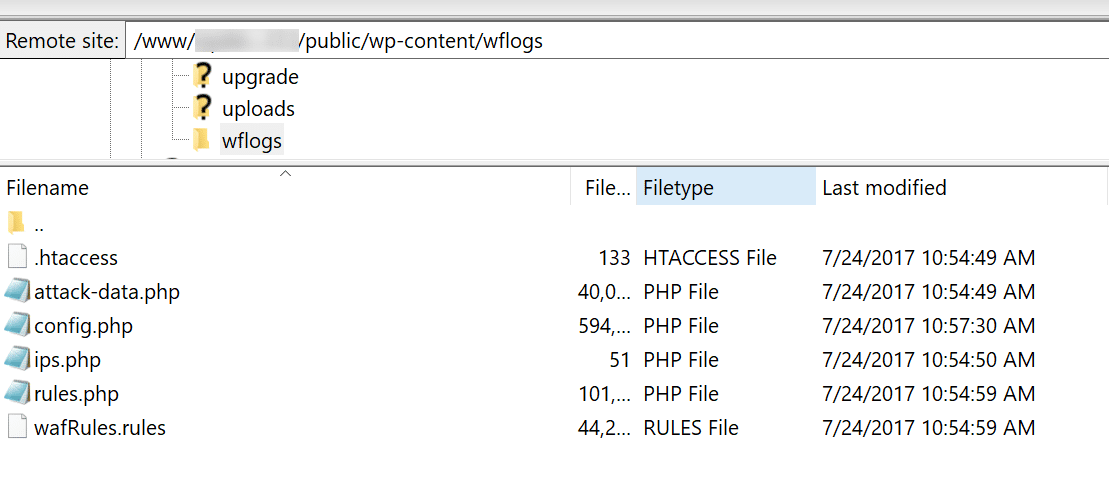
Log files keep track of activities. They record events on your website. Errors and security warnings appear here. These files help in understanding issues. They provide insights into how your site behaves.
Configuration files store settings. These settings control how the site works. They decide which features are active. Changing them alters site behavior. They are important for managing your site.
Cache files store temporary data. They help in loading pages faster. These files save time by reducing load on the server. They can be cleared to fix display issues. Keeping them helps with smooth site performance.
Credit: kinsta.com
Location In WordPress
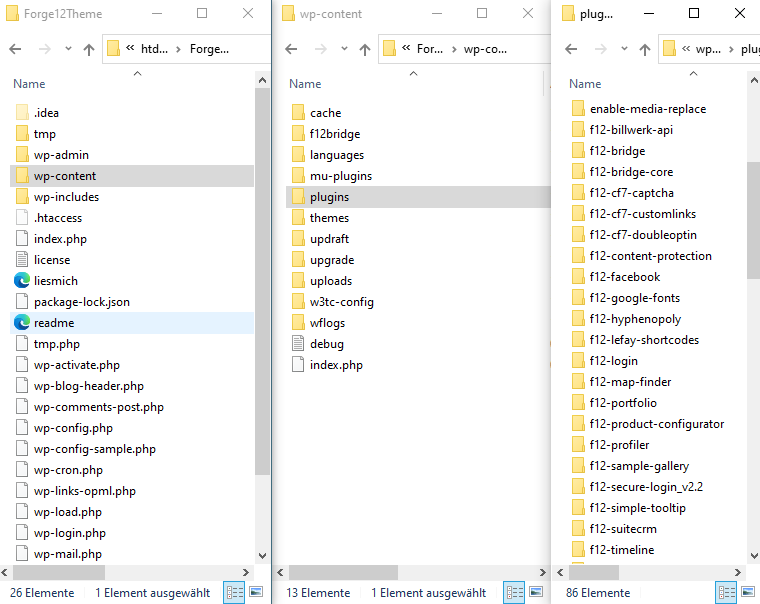
The Wflogs directory is part of the Wordfence plugin. This directory holds important log files. These files help keep your site safe. It’s found in the wp-content folder. This is where many plugin files are stored. The path looks like this: wp-content/plugins/wordfence/wflogs.
To see the wflogs, you need to use a file manager. This could be in your hosting account. Or, use a FTP client like FileZilla. Open the wp-content folder, then find the plugins folder. Inside, look for wordfence. Here, you will find the wflogs folder. Always handle these files with care.
Managing Wflogs
Wflogs store data about your site’s activity. Check these logs often. It helps in understanding how your website works. Track the usage to spot any unusual behavior. This makes your site safe and secure.
Logs can grow big and slow down your site. Clear logs regularly to keep your site fast. It’s like cleaning your room to keep it tidy. This helps in improving site speed. Use tools that automate this process.
Optimizing Wflogs boosts your site’s performance. Keep logs small for a faster website. Small logs reduce load time. Fast websites make visitors happy. Install plugins that manage logs efficiently.

Credit: m.youtube.com
Security Implications
Protecting Sensitive Data is very important. Wflogs in WordPress helps keep data safe. It stops bad people from taking your data. It records what happens on your website. This helps find threats quickly. Sensitive info like passwords are protected. Wflogs helps make your site secure. It keeps your visitors safe too.
Preventing Unauthorized Access is a key feature. Wflogs blocks people who try to sneak in. It alerts you about suspicious activity. You can see who tries to access your site. It tracks login attempts. Wflogs helps keep bad guys out. Your website stays safe.
Troubleshooting Wflogs
Many face issues with Wflogs on WordPress. Problems often include high storage usage or slow site performance. Logs may become too large. This affects speed.
Clear logs often to save space. Use plugins that manage logs. Ensure WordPress is updated. Check for plugin conflicts. Look at server settings. Make sure permissions are correct. Try to fix file issues.
Best Practices
Regular maintenance of Wflogs is crucial. Check logs weekly. Look for errors or unusual activity. Clean up old logs. This keeps your site running fast. It also helps in finding issues early. Regular checks ensure your site is safe. Keep your WordPress healthy.
Backup strategies are important. Always have backups of Wflogs. Use plugins to automate backups. Store backups in different places. This keeps your data safe. If something goes wrong, you can restore quickly. Backups save you from losing important data.
Frequently Asked Questions
What Is The Purpose Of Wflogs In WordPress?
Wflogs is a directory used by the Wordfence security plugin in WordPress. It stores log files and configuration data. These logs help monitor traffic, block threats, and ensure site security. By analyzing Wflogs, users can understand and manage potential security issues effectively.
How Do I Access Wflogs In WordPress?
To access Wflogs, navigate to your WordPress installation via FTP or file manager. Find the “wp-content” directory and open the “wflogs” folder. This folder contains logs and data used by Wordfence. Accessing these logs can help you monitor security events on your site.
Can I Delete Wflogs Files Safely?
Yes, you can delete Wflogs files, but proceed with caution. Deleting these files won’t harm your site but may remove important security logs. Wordfence will recreate necessary files if needed. Regularly clearing old logs can save space, but ensure you don’t need the data first.
Why Is My Wflogs Folder Large?
The Wflogs folder may grow large due to accumulated logs and data. This happens when Wordfence monitors heavy traffic or frequent security events. Regularly clearing old logs or configuring Wordfence settings can help manage folder size. Keeping it optimized ensures efficient site performance.
Conclusion
Wflogs in WordPress plays a crucial role in site security. It helps track and manage logs efficiently. You gain insights into potential threats and vulnerabilities. Regular monitoring of Wflogs ensures your site remains protected. It’s important to keep these logs well-organized.
This makes troubleshooting easier when issues arise. Proper use of Wflogs enhances security measures. It supports your efforts to maintain a safe online environment. By understanding Wflogs, you safeguard your WordPress site effectively. Explore and utilize Wflogs to strengthen your site’s defenses.
Stay proactive in managing your WordPress security.


