
Have you ever stumbled upon the term “Page ID” while navigating your WordPress dashboard and wondered what it actually means? You’re not alone.
Understanding what a Page ID is can unlock a world of possibilities for customizing and managing your website more effectively. Imagine being able to effortlessly target specific pages for styling, plugins, or tracking analytics. Knowing your Page ID can make these tasks easier and more precise.
So, if you’re eager to gain greater control over your WordPress site and enhance your web management skills, keep reading. This guide will demystify the concept of Page IDs and show you how to leverage them to your advantage.
Page Id Basics
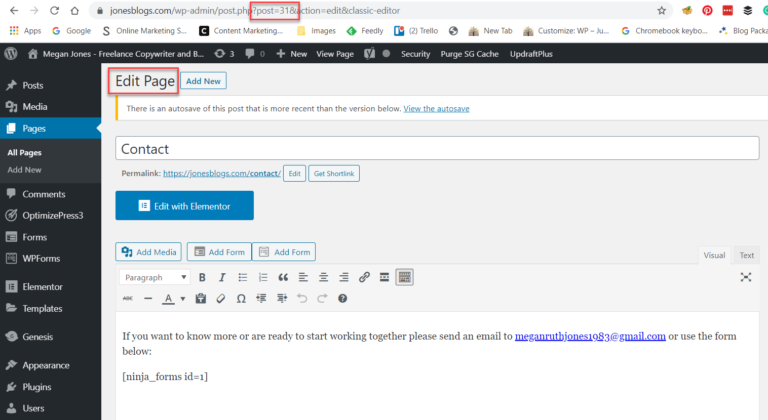
A Page ID is a special number in WordPress. It helps identify each page. Every page has its own unique ID. This ID is important for many tasks. It helps in customizing and managing pages. It’s like a secret code. You can find it in the page’s URL. Look for the number after “post=”. It’s easy to spot once you know where to look.
The Page ID is very useful. It helps in adding custom features. You can hide or show parts of a page. Use it for special designs. Developers find it helpful too. They use it for coding tasks. The ID makes working with pages easier. Without it, things get tricky. So, always remember the Page ID.

Credit: squareinternet.co
Locating Page Id
Page ID in WordPress is a unique number assigned to each page. It helps in managing and editing pages efficiently. Finding this ID is useful for customizing themes or plugins.
Using Admin Dashboard
Finding the Page ID is simple with the admin dashboard. Start by logging into your WordPress account. Navigate to the Pages section. Click on the title of the page you need. Once clicked, look at the URL in your browser. The Page ID is the number that appears after “post=”. This number is unique for each page. You can write it down if needed.
Url Inspection Method
Another way to find the Page ID is through URL inspection. Open the page you want to check. Look at the URL bar on top. The ID is part of the URL. Usually, it is after “post=”. This method works even if you are not logged in. Simple and effective.
Importance Of Page Id
Every page in WordPress has a unique number. This number is called the Page ID. It helps in managing the website easily. With Page ID, you can update or delete content without confusion. Knowing the Page ID makes managing content efficient and organized. It is especially helpful for large sites. Remembering names of many pages is hard. Page IDs make it easier.
Page IDs play a key role in SEO and analytics. They help track which pages get more views. You can use Page ID to improve the site’s performance. This way, you know which pages need more work. Identifying popular content becomes simple. Analyzing traffic is easier with Page IDs. They are vital for understanding audience behavior.
Credit: athemes.com
Common Uses Of Page Id
The Page ID is very helpful in WordPress. It helps you build custom queries. You can ask for pages with certain IDs. This makes your site more useful. It helps you show the right content to visitors.
The Page ID is also useful for template changes. You can make each page look different. This is great for showing special content. It helps in making your website unique.
Troubleshooting Page Id Issues
WordPress sometimes doesn’t show the Page ID. This can confuse users. Page ID is important for managing pages. Without it, tasks become harder. Users need to find the ID manually. Use the URL or the page editor to find it. These methods take time but are effective.
Errors can occur with Page IDs. This can happen during updates. They can also happen after installing plugins. Check settings first. Sometimes, errors are simple mistakes. Restart WordPress to fix small problems. If errors persist, seek help from online forums or the WordPress community.

Credit: www.fixrunner.com
Enhancing Page Id Utility
Several plugins can help with Page ID tasks. These plugins make it easy to find and use Page IDs. One popular plugin is Show IDs. It displays IDs in your dashboard. This makes them easy to see. Another plugin is Reveal IDs. It adds ID columns in posts and pages. Both plugins are simple to use. They save time and effort. With these tools, managing Page IDs is easier.
Advanced users can use Page IDs for custom queries. This helps in filtering content. Shortcodes can also use Page IDs. They add more features to pages. Developers often use IDs in custom themes. This gives more control over website design. Knowing Page IDs can improve your site’s functionality. It’s a useful skill for WordPress users.
Frequently Asked Questions
What Is A Page Id In WordPress?
A Page ID in WordPress is a unique identifier assigned to each page. It’s used by the system to manage and reference pages within the database. You can find the Page ID in the URL when editing a page or by hovering over the page title in the dashboard.
How Do I Find My WordPress Page Id?
To find your WordPress Page ID, go to the Pages section in your dashboard. Hover over a page title, and you’ll see the ID in the URL at the bottom of your browser. Alternatively, click to edit a page, and the ID appears in the URL bar.
Why Is Page Id Important In WordPress?
Page IDs are crucial for developers and users to reference specific pages in code or customizations. They help in applying targeted CSS styles, creating custom queries, or modifying page settings. Understanding Page IDs can enhance your ability to customize and manage a WordPress site effectively.
Can I Change A WordPress Page Id?
No, you cannot change a WordPress Page ID as it’s automatically generated by WordPress for database management. Altering it would disrupt the database’s integrity. However, you can create new pages if reorganization is needed, and WordPress will assign new IDs automatically.
Conclusion
Understanding Page IDs in WordPress simplifies website management. These IDs help you organize pages easily. By knowing how to find them, you can customize your site better. You can enhance site navigation and user experience. Page IDs play a crucial role in WordPress development.
They assist in implementing themes and plugins effectively. This knowledge saves time and avoids confusion. Whether you’re a beginner or an expert, grasping Page IDs is beneficial. It makes your WordPress journey smoother. Explore further and enhance your skills. Your website will thank you!


