
Imagine having the power to effortlessly customize your WordPress site, tailoring every detail without diving into complex code. Sounds appealing, right?
That’s where hooks come into play. Hooks in WordPress are your secret weapon for making your website truly yours, allowing you to add, modify, and control features with ease. They are like magic wands that give you control over how your site behaves.
Whether you’re a seasoned developer or a curious beginner, understanding hooks can transform your WordPress experience. Keep reading to discover how these invisible tools can make your website more dynamic, engaging, and uniquely yours. Your curiosity will be rewarded with insights that could change the way you manage your WordPress site forever.
Hooks In WordPress
Hooks in WordPress are special tools. They let you change or add things. Actions and filters are two kinds of hooks. Actions let you add new things. Filters let you change existing things. They make WordPress very flexible. You can create custom features with them.
Developers use hooks to improve websites. They can add new features. Or change old ones. This makes websites better. Hooks help save time. No need to change core files. This keeps updates easy. WordPress hooks are important for custom development. They allow creativity and flexibility.

Credit: stackoverflow.com
Action Hooks
Action hooks allow you to add or change features in WordPress. They are like signals. You can do things at specific times. For example, you can run code when a post is published. This helps you customize your site easily. You don’t need to change the core WordPress files. This keeps your site safe from updates.
Some well-known action hooks include wp_head, wp_footer, and init. wp_head lets you add code to the page head. This can be useful for adding scripts or styles. wp_footer is used for code at the end of a page. This can help with analytics tracking. init runs after WordPress is loaded. You can use it to set up your environment.
Filter Hooks
Filter hooks let you change data before it shows up. They are important for developers. They help make WordPress more flexible. You can change how content appears. This is done without changing the core files. Filters work by taking input and giving it back with changes. You can add your own functions to these filters. This helps you make the site better. Filters are used in many parts of WordPress. They are great for customizing your site.
Filters can change post titles. They can adjust content before publishing. Excerpt length can also be changed with filters. Developers use filters to format dates. They use them to change text in widgets. Filters help make site language different. Filters make WordPress more adaptable. They are used in many themes and plugins.
Creating Custom Hooks
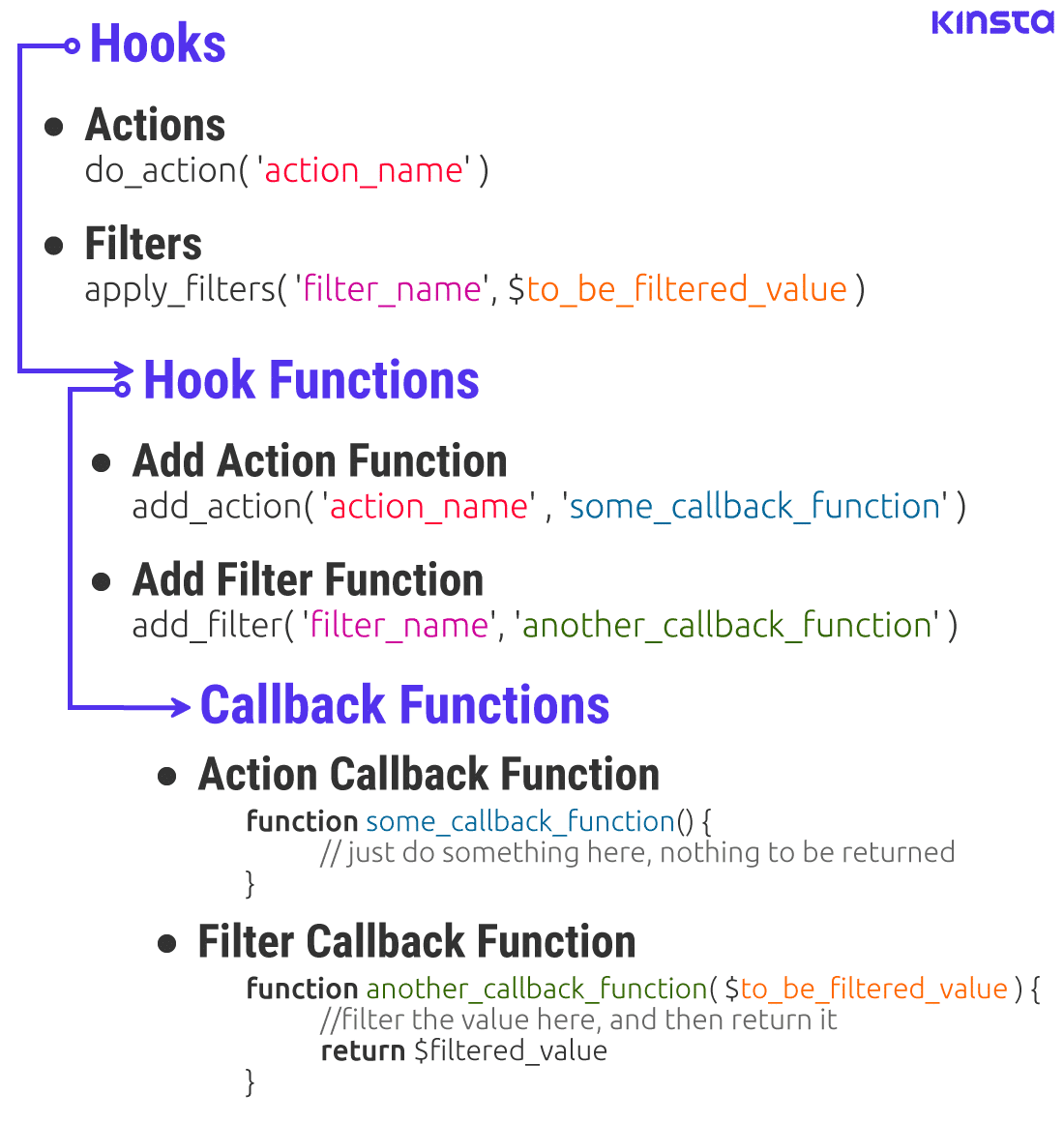
Custom actions help developers add extra functionality. They let you insert code at specific points. Start by using add_action() function. This function ties your action to a specific event. Choose a name for your action. Make sure it is unique. Use do_action() where you want the action to occur. These actions are very helpful. They make your WordPress site more flexible. They let you do things your way.
Filters change data before it is shown. Use the add_filter() function. This function links your filter to a hook. A filter hook changes data passed through it. Choose a name for your filter. Ensure it is unique. Use apply_filters() to run the filter. Filters let you modify text and content. They provide control over data display. Filters make your site more dynamic.
Best Practices
Hooks in WordPress allow customization without altering core files. These are tools to add or change features. Developers can use them to improve site functionality.
Naming Conventions
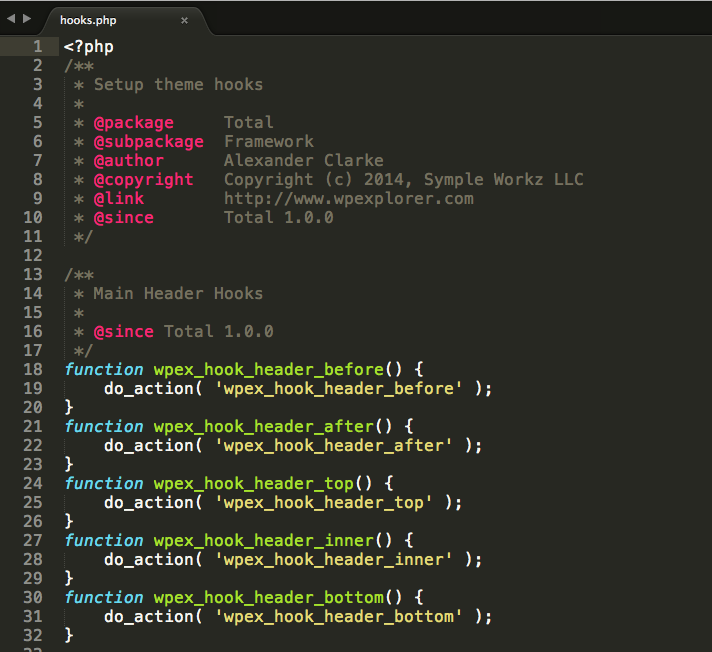
Choosing clear names helps users understand your hooks. Names should describe what the hook does. Use unique names to avoid confusion. Prefix your hook names. This helps prevent clashes. Always use lowercase letters. Separate words with underscores. Follow these tips to ensure your hooks are easy to use and understand.
Avoiding Conflicts
Conflicts occur when two hooks have the same name. This can cause errors. To prevent this, use prefixes in your hook names. Prefixes should be related to your plugin or theme. This keeps them unique. Check existing hooks before naming yours. Testing your hooks helps ensure they work well. Good testing practices catch conflicts early. Fixing conflicts later is hard. Avoid them from the start. This makes your WordPress site run smoothly.
Credit: totalwptheme.com
Troubleshooting Hooks
Hooks may sometimes not work as expected. They might not execute the desired action. This can be because of missing or misplaced code. Another issue could be conflicting hooks. This happens when two hooks try to do the same thing. Sometimes, typos in the hook name can also cause problems. These are common and easy to fix.
Debugging hooks can be simple. Start by checking for typos. Ensure that the hook name is correct. Next, disable other plugins. This helps to find if a plugin is causing problems. Use WordPress debugging tools. They can show what’s going wrong. Read the error logs. They provide clues about the issue. Follow these steps to fix most hook problems.
Real-world Applications
Hooks in WordPress allow developers to modify or extend functionality. They enable custom code execution without altering core files. Real-world applications include customizing themes and plugins or automating tasks.
Enhancing Functionality
Hooks can add new features to your website. They help in making the site more interactive. You can change how your site works with hooks. They allow adding custom actions and filters. This helps in modifying content easily. Developers use hooks to improve site performance. It makes the site faster and better.
Integrating With Themes And Plugins
Themes and plugins work well with hooks. Hooks allow them to connect with the site. They can change how the site looks and feels. Plugins use hooks to add special features. Themes use hooks to change design elements. It makes the site unique and special. Hooks give control over site design and function.
Credit: kinsta.com
Frequently Asked Questions
What Are Hooks In WordPress?
Hooks in WordPress are points in the code where developers can add custom functions. They allow modification of WordPress functionality without changing core files. Hooks come in two types: actions and filters. Actions execute functions, while filters modify data. Using hooks enhances flexibility and customization in WordPress development.
How Do Actions And Filters Differ?
Actions and filters are both WordPress hooks but serve different purposes. Actions let you add custom functionality to WordPress. Filters allow you to modify data before it’s displayed or processed. Actions execute your functions, while filters change data. Understanding both is crucial for effective WordPress customization.
Why Use Hooks In WordPress Development?
Hooks offer a way to customize WordPress without altering core files. They provide flexibility by allowing developers to add or modify functionality. This ensures updates don’t overwrite custom changes. Using hooks, you can enhance performance, add features, and maintain code integrity.
They are essential for creating custom themes and plugins.
Can Hooks Affect WordPress Performance?
Yes, hooks can affect WordPress performance if not used correctly. Poorly coded hooks can slow down your site. It’s essential to write efficient code and only use necessary hooks. Regularly review and optimize your hooks to maintain site speed. Properly managed hooks ensure a smooth and fast WordPress experience.
Conclusion
Hooks in WordPress simplify customization for users. They offer flexibility and control. By using hooks, you can easily modify themes and plugins. This ensures your website meets your needs. Remember, hooks are a powerful tool in WordPress development. They make tasks easier for beginners and experts alike.
With practice, you’ll find them invaluable. Start exploring hooks today. Discover the potential they bring to your projects. Enhance your WordPress journey with this essential feature. Enjoy creating a website that stands out. Happy coding!


