
Imagine having the power to manage multiple websites from a single WordPress installation. Sounds like a dream, right?
Well, that dream is called “Multisite” in WordPress, and it’s a game-changer for those who crave simplicity and efficiency. Whether you’re a business owner with several brands, a developer managing client sites, or just someone curious about expanding your web presence, understanding Multisite can be your secret weapon.
You might be wondering how this works and what benefits it can bring to your digital strategy. Keep reading, because what you’ll discover might transform the way you approach web management and expand your online reach effortlessly.
Credit: www.wpbeginner.com
Understanding Multisite
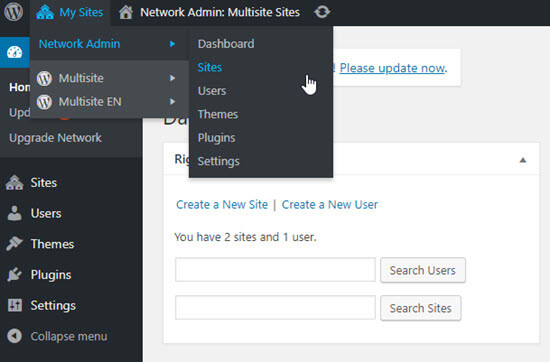
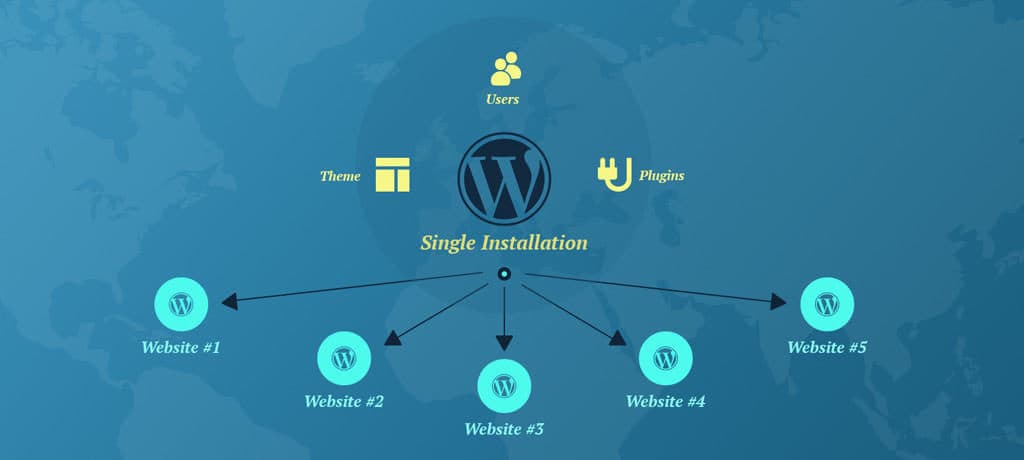
Multisite is a feature in WordPress. It allows users to create multiple sites. They can do this under one WordPress installation. This is useful for managing many blogs or websites. Each site can have its own theme and plugins. Users can share resources across sites. This saves time and effort. Multisite is ideal for schools, businesses, or networks. It helps with easy management and updates. Users can switch between sites easily. They need only one login. Multisite is powerful for large networks. It offers centralized control. Users can customize each site differently. This makes it flexible for different needs.
Setting up Multisite is simple. It requires a few steps. Users need to enable Multisite in WordPress. After that, they can start adding sites. Each site can have unique content. This makes Multisite versatile for various projects.
Credit: www.mooveagency.com
Benefits Of Multisite
With Multisite, you manage all websites in one place. This makes it easy. You update themes and plugins once. Changes apply to all sites. This saves time and effort. You can also monitor site performance centrally. No need to log into each site separately.
Multisite helps you grow easily. Add new websites without much effort. It suits big networks like schools or companies. Each site can have its own look and feel. Yet, they share the same core resources. This makes management smooth.
Control who accesses each site. Assign different roles to users. Site admins manage individual sites. Network admins oversee the entire network. This ensures security and proper role management. Users only see what they need to see.
Setting Up Multisite
Make sure you have a backup of your site. You will need it if anything goes wrong. Check your hosting plan. It should support multisite. You need WordPress installed on your site. The version should be the latest. Create a subdomain or subdirectory. Choose one that fits your plan. Enable the Apache mod_rewrite module. It helps with URLs.
Open your wp-config.php file. Find the line that says “That’s all, stop editing!” Above it, add the code: define('WP_ALLOW_MULTISITE', true);. Save the file. Go to your WordPress dashboard. Look for Tools > Network Setup. Choose subdomains or subdirectories. Click Install. Follow the instructions. You will get some code. Add it to wp-config.php and .htaccess. Now, you have a multisite.
Visit your new network dashboard. Go to Settings. Configure your network title. Set the admin email. Decide on new site registration rules. Choose if users can create new sites. Pick a theme for all sites. Set default plugins. Save your settings. Add new sites from the Sites menu. Each site can have its own theme and plugins.

Credit: kinsta.com
Managing A Multisite Network
Creating new sites is easy in a multisite network. Go to the admin panel and click “Add New.” Fill in the site details like the name and URL. Click “Create Site.” The new site is now part of the network. Each site has its own settings. You can manage them separately. This helps keep things organized.
Plugins and themes are controlled from the network admin area. Install a plugin once, and it’s available for all sites. Themes work the same way. Activate or deactivate them from the admin panel. This saves time and keeps things simple. You don’t need to update each site separately.
User roles define what users can do. Admins have full control. Editors can change content. Authors can write posts. Subscribers can only read. Set roles based on needs. Permissions keep sites secure. They prevent unwanted changes. Adjust them in the admin panel.
Multisite Vs Multiple WordPress Installations
Multisite allows managing many sites from one dashboard. It saves time and effort. Each site can share plugins and themes. Updates happen in one place. Sites can have different users. Multisite is great for schools or businesses. It handles many sites easily.
Multiple installations are different. Each site has its own dashboard. Sites don’t share plugins or themes. Updates must be done separately. This setup is good for different projects. It offers more control over each site. It is simple but takes more time to manage.
Multisite suits networks of sites. Schools use it for different classes. Businesses use it for teams. It helps manage many sites together. It saves effort and reduces errors.
Multiple installations suit diverse projects. Developers use it for client sites. Each site can have its own look. It provides full control over each site. It allows unique setups for each project.
Common Challenges
Multisite can slow down your site. Too many sites share the same server. This overload can affect speed. Users may face long loading times. It’s important to optimize resources.
Not all plugins work with multisite. Some plugins fail to function properly. Plugin developers may not support multisite. Always check plugin compatibility before use. This helps avoid unexpected issues.
Multisite networks face security risks. A breach in one site can affect others. Shared resources can be vulnerable. Regular updates and strong passwords are essential. This helps protect all sites in the network.
Best Practices
Keeping your WordPress multisite updated is crucial. Regular updates ensure security and performance. Outdated plugins can cause issues. Always check for new plugin versions. Update them as soon as possible. The WordPress core also needs updates. This keeps your multisite safe and fast. Don’t forget the themes. They need updating too. Regular maintenance is key. It makes the site run smoothly.
Backing up your site is essential. Things can go wrong sometimes. Regular backups keep your data safe. Use a reliable backup plugin. Schedule automatic backups. Store backups in a safe place. Cloud storage is a good option. This way, you can restore your site easily. If a problem occurs, you won’t lose everything. Backups give you peace of mind.
A fast site is a happy site. Optimize your multisite for speed. Use a good caching plugin. This helps pages load faster. Optimize images before uploading them. Large images slow down the site. Choose a reliable hosting provider. Good hosting improves performance. Minimize the use of heavy plugins. Too many plugins can make the site slow. Keep your site light and speedy.
Case Studies
Many big companies use WordPress Multisite. They manage different sites with ease. Each site can have its own look. But they share the same core code. This saves time and effort.
One example is a large university. They have many departments. Each department runs its own site. But all use the same Multisite network. This way, updates are simple. Changes apply to all sites at once.
Using Multisite helps in saving resources. But planning is key. Each site should have a clear purpose. This avoids confusion later.
Also, training is important. Teams need to know how Multisite works. With training, they can handle issues better. This leads to fewer problems and happier users.
Frequently Asked Questions
What Is WordPress Multisite?
WordPress Multisite allows you to create multiple websites under one WordPress installation. This feature simplifies managing several sites from a single dashboard. Each site can have its own domain, theme, and plugins. It’s ideal for businesses, schools, or any entity needing separate sites with shared resources.
How Do I Enable Multisite In WordPress?
To enable Multisite, you need to edit your wp-config. php file. Add a specific line of code to activate the feature. Then, follow the setup instructions in your WordPress dashboard. Remember to backup your site before making changes to the configuration files.
Can I Use Plugins With Multisite?
Yes, plugins can be used with Multisite, but they must be network-enabled. This means plugins are activated for all sites within the network. Some plugins may not be compatible with Multisite. Always check the plugin documentation for compatibility before installation.
Is Multisite Suitable For Beginners?
Multisite is generally not recommended for beginners due to its complexity. It requires understanding of WordPress configuration and server management. Beginners should start with a single site setup. Multisite is better suited for users with experience in managing multiple websites or large networks.
Conclusion
Understanding WordPress Multisite opens new possibilities for website management. It simplifies handling multiple sites from a single dashboard. This feature saves time and reduces stress. Perfect for businesses, schools, or bloggers managing different projects. Multisite streamlines updates and enhances efficiency.
Users enjoy consistent experiences across various sites. Consider this tool for better organization and control. Explore WordPress Multisite to optimize your digital presence. It offers practical solutions for managing multiple websites effectively. Easy to set up, easy to use. Give it a try and see the benefits firsthand.


