
Are you ready to take your Python web app to the next level? Hosting it on AWS can open doors to enhanced scalability, reliability, and performance.
But where do you start? This guide is here to walk you through each step, ensuring you have the confidence to deploy your app successfully. Imagine the satisfaction of seeing your project live, accessible to users around the globe. With AWS, you’re not just hosting an app; you’re building a future-proof solution.
Dive in, and discover how easy it is to harness the power of AWS for your Python web app. Don’t miss out on this opportunity to transform your ideas into reality. Let’s get started!

Credit: aws.amazon.com
Setting Up Aws Account
First, visit the AWS website. Find the “Create Account” button. Click it. Fill in the required details. Ensure you provide a valid email. Choose a strong password. Select your account type. Follow the steps. Verify your email. Enter your billing information. You won’t be charged immediately.
AWS offers a free tier. It is for new users. You get access to many services. You can use them free for 12 months. Some services are always free. Check which services are included. Be aware of usage limits. Exceeding limits may incur charges. Always monitor your usage.
Preparing Your Python Web App
First, open the terminal. Then, navigate to your project folder. Type pip install -r requirements.txt. This command installs all needed packages. Make sure all dependencies are listed correctly. If you add new libraries, update the requirements.txt file. This keeps everything in sync.
Run your app locally to check for errors. Use python app.py or a similar command. Watch the terminal for any error messages. Testing helps find problems early. Fix any bugs found during this step. Now, your app is ready for deployment.
Choosing The Right Aws Service
EC2 is great for those who need more control. It allows you to manage everything. You can choose the operating system and software. This service is perfect for custom setups. You have the ability to scale as needed. It suits apps that need constant changes.
Elastic Beanstalk is easy to use. It manages the infrastructure for you. Just upload your Python code. This service scales your app automatically. It handles load balancing and monitoring. It is great for those who want quick deployment. No need to worry about servers.
Lambda is a serverless option. It runs your code in response to events. You pay only for what you use. No need to manage any servers. It is perfect for small tasks and quick executions. Great for those who want flexibility. Ideal for apps with sporadic usage.
Configuring Ec2 Instance
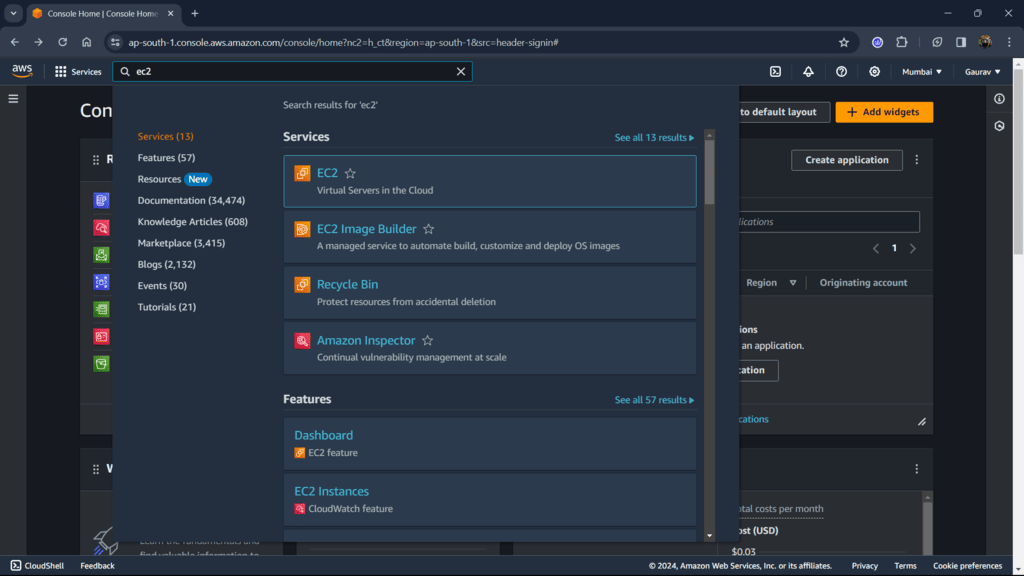
Start by logging into the AWS Management Console. Use the EC2 Dashboard to launch a new instance. Choose the right Amazon Machine Image (AMI). Select an instance type that fits your app needs. Review and click the Launch button.
Security groups control access to your instance. Create a new security group in the EC2 dashboard. Allow HTTP and SSH traffic for your app. This ensures safe and controlled access.
Use SSH to connect to your instance. Open a terminal or use a tool like PuTTY. Enter your instance’s public IP address. Load the private key file to gain access. Now, you are connected to your EC2 instance.
Deploying With Elastic Beanstalk
Elastic Beanstalk makes it easy to set up a server. First, choose a Python platform in the console. Then, create a new environment. This environment will host your app. Select an instance type for your server. Smaller types cost less money. Use a larger type for big apps. Add a database if your app needs it. Finish by reviewing your settings. Click on the Create button to start.
Prepare your code for upload. Make sure all files are in a ZIP folder. Open the Elastic Beanstalk console. Click on Upload and Deploy. Find your ZIP folder. Select it and upload. Elastic Beanstalk will deploy your code. Watch for errors. Fix them if they happen. Your app is now on the web!
Using Aws Lambda
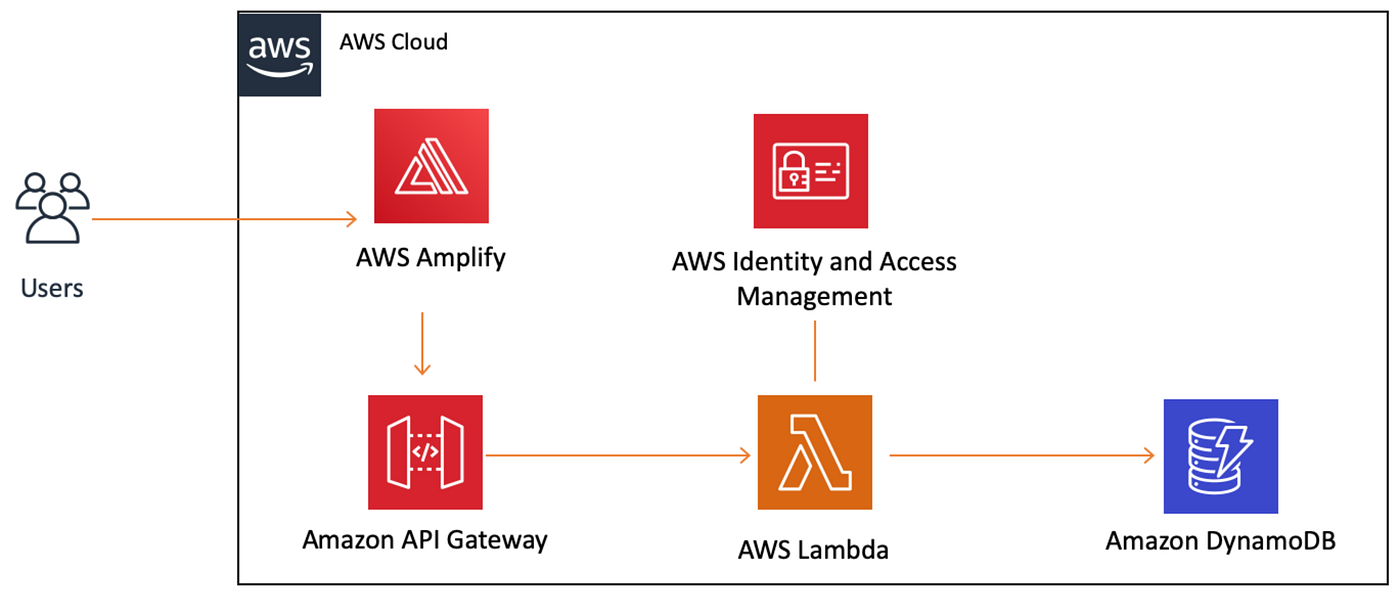
Begin by creating a new Lambda function on the AWS Console. Choose the right runtime for your Python app. Upload your code as a .zip file. Set the handler to the main function of your app. Configure the execution role with the right permissions. Save all settings. Test the function to check if it works.
Open the API Gateway on the AWS Console. Create a new API. Link your Lambda function to this API. Set the HTTP method you need. Deploy the API to a stage. Copy the endpoint URL. Use this URL to access your Python app.
Database Integration
AWS offers many database services for web apps. RDS, DynamoDB, and more are available. RDS is popular for Python web apps. It supports databases like MySQL, PostgreSQL, and Oracle. Choose a service that fits your app’s needs. Consider factors like data size, complexity, and budget. RDS is easy to set up and manage. It handles updates and backups automatically.
First, set up your RDS instance in the AWS console. Note the endpoint, username, and password. Use these details in your Python app. Install necessary libraries like boto3 or psycopg2 for PostgreSQL. These libraries help connect your app to RDS. Test the connection to ensure it works. Secure your database with proper access controls.
Credit: www.geeksforgeeks.org
Monitoring And Scaling
Ensure your Python web app runs smoothly on AWS by monitoring performance metrics. Adjust server resources to handle traffic spikes efficiently. Keep your app reliable and scalable with AWS tools and services for seamless user experiences.
Setting Up Cloudwatch
CloudWatch helps keep an eye on the app. It checks performance and health. Set up CloudWatch for alerts. Alerts notify you of problems. Use dashboards for quick views. Dashboards show important metrics. Metrics help find issues fast. CloudWatch tracks CPU, memory, and more. It also logs errors for review. Logs help fix bugs quickly. Keep data safe and organized.
Auto Scaling Configuration
Auto Scaling adjusts resources. Resources change based on traffic. High traffic needs more power. Low traffic saves resources. Set scaling rules in AWS. Rules control how scaling works. Use thresholds to decide scaling. Thresholds are limits for scaling up or down. Scaling ensures smooth performance. No lag during busy times. Save costs during slow times. Auto Scaling keeps the app efficient.
Security Best Practices
Use IAM roles to control access. Assign specific roles to users. This limits what they can do. Always follow the principle of least privilege. Users get only the access they need. Regularly review and update IAM roles. Remove roles not needed anymore. This keeps your app safe.
Data transfer should be secure. Always use HTTPS for web traffic. It encrypts data. Protects from eavesdropping. Use secure protocols for database connections. Consider using SSL/TLS. They provide extra security. Always validate data before sending. This prevents attacks. Keep your data safe.
Cost Management
Estimating costs for hosting a Python web app on AWS is crucial. AWS offers a pricing calculator for accurate estimates. Start by selecting services and regions you need. Consider storage, data transfer, and compute costs. Each affects the total price.
AWS provides different pricing tiers. Choose the right one for your project. Keep an eye on extra costs like support plans or reserved instances. These can add to the budget. Always update your estimates regularly. Costs can change with usage.
Using Cost Explorer helps track spending on AWS. This tool provides detailed reports. You can view costs by service or region. It helps find areas where you spend more. Set alerts for spending limits. This keeps your budget in check.
Cost Explorer offers graphs and charts. These visual aids simplify understanding your expenses. Look for trends over time. Adjust your services if needed. Saving money is important for your project’s success.
Credit: medium.com
Frequently Asked Questions
How To Host A Web Application In Aws?
To host a web application in AWS, first create an AWS account. Then, use EC2 to launch a server. Deploy your application by uploading files via SSH or using AWS Elastic Beanstalk for automatic deployment. Configure security groups and set domain settings in Route 53 for access.
Can I Run My Python Code In Aws?
Yes, you can run Python code on AWS. Utilize AWS Lambda, EC2, or AWS Batch for your Python applications. AWS provides flexible and scalable computing resources to execute your scripts efficiently. Explore AWS services to optimize Python code execution in the cloud.
How To Run Python App On Ec2?
Launch an EC2 instance. SSH into the instance. Install Python and necessary dependencies. Upload your app files. Run the Python app using the command line. Ensure security group settings allow required traffic.
Is Python Compatible With Aws?
Yes, Python is compatible with AWS. AWS supports Python for various services like Lambda, EC2, and S3. Developers can use Python SDK, Boto3, to interact with AWS APIs. Python’s versatility makes it a popular choice for AWS cloud computing tasks.
Conclusion
Deploying your Python web app on AWS is manageable. Start by understanding AWS services. Follow the steps carefully for successful hosting. Use the right tools for a seamless experience. Monitor your app regularly. Ensure security measures are in place. AWS offers flexibility and scalability.
Make sure to optimize performance. Stay informed about updates and best practices. Hosting on AWS can boost your app’s reach. Dive in and explore the possibilities. Now, you’re ready to take your app live. Happy hosting!


