
Are you looking to streamline your customer support process and enhance user satisfaction? Creating a web hosting knowledge base with WHMCS might be just what you need.
Imagine having a centralized hub where your customers can find answers to their questions without waiting for a support ticket response. Sounds appealing, right? This isn’t just about saving time; it’s about empowering your clients and boosting their confidence in your services.
With a well-structured knowledge base, you can reduce support workload, improve customer experience, and foster trust in your brand. You’re about to discover how you can set up an effective knowledge base using WHMCS that’s tailored to your needs. Keep reading to find out how you can transform your customer support approach and make your business thrive.
Benefits Of A Knowledge Base
A knowledge base helps customers find answers quickly. Less waiting for help. Customers feel happy. They solve problems on their own. They learn new things easily. The support team gets fewer calls. They focus on complex issues. Everyone wins.
Customers love solving problems by themselves. A self-service system empowers them. They gain confidence. They feel in control. Searching the knowledge base is easy. They find solutions without asking for help. This builds trust. It shows you care. Customers come back.
A knowledge base makes work smoother. Staff find answers fast. Less time wasted. Processes become clear. Everyone knows what to do. Teams work better together. Problems are fixed faster. Business runs smoothly. Growth becomes easier.
Credit: marketplace.whmcs.com
Planning Your Knowledge Base
Find out what people ask about web hosting. Make a list of common questions. Focus on simple topics first. Explain hosting plans, billing, and setup. Use clear words. Avoid tech jargon. Keep the topics short and clear.
Know who will read your content. Beginners need easy words. Experts want more detail. Think about their needs. Use simple examples. Help them understand web hosting better. Adjust your tone to fit them. Make sure everyone can follow along.
Organize your information well. Start with basics. Then add more details. Use headings and subheadings. Lists help in breaking down information. Ensure each piece is clear. Link related topics together. This makes it easier to find. Structure helps readers a lot.
Setting Up Whmcs For Knowledge Base
Start by accessing your WHMCS admin panel. Navigate to the Setup section. Here, you will find the option for Knowledge Base. Ensure it is enabled for users. This allows them to find answers easily.
Connect WHMCS with your database. This ensures data is stored properly. Use a secure connection to prevent data loss. Keep your database updated. This helps maintain accuracy.
Set permissions for different users. Admins can edit and add content. Regular users can only view articles. This keeps the knowledge base safe and organized. Make sure permissions are clear and easy to follow.
Creating Content For Your Knowledge Base
Simple words work best for knowledge base articles. Keep sentences short and clear. Use bullet points for important details. Focus on one idea per paragraph. Readers should understand without confusion. Check for spelling and grammar errors. Make sure information is accurate. Use a friendly tone to engage readers.
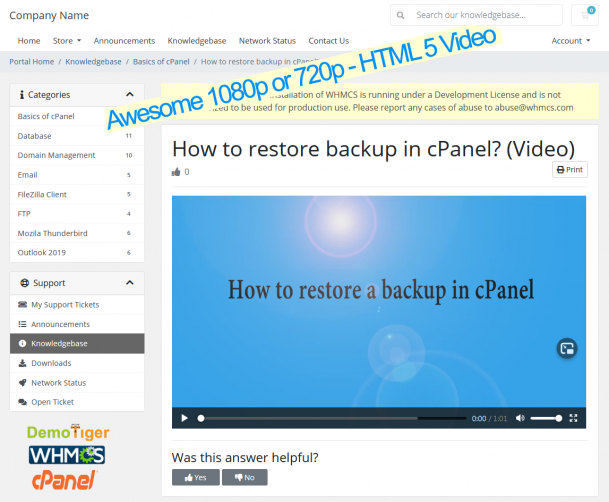
Images and videos make articles more engaging. Use screenshots to explain steps. Videos can show processes clearly. Infographics help in showing data visually. Keep multimedia simple. Ensure files are easy to load. Test all media before publishing.
Keep articles fresh and current. Check for new updates in software. Edit outdated information. Add new features as they come. Review content monthly. Readers want the latest information. Feedback helps improve articles. Make sure all links work.
Designing Your Knowledge Base Interface
Easy navigation is vital for your knowledge base. Users need to find information fast. Organize topics clearly. Use categories and subcategories. A simple menu helps users. Keep it tidy and neat.
Search bars are essential. They help users find answers quickly. Add a search box on each page. Make it visible and easy to use. Autocomplete features are helpful too. They guide users to correct answers.
Design must adapt to all devices. Phones, tablets, computers. Ensure images and text fit well. Responsive design keeps users happy. They can access information anywhere, anytime.
Promoting Your Knowledge Base
Creating a web hosting knowledge base using WHMCS helps organize and share essential information. Users easily access guides, FAQs, and tutorials. Enhance user experience with clear, concise content tailored to common queries.
Integration With Support Channels
Make sure to connect your knowledge base with support channels. This includes chat, email, and phone support. It helps users find answers fast. A well-integrated system saves time for both users and support teams. Users feel more satisfied when they can find solutions quickly.
Seo Optimization
Use keywords that people often search for. This makes your articles easy to find. Use clear titles and subtitles. Add tags to your articles. This improves search visibility. Make your content simple and direct. This helps in better ranking in search engines.
User Feedback And Analytics
Collect feedback from users. Feedback helps in improving content quality. Use analytics to track popular topics. This tells you what users need most. Update articles based on user input. This keeps your knowledge base fresh and useful. Happy users will return to your site.
Maintaining Your Knowledge Base
Conducting regular content audits is key. It helps keep your knowledge base current. Remove outdated information often. Update it with new, relevant content. This ensures users find accurate information. A clean and updated knowledge base boosts user trust.
Keep an eye on how users interact. Check which articles are most viewed. Identify those that receive less attention. This data helps improve content quality. Engage with users through feedback forms. It reveals what users find helpful. Adjust your content accordingly.
Feedback is a valuable tool. Listen to user suggestions and complaints. Make changes based on feedback. This improves user satisfaction. It also enhances the relevance of your content. Users feel valued when their input matters. A responsive knowledge base is a successful one.

Credit: www.interserver.net
Credit: m.facebook.com
Frequently Asked Questions
How To Add Knowledgebase In Whmcs?
To add a knowledgebase in WHMCS, log into the admin panel. Navigate to Support > Knowledgebase. Click “Add Article,” fill out the necessary fields, and save. Use categories for better organization and easy navigation. Ensure content is clear and concise for user understanding.
How To Create A Website Hosting Service?
Start by researching hosting platforms and software. Choose reliable servers and secure infrastructure. Set competitive pricing plans. Create a user-friendly website with clear service descriptions. Implement strong customer support systems and marketing strategies to attract clients.
How To Create A Package In Whmcs?
Log into WHMCS and navigate to “Setup”. Click “Products/Services”, then “Create a New Product”. Fill in the details, configure settings, and save the package.
What Is Whmcs In Cpanel?
WHMCS in cPanel is a web hosting management and billing software. It automates tasks like account creation, billing, and support. WHMCS integrates seamlessly with cPanel, making it easier to manage web hosting businesses efficiently. It’s a popular choice among hosting providers for streamlining operations.
Conclusion
Creating a web hosting knowledge base with WHMCS can simplify user support. It organizes information, making it easy for users to find solutions. Start by planning the structure carefully. Use clear categories to guide users. Write articles with straightforward language.
Regular updates keep the content fresh and relevant. A well-built knowledge base reduces support tickets. It empowers users to solve problems independently. This boosts customer satisfaction and enhances efficiency. Remember, a good knowledge base is a valuable asset for your web hosting business.
It helps you provide better service and support to your customers.


