
Have you ever developed a website using MySQL and wondered how you can bring it to life on the internet? Deploying your MySQL website into a web hosting platform can feel like a puzzle with many pieces.
But don’t worry, you’re not alone in this. Many find the process daunting at first, yet it’s a crucial step to showcase your hard work to the world. Imagine turning your local project into a live, interactive website that anyone can access anytime, anywhere.
The excitement of seeing your creation on the web is unmatched. But how do you get there? How do you ensure that your site is not just online but running smoothly and securely? You will discover a straightforward guide to deploying your MySQL website into a web hosting environment. You’ll learn the essential steps and some insider tips to make the process as seamless as possible. Whether you’re a beginner or have some experience, this guide is tailored to give you the confidence to proceed without unnecessary complications. Get ready to unlock the secrets of web hosting and give your MySQL website the platform it deserves. Dive in, and let’s make your website shine online!
Choosing A Web Hosting Provider
First, find a web hosting provider. Many options are available. Check their features. Look for MySQL support. Ensure they offer reliable uptime. This means your site stays online. Compare pricing plans. Some are cheap. Others offer more features.
Customer support is important. They help fix problems. Read reviews online. See what users say. Choose a provider with good feedback. Also, check for security features. This keeps your data safe.
Some providers offer free domains. This can save you money. Others include SSL certificates. They make your site secure. Pick a provider that fits your needs and budget.
Preparing Your Website Files
Start by gathering all your website files. Ensure images, scripts, and stylesheets are included. Check for any missing files. Correct any broken links or paths. Organize files into folders. Make sure your database file is ready. This file contains important data. It helps your website function well.
Use a zip file to compress your files. This makes uploading easier. Keep the file size small. It speeds up the upload process. Check the file names. They should be easy to understand. Avoid using special characters. These can cause problems during upload.
Review your website’s configuration settings. Check for any mistakes. Errors can stop your website from working. Make sure all settings are correct. This will help in smooth deployment.
Setting Up The Mysql Database
Deploying a MySQL website involves setting up the database on your web hosting platform. Begin by accessing your hosting control panel. Then, create a new MySQL database and user. Ensure proper configuration by linking the database to your web application, ensuring smooth data management and website functionality.
Creating A New Database
Start by accessing your web hosting control panel. Look for the MySQL databases section. Click on the option to create a new database. You must choose a database name that is simple. Then, create a username and password for accessing it. Keep this information safe. It is important for security. Once done, confirm the changes. Your new database is ready. You will need it for your website.
Importing Database Structure
First, locate the import tool in your hosting panel. This tool is usually under the database section. Click to open it. Next, select your database from the list. You need a SQL file with the structure. Choose the file from your computer. Now, click import to start the process. Wait for it to finish. You will see a success message once complete. Your database structure is now imported. You can start adding data.
Uploading Website Files
FTP is a simple way to move files. First, use an FTP client like FileZilla. Connect it to your hosting server. Enter your server details and login info. You will see files on your computer and server. Drag and drop your website files. Watch them upload. Ensure all files move correctly. Check for any errors. Try again if needed.
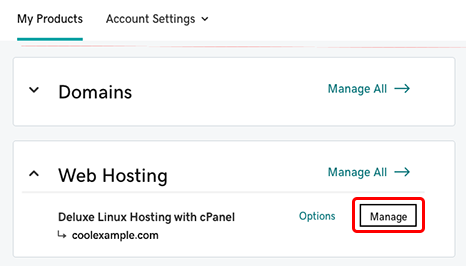
Hosting dashboards have a file manager tool. Log into your hosting account. Look for the file manager section. It is usually easy to find. Use it to upload files directly. Click “Upload” and select files from your computer. Wait for them to finish uploading. Ensure all files are there. This method is fast and easy. Great for small websites.
Configuring Database Connections
Start by finding the configuration files of your website. These files often have names like config.php or settings.ini. Open the file using a text editor. Look for sections about database settings. Update the host name to match your web host’s database server. Change the username and password to match your database login details. Save the file after making changes. It’s important to double-check these details to ensure the website can connect to the database. Simple errors can cause problems.
Run a simple test to ensure the website connects to the database. Open your web browser and navigate to your site. Look for any error messages related to database connections. Errors mean something is wrong. Check the configuration file again for mistakes. If errors persist, contact your web hosting support. They can help find solutions. Testing ensures your website works properly. It’s a key step in deployment.
Credit: www.godaddy.com
Domain And Dns Settings
First, log into your domain account. Find the DNS settings section. Look for the Nameservers option. These settings control where your domain points. To connect your domain to your hosting, you need to change these nameservers. Your hosting provider will give you new nameservers. Copy these and paste them in your domain account.
DNS records tell the internet where your site is located. You need to update these records in your domain account. Find the section labeled DNS Records. Look for records like A, CNAME, or MX. Each record has a purpose. To point your website, update the A record. Change the IP address to your hosting IP. Save your changes. Sometimes, changes can take up to 48 hours.
Testing And Troubleshooting
Ensuring Website Functionality is very important. First, load your website in a browser. Check if all pages display correctly. Click links to see if they work. Test forms to make sure they send data. If images are missing, check their paths. Check if all scripts run smoothly.
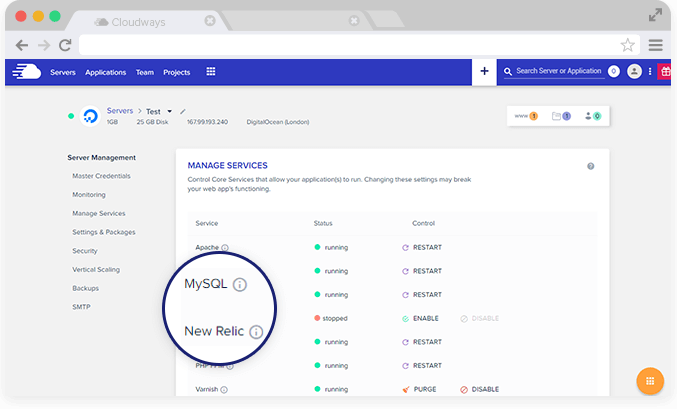
Resolving Common Issues can help. Sometimes, websites show errors. These errors can be fixed. If a page is blank, check its code. Broken links should be fixed. Missing data can be retrieved. If forms don’t work, review their setup. Scripts not running may need debugging.
Credit: www.cloudways.com
Ensuring Security Measures
Deploying a MySQL website involves setting up security measures to protect data. Secure passwords and encryption safeguard sensitive information. Regular updates and backups ensure stability and resilience against threats.
Setting Up Ssl Certificates
SSL certificates protect data. They keep information safe from hackers. Websites need SSL to be secure. Users trust SSL-secured sites more. Many hosting services offer free SSL. It’s easy to install. Follow hosting guides for setup. Check SSL status regularly. This ensures security.
Database Security Practices
Secure databases are important. Always use strong passwords. Change passwords often. Limit database access. Only trusted users should access it. Use encryption for sensitive data. Regularly update database software. Updates fix security holes. Backup databases frequently. Backups save data from loss.

Credit: www.youtube.com
Frequently Asked Questions
How To Host A Website With A Mysql Database?
Choose a hosting provider offering MySQL support. Install necessary software like Apache, PHP, and MySQL. Upload your website files via FTP. Configure database settings in your site’s configuration file. Test your website to ensure functionality. Backup data regularly for safety.
Where Can I Host My Mysql Database?
You can host your MySQL database on platforms like AWS RDS, Google Cloud SQL, or Azure Database. These services offer scalable and secure hosting solutions. Consider shared hosting providers like Bluehost or HostGator for smaller needs. Choose based on your budget, scalability, and security requirements.
How To Connect Mysql With Host?
Use a MySQL client like phpMyAdmin or MySQL Workbench. Input your host, username, password, and database name. Ensure your hosting provider allows remote MySQL connections. For command-line, use: `mysql -h host -u username -p password database_name`. Ensure ports are open for MySQL access.
How Much Does It Cost To Host A Mysql Server?
Hosting a MySQL server costs between $5 to $100 monthly, depending on the provider and resources needed. Prices vary by storage, bandwidth, and support level. Cloud providers like AWS and Google Cloud offer scalable options. Shared hosting is cheaper, while dedicated servers are more expensive.
Conclusion
Deploying a MySQL website to web hosting is straightforward. First, choose reliable hosting. Then, upload files using a control panel or FTP. Configure your database settings correctly. Ensure security by using strong passwords. Test your website thoroughly after deployment. Troubleshoot any issues promptly.
Regularly update your site for optimal performance. Monitor traffic to understand user interaction. Keep backups to avoid data loss. With these steps, your website runs smoothly. Enjoy your live MySQL website and engage your visitors effectively.


