
Have you ever wondered who is hosting your website? Knowing your web host can be crucial, especially when you need assistance or want to make changes to your site.
Whether you’re troubleshooting issues, upgrading your hosting plan, or planning to switch providers, understanding your web host’s identity is the first step in taking control of your online presence. This article will guide you through simple, effective ways to uncover your web host with ease.
Stick around to discover practical tips that can save you time and enhance your website management skills. Your path to mastering your website begins here!
Web Hosting Basics
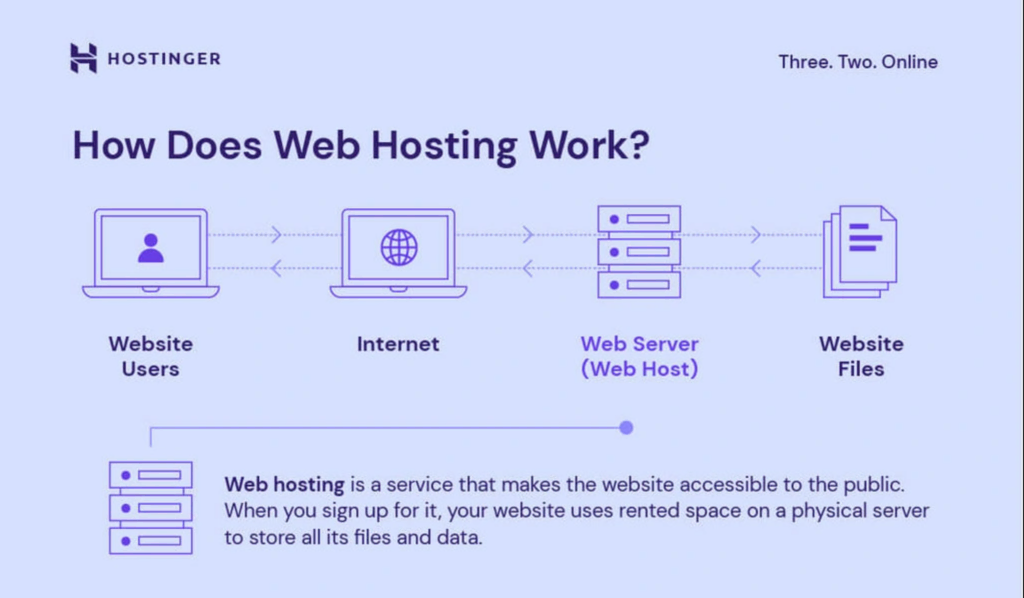
Web hosting is like renting a space for your website. Your website lives on a server. That server is managed by a web host. Web hosts are companies that provide space for websites. They keep your website online. They handle all technical stuff. There are many web hosting companies. Examples include Bluehost and HostGator.
There are different types of web hosting. Shared hosting is like living in an apartment. Many websites share the same server. Dedicated hosting is like owning a house. Your website gets its own server. VPS hosting is like owning a condo. You share a server, but have a separate space. Cloud hosting uses many servers. Your website can move between them. Each type has its own benefits and costs.
Credit: whitepeak.io
Why Knowing Your Web Host Matters
Web host information is very important. It helps you solve problems. You need this info for customer support. Without it, fixing issues is hard. Also, it helps in making decisions. You might want to change hosts. For this, you must know your current host.
Security is a big reason to know your host. A secure host keeps your site safe. Another reason is site performance. A good host makes your site fast. Fast sites keep visitors happy. They stay longer and explore more.
Situations Requiring Web Host Details
Sometimes, you need to upgrade your plan. Knowing your host helps here. Also, if your site goes down, host info is crucial. It helps in contacting support quickly. Lastly, for domain issues, host details are needed.
Using Online Tools
Many tools can help find your web host. Some of the most popular ones include WHOIS Lookup, HostAdvice, and Site24x7. These tools are free and easy to use. Simply enter your website’s URL and get results.
First, go to the tool’s website. Enter your website’s domain name. Click the search button. Wait for the results to load. The tool will show your web host’s name. It may also show contact details. Check the information carefully. Make sure it matches your website.
Checking Domain Details
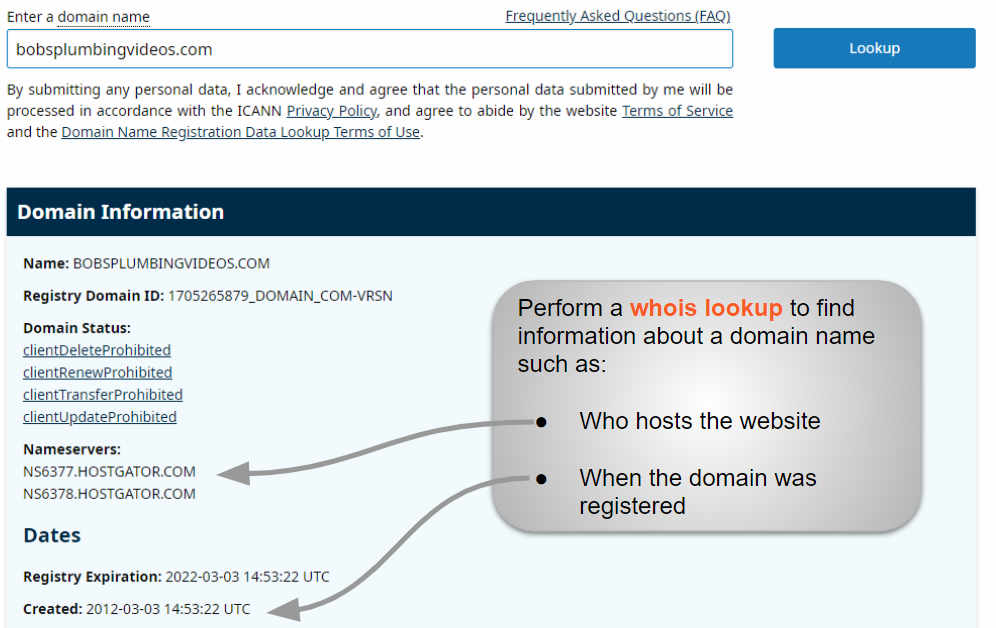
To find your web host, start with WHOIS lookup. This tool shows domain details. Go to a WHOIS website. Enter your domain name in the search box. Click search and wait for the results. You will see a list of information. The page shows the registrar’s name. This is your web host.
Once you have the WHOIS results, look for key data. The registrar name is important. It tells you who manages your domain. Look for the hosting provider in the list. They keep your website online. Sometimes, the host’s contact is also listed. This helps if you need to reach them. Always keep a note of these details. It is good to know your hosting provider.
Examining Website Source Code
Finding your web host can be simple. Start by looking at the source code of your website. Open your website and right-click on the page. Select “Inspect” or “View Page Source”. This opens a window with lots of information.
Look for meta tags. Meta tags might show hosting details. Search for words like “hosting” or “provider”. Also, check the footer of the site. Some footers have hosting company names.
Use tools to read the source code easily. Tools like Chrome DevTools help you see the code. They show you the structure of the website. Another tool is Firebug. Firebug works with Firefox.
These tools make code reading simple. They highlight important parts. Use them to find hosting info fast. You don’t need to be an expert.
Credit: www.hostinger.com
Consulting Your Web Developer
Talking to your web developer can help. Ask simple questions. “Who is our web host?” is a good start. “How do we contact them?” is also useful. These questions give you quick answers.
Understanding what your developer says is key. Developers use tech words. Ask them to explain clearly. “What does our host do?” might be a good question. “Why did we choose them?” can also help. These questions help you learn more.
Exploring Hosting Provider Features
Every hosting provider offers unique features. Some hosts provide 24/7 support. Others focus on speed and security. Check for backup options. Look at data transfer limits. Examine the control panel. Many offer easy website builders. Some hosts include free domain names. Review the server location. It affects website speed.
List your needs first. Decide what’s most important. Compare prices and features. Look at customer reviews. They show real experiences. Check uptime guarantees. A good host has 99% uptime. Consider monthly costs. Some offer discounts for yearly plans. Research is key. Find the host that fits your needs.
Credit: www.boldgrid.com
Frequently Asked Questions
How Do I Know Whois Hosting My Website?
Use an online WHOIS lookup tool to find your website’s hosting provider. Enter your domain name to get the details. These tools offer information about the registrar, hosting company, and contact details, helping you identify who is hosting your website.
What Is Your Website Host?
We host our website with Bluehost. They offer reliable services, excellent customer support, and competitive pricing. Bluehost ensures fast loading times, enhancing user experience. Their security features protect our site from threats. We trust Bluehost for our hosting needs.
How Can I Find My Host?
Check your hosting account details or email confirmations. Use online tools like WHOIS to locate your website host. Contact your domain registrar or website support for assistance. Explore your website’s control panel or dashboard for hosting information.
How Do I Find Out Who Owns My Website Domain?
Use a WHOIS lookup service to find domain ownership details. Enter your domain name to retrieve owner information.
Conclusion
Finding your web host is easier than you think. Use online tools for quick answers. Check your domain’s WHOIS information. Ask your web developer for details. These methods help you identify your host. Knowing your host is important. It helps in managing your site better.
Better management leads to improved performance. Make sure to keep this information handy. It saves time in troubleshooting issues. Your website deserves the best hosting service. Stay informed about your web host. This knowledge empowers you. Take control of your website’s future.
Simple steps make a big difference.


