
Are you looking to free yourself from an old web hosting account with GoDaddy? Maybe you’ve found a better deal, or you’re simplifying your online presence.
Whatever your reason, deleting your GoDaddy web hosting account can seem like a daunting task. You might be worried about losing data or getting stuck in a maze of technical jargon. But don’t worry; you’re about to discover a straightforward path to achieving your goal.
We’ll guide you through each step to ensure you can confidently and efficiently delete your GoDaddy web hosting account. Let’s dive in and put you in control of your digital space!
Credit: www.hostinger.com
Reasons To Delete Godaddy Hosting
Some people want to switch to a different provider. Others find the cost too high for their budget. Some need better support or features. Issues with performance can also be a reason. Sometimes, security concerns lead to change. A few just don’t need hosting anymore.
Canceling a plan can save money. Simplifying web management is another reason. Users often seek faster speeds. Better uptime is crucial for online businesses. People might prefer a local provider. New providers offer better deals. Some users find interface complex. User experience matters.
Preparing For Account Deletion
Always save your important files first. Backup data includes websites, emails, and databases. Use a reliable method to store your data. Cloud storage can be a good choice. USB drives also work well. Make sure everything is safe before deleting your account. This avoids losing any important information.
Check all your billing details carefully. See if there are any active subscriptions. End them if needed. Cancel services you don’t want anymore. This prevents extra charges. Look at the payment history for any upcoming bills. Ensure there are no pending charges before proceeding. This will help you avoid unexpected fees.
Accessing Your Godaddy Account
First, visit the Godaddy website. You will see the login button. Click it. Now, enter your username and password. Make sure they are correct. After that, click the sign-in button. This will open your account. Check if you see your name at the top. That means you are logged in.
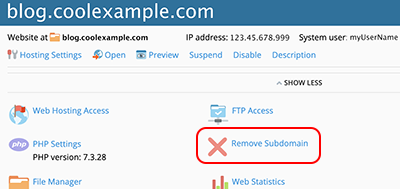
Once logged in, find the My Products section. It’s on the homepage. Look for the Web Hosting tab. Click on it. This will show your hosting accounts. Find the account you want to delete. Next, click on the Manage button. This opens the hosting settings page.
Credit: www.godaddy.com
Steps To Delete Hosting Account
First, log in to your GoDaddy account. Find the My Products page. Look for your hosting plan. Click on Manage next to it. This will show your plan details. Make sure you select the correct plan. Double-check everything before moving on.
After selecting the plan, find the Settings tab. Under this tab, look for Account Actions. Click on Delete. A prompt will appear. It will ask if you want to proceed. Make sure you are ready to continue. This step is important.
A confirmation page will show up. Read the instructions carefully. Click Continue to confirm deletion. You might need to enter your password again. This ensures it’s really you. Once confirmed, your account will be deleted. Remember, this action cannot be undone. Make sure you are certain.
Post Deletion Considerations
Verifying Account Removal is a crucial step. Ensure the account is fully deleted. Check for confirmation emails. They often confirm the deletion. It’s important to be certain. An active account might incur charges. Always double-check your email inbox. Look for any unexpected emails from GoDaddy.
Handling Domain Names and Other Services requires careful attention. Domains and services may not delete automatically. Log into your account dashboard. Check if any domains are still active. You might need to transfer them first. This avoids losing your domain name. GoDaddy provides tools for managing these services. Use them to ensure nothing is left behind. Always make sure to review all services linked to your account.
Troubleshooting Common Issues
Many face error messages while deleting their account. These messages can be confusing. Ensure all data is backed up. Check if any active services are linked. Sometimes, services need removal first. Review any pending payments. Payments might block the process. If an error persists, try again after clearing your browser cache.
Dealing With Error Messages
Read each message carefully. It usually tells what went wrong. Follow the instructions given. If the message is unclear, search for it online. You might find similar issues faced by others. Forums and help sites are useful. They may provide solutions or tips.
Contacting Godaddy Support
Support can help solve issues. Godaddy support is available by phone or chat. Prepare account details before contacting. This includes login ID and service details. Explain the problem clearly. They will guide you step by step. Support can help with complicated errors.
Credit: www.hostinger.com
Frequently Asked Questions
How Do I Delete Hosting In Godaddy?
Log into your GoDaddy account. Go to “My Products. ” Find your hosting plan. Click “Manage. ” Select “Account Settings” then click “Delete. ” Confirm your action.
How Do I Cancel Godaddy Web Hosting?
Log in to your GoDaddy account. Go to the “My Products” page. Find your web hosting plan. Click “Manage” next to it. Select “Cancel Renewal” or “Cancel Hosting. ” Follow the prompts to confirm cancellation.
Why Can’t I Delete My Godaddy Account?
You can’t delete your GoDaddy account directly. Instead, cancel all products and services first. Afterward, contact customer support to request account closure. This ensures all data and services are appropriately managed before deletion.
How Do I Remove My Account From Godaddy?
Log into your GoDaddy account, click on “Account Settings,” then select “Contact Preferences. ” Choose “Close Account” and follow prompts to confirm.
Conclusion
Deleting your GoDaddy hosting account is straightforward. Follow the steps carefully. Begin by logging in. Navigate to “My Products. ” Select the hosting plan to delete. Confirm your choice. Consider backing up important data first. Always double-check before final deletion.
This ensures no vital information is lost. If uncertain, contact GoDaddy support for guidance. They can assist with any issues. Remember, deleting an account means losing data tied to it. Take time to decide. It’s crucial to make informed decisions.
A little preparation saves future headaches. Happy managing and organizing your web hosting needs!


