
Are you struggling to find your web host name? You’re not alone.
Many people feel overwhelmed when trying to locate this crucial piece of information. It’s like searching for a needle in a haystack, especially if you’re new to managing websites. But don’t worry, we’re here to help you uncover it with ease.
Imagine the relief of finally knowing your web host name and being able to tackle those tasks you’ve been putting off. Whether it’s troubleshooting issues or optimizing your site, finding your web host name is the first step. Knowing this can empower you to take control of your website and ensure everything runs smoothly. We will guide you through simple steps to identify your web host name. You’ll discover straightforward techniques, useful tips, and expert insights that will make the process a breeze. By the end of this read, you’ll feel more confident and ready to manage your website effectively. Let’s dive in and unveil the mystery of your web host name.
Understanding Web Hosting
Web hosting is like renting space online. It stores your website’s files. These files are on special computers. We call them servers. When someone visits your website, the server sends them the files. This makes your website visible. Without web hosting, your site can’t be online. It’s like a home for your website. Different hosts offer different services. Some are faster. Some are cheaper. Choosing the right one is important.
Knowing your web host is very important. It helps you solve problems quickly. If your website is slow, you can ask them why. They can help fix issues. It also helps in keeping your data safe. Some hosts offer extra features. Backup services, security checks, and more. Always know who your host is. It makes things easier. You can plan better. Make informed choices. Protect your website and data.
Using Command Line Tools
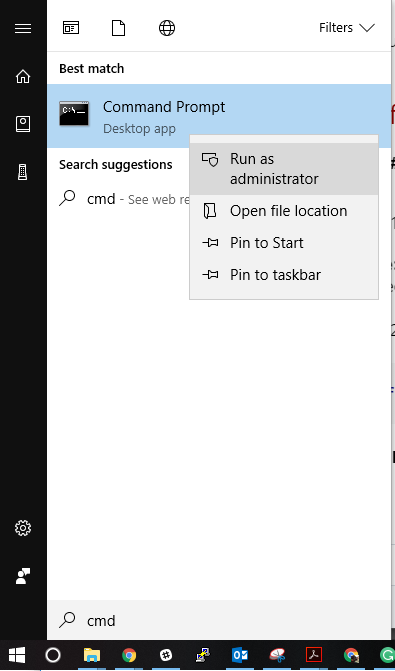
Use the Command Prompt to find your web host. First, open the Command Prompt on your computer. Next, type ping yourwebsite.com and press enter. You will see a series of numbers. These numbers are your website’s IP address. This is how you can find your web host. It is quick and easy.
On a Mac or Linux, open the Terminal application. Type ping yourwebsite.com and hit enter. The Terminal will show you an IP address. This address belongs to your web host. Finding your host this way is simple. Just follow these steps.
Online Tools And Services
Online tools help you find your website’s host. These tools are easy to use. You just need to enter the website’s URL. In seconds, you get the host name. Some tools are free. Others might have a cost. Free tools may show ads. Paid tools can give more details. They might offer extra features too. Choosing the right tool is important. Make sure the tool is trusted and safe.
These tools save time. They are quick and simple. You don’t need special skills. Anyone can use them. They help check hosting information fast. This is useful if you want to switch hosts. It’s also good for checking competitors. Knowing who hosts a site is valuable. It helps in planning and decision making. These tools make your work easier. And they keep your work stress-free.
Checking Domain Registration
Discovering your web host name involves checking your domain registration details. Access the WHOIS database online. This tool reveals the registrar and host information. Simple steps help identify your web host quickly. Understanding this can aid in website management and troubleshooting.
Using Whois Lookup
WHOIS is a tool to find a domain’s owner. It shows where a website is hosted. Use any WHOIS search engine online. Enter the domain name. Click search. You’ll see details like owner name and registration date. Web host name is often listed here. If not, check “Name Server” information. It can guide you to the host. Sometimes, privacy settings hide details. In this case, try other methods.
Interpreting Whois Data
WHOIS data can be tricky. Focus on key fields. Registrant Name shows who owns the domain. Registrar is the company registering the domain. Name Server helps find the host. Look for “Tech Contact” and “Admin Contact” info. They can provide clues. If data is hard to read, seek help. Some websites explain WHOIS results. Remember, not all WHOIS data is public. Privacy rules apply.
Contacting Your Web Host
Contacting your web host is a good step when facing issues. Start by visiting their website. Search for a contact page. Often, you can find phone numbers or email addresses here. Live chat options may be available. Check for support forums. These can provide quick help. Look for a help section or a FAQ page. These often have answers to common questions. Use these resources to reach out. Be clear in your communication. This helps solve your problem faster.
Asking questions can help you understand your web host better. What is the server uptime? This tells how reliable they are. Do you offer backups? This ensures your data is safe. How can I upgrade my plan? Ask about costs and benefits. Is there 24/7 support? This is important for urgent help. Can you help with security issues? Protecting your site is vital. Always ask these questions. This makes sure you get the best service.
Credit: computing.cs.cmu.edu
Analyzing Website’s Dns Records
DNS stands for Domain Name System. It is like the phone book of the internet. DNS helps turn web addresses into IP addresses. These addresses are like street addresses for computers. They help computers find each other online.
Use a DNS lookup tool to find a web host name. These tools show the DNS records of a website. Common DNS records include A, MX, and CNAME. The A record shows the IP address of a website. The MX record shows where emails go. The CNAME is like a nickname for domains.
Consulting Web Hosting Records
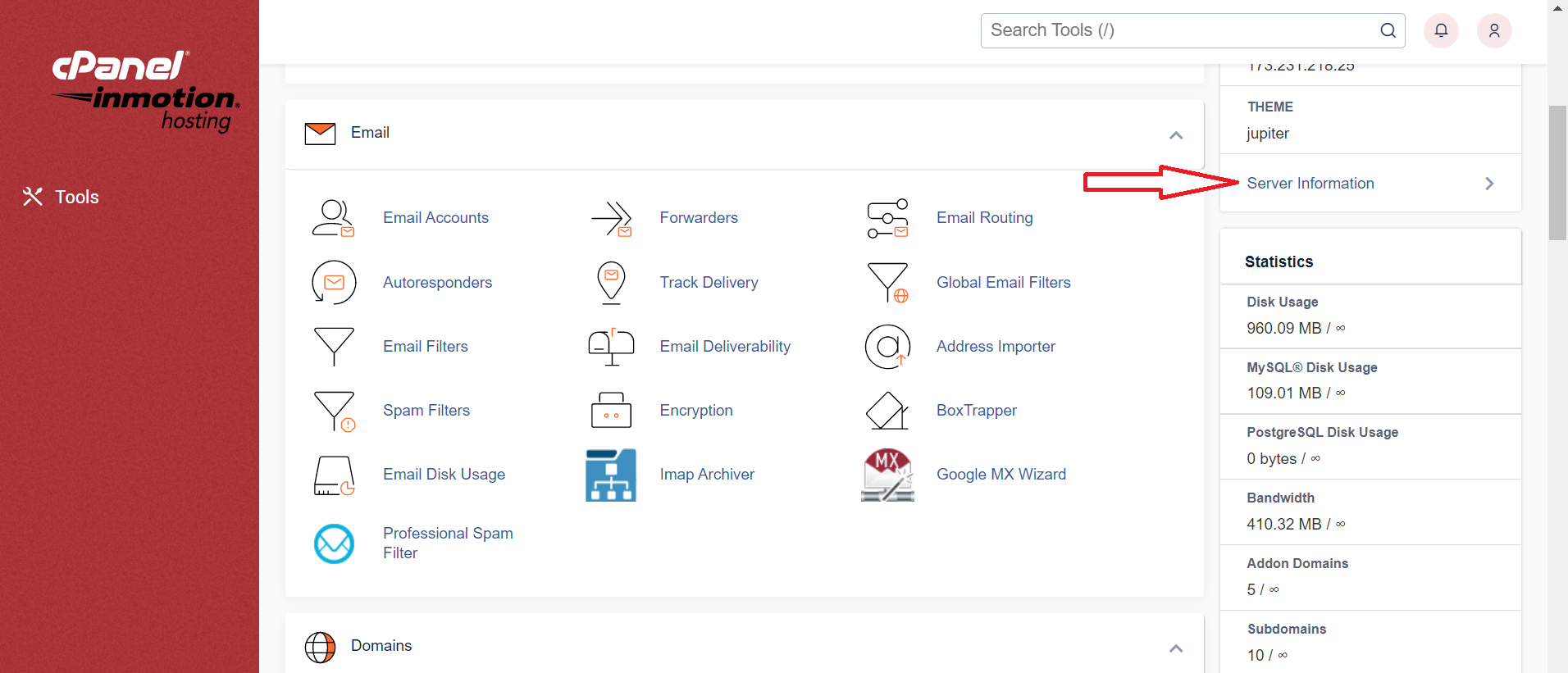
Finding your web host can be easy. Start by logging into your cPanel or hosting dashboard. Your web host name is often on the main page. Look for sections labeled account or server details. These sections may show your host name.
Check for any settings or options. Sometimes, there is a tab for web hosting info. Clicking this can reveal more details. If unsure, use help or support options. They can guide you to find your host name.
Your web hosting records hold clues. Look for emails from your hosting provider. These emails often contain host details. Also, billing statements might mention your host name. Examine past invoices carefully. They might list your hosting service. If you have trouble, contact your hosting provider. They can confirm your host name.

Credit: support.knowbe4.com
Seeking Professional Assistance
Finding a web host name can be tricky. It might seem easy at first, but many people face problems. If things get too hard, it’s smart to ask for help. Professionals know how to deal with these issues. They have experience and can find the best solutions quickly.
Sometimes, the problem needs special tools or skills. Experts have these tools. They can save you time and stress. You may also avoid mistakes that could cause more trouble. Getting help early can be a good idea. It keeps your website safe and running well. Always consider expert help when you feel stuck or unsure.
Professionals offer many benefits. They can find problems fast. This saves you time. Experts also give you peace of mind. You know your website is in good hands. They can also suggest ways to improve your site. Their advice can make your website better. It runs faster and safer.
Working with experts means less stress for you. You can focus on other tasks. Experts handle the tough parts. They have experience and know what works best. This means your website is more reliable. You can trust it to work well for your visitors.
Credit: www.inmotionhosting.com
Frequently Asked Questions
How To Find The Host Name Of A Website?
To find a website’s host name, use the “nslookup” command in the Command Prompt or Terminal. Alternatively, you can use online tools like WHOIS or DNS lookup services. These methods reveal the server hosting the domain.
What Is A Website Host Name?
A website host name identifies a website’s location on the internet. It’s the domain name users enter in browsers to access a site. This unique identifier helps direct traffic to the correct server, ensuring visitors reach the intended web page.
It often includes extensions like. com or. org.
How Can I Find My Host?
Check your website hosting account or contact your domain registrar for details. Use online tools like WHOIS lookup to find host information easily. Your website’s control panel may also display hosting details.
Is Host The Same As Domain Name?
A host is not the same as a domain name. A domain name is your website’s address, while a host provides the server space to store your site’s files. Both are essential for a website to function. They work together but serve different purposes in web development.
Conclusion
Finding your web host name isn’t hard. Use simple tools online. These tools quickly reveal your hosting provider. Knowing your host helps manage your website better. It’s essential for troubleshooting issues. A clear understanding ensures smoother website operations. Always check your web host details regularly.
This ensures your site remains secure and reliable. Stay informed about your host for optimal website performance. Remember, information is key to effective management. So, explore, learn, and keep your website in top shape. Your site’s success depends on your knowledge.
Keep learning and stay proactive.


