
Are you tired of using generic web hosting control panels that don’t quite meet your needs? Imagine having a custom-built panel tailored specifically for you and your projects.
It sounds complex, doesn’t it? But in reality, creating your own web hosting control panel can be simpler than you think. By taking control of the design and functionality, you can optimize your web hosting experience and address your unique requirements.
We’ll guide you through the process of building your very own control panel from scratch. You’ll discover the tools, techniques, and strategies needed to unlock the potential of customized web hosting management. Dive in and see how you can transform your web hosting operations into a seamless, efficient, and personalized experience.

Credit: www.youtube.com
Understanding Web Hosting Control Panels
Web hosting control panels help manage websites easily. They offer tools for domain management, email accounts, and files. Users can monitor website performance and handle databases. Control panels often provide security features. This includes SSL certificates and firewall settings. They simplify complex tasks. This allows users to focus on their websites.
Some popular web hosting control panels are cPanel, Plesk, and DirectAdmin. cPanel is user-friendly and widely used. Plesk supports many operating systems. It offers a clean interface. DirectAdmin is known for its speed and efficiency. Each panel has unique features and benefits. Choosing the right one depends on user needs.
Requirements For Development
Building a web hosting control panel needs some skills. Programming languages like Python, PHP, or JavaScript are essential. You must know HTML and CSS for the user interface. Understanding networking basics is crucial. You need to manage server connections. Knowledge of databases like MySQL or PostgreSQL helps in storing data. Linux command line skills are very useful. Most servers run on Linux. Problem-solving skills help in debugging errors.
Text editors like VS Code or Sublime Text are needed for coding. Use version control tools like Git for tracking changes. Database management systems like MySQL Workbench aid in handling databases. Virtual machines or Docker help in testing. Web servers like Apache or Nginx are essential for running your control panel. SSH clients are important for remote server access. Monitoring tools like Nagios or Grafana help keep an eye on server health.
Planning And Design
A clear and simple interface is key for users. Buttons should be easy to find. Text should be big and clear. Colors need to be bright and friendly. Users should feel happy using it. A menu helps users find things fast. A search bar is also helpful. Users like simple designs.
Make sure the site loads fast. Nobody likes slow websites. Pages should be easy to navigate. Users should not get lost. Add help buttons for users who need it. Keep the site safe and secure. Users trust sites that protect their data. Test the site with real users. Their feedback is valuable.

Credit: www.web.com
Core Features To Implement
Domain management is crucial. Users should add, remove, or transfer domains easily. An intuitive interface helps. Display domain status, like active or expired. Include tools for DNS settings. This keeps things simple for users.
Email management should be user-friendly. Allow users to create and delete email accounts. Offer options for email forwarding and autoresponders. Ensure spam filters are available. This keeps inboxes clean and organized.
Database management is important. Users should create databases quickly. Provide backup and restore options. Include support for popular databases like MySQL. Easy access to database tools is key.
Security is very important. Implement SSL certificate management. Offer firewall protection and DDoS mitigation. Ensure regular security updates. This keeps user data safe and secure.
Choosing The Right Technology Stack
Picking front-end tools is key. Start with HTML and CSS. They help create web pages. JavaScript adds interactivity. It makes pages lively. React and Vue.js are popular. They help build user interfaces. They are fast and easy to use. These tools help build a user-friendly panel.
Back-end tools manage data. Node.js is a favorite. It runs on JavaScript. Python is easy to learn. It is powerful too. Ruby on Rails is great for web apps. PHP is common for web hosting. It powers many websites. These tools handle databases and server requests. A strong back-end makes the panel work smoothly.
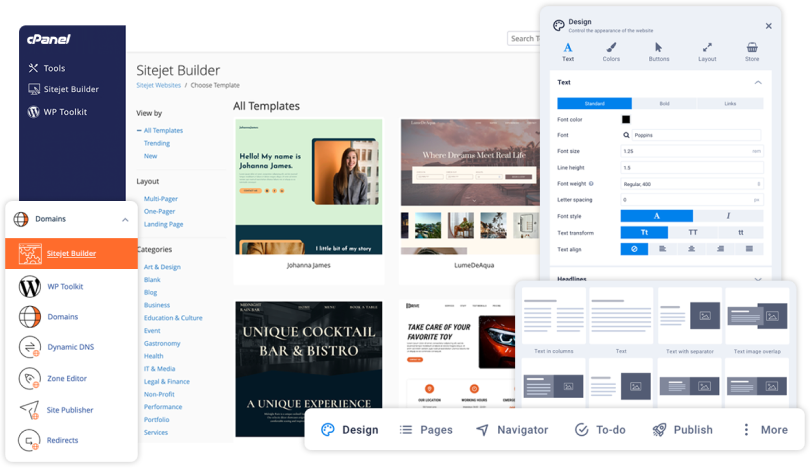
Credit: cpanel.net
Development Process
Start by choosing a reliable server. A good server is fast and stable. Install the necessary software. This includes a web server and a database. Make sure the server settings are correct. Check the firewall settings for safety. Test the server after setup. All software should work well together.
Write code that handles data. Use a programming language like PHP or Python. Your code should talk to the database. It should be secure and efficient. Test each part of the code. Find errors and fix them. Make sure the code is easy to read. This helps others understand it.
Design the user interface. Use HTML, CSS, and JavaScript. Make it look nice and easy to use. Connect the frontend to the backend. Make sure buttons and links work. Test the interface on different devices. Ensure it looks good everywhere. Keep improving the design. Users will appreciate this.
Testing And Debugging
Automated testing runs tests without human help. Scripts check if things work right. Errors are found fast this way. Automation saves time. It checks many parts quickly. Consistency is key here. Automation gives same results every time. This makes finding bugs easier. Scripts need updates. New changes must be tested. Automated tests are important for big projects. They help keep quality high.
Manual testing needs a person to check things. People find errors that scripts miss. Real users test like they use the product. This helps spot problems. Manual testing is slower than automated. But it finds unique issues. People can think and see hidden bugs. Human touch matters here. Manual tests check user experience. They ensure everything feels right. Both types of testing are important.
Deployment And Maintenance
Deploy web hosting control panels easily by understanding key steps. Ensure smooth operation with regular updates and server monitoring.
Deployment Strategies
Choosing the right deployment strategy is important. It affects your panel’s performance. Strategies include containerization using Docker, or virtual machines. Docker offers quick setup and easy scaling. Virtual machines give more control and customization. Each strategy has its own pros and cons. It is crucial to weigh them carefully.
Regular Updates And Patches
Web hosting panels need regular updates. Updates fix bugs and improve security. Without updates, vulnerabilities can arise. Patches should be applied quickly. They protect against threats. Staying updated ensures smooth operation. A schedule for updates is helpful. It keeps the panel running efficiently. Ignoring updates can lead to problems. Problems that can affect users.
Frequently Asked Questions
What Is An Hosting Control Panel?
A hosting control panel is a web-based interface used to manage server settings and website operations. It simplifies tasks like domain management, email setup, and database administration. Popular options include cPanel and Plesk, offering user-friendly tools for efficient web hosting management.
Can I Create My Own Web Hosting?
Yes, you can create your own web hosting. Set up a server, install hosting software, and configure DNS. Ensure you have a reliable internet connection and robust security measures. This allows you to manage your website independently.
How To Make A Server Panel?
Create a server panel using frameworks like Laravel or Node. js. Set up a web server, design UI, and connect databases. Implement security features, manage user roles, and test functionalities. Utilize online tutorials and resources for guidance. Customize features based on your needs and ensure efficient performance.
How To Open Hosting Control Panel?
Log in to your hosting account. Locate the “Control Panel” or “cPanel” link in the dashboard. Click to open.
Conclusion
Creating a web hosting control panel can be rewarding. You gain control over hosting tasks. Simplified management makes your life easier. Follow the steps outlined here. Build your panel with care. Test it thoroughly. Ensure it meets your needs. Remember to keep it user-friendly.
Adjust features as required. Stay updated with tech trends. This helps you adapt quickly. A successful control panel boosts efficiency. It saves time and resources. A worthwhile investment for any developer. Stay committed to learning. Improve your skills regularly. Your journey in web hosting starts here.


