
Imagine waking up one morning to find your website offline. Frustrating, right?
Whether you’re running a small blog or managing an online business, the stability of your website is crucial. That’s where redundancy in web hosting comes into play. You might be wondering, “What exactly is redundancy, and how can it protect my site?
” By integrating redundancy into your web hosting, you ensure your website remains accessible, even if unexpected issues arise. This strategy not only enhances reliability but also provides peace of mind for you and your visitors. Stick around, and you’ll discover simple yet effective steps to safeguard your online presence. Your website deserves the best protection, and we’re here to help you achieve it.
Redundancy Basics
Redundancy in web hosting keeps your site running smoothly. When one server fails, another takes over. This means no downtime for your website. Customers can always access your services. Redundancy also helps in data protection. Backups are available if something goes wrong. This ensures data safety. It’s crucial for businesses that rely on online presence. Everyone wants their site to be reliable and secure.
There are various types of redundancy. Server redundancy uses multiple servers. If one crashes, others keep the site live. Data redundancy saves copies of data. Network redundancy uses multiple connections. If one fails, others keep the site connected. Power redundancy uses backup power sources. It ensures the site stays on during outages. Each type boosts website reliability.

Credit: www.drupal.org
Server Redundancy
Load balancing techniques help spread traffic. They keep servers from being overwhelmed. This ensures websites stay up. Even during high traffic times. Load balancers distribute requests evenly. This helps maintain performance. It also reduces the chance of a server crash. There are many ways to load balance. Some use software. Others use hardware. Both have their pros and cons.
Failover strategies are also important. They keep websites online. Even if a server fails. Backups take over quickly. This reduces downtime. Failover can be automatic. Or it can be manual. Automatic is faster. Manual gives more control. Both are useful. Always have a failover plan. It protects your online presence.
Data Redundancy
Backups keep your data safe. They are copies of your files. If something goes wrong, you can use these copies. Cloud storage is a popular backup method. It keeps data in a safe place. External hard drives are also useful. They store copies of your data. Remember to update backups regularly. This keeps them current and useful.
Replication makes multiple copies of your data. These copies live in different places. If one copy fails, others are there. This ensures your data is always safe. Different servers can hold these copies. Replication helps when there is a server problem. It keeps your website running smoothly. Having many data copies is smart.
Network Redundancy
Using more than one Internet Service Provider (ISP) helps keep your website online. If one ISP fails, another can take over. This means your website stays up and running. Choose different ISPs for better reliability. Having various connections boosts performance. It also reduces the risk of downtime. Many businesses prefer this approach for their online presence. It ensures consistent and reliable service. This method is essential for website availability.
Network failover is like a safety net for your website. If one network path fails, another path takes over. It keeps your site accessible. This technique enhances user experience. Failover options provide stability and consistency. They help handle unexpected issues smoothly. Various tools and software can assist in setting up failover systems. These options are crucial for maintaining continuous web access. Businesses use them for seamless operations.
Application Redundancy
Clustering helps apps stay online. If one server fails, another picks up. This is called load balancing. It keeps the app running smoothly. Users won’t notice any problems. Clusters can have many servers. More servers mean better performance. It also means better uptime. This is important for users. Nobody likes downtime. With clustering, users stay happy.
Containers hold apps in small packages. These packages work anywhere. They make moving apps easy. Containers use less space than virtual machines. They also start up quickly. This saves time and resources. Developers like using containers. They make testing easier. Bugs are easier to find and fix. This makes apps more reliable. Users get better experiences. Everyone wins with containers.
Monitoring And Testing
Regular testing keeps your web hosting strong. It helps find issues early. Run tests every week. Check for server problems. Test the backup systems too. Make sure they work. Also, update your software often. This stops security threats. Regular checks keep your site safe and fast.
Use tools to watch your web hosting. They help track server health. Some tools send alerts when things go wrong. Choose tools that fit your needs. Look for tools that are easy to use. Some tools even fix small problems automatically. Monitoring tools save time. They help keep your website online all the time.
Cost Considerations
Creating redundancy in web hosting requires careful budgeting. Choose cost-effective solutions that ensure reliable backup systems. Balance initial expenses with long-term savings to maintain continuous website availability.
Budget Planning
Budget planning is very important. First, know your hosting needs. Then, set a budget. Think about hardware costs. Also, consider software expenses. Don’t forget maintenance fees. Keep a backup fund for emergencies. This helps in unexpected situations. Plan for growth. Your site may expand. Costs can rise. Budget planning helps manage these changes.
Cost-benefit Analysis
Weigh the costs against the benefits. Is redundancy worth it? Redundancy can prevent downtime. Downtime can be costly. Look at initial expenses. Compare with long-term savings. Think about customer trust. Reliable hosting builds trust. Trust can lead to more sales. Consider these factors. Make informed decisions.
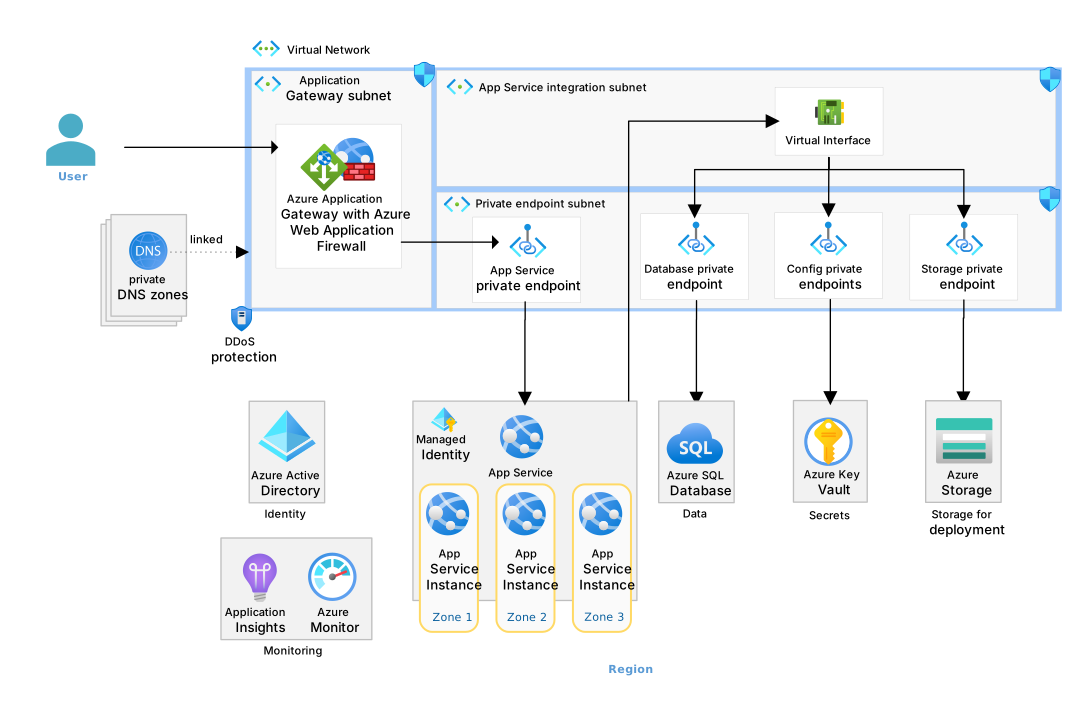
Credit: learn.microsoft.com
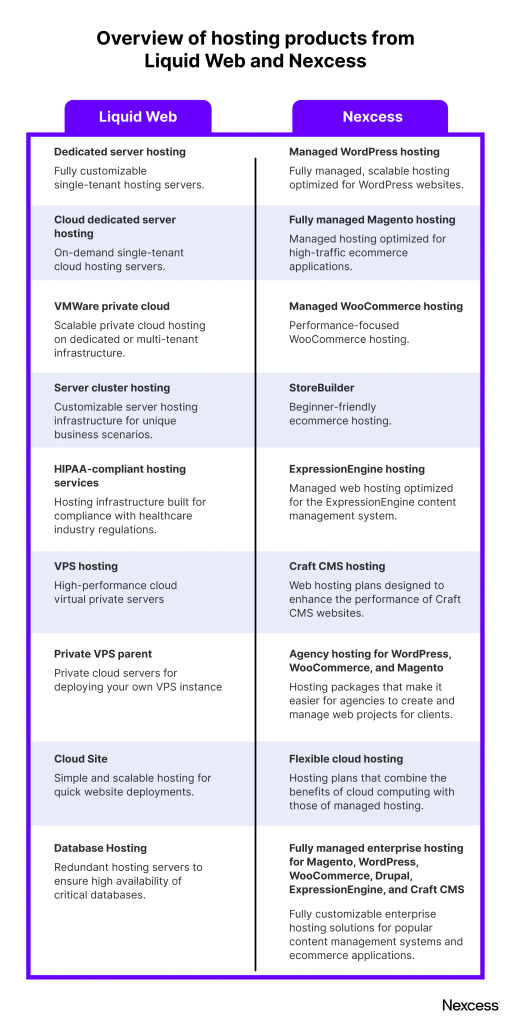
Credit: www.liquidweb.com
Frequently Asked Questions
How Do I Create A Redundant Server?
Set up two or more servers with identical configurations. Use load balancers to distribute traffic evenly. Ensure data synchronization across servers and implement failover mechanisms. Regularly test for seamless switching during server failures.
How To Create Network Redundancy?
To create network redundancy, use multiple internet connections and deploy load balancers. Implement failover protocols and utilize diverse hardware. Regularly test backup systems for effectiveness. Ensure diverse routing paths and engage in periodic network audits to identify vulnerabilities. Employ redundant power supplies for uninterrupted connectivity.
What Is Redundant Hosting?
Redundant hosting involves using multiple servers to ensure website availability. It prevents downtime by redirecting traffic during server failures. This setup enhances reliability, offering seamless performance and reducing risks of data loss. Redundant hosting is crucial for businesses needing uninterrupted online presence.
It ensures constant access and optimal user experience.
How To Implement Redundancy?
Implement redundancy by using backup systems and duplicate critical components. Regularly update and test backups for reliability. Distribute data across multiple locations to prevent single points of failure. Utilize load balancing to enhance system performance. Ensure continuous monitoring to swiftly address any issues.
Conclusion
Building redundancy in web hosting ensures a stable website. Your users will enjoy consistent access. Downtime is minimized. Backups protect your data against unexpected failures. Load balancing improves performance. Multiple servers can handle traffic surges. Diverse locations add reliability. Monitoring tools catch issues early.
Regular updates keep systems secure. Redundancy boosts user experience. It’s essential for business growth. Secure your website’s future with these strategies. Reliable hosting builds trust with visitors. Invest in redundancy to safeguard your online presence.


