
Imagine walking into a well-organized library where every book is neatly placed and easy to find. That’s exactly what permalinks do for your WordPress website.
They are the web addresses that lead visitors to specific pages or posts on your site. But why should you care about them? Well, permalinks are crucial for user experience and SEO. A well-crafted permalink can make your content easier to find and more appealing to search engines.
Are you ready to take control of your WordPress site’s structure and boost its visibility? In this post, we’ll walk you through what permalinks are, why they’re important, and how you can set them up easily. Stick with us, and you’ll discover how simple tweaks can lead to big gains in website traffic and user engagement. Let’s dive in and unlock the potential of your WordPress site.
Permalinks Definition
Permalinks are the web addresses for your pages and posts. They are unique for each page. Readers use them to find your content. They help in keeping things organized. Think of them as the permanent address for your online content. Good permalinks improve your site’s SEO. Search engines like clear URLs. People find them easier to remember too.
In WordPress, you can set these links easily. You can choose different styles for them. Some are simple, while others include dates or categories. A clear permalink is better for users. It gives them an idea of what the page is about. Shorter links are often better. They are easier to read and share. Make sure your permalinks are descriptive and simple.
Importance Of Permalinks
Permalinks are essential for your WordPress site. They are the web addresses for your posts and pages. These links help users find your content easily. Search engines use permalinks to understand your site’s structure. A clear permalink improves your site’s visibility on search engines.
Permalinks should be easy to read and describe the content. Good permalinks make your site look professional. They also make sharing your content easier. Users prefer links that tell them what to expect. This builds trust with your audience.
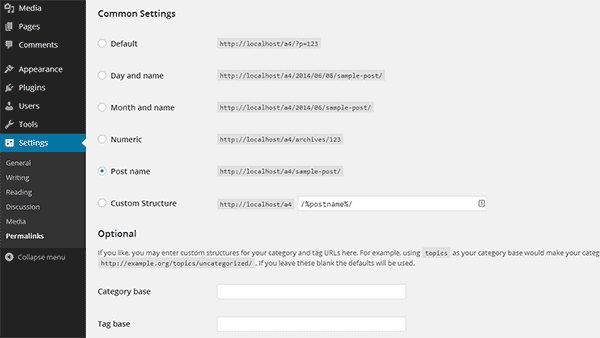
Setting permalinks in WordPress is simple. Go to your dashboard and find “Settings”. Click on “Permalinks” to choose your format. Many choose the “Post name” option. This option is clear and SEO-friendly.
Default Permalink Structure
Permalinks are the web addresses for your posts. WordPress has a default structure. It’s not always best for SEO. The default structure includes numbers and symbols. This can be confusing for visitors. It also affects search engines. Search engines prefer clear and simple URLs. You can change this in the WordPress settings. Choose a structure that uses words. Make sure the words relate to your content. This helps search engines understand your page.
Go to the settings menu. Find the permalinks option. You will see different choices. Pick the one called ‘Post name.’ This uses your post title in the URL. It makes URLs easier to read. It helps visitors and search engines. A good URL is short and clear. Avoid using too many words. This keeps your site organized and user-friendly.

Credit: www.interserver.net
Customizing Permalink Settings
First, go to your WordPress dashboard. Find the Settings option. Click on Permalinks. This opens the permalink settings page. Here, you can change URL structures. Make sure you save changes after you finish.
There are different permalink structures. The Plain option is simple but not good for SEO. Day and name or Month and name show the date in URLs. Numeric uses numbers. Post name is short and clean. Choose what fits your site.
- Use keywords in your URLs.
- Keep URLs short and clear.
- Avoid special characters in URLs.
- Use hyphens instead of spaces.
- Use lowercase letters only.
Common Permalink Structures
The plain structure is basic. It uses page numbers. This is not great for SEO. URLs look like example.com/?p=123. It is hard to understand. Most people avoid this style.
This format shows the date and post title. It looks like example.com/2023/10/05/post-title. Search engines like dates. Readers see when a post is made. This helps in organizing posts.
Similar to day and name, but uses month. URLs look like example.com/2023/10/post-title. This is tidy. It works well for monthly archives. It is simple to follow.
This style uses numbers only. URLs look like example.com/archives/123. It is not clear. This is not SEO friendly. Numbers do not show content details.
Post name is popular. It uses the post title in URL. Looks like example.com/post-title. It is great for SEO. Easy to read and understand. Many bloggers prefer this style.
Custom structure is flexible. You can create URLs to suit needs. Use tags, categories, or anything. Example: example.com/category/post-title. It helps in organizing content. It improves navigation.
Seo And Permalinks
Using keywords in permalinks helps search engines understand your page. It tells what your content is about. Choose words that match your topic. This makes your link more relevant. It helps users and search engines find your page easily. Good keywords make your link easy to remember.
Special characters can confuse search engines. They might not read them well. Use simple words and hyphens instead. This keeps your link clean and clear. Avoid using symbols like &, %, and $. They can make links look messy. Clean links are better for SEO.
Short URLs are easy to read. They are also easy to type. Make them descriptive but not too long. This helps users know what your page is about. Keep it simple. A good URL is clear and direct. It helps both users and search engines.
Changing Permalinks Safely
Changing permalinks can affect your website’s links. Old links may break. This can frustrate users. Google might also rank your site lower. It’s crucial to address these issues.
Impact On Existing Links
When permalinks change, existing links can break. Users find 404 errors. This harms your site’s user experience. Broken links can affect search rankings too. It’s important to fix this quickly.
Setting Up Redirects
Redirects help manage broken links. They guide users to the right page. Use 301 redirects for permanent changes. This tells search engines about the update. Users will land on the correct page. Your site’s traffic remains steady.
Testing New Permalinks
Test new permalinks before they go live. Check all links on your site. Ensure they work correctly. Use tools to test each link. Fix any issues found. This keeps your site user-friendly and reliable.
Credit: www.isitwp.com
Troubleshooting Permalink Issues
404 Errors appear when a page is missing. Check the URL. It must be correct. Go to WordPress settings. Update permalinks. This refreshes links and fixes errors. If the problem stays, look at the page. It might be deleted or moved.
Cache Problems can show old pages. Clear the cache often. Use plugins like WP Super Cache. They help clear old data. Make sure to check browser settings too. Sometimes, browsers store old pages. This causes confusion.
Plugin Conflicts cause many issues. Some plugins change permalinks. Disable them one by one. Find the problem plugin. Update or replace it. Always keep plugins updated. This prevents many issues. Check compatibility before installing.
Best Practices For Permalinks
Permalinks in WordPress are the URLs for your posts and pages. Set them by navigating to Settings, then Permalinks. Use a structure that is clean and descriptive to improve SEO and user experience.
Consistency
Keep your permalinks consistent across all pages. This helps users and search engines. A clear pattern makes navigation easier. Avoid changing the structure often. It can confuse visitors and break links. Stick to a format that works well.
Readability
Permalinks should be easy to read. Use simple words that describe the content. Avoid long strings of numbers or symbols. A user should understand the link at a glance. This improves user experience and SEO.
Future-proofing Urls
Plan permalinks with the future in mind. Avoid using dates or temporary words. This keeps URLs relevant even if content updates. Think long-term when setting your structure. A stable URL is good for SEO.

Credit: www.accuwebhosting.com
Frequently Asked Questions
What Are Permalinks In WordPress?
Permalinks are the permanent URLs to your WordPress posts, pages, and archives. They are crucial for SEO and user navigation. A well-structured permalink improves search engine visibility and enhances user experience. WordPress allows customization of permalinks to make them more readable and relevant.
Why Are Permalinks Important For Seo?
Permalinks play a vital role in SEO by providing clean, keyword-rich URLs. They help search engines understand the content of your page better. An optimized permalink structure can improve your site’s rankings and attract more organic traffic. It’s essential for visibility and indexing.
How Do I Change Permalinks In WordPress?
Changing permalinks in WordPress is simple. Go to Settings > Permalinks in your dashboard. Choose a structure that suits your content and SEO goals. Save changes to update your site’s URLs. Always ensure your new structure maintains readability and relevance for users.
What Is The Best Permalink Structure?
The best permalink structure is concise, descriptive, and contains keywords. Use the post name or a custom structure that reflects your content. Avoid using dates unless relevant. A well-crafted permalink improves SEO and user experience, making it easier to understand your content.
Conclusion
Permalinks are vital for WordPress site structure. They help with navigation and SEO. Set them up in your WordPress settings. Choose a format that suits your content. Keep it simple and descriptive. This makes your URLs more user-friendly. Visitors and search engines will appreciate it.
Review your permalinks regularly. Ensure they still align with your content strategy. By doing so, you enhance your website’s performance. Better visibility and user experience follow. Now, you’re ready to optimize your WordPress permalinks effectively. Happy blogging!


