
You might be wondering about the company that’s hosting your website. Knowing who your web hosting provider is can impact your site’s performance, security, and even its success.
Imagine being able to optimize your website to run faster, solve issues quicker, and ensure your site is secure. This knowledge puts you in control and helps you make informed decisions. It empowers you to enhance your website’s experience and reliability, which could be the difference between attracting visitors or losing them.
Dive deeper into this article to discover the simple steps to identify your web hosting provider and unlock the potential of your website.
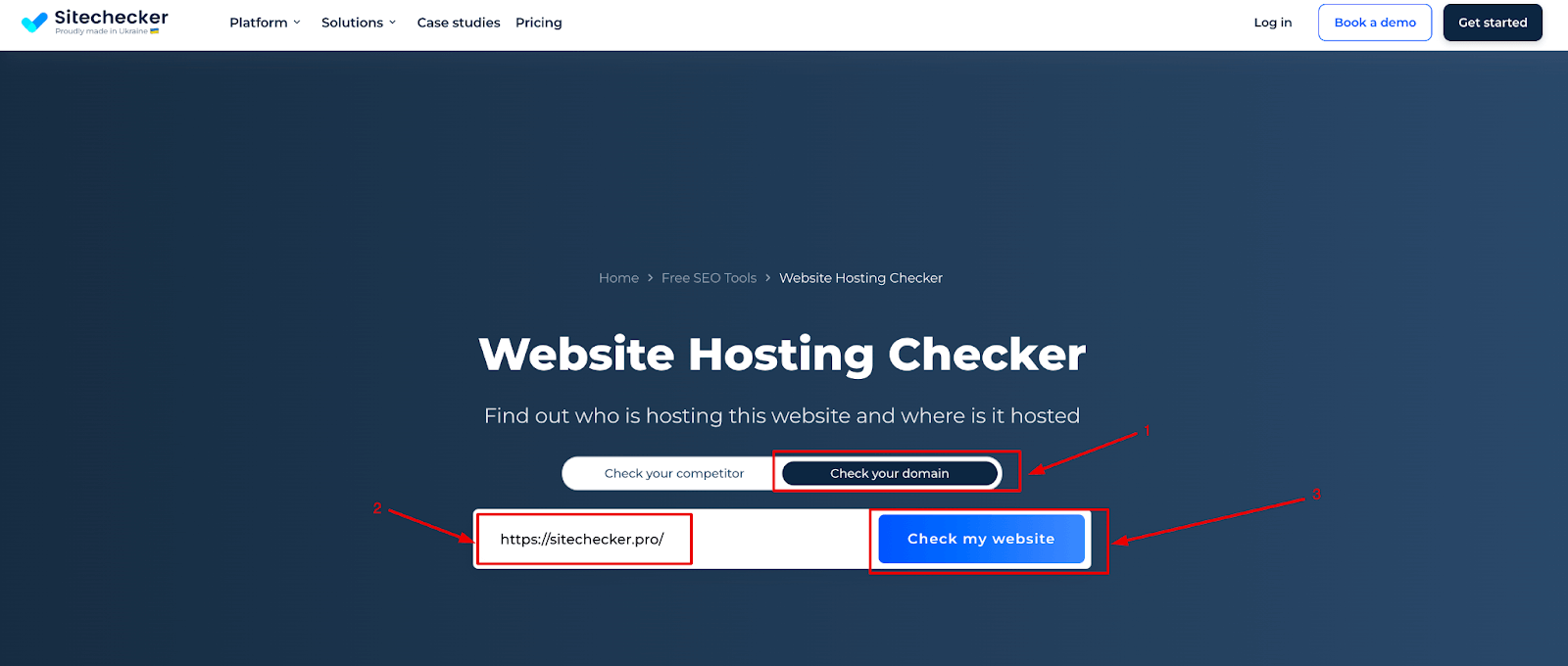
Credit: sitechecker.pro
Understanding Web Hosting
Web hosting is like renting a spot on the internet. It’s where your website lives. A web host provides the space and tools for your site. They keep it running so people can visit. Think of it like a home for your web pages. Without a host, your site cannot be seen online.
A web host stores your website files. They make sure your site is available all the time. They also manage traffic and security. Good web hosts help your website load fast. This is important for visitors. Some web hosts offer extra tools. These tools can help you build and manage your site.
| Type | Description |
|---|---|
| Shared Hosting | Many websites share one server. It’s cheap but slower. |
| VPS Hosting | You get a private space on a server. It’s faster than shared. |
| Dedicated Hosting | One server for your site only. It’s fast but costs more. |
| Cloud Hosting | Your site uses many servers. It’s reliable and flexible. |
Checking Hosting Provider
WHOIS Lookup helps find your hosting provider. Search your domain name in a WHOIS tool. It shows details like hosting provider name. Also, find information about domain registration and expiration. WHOIS Lookup is a simple tool. Easy for everyone to use.
Your domain registrar can also help. Log into your account. Look for hosting details there. Often, registrars provide hosting services. If not, they show where your domain is hosted. Contact them for more help. They can guide you.
DNS Records reveal hosting info. Use online tools to check them. Look for nameservers. They often show the hosting provider’s name. Some records are hard to read. But nameservers give clear clues. They are key to finding your hosting provider.
Accessing Hosting Account
Start by opening your web browser. Type your hosting provider’s website. Find the login page. Enter your username and password. Can’t remember them? Check your email for details. After logging in, you’ll see the control panel. This is where you manage your website. Look for settings or account info. This tells you who your hosting provider is.
Find your past billing statements. These are often sent by email. The statements show the name of your hosting company. Check your bank statements too. They list payments to your hosting provider. If you still can’t find it, contact your bank. Ask them about recent payments to web hosts. They can help you identify the company.
Contacting Customer Support
Find the company’s contact details on their website. Look for a support email or phone number. Some websites have a live chat feature. This is a fast way to talk with someone. Ask them who hosts your website. Keep your account details ready. This helps them assist you better.
Check the company where you bought your domain. They might know your hosting provider. Look for their customer support page. Send them an email or call them. Share your domain name with them. They can help find your hosting details. Always note down any information they give. This can be helpful later.
Utilizing Third-party Tools
Discovering your web hosting provider can be simple with third-party tools. These tools quickly analyze your website and show hosting details. Users can easily find their web host in minutes.
Using Online Hosting Checkers
Online hosting checkers help find out your web hosting provider. These tools search for hosting details quickly. Enter your website address in the checker. It shows the hosting company name. Some checkers provide extra info. IP address and server location are common details. These tools are easy to use. No special skills needed.
Benefits Of Web Hosting Tools
Web hosting tools offer many benefits. They save time by giving quick results. They help in comparing different hosting services. You can check uptime and speed. This helps in choosing the best host. Tools also show server locations. Knowing this is important for global audience reach. They make finding hosting providers easy and fast.
Credit: wetopi.com
Common Issues In Identifying Hosts
Misleading WHOIS Information can confuse website owners. Sometimes, WHOIS records show old data. This means you may see wrong hosting details. This happens when records are not updated. Also, privacy settings may hide the actual host. In such cases, identifying the correct host becomes hard. It is important to understand that WHOIS data is not always accurate.
Another issue arises with Complications with Third-Party Services. These services might use their own servers. So, your site might seem to be hosted by them. This can lead to misunderstandings about the actual host. Always check the service agreement. It often lists the real hosting provider. Pay attention to details. This helps in ensuring you know the right host.
Switching Hosting Providers
Web hosting is the backbone of your website. Sometimes, changing hosts is a good idea. Maybe your site is slow. Or, you need more features. Perhaps, your host is too expensive. Customer support might be lacking. Security issues can also be a problem. These are all reasons to consider a switch. A new host might offer better performance. Or, lower costs. Always think about your website’s needs. Make sure the new host meets those needs. Choose wisely.
Moving to a new host needs steps. First, backup your data. Use a plugin or tool to help. Next, find a new host. Make sure it suits your needs. Then, transfer your files. This includes images and text. Check your domain settings. You might need to update these. Finally, test your site. Make sure everything works well. Check links and images. This ensures a smooth transition. Follow these steps for a successful move.

Credit: hostarmada.com
Frequently Asked Questions
How Do I Find Out Whois Hosting A Website?
Use a WHOIS lookup tool to find out who is hosting a website. Enter the domain name, and the tool will display hosting details. Popular tools include WHOIS. net, ICANN WHOIS, and DomainTools. Check the hosting provider information in the “Registrar” or “Name Server” sections.
How Do I Know My Web Hosting Provider?
Check your email for hosting provider details or log into your domain registrar account. Review billing statements or contact support. Use online tools like “Whois” to identify your web hosting provider quickly. Ensure easy access to your provider’s contact information for efficient management.
How Do I Know What Platform My Website Is Hosting?
Check your website’s hosting platform by examining the DNS settings or using online tools like BuiltWith or WhoIs. These tools provide detailed information about the hosting provider and technology used. Alternatively, contact your website administrator or developer for direct confirmation.
What Is Your Website Host?
We host our website with Bluehost. It’s reliable, user-friendly, and offers excellent customer support. Bluehost provides great uptime, ensuring your website remains accessible. Their hosting plans are affordable and suitable for various needs. They also offer a variety of features and tools to enhance website performance and security.
Conclusion
Finding your web hosting provider is easier than you think. Start by checking your website or billing emails. Look for hosting-related details. Tools like WHOIS can help you discover more. Remember, knowing your hosting is crucial. It aids in solving website issues quickly.
Plus, it ensures you can access important services. Always keep your hosting information handy. This knowledge empowers you to make better decisions. Now, you can manage your website with confidence. So, take action today. Identify your web hosting provider and stay informed.


