
Are you ready to take the next step in making your website truly your own? Changing your web host name to a domain name can seem like a daunting task, but it doesn’t have to be.
Imagine the confidence you’ll feel when you type in your unique domain and see your website pop up. It’s a powerful move that boosts your online presence and makes it easier for people to find you. In this guide, we’ll break down the process into simple, manageable steps.
You’ll learn everything you need to know to make this transition smooth and stress-free. Ready to unlock the full potential of your website? Let’s dive in and get started!

Credit: mizitechinfo.wordpress.com
Understanding Domain Names
A domain name is your website’s address. Like a home address, but online. It helps users find your site easily. Each domain name is unique. No two are the same.
Domain names usually have two parts. The first part is the name you choose. The second part is the extension, like .com or .org. These parts are separated by a dot.
Choosing a good domain name is important. It should be short and easy to remember. Avoid numbers and special characters. Simple names work best. They make your site easy to find.
Register your domain with a domain registrar. This is a company that sells domain names. Once registered, the domain is yours to use.

Credit: newhelptech.wordpress.com
Web Hosting Basics
Web hosting lets websites be seen online. Servers store website data. This data is shown on browsers. Domain names are like website addresses. They help users find sites easily. Hosting and domains work together. Without hosting, domains can’t show site content.
Hosting providers offer space on servers. Domains link to this space. Changing the host name to a domain name needs steps. First, buy a domain name. Next, connect the domain to the host. This is done by updating DNS settings. DNS tells browsers where to find the site.
Difference Between Host Name And Domain Name
A host name is like a nickname for a computer. It helps us know which computer we’re talking about. Computers use it to find each other on the internet. It’s like calling your friend by their name.
A domain name is like an address for a website. It helps people find websites easily. Instead of numbers, we type words like “example.com”. It’s like your home address but for websites.
Both are important for the internet. Host names are for computers. Domain names are for websites. They work together to make the internet work smoothly. Understanding them helps us use the web better.
Credit: www.namecheap.com
Choosing The Right Domain Name
Picking a good domain name is important. It helps people find your website. Make sure it’s easy to spell. This way, people won’t get confused. Keep it short. Long names are hard to remember. A short name is better.
Use words that show what your site is about. This helps people understand your site. Avoid numbers and hyphens. They can make the name look messy. Choose words that are easy to say.
Domain name extensions are the letters after the dot. Like .com or .org. Each has a different use. .com is very popular. Many people trust it. But .net and .org are good too. They are often used for tech and charities.
New extensions are available now. Like .shop or .blog. These can show what your site is about. Picking the right extension is important. It can help your site look professional.
Registering A Domain Name
Finding the right domain registrar is crucial. Some registrars are more trusted than others. Look for one with good reviews. Consider the cost of registration. Sometimes, cheap registrars have hidden fees. Choose one with good customer support. This helps if you face problems later. Check if they offer extra features. Some provide email hosting or privacy protection. Compare different registrars before deciding. This ensures you get the best deal.
- Search for your desired domain name.
- Check if the name is available.
- Select the duration for registration.
- Enter your personal information.
- Choose any additional services.
- Complete the payment process.
- Confirm your registration.
Changing Host Name To Domain Name
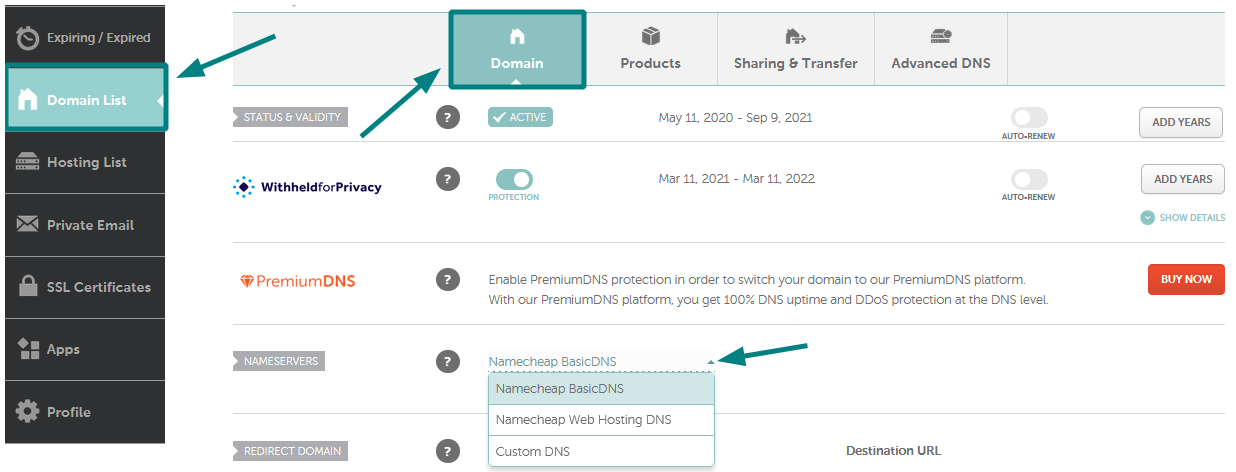
First, go to your domain registrar’s website. Find the DNS settings or DNS management page. Here, you will see a list of settings. Look for the Nameserver section. You might see “NS” written there. Replace the old nameservers with the new ones from your hosting provider. Click save or update. It might take some time to work. Be patient.
Log into your hosting account. Find the section for managing domains. Add your domain name there. Next, enter the DNS settings you updated earlier. This tells the internet where your website is. Check if everything is correct. Then, wait a few hours for changes to happen. Now your website should work with the new domain name.
Testing The New Domain
Domain propagation is when changes spread across the internet. It takes some time. Usually between 24 to 48 hours. Check if your new domain works everywhere. Use online tools for this. They show if the domain is active worldwide. If it is not, just wait. These things need time to settle. Patience is key here.
Make sure your site works well. Test all links on the site. Broken links can confuse visitors. Check forms and buttons. Are they working? Open the site on different browsers. Chrome, Firefox, Safari. Each browser can show the site differently. Don’t forget mobile devices. Many people use phones to browse. Your site should look good everywhere. If you find issues, fix them quickly. Your site should be smooth and easy to use.
Troubleshooting Common Issues
Changing a web host name to a domain name can seem tricky. Start by accessing your domain registrar’s settings. Update the DNS records to point to the new web host.
Dns Errors
Changing a web host name to a domain name can cause DNS errors. DNS stands for Domain Name System. It helps computers find websites. When DNS settings are wrong, your site won’t load. Check if the DNS records match your domain. Use tools like DNS Checker to verify them. If records are missing, add them in your web hosting control panel. Wrong DNS can lead to website downtime.
Website Downtime
Website downtime means your site is offline. People can’t visit it. This happens if the domain name isn’t linked right. Double-check DNS settings to ensure they’re correct. Sometimes, hosts take time to update DNS. Wait a few hours and check again. If downtime continues, contact your web host support. They can help fix the problem. Avoid mistakes in DNS settings to prevent downtime.
Maintaining Domain And Hosting
Keeping track of your domain renewal is important. Set reminders so you don’t forget. Domains usually need renewal every year. Missing this can cause your website to go offline. Use a calendar app to remind you. Some registrars offer auto-renewal. Check this option for peace of mind.
Protecting your domain is very important. Use strong and unique passwords. Never share them with anyone. Enable two-factor authentication for extra safety. This makes it harder for hackers to access your account. Regularly update your contact information. This helps in case you need to recover your account.
Frequently Asked Questions
Is Web Hosting The Same As Domain Name?
Web hosting and domain names are not the same. Web hosting stores website files online. A domain name is the website’s address. Both are essential for a website to function. Web hosting provides the server, while the domain name directs users to your website.
They work together but serve different purposes.
How To Change Website Hosting Domain?
To change your website hosting domain, update the domain settings in your hosting account. Modify DNS records to point to the new domain, ensuring all configurations are correctly set. Verify the domain switch by accessing the site through the new domain URL.
Contact support if issues arise during the process.
How Do I Point A Website To A Domain?
To point a website to a domain, update the domain’s DNS settings. Add the website’s IP address as an A record in the DNS. Ensure the name servers are set correctly on the domain registrar’s site. Changes may take up to 48 hours to propagate.
Is The Host Name The Same As The Domain Name?
The host name and domain name are not the same. A host name identifies a specific device within a domain, while a domain name is the broader address used to access a website. Understanding the difference is crucial for accurate website navigation and management.
Conclusion
Changing your web host name to a domain name is simple. Follow the steps carefully to avoid mistakes. First, choose a domain name that suits your needs. Then, update the DNS settings with your new domain name. Check if everything works correctly after the change.
Make sure your website loads smoothly with the new domain. Contact support if you face any issues during the process. This change helps in branding and online presence. A unique domain name makes your site memorable. Always aim for a seamless transition.
Enjoy your updated website identity!


