
Finding the perfect web host for your website can feel like searching for a needle in a haystack. With countless options available, how do you ensure you’re making the right choice?
You want a host that’s reliable, fast, and suits your specific needs. Imagine launching your site only to face downtime, slow loading speeds, or even security issues. It’s a nightmare you want to avoid. But don’t worry—this guide is here to help you navigate the crowded market and find the best web hosting solution for your site.
You’ll discover key factors to consider, mistakes to avoid, and tips to ensure your decision boosts your website’s success. Dive in and learn how to secure a web host that will serve as a strong foundation for your online presence.
Identify Your Website Needs
Choosing the right web host starts with knowing your website type. Is it a blog, a business site, or an online store? Each type needs different features. Blogs might need simple designs. Business sites could need professional tools. Online stores require strong security and payment systems. Identifying your website type helps you pick a suitable host.
Traffic means visitors. How many people will visit your site? Traffic levels affect the host choice. If many people visit, you need strong hosting. Less traffic might mean a simpler host works. Hosting plans often depend on traffic. Knowing traffic helps avoid slow sites.
Storage means space. How much space do you need for files, images, and videos? Bandwidth is the data transfer. Storage and bandwidth are key in hosting. Big sites need more space. Small sites need less. More visitors mean more bandwidth. Choose a host with enough space and bandwidth.

Credit: www.nameboy.com
Explore Different Hosting Types
Shared hosting is a basic hosting type. Many websites use the same server. It is affordable and great for small websites. Resources are shared among users. This means less control and slower speeds. Perfect for beginners with simple sites.
VPS stands for Virtual Private Server. It offers more control than shared hosting. You get a part of a server just for you. It is faster and more secure. Good for growing websites that need more power.
With dedicated hosting, you have a whole server for yourself. This means full control and high performance. It is expensive but provides maximum security. Ideal for large businesses with high traffic sites.
Cloud hosting uses many servers to host your site. It is flexible and can handle lots of visitors. You only pay for what you use. Good for sites with changing traffic. It is reliable and offers scalability.
Evaluate Hosting Features
Uptime shows how often a site is online. A good host offers 99.9% uptime. This means your site is almost always available. A site that is down loses visitors. Choose a host with strong uptime promises. This keeps your site active.
Customer support is very important. Problems can happen anytime. A host with 24/7 support can help fast. Look for support by chat, email, or phone. Good support solves issues quickly. This keeps your site running smoothly.
Websites can grow over time. Scalability means a site can handle more traffic. A good host lets you upgrade easily. This means your site can grow without problems. Check if a host offers easy upgrades. This helps your site stay strong.
Consider Security Measures
SSL certificates keep your data safe. They protect information from hackers. Sites with SSL show a padlock. This makes them trustworthy. Google likes sites with SSL more. SSL certificates help build trust. They are easy to install.
Backups save your site. Accidents happen. Files can be lost. Backups keep a copy safe. Daily backups are best. They help recover lost data. Many hosts offer backups. Always check for this feature.
Firewalls stop bad traffic. They block harmful attacks. Protect your site with a firewall. It keeps your site safe. Hackers look for weak sites. Firewalls make sites strong. Many web hosts offer firewall protection.
Analyze Pricing Models
Many hosts offer low prices for the start. But renewal rates can be higher. Always check the price after the first year. Compare it with the initial cost. Some hosts give discounts only for the first time. Stay alert for changes in pricing.
Some hosts have hidden fees. These fees can surprise you later. Look for fees for extra services. Check for fees on extra traffic or storage. Read the terms carefully. You want to know all costs before signing up.
Contracts can lock you in. Long contracts may have low monthly costs. But getting out early can cost more. Check for cancellation fees. Shorter contracts give flexibility. You can change hosts if you need. Always read the contract terms.
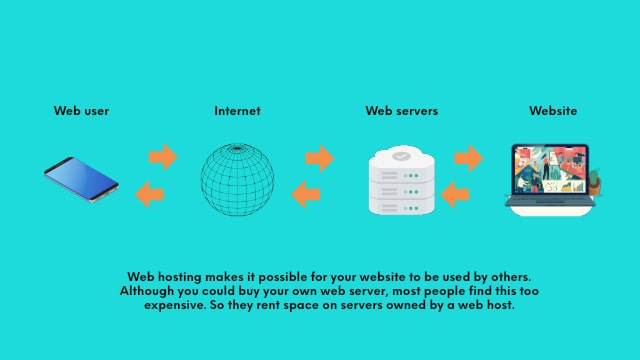
Credit: www.godaddy.com
Review User Feedback
Read what users say about the web host. Positive reviews show happy customers. Negative reviews can reveal problems. Check for patterns in feedback. This helps you know if the service is good.
Experts often share their thoughts on web hosts. Industry recommendations can be helpful. They know what works best. Following their advice may guide you to a good choice. Always check if they are unbiased.
There are many websites that compare web hosting services. These sites show features and prices side by side. Comparison websites make it easy to see differences. Look for trusted comparison sites to help make a decision.
Test Customer Support
Fast help is very important. Good web hosts answer quickly. Response time should be less than an hour. Check this before choosing. Slow answers can be frustrating.
Many ways to get help is best. Look for chat, email, and phone. More options mean better support. Chat is quick and easy. Email is good for detailed help.
Experts should solve problems fast. Test their knowledge with simple questions. They should know about servers and websites. Choose hosts with skilled teams.
Check For Additional Services
Many web hosts offer domain registration as an extra service. This means you can buy your website name directly from them. It makes managing your site easier. Some hosts even give a free domain for the first year.
Website builders are tools to create your website. They are user-friendly. Many web hosts include these builders for free. You can design your site without knowing coding.
Email hosting is another service to consider. It lets you have a custom email address. It looks professional, like yourname@yourwebsite.com. Some web hosts offer free email hosting.
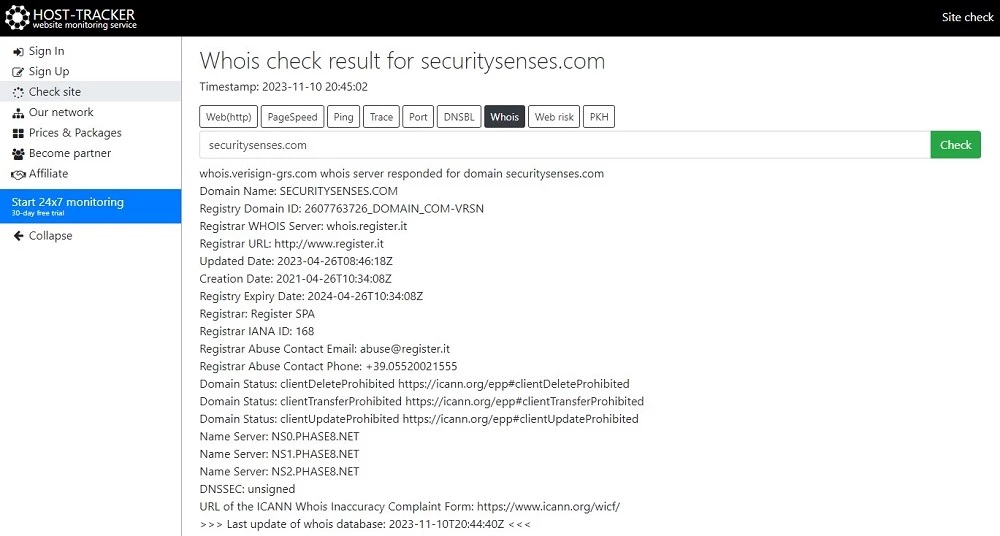
Credit: securitysenses.com
Frequently Asked Questions
How Do I Find The Host Of A Website?
Use a WHOIS lookup tool to find the website’s host. Visit websites like whois. domaintools. com. Enter the domain name and view the registrar details. Look for the “Name Server” section for hosting provider information. This method helps identify the host quickly.
What Is Your Website Host?
We use Bluehost for hosting our website. It offers reliable services and excellent customer support. Bluehost provides fast loading speeds, enhancing user experience. With easy WordPress integration, it’s ideal for both beginners and experienced users. Choose Bluehost for its competitive pricing and robust security features.
How Do I Know The Web Server Of A Website?
Use online tools like Netcraft or BuiltWith to identify a website’s web server. Alternatively, inspect HTTP headers using browser developer tools.
How Do I Find Out What Platform A Website Is Hosted On?
Use online tools like BuiltWith or Netcraft to identify the hosting platform. Inspect website source code for server information. Check WHOIS data for hosting details. These methods provide insights into the hosting platform used by the website.
Conclusion
Choosing the right web host is crucial. It affects your site’s performance. Think about your needs first. Consider budget, support, and reliability. Research different hosting options. Compare features and user reviews. Don’t rush the decision. A good host ensures a smooth online presence.
It helps with website speed and uptime. Protects your data too. Make an informed choice. It benefits your online goals. Remember, a reliable host builds trust. Ensures visitors return. Your website deserves the best foundation. Start strong with a smart hosting choice.
Your efforts will pay off.


