
Imagine having full control over your own corner of the internet. Hosting a web server can give you just that.
But where do you start? Whether you’re setting up a personal blog or launching a business website, understanding how to host a web server is crucial. You might feel overwhelmed by the technical jargon, but don’t worry—you’re not alone. This guide is tailored to simplify the process for you, breaking it down into straightforward steps.
You’ll discover the tools, resources, and skills needed to turn your vision into reality. Ready to unlock the potential of the web? Keep reading, and let’s make the complex world of web hosting easy and accessible for you.
Choosing A Hosting Type
Shared hosting is a simple option. Many websites share one server. This makes it cheap. But, it can be slow if many people visit at once. It’s great for beginners with small websites. Easy to use and manage. You can start without knowing much.
VPS hosting is more powerful. It gives you part of a server. You have more control over settings. It’s more expensive than shared hosting. But, it offers better performance. Suitable for growing websites. You can customize it to your needs.
A dedicated server is for big websites. You get a whole server for yourself. It costs more than other types. But it offers maximum control and power. This is best for websites with lots of visitors. You need more technical skills.
Cloud hosting uses many servers. This makes it very flexible. If more people visit, it can handle them. You only pay for what you use. It’s good for websites that grow fast. Offers reliability and scalability. Easy to upgrade when needed.
Selecting An Operating System
Linux is a popular choice for web hosting. It is free and open-source. Many people like it because it is secure and stable. Linux can run on different types of computers. It works well with most web hosting software. Support for Linux is easy to find. Many online communities are ready to help.
Linux often uses less computer power. This can save money and resources. It supports many languages like PHP and Python. This makes it a good choice for many websites.
Windows hosting is another option. It works with Microsoft technologies like ASP.NET. This is good for websites that use Microsoft tools.
Windows is easy to use and has a friendly interface. It can run on many servers. It offers good support for databases like MSSQL. Windows hosting may cost more than Linux. But it is a good choice for businesses using Microsoft products.
Setting Up The Server
Start by choosing a web server software like Apache or Nginx. These are popular options. Download the software from their official website. Follow the installation steps. It’s usually simple. Just click “Next” a few times. Ensure you have the necessary permissions. Also, check that your computer meets the software requirements.
Open the server settings file. This file is important. Edit the file to set your server’s name. Also, choose the port number. Port 80 is common. But you can choose another. Add your website files to the server. Ensure they are in the right folder. Finally, restart the server. This will apply the new settings.
Credit: www.youtube.com
Domain And Dns Configuration
Buying a domain is simple. Visit a domain registrar website. Search for your desired name. If available, follow the steps to purchase. Keep the name short and easy to remember. A good name helps users find you.
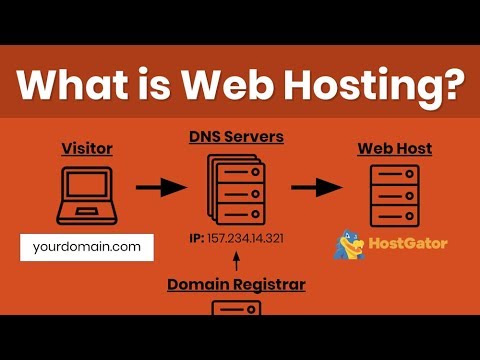
DNS records tell the internet where your site lives. After buying a domain, set up DNS records. Log into your registrar account. Find the DNS settings. Add an A record for your server’s IP address. This connects your domain to your server. Ensure all details are correct. Mistakes can stop your site from loading.
Securing The Server
Securing the server is essential for hosting a web server safely. Regular updates and strong passwords help protect against threats. Limit access to sensitive data and utilize firewalls to ensure robust security measures are in place.
Implementing Firewalls
A firewall acts as a shield for your web server. It stops unwanted traffic and attacks. Set it up to allow only trusted connections. This keeps your server safe from hackers. Firewalls also monitor and control the data that enters and leaves. It is a must-have for server security.
Ssl/tls Certificates
SSL/TLS certificates protect your server’s data. They encrypt the information. This makes it hard for others to read it. Your users will trust your site more. A green lock icon shows it is secure. Always keep your certificates updated. This ensures safe connections.
Regular Software Updates
Keeping your software updated is important. Updates fix bugs and security holes. They make your server stronger against threats. Schedule regular checks for new updates. Apply them as soon as they are available. This helps keep your server secure and reliable.

Credit: www.hostinger.com
Testing The Server
First, confirm your server is online. Ping the server from your computer. This checks if the server responds. Use the command prompt or terminal. Type ping [server IP] and hit enter. The server should reply quickly. If not, check your network settings. Ensure cables and routers work. Firewall settings might block the server. Adjust them if needed.
Open a browser to visit your website. Enter your server’s IP address. The website should load without errors. Check all links and pages. Ensure images and videos display correctly. Interactive elements like forms must work. If something breaks, check the code. Look at error messages for clues. Fix any broken parts to ensure everything runs smoothly.
Monitoring And Maintenance
Setting up a web server requires regular monitoring and maintenance to ensure smooth operation. Check server performance frequently, update software, and protect against security threats. This proactive approach helps avoid potential issues and keeps your web server running efficiently.
Performance Monitoring Tools
Web servers need regular checks to run smoothly. Use performance monitoring tools for this task. They help you see how your server is doing. You can find out how fast it is. You can check if it is having problems. These tools show you real-time data. This is important for fixing issues quickly. They help you keep your server healthy. Some popular tools are Nagios, Zabbix, and New Relic. Choose one that fits your needs.
Regular Backups
Regular backups are vital for your web server. They protect your data from loss. If something goes wrong, backups help you restore your site. Make sure you back up your data often. You can set automatic backups. This saves time and ensures safety. Store backups in a safe location. Consider using cloud storage for this. It keeps your data secure and easy to access.

Credit: www.hostinger.com
Frequently Asked Questions
How Do I Host My Own Website Server?
To host your own website server, choose hardware, install server software, and configure your network. Ensure proper security measures and register a domain name. Regularly update and maintain your server for optimal performance and security.
How Much Does It Cost To Host A Website Server?
Hosting costs vary from $3 to $300 per month. Prices depend on server type, resources, and additional features. Shared hosting is cheaper, while dedicated hosting costs more. Consider your website needs for the best option. Research hosting providers for competitive pricing and reliable services.
Is Google Web Hosting Free?
Google offers limited free hosting through Firebase and Google Sites. These options suit small projects and personal websites. For extensive features and scalability, consider paid Google Cloud services.
How Do I Make My Computer A Web Server?
Install a web server software like Apache or Nginx. Configure your router to forward ports. Ensure your computer has a static IP. Customize firewall settings to allow incoming traffic. Test your server by accessing the IP address in a browser.
Conclusion
Hosting a web server is easier than you think. Follow the steps carefully. Choose the right server software. Consider your hardware needs. Focus on security. Regular updates keep your server safe. Backup data often. Troubleshooting is part of the process.
Don’t get discouraged. Success comes with practice and patience. Experiment and learn as you go. Your web server can grow with your knowledge. Remember, this journey is rewarding. Enjoy building your online presence. You’ve got this!


