
Are you dreaming of creating your own web hosting website but unsure where to start? You’re not alone.
Many people, just like you, are eager to dive into the world of web hosting but find themselves overwhelmed by technical jargon and complex processes. Imagine having the power to host websites, manage domains, and offer services that others rely on to bring their online visions to life.
Sounds exciting, right? This guide will walk you through every step of the process, breaking down each part into simple, digestible pieces. By the end of this article, you’ll not only understand how to make a web hosting website but feel confident in your ability to create one that stands out. Ready to transform your web hosting dreams into reality? Let’s get started!
Credit: www.hostinger.com
Choosing The Right Platform
Choosing a Content Management System (CMS) can be tricky. WordPress is a popular choice. It’s easy and has many themes. Joomla offers more features for advanced users. It’s a bit harder to use. Drupal is powerful and flexible. But it is mostly for experts. Each CMS has its own pros and cons. Think about what your website needs. Look at your skills and time. Pick a CMS that fits best.
Custom development means building a website from scratch. This gives you more control. It also allows you to make a unique design. But, it can take more time and money. You might need a developer’s help. Think about your budget and time limits. Consider if you need special features. Custom sites can be a good choice if you want something special.
Domain And Hosting Setup
Choosing a good domain is key. It is like your website’s name. Keep it short and easy to remember. Avoid numbers and hyphens. They confuse people. A domain ending in .com is often preferred. Make sure it relates to your website’s purpose. Check if the domain is available. Use a domain search tool. Many websites offer this service for free.
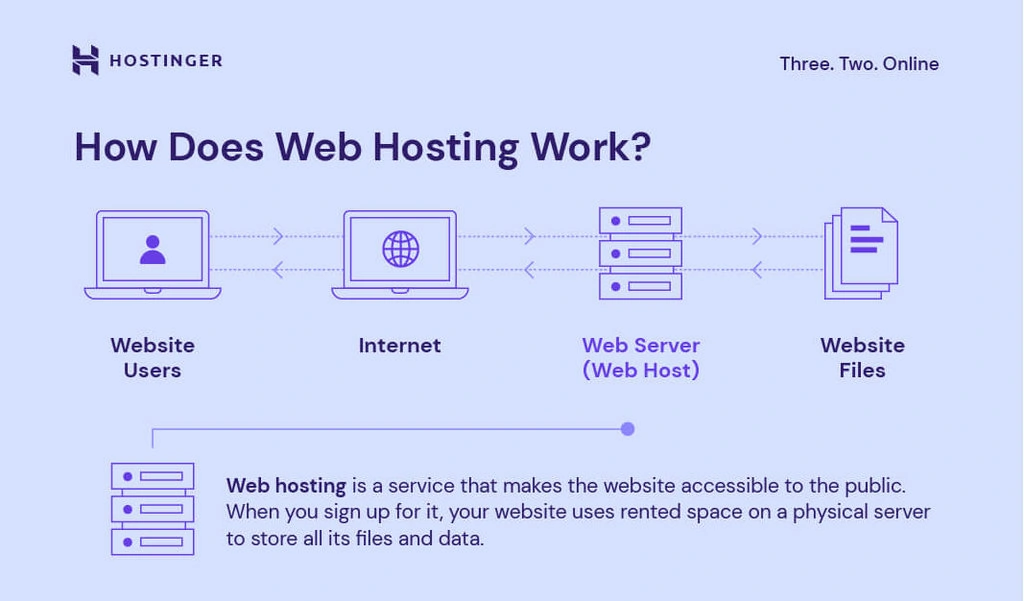
Web hosting is where your website lives online. Shared hosting is cheap and good for beginners. VPS hosting offers more resources. It is for growing websites. Dedicated hosting gives complete control. It’s for big websites with lots of traffic. Cloud hosting is flexible and scalable. Compare prices and features. Choose what suits your needs. Always read reviews before buying.
Designing The Website
Good design is easy to use. Users should find things quickly. Navigation must be simple. Clear labels help users understand options. Fast loading pages make users happy.
Consistent design is important. Use the same colors and fonts. Keep layouts similar on each page. Test your design often. Ask users what they think. Feedback helps improve the site.
Websites must work on all devices. Responsive design is key. Use flexible grids to adjust layouts. Images should resize to fit screens. Media queries help change styles for different devices.
Touch-friendly elements are useful. Buttons should be easy to tap. Simple menus work better on phones. Check your site on phones and tablets. Make sure everything looks good.

Credit: wegic.ai
Integrating Hosting Solutions
Hosting services come in many types. Shared hosting is one option. It is cost-effective. Many users share the same server. VPS hosting offers more control. Each user gets a private space. Dedicated hosting is also available. Here, you own the whole server. It is ideal for big websites. Cloud hosting is flexible. It uses many servers. Resources scale up easily. Choose the best fit for your needs.
Automation saves time. It makes hosting easy. Use tools like cPanel or Plesk. These tools manage servers. They help with tasks like backups and updates. Scripts can automate tasks too. Set them to run at specific times. This ensures smooth operations. Automate billing with billing software. It keeps track of payments. This helps in managing clients better. Automation leads to fewer mistakes. It ensures a reliable service.
Implementing Security Measures
SSL Certificates are vital for website security. They encrypt data between the user and the server. This keeps sensitive information safe from hackers. Websites with SSL show a padlock icon in the browser. Users trust sites with this icon. It’s also essential for better search rankings. Google prefers secure sites. Installing an SSL is simple. It involves purchasing a certificate. Then, follow the steps to apply it to your site.
Firewall and Protection Tools safeguard your site from threats. Firewalls block malicious traffic. They prevent unauthorized access. Protection tools scan for vulnerabilities. Some tools offer real-time protection. This detects threats instantly. Always update these tools. Regular updates improve security. They fix known flaws. Many hosting platforms offer built-in firewalls. Consider using third-party tools for extra safety.
Setting Up Payment Systems
Choosing the right payment system is crucial for a web hosting website. Simplify transactions with secure and easy-to-use payment methods. Enhance user experience by integrating options like PayPal or credit cards, ensuring smooth and trustworthy dealings.
Payment Gateway Integration
Payment gateways are important for online sales. They help in processing payments. Choose a gateway that is secure and reliable. Many gateways offer easy setup and support. Some popular options are PayPal and Stripe. Check fees and terms before signing up. Always protect customer data. Use SSL certificates for safety.
Subscription And Billing Management
Subscriptions help in recurring revenue. Customers pay monthly or yearly. Use software for billing management. It makes tracking payments easier. Automate invoicing and reminders. Ensure system is user-friendly. Offer different plans and discounts. Keep billing information secure and confidential.
Seo And Marketing Strategies
Keywords help search engines find your site. Choosing the right words is important. Use words people search for often. Long-tail keywords can be helpful. They are longer and specific phrases. Place these keywords in titles and headings. They should be in the first paragraph too. Don’t use too many keywords. It might confuse search engines. Your content should still make sense. Readable and natural content is best.
Good content attracts visitors. Write interesting and useful articles. Share tips and stories. Make sure to update your content regularly. This keeps people coming back. Use pictures and videos. They make articles more engaging. Share your content on social media. This helps reach more people. Ask readers to comment. It makes your site lively. Encourage sharing by adding share buttons. This spreads your content wider.
Customer Support Setup
Live chat helps customers fast. They type questions and get answers. Support agents reply quickly. This makes users happy. Ticketing systems track problems. Customers can check their issue status. This system helps in solving problems. A simple interface is key. Users should find it easy to use. 24/7 support is best. This means help is always ready. A good system builds trust. Trust means customers stay. They feel valued. Happy customers tell friends. This brings more users.
A knowledge base is a helpful tool. It has articles and guides. Users read to fix problems. This saves time for both. Common questions should be answered. Add pictures for better understanding. Organize topics clearly. It helps users find answers fast. Always update with new info. This keeps it relevant. A well-made base helps users. They learn and solve easily. Self-help is empowering. It reduces support work. Everyone benefits.
Monitoring And Maintenance
Performance Tracking Tools help you watch your website’s health. These tools keep an eye on speed and uptime. Some popular tools include Google Analytics and Pingdom. They show how your site is doing. If your site is slow, users may leave. Keeping track of this helps fix problems fast. Tools also show where users come from and what they like.
Regular Updates and Backups keep your website safe. Updating plugins and themes is important. Old versions can have security issues. Backups save your data if something goes wrong. You can use tools like UpdraftPlus for backups. It’s like having a copy of your website. If something breaks, you can bring it back. Regular checks ensure everything runs smoothly. This keeps your site safe and secure.
Credit: verpex.com
Frequently Asked Questions
Can I Create My Own Web Hosting?
Yes, you can create your own web hosting. Purchase a server, install necessary software, and manage it. Ensure reliable internet connection, security measures, and technical expertise for maintenance. Consider costs and scalability before starting. It’s often easier and cost-effective to use established hosting providers.
How To Set Up A Website Web Hosting?
Choose a reliable hosting provider. Sign up for a plan that suits your needs. Register a domain name. Configure DNS settings to point to your hosting server. Upload your website files using FTP or a web-based control panel. Ensure the website is live by checking the domain name in a browser.
Is Google Web Hosting Free?
Google does not offer free web hosting. Google Cloud provides hosting services with pricing based on usage. Users can explore Google’s free trial options to test services. Pricing varies, so review Google’s offerings for more details.
How Much Does It Cost To Host A Website?
Website hosting costs vary based on provider and plan. Shared hosting can start as low as $3/month. VPS hosting ranges from $20 to $100/month. Dedicated hosting may exceed $100/month. Consider features, performance, and support when choosing. Always compare plans to find the best value for your needs.
Conclusion
Creating a web hosting website can be straightforward. Follow the steps outlined above. You’ll soon have a site that attracts users. Focus on user experience and reliability. Choose the right hosting provider. Customize design to fit your brand. Keep content clear and concise.
Regularly update your site for better performance. Monitor feedback to improve services. Always prioritize security to protect user data. With patience and effort, your hosting site will succeed. Remember, practice makes perfect. Stay committed to learning and growing. Your website journey is just beginning.


