
Have you ever wondered why your website sometimes loads slowly or crashes unexpectedly? The secret might lie in your web hosting.
Choosing the right web hosting service can transform your online presence from mediocre to outstanding. Imagine having a website that opens in a flash, handles heavy traffic effortlessly, and provides a seamless experience for your visitors. Sounds appealing, right? But how do you make that happen?
You’ll uncover the essentials of web hosting that can elevate your website’s performance. We’ll guide you through the maze of hosting options, helping you make informed decisions that match your specific needs. Whether you’re launching a personal blog or managing a bustling e-commerce platform, understanding web hosting can be the game-changer you need. Dive in to discover how web hosting can empower your digital ambitions.
Types Of Web Hosting
Websites share a single server. Costs are low. Resources like memory are shared. Great for small sites. Easy setup. Basic control panel. Limited resources can cause slowdowns. Many sites on one server. Good for learning.
VPS stands for Virtual Private Server. More control than shared hosting. Resources are divided among users. More reliable than shared. Cost is mid-range. Users have dedicated space. Better performance and security. Ideal for growing sites.
One server for one website. Full control over resources. High performance. High cost. Excellent security. Best for large businesses. No sharing of resources. Offers complete customization. Suitable for high-traffic sites.
Websites use many servers. Resources come from a network. Flexible and scalable. Pay for what you use. Good for growing sites. High reliability. Handles traffic spikes well. Costs vary based on usage.
Hosting service manages the server. Offers support and updates. Saves time for users. Higher cost. Ideal for busy owners. Provides security and backups. Less technical work for site owners. Simplifies website management.

Credit: www.hostinger.com
Key Features To Consider
Storage is like a closet for your website files. Some websites need a lot of space. Others need less. Bandwidth is like a road. It shows how much data travels between users and your site. More bandwidth means many people can visit without slowing down. Choose storage and bandwidth based on your needs. Websites with many pictures or videos might need more space.
Uptime shows how often your site is online. A good host has high uptime. This means your site is always available. Reliability means the host keeps your site running well. Websites should not crash often. A host with 99% uptime is great. People can visit your site anytime they want.
Security is like a lock on your door. It keeps your site safe. Look for hosts with SSL certificates. They protect data. Firewalls are important too. They stop bad guys from entering. Backup services help restore lost data. A safe website makes users trust you more.
Good support helps solve problems fast. It is important when something breaks. Choose a host with 24/7 support. They help day or night. Phone, chat, or email support is handy. Friendly support makes a big difference. Quick answers can save time and stress.
Choosing The Right Hosting Provider
Always check a hosting provider’s reputation. Look at user reviews online. Happy users mean good service. Negative reviews can show problems. Read both good and bad feedback. Reliable hosts have more positive feedback.
Compare prices and plans carefully. Different hosts offer various plans. Some plans are cheap. Others are expensive. Choose a plan that fits your needs. Make sure there are no hidden fees.
Good technical support is crucial. Problems can happen anytime. 24/7 support is best. Check if they have a phone or chat support. Fast help can solve issues quickly.
Look for scalability options. Your site may grow fast. Ensure your host can handle growth. Upgrading should be easy. Check if they offer flexible plans.
Credit: www.godaddy.com
Setting Up Your Website
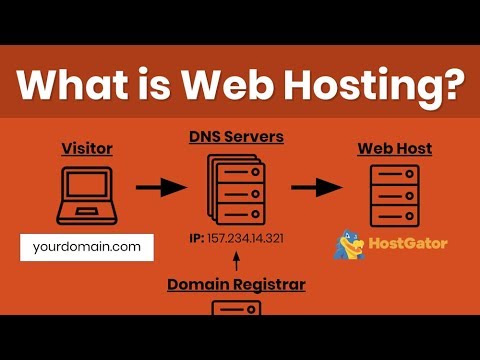
First, pick a catchy name for your website. Then, check if it’s available. Use a domain registrar to buy it. Keep it short and easy to remember. This is your website’s home on the internet.
A Content Management System (CMS) helps you build your site. Popular choices are WordPress and Joomla. Install your chosen CMS through your web hosting dashboard. Follow the step-by-step instructions. It’s easy and quick.
Create professional email accounts for your site. Use your domain name in the email address. This looks more professional. Access your web hosting control panel. Set up new email accounts. Check your email settings to ensure they work properly.
Websites need databases to store information. Use your hosting panel to create a database. This helps keep your site data organized. Choose a simple name for easy access. Connect your CMS to the database. Follow the instructions carefully.
Tips For Optimizing Web Hosting
Fast websites make users happy. Use lightweight images and compress files. This helps pages load quickly. Choose a fast server. It boosts speed too. Keep your site clean. Remove unused plugins and scripts.
Safety matters for websites. Use strong passwords to protect accounts. Always update software. Updates fix security holes. Install a firewall. It blocks bad traffic. Monitor your site. Look for strange activity. This keeps data safe.
Backups save your work. Make them often. Use automated tools for backups. They work without help. Store copies in safe places. This means you can restore lost data. Keep backup files secure. Protect them from hackers.
Check how your site runs. Use tools to watch speed. Track uptime. Downtime costs visitors. Analyze traffic patterns. See what users like. Find problem areas quickly. Fix them fast. This improves user experience.
Future Trends In Web Hosting
Green hosting uses renewable energy to power servers. It helps reduce the carbon footprint. Many companies are now choosing eco-friendly options. This trend is important for the planet’s health. Using less energy can save money too. Green hosting is a smart choice for the future.
AI makes web hosting tasks faster. Automation helps with server management. It can fix issues without human help. This means less downtime for websites. AI tools learn and improve over time. This leads to better performance and security.
Edge computing brings data closer to users. It makes websites load faster. This is great for people in different places. Edge computing can handle more data. It helps provide better experiences for users.
Serverless architecture means no need to manage servers. Developers can focus on building apps. It is a cost-effective solution. You only pay for what you use. Serverless is flexible and easy to scale.
Credit: www.youtube.com
Frequently Asked Questions
How Does The Web Hosting Work?
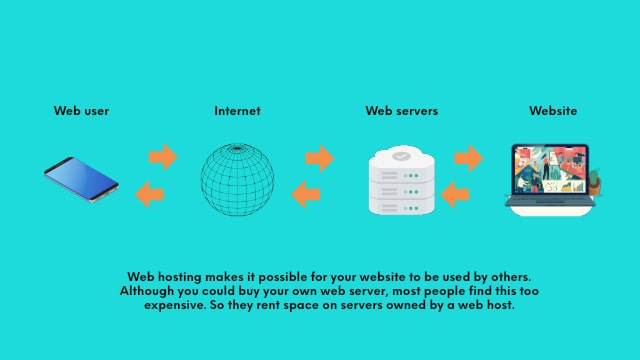
Web hosting stores website files on servers. These servers make your website accessible on the internet. Users access your site by entering your domain name in their browsers. Web hosting providers offer various plans, including shared, VPS, and dedicated hosting, to suit different needs and budgets.
How Do I Host My Own Website?
To host your own website, register a domain name, choose a web hosting provider, and upload your website files. Configure DNS settings, and ensure your site is secure with an SSL certificate. Regularly update your content and monitor server performance for optimal results.
Is Google Web Hosting Free?
Google does not offer free web hosting. Google Cloud provides hosting services with a pay-as-you-go model. Users can try it with a free tier that includes limited resources.
How Much Do I Pay To Host A Website?
Web hosting costs vary, starting from $3 to $300 per month. Prices depend on the hosting type, features, and provider. Shared hosting is cheaper, while dedicated servers cost more. Compare options to find the best fit for your budget and needs.
Conclusion
Web hosting shapes your online presence. It affects website speed and security. Choosing the right host ensures smooth performance. Reliable support keeps your site running. It’s crucial for businesses and blogs alike. Evaluate features that meet your needs. Consider uptime, bandwidth, and customer service.
Good hosting makes managing your site easy. Don’t rush the decision. Research and compare different options carefully. Your website’s success depends on solid hosting. Make sure you choose wisely. Investing time in finding the best host pays off. Your online journey starts here.
Keep your site accessible and efficient. Enjoy building your digital space.


