
Are you looking to elevate your WordPress site into a dynamic social hub? Integrating BuddyPress with your existing WordPress theme is your gateway to creating an engaging community platform.
Imagine transforming your website into a lively space where users can interact, share, and connect seamlessly. The process might seem daunting, but with the right guidance, you can smoothly incorporate BuddyPress without compromising the integrity of your current design. This article will guide you through simple steps to enhance your site’s functionality while maintaining its aesthetic appeal.
Ready to turn your WordPress theme into a vibrant social network? Keep reading, because you’re about to discover how easy it can be!
Understanding Buddypress
Buddypress is a plugin for WordPress. It helps create social networks. Buddypress makes community websites easy. Users can make profiles and join groups. They can also send messages. This makes sites more interactive.
Setting up Buddypress is simple. First, install the plugin. Then activate it. This adds new features to your site. New pages will appear. These pages include activity and members. You can also see groups and messages.
Themes are important. They change how your site looks. Buddypress works with many themes. Some themes need tweaks. Buddypress has built-in tools. These tools help fix theme problems. This ensures everything works well.

Credit: www.youtube.com
Benefits Of Integration
Integrating Buddypress with WordPress can make your website better. It adds social features. Users can create profiles. They can make connections with others. This can make your site a fun place to be.
Your website becomes a community hub. People can share thoughts. They can join groups. These features can keep visitors coming back. It can increase user engagement. This means people spend more time on your site.
Adding Buddypress is like giving your website a boost. It can help grow your audience. Your site can become more popular. People will talk about it. This is a good thing for any website owner. It makes your site more valuable.
Preparing Your WordPress Theme
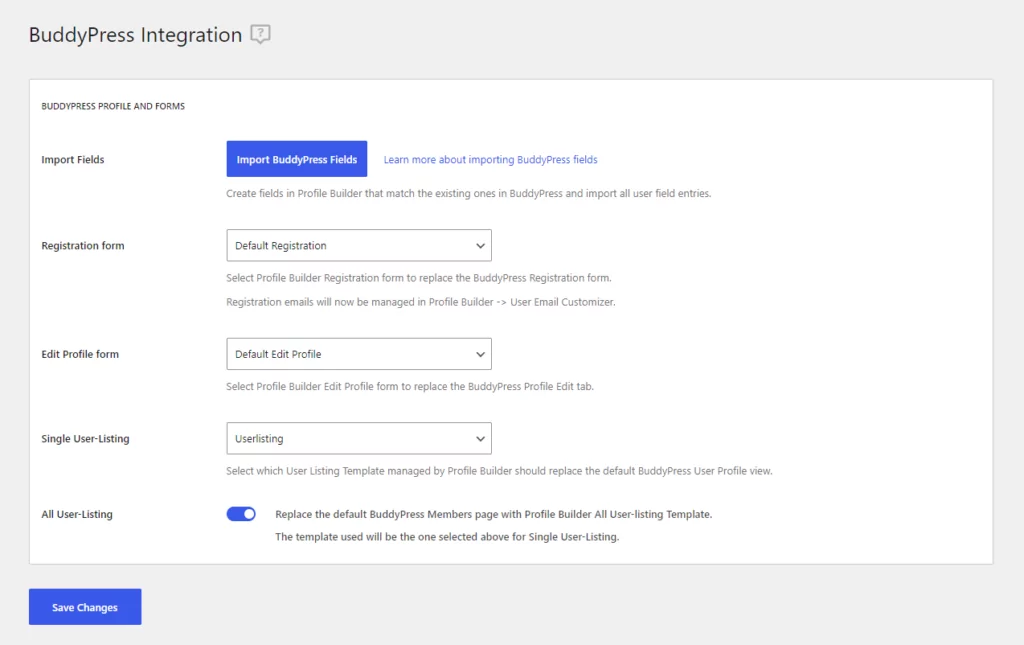
Checking theme compatibility is important for Buddypress integration. Not all themes work well. Some themes might break your site. Check the theme’s documentation. Look for Buddypress support. Visit forums to ask other users. They can share their experiences. Use a test site first. Ensure everything works smoothly. Avoid problems later.
Backing up your site is crucial before starting. Mistakes can happen. You might lose data. Use a backup plugin. Store your backup safely. You can use cloud storage. Make regular backups. Keep your data secure. Protect your hard work.
Credit: www.cozmoslabs.com
Installing Buddypress Plugin
Buddypress helps connect people on your website. First, download the Buddypress plugin. Open your WordPress dashboard. Navigate to the Plugins section. Click on Add New. In the search bar, type “Buddypress”. Find the plugin and click Install Now. Wait a few seconds for it to download.
Next, activate the plugin. Look for the Activate button. Click it. This step is important. It turns on the plugin. Now, your website is ready to be social. Buddypress adds social features to your site. Members can interact easily. They can create profiles. They can join groups. They can send messages. Your website becomes lively and engaging.
Configuring Buddypress Settings
User profiles are important for your site. Buddypress helps in creating these profiles. Users can add their name, picture, and more details. These profiles make your site interactive. Visitors will enjoy seeing who is on your site. Profiles help connect people. They are easy to set up.
Activity streams show what users do. They show posts, comments, and likes. Streams keep users updated. Buddypress makes streams easy to manage. You can choose what appears in the stream. Users will see the latest happenings. These streams make your site lively. They are fun to watch.
Notifications alert users about updates. Buddypress lets you customize these alerts. Users can choose how they get alerts. Notifications can be emails or messages. These alerts keep users engaged. They help users stay informed. Customizing notifications is simple. Users will appreciate timely alerts.

Credit: lifetimo.com
Adapting Your Theme
Integrating BuddyPress with your existing WordPress theme enhances your site’s social features. Start by ensuring compatibility between BuddyPress and your theme. Customize styles and templates to match your site’s design, creating a seamless user experience.
Using Buddypress Compatibility Pack
The Buddypress Compatibility Pack helps to integrate Buddypress into your theme. This tool ensures that all Buddypress pages look neat. It matches the design of your current theme. Just install the pack and follow the steps. It will guide you through the setup process. This makes sure everything looks good. Most themes will work well with the pack.
Tweaking Theme Templates
Sometimes, you need to tweak the theme templates. First, locate your theme files. Look for the ones related to Buddypress. Next, open these files in an editor. Check that everything aligns well. If something looks off, adjust the code. Small changes can make a big difference. Always make backups before editing. This keeps your site safe.
Testing The Integration
Checking for Functionality is important after integrating Buddypress with a WordPress theme. Ensure all features work correctly. Visit different pages. Test user profiles and groups. Verify notifications and messages function. Look for broken links or errors. Fix any issues promptly. This keeps users happy. It helps the site run smoothly.
Ensuring Responsive Design is vital. Check how the site looks on mobile devices. Use a phone or tablet to test. Make sure text and images fit well. Buttons should be easy to tap. Responsive design improves user experience. It also boosts accessibility. A good design works on all screens.
Troubleshooting Common Issues
Integrating BuddyPress with an existing WordPress theme can lead to compatibility issues. Ensure your theme supports BuddyPress features for smooth integration. Check plugin settings and update files to resolve layout problems.
Handling Plugin Conflicts
Buddypress can sometimes clash with other plugins. Deactivating plugins one by one helps find the problem. Check for updates. Often, updates fix bugs and compatibility issues. Prioritize essential plugins. Some plugins might not be necessary. Consult forums for advice. Many users share solutions there. Consider using a plugin conflict tester to identify problems quickly. Backup your site before making changes. This ensures you can restore it if things go wrong.
Resolving Theme Styling Issues
Buddypress may alter your theme’s look. Custom CSS can adjust styling conflicts. Use the WordPress customizer for minor changes. Inspect element tools show what’s wrong. Identify the CSS class causing the issue. Change styles as needed. Review child themes. They help keep styles consistent. Revert changes if they don’t work. Experiment with different settings. Seek help in community forums for specific style fixes.
Enhancing User Experience
Boost your WordPress theme with useful plugins. Plugins add features to your site. Some enhance user interaction. Others improve site performance. Use BuddyPress extensions to add more. Choose plugins that fit your needs. Test them to ensure they work well together.
Keep your plugins updated. Updates fix issues. They also add new features. Avoid using too many plugins. They can slow down your site. A few good plugins are better than many bad ones.
Speed is important for a good user experience. Fast sites keep visitors happy. Use tools to check your site’s speed. Make changes to improve it. Optimize images and reduce file sizes.
Use caching plugins to boost speed. They store data to load pages faster. Minimize the use of heavy scripts. Always test your changes. Ensure your site still works well. Fast and smooth sites attract more users.
Maintaining Your Buddypress Site
Integrating Buddypress with your WordPress theme enhances site functionality. Ensure compatibility by checking theme settings and plugins. Customize layouts to match Buddypress features seamlessly.
Regular Updates
Keeping your Buddypress site updated is crucial. Updates fix bugs and improve security. New features come with updates too. Always check for updates regularly. Ensure compatibility with your WordPress theme. Backup your site before updating. This prevents data loss. Updates make your site run smoothly.
Monitoring User Engagement
Understanding user engagement is key. It shows what users like. Track user activity on your site. Use analytics tools to get insights. Check which pages are visited most. Look at comments and user interactions. This helps you know users better. Adjust your content based on engagement. Engaged users stay longer and return often.
Frequently Asked Questions
How To Install Buddypress On WordPress?
To install BuddyPress on WordPress, go to your dashboard. Click on “Plugins” and then “Add New. ” Search for “BuddyPress,” click “Install Now,” and activate it. Follow the setup wizard to configure. This integration enhances your site with social networking features, making it more interactive.
Does Buddypress Work With Any WordPress Theme?
Yes, BuddyPress is designed to work with most WordPress themes. However, for optimal results, ensure your theme is BuddyPress-compatible. Some themes might require slight modifications to display all features correctly. Check your theme’s documentation or contact the developer for compatibility details.
What Are The Benefits Of Using Buddypress?
BuddyPress transforms your WordPress site into a social network. It allows user profiles, activity streams, and private messaging. This enhances user engagement and community building. By integrating BuddyPress, you can create a vibrant, interactive community around your existing WordPress site.
Can I Customize Buddypress Features?
Yes, BuddyPress is highly customizable. You can modify its features through plugins and custom code. Adjust settings in the BuddyPress settings panel to fit your needs. Use additional plugins to extend its functionality, ensuring your social network aligns with your site’s goals.
Conclusion
Integrating BuddyPress with your existing WordPress theme is straightforward. Start by ensuring compatibility. Check theme settings for BuddyPress support. Install necessary plugins. Customize the appearance to match your site’s design. Test the integration thoroughly. Ensure all features work seamlessly. User experience should remain smooth and intuitive.
Regular updates help maintain functionality. Stay informed about new features and improvements. This integration enhances your site’s community engagement. It offers a richer user experience. Enjoy building a vibrant online community. Your WordPress site can grow with BuddyPress. Happy integrating!


