
Imagine having a virtual space that’s all yours, where your website can live and thrive. That’s what web hosting offers you.
But how do you use it effectively? Whether you’re launching a blog, an online store, or a portfolio, understanding web hosting is key to getting your site up and running. You might wonder how it works, what choices you have, and how to make the right decisions.
Don’t worry; you’re about to discover the secrets to navigating web hosting with ease. This guide will unravel everything you need to know, step by step, empowering you to make the best choices for your needs. Dive in and unlock the potential of your website!
Choosing The Right Web Hosting Provider
Web hosting comes in different types. The most common are Shared Hosting, VPS Hosting, and Dedicated Hosting. Shared hosting means many websites share one server. It’s cheap, but sometimes slow. VPS hosting gives you a part of a server. More control and faster. Dedicated hosting means one server just for you. It’s expensive but very fast.
Think about your budget first. Shared hosting is cheap. Dedicated hosting costs more. Next, look at storage space. More space means you can store more files. Check the bandwidth too. It affects how much data you can send and receive. Always check customer support. Good support helps solve problems fast.
Setting Up Your Hosting Account
First, choose a unique domain name for your website. A domain name is your website’s address on the web. It’s important to pick a name that is easy to remember. Once you have decided, visit a domain registrar. Domain registrars are companies that sell domain names. You can search for available names there. Prices for domains can vary, so check several registrars before buying. After finding a suitable name, complete the purchase. You now own your domain.
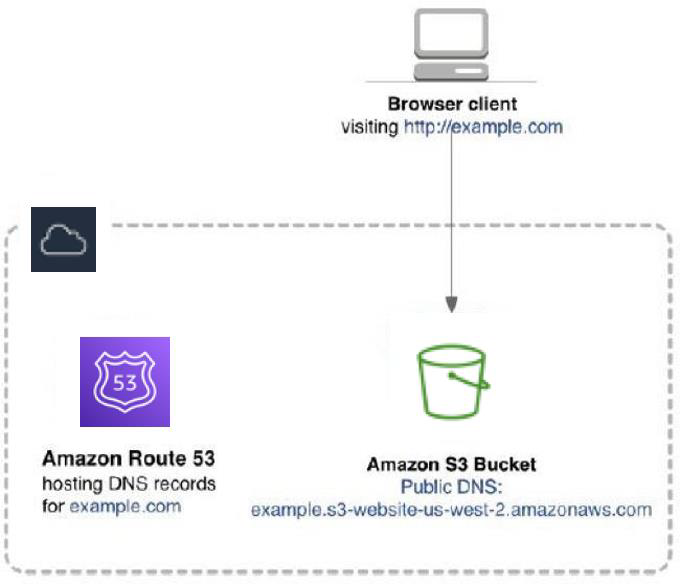
After buying your domain, configure its settings. Login to your registrar’s website. Find the domain settings section. Here, you can set up DNS records. DNS records help direct traffic to your website. You need to enter the nameservers provided by your hosting company. This connects your domain to your hosting account. Save the changes once you have entered the nameservers. It might take some time for changes to update. Then, your domain is ready to use with your hosting.
Uploading Your Website Files
FTP clients help move files from your computer to the web. FileZilla is a popular choice. Start by downloading and installing it. You will need your FTP login details. These are usually given by your host. Open the FTP client. Enter your server name, username, and password. Connect to your web server. You will see two panels. The left shows your computer files. The right shows your server files. Drag and drop files from left to right. This uploads your website files.
Web hosting control panels make file uploads easy. cPanel is the most common. Log in to your control panel. Look for the File Manager tool. Open it to see your web server files. Use the upload button to add new files. Choose the files from your computer. Click upload to transfer them. Your website is now live. Control panels also help manage your website. They offer many other features. Explore them to learn more.
Managing Databases
A database keeps your data safe. First, log into your web hosting account. Find the database section. Click on “Create Database.” Choose a name. Make it easy to remember. Next, set a strong password. Keep it secret. Your database is ready!
Your website needs to talk to the database. Use a connection script. Put in your database name. Add your username and password. This helps your website get the data. Test the connection. Make sure it works. If it does, your website is ready to go!
Securing Your Website
SSL certificates protect your website. They keep data safe. Hackers cannot steal information. Visitors trust websites with SSL. The browser shows a lock symbol. This means the site is secure. A site without SSL is risky. Users may leave. You can buy SSL from your web host. Some hosts offer free SSL. Always check before buying. Install SSL correctly. Follow the guide from your host. Make sure it covers all pages. This keeps everything protected.
Regular backups save your data. They protect against loss. Websites can crash. Hackers can attack. Backups help restore your site. You won’t lose important files. Choose a backup plan. Do it weekly or daily. Some hosts provide automatic backups. Check this feature. Always store backups safely. Use a different location. This ensures safety. Test your backup system. Make sure it works. This is very important. Backup files must be correct.
Credit: docs.aws.amazon.com
Optimizing Website Performance
Content Delivery Networks, or CDNs, help websites load faster. They store copies of your site on many servers. These servers are all around the world. Users can access your site from the closest server. This reduces loading time. Faster sites keep visitors happy. They are also good for search engines. CDNs are easy to use. They work with most websites.
Caching is like saving data for later. It makes websites faster. Browsers can store parts of your site. When users return, they see cached data. This means less waiting. Caching can happen on servers too. It helps with repeat visits. Fast sites are important. They keep users engaged. Caching saves time and resources. Set it up for better performance.
Troubleshooting Common Issues
Downtime is frustrating. Check your server status first. Most web hosts offer status pages. Confirm there are no outages. If the server is fine, inspect your own settings. Ensure your domain points to the correct IP address. Verify DNS settings are accurate. Sometimes, simple errors cause downtime. Restart your server if necessary. Often, a reboot solves minor issues. Contact support if problems persist. They can offer detailed help.
Broken links are bad for websites. They confuse visitors. Use a link checker tool. These tools find broken links fast. Update incorrect URLs. Ensure links point to the right pages. Check for typos in URLs. Even small errors cause links to break. Redirect old pages to new ones. This keeps traffic flowing smoothly. Regularly test links to prevent issues. Routine checks help maintain a healthy site.

Credit: www.godaddy.com

Credit: www.hostpapa.com
Frequently Asked Questions
How Do I Use Web Hosting?
Choose a reliable web hosting provider. Set up your domain and hosting account. Upload website files using FTP or a control panel. Manage settings through the hosting dashboard. Ensure regular backups and updates for security.
How Do I Host My Own Website?
To host your website, choose a domain name and purchase it. Select a reliable web hosting service. Upload your site files via FTP. Configure DNS settings to point your domain to the hosting server. Test your website to ensure it’s live and functioning properly.
How Does The Web Hosting Work?
Web hosting stores website files on servers, making them accessible online. Hosts provide space, support, and bandwidth for sites. Users access websites through browsers, connecting to the server. Different plans offer varied features, such as storage and speed, catering to diverse website needs.
Reliable hosting ensures smooth website performance.
Is Google Web Hosting Free?
Google does not offer free web hosting. Google Cloud provides hosting services, but they are paid. You can explore Google Sites for basic free website creation, but it lacks advanced hosting features. Google’s hosting solutions are suitable for businesses looking for scalable and reliable services.
Conclusion
Web hosting helps your website go live online. Choose a plan that fits your needs and budget. Many plans offer different features. Consider your website’s size and traffic. Understand basic hosting terms for better decisions. Use tutorials and guides available online.
Practice makes perfect. Experiment with settings to learn more. A reliable host ensures your site runs smoothly. Check reviews to find trusted providers. Good hosting boosts user experience. It’s crucial for website success. Start small and grow with your site.
Stay informed about updates and new features. Happy hosting!


