
Are you ready to give your WordPress site a fresh look? Installing a new theme can completely transform your website, enhancing both its aesthetics and functionality.
But here’s the catch: doing it the right way is crucial to avoid headaches down the road. If you’ve ever felt overwhelmed by the plethora of themes available or unsure about the steps to install them, you’re not alone. In this guide, you’ll learn the proper way to install a WordPress theme, ensuring smooth sailing and optimal performance for your site.
Stick around, because mastering this process will empower you to create a stunning online presence that stands out.
Choosing The Right Theme
Think about what you want your website to do. Is it a blog, an online store, or a portfolio? Each type needs a different theme. A blog needs a simple layout. An online store needs a theme with product pages. Pick a theme that fits your needs.
Responsive design is crucial. It makes your site look good on phones and computers. Many people use phones to browse the web. A responsive theme adjusts to screen size. This improves user experience and keeps visitors happy.
Look at theme reviews and ratings. Users share their thoughts about themes. High ratings mean the theme works well. Low ratings can signal problems. Read comments for more details. Choose a theme with good feedback for best results.
Downloading The Theme
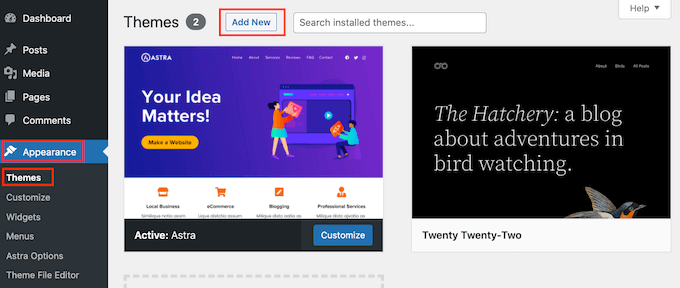
Find the WordPress Dashboard on your screen. Click on Appearance. Then select Themes. Hit the Add New button. You will see many themes. Choose one you like. Click on the Install button. Then, hit Activate to use it. Easy steps for everyone.
Visit a trusted theme vendor’s website. Choose a theme and pay for it. They will give you a download link. Click to download the theme file. It is usually a .zip file. Keep it safe on your computer. You will need it for the next steps.
Check if the theme works with your WordPress version. Read the theme details carefully. Some themes need special plugins. Make sure you have them. This avoids problems later. Always check for updates. Updated themes work better and are safer.
Installing The Theme
Discover the proper way to install a WordPress theme by accessing the dashboard. Navigate to “Appearance” and select “Themes. ” Click on “Add New,” upload your chosen theme, then activate it. Enjoy a fresh look for your site effortlessly!
Via WordPress Dashboard
First, open your WordPress Dashboard. Click on Appearance then Themes. Find and click the Add New button. You can search for a theme or upload one. To search, type the theme name into the search box. Click Install to get your theme. To upload, click the Upload Theme button. Choose your theme file from your computer. Click Install Now to proceed.
Using Ftp For Installation
Install an FTP client like FileZilla on your computer. Connect to your website server. Use your FTP login details. Navigate to the wp-content/themes folder. Upload your theme folder here. Ensure the theme folder is complete. Check if all files are uploaded. Close the FTP client after uploading.
Activating The Theme
Return to your WordPress Dashboard. Go to Appearance, then Themes. Find the new theme in the list. Click Activate to make it live. Check your website for any changes. Ensure everything looks good. Adjust settings if needed.
Credit: www.wpbeginner.com
Customizing Your Theme
Installing a WordPress theme requires careful attention. First, log in to your WordPress dashboard. Navigate to “Appearance,” then “Themes. ” Click “Add New,” then “Upload Theme. ” Choose your theme file and click “Install Now. ” Finally, activate your theme to see the changes.
Proper installation ensures a smooth, customized look.
Using The WordPress Customizer
WordPress Customizer lets you change your theme easily. You can edit colors, fonts, and images. It’s simple to use. Start by opening the Customizer tool. You can see changes instantly. This helps you choose the best look for your site. Make sure to save your changes.
Installing Necessary Plugins
Plugins add extra features to your theme. They can help with SEO, security, and design. Find plugins in the WordPress plugin directory. Install and activate them for best results. Some themes suggest certain plugins. Follow their advice for better theme performance. Always update your plugins regularly.
Adjusting Layout And Design
Layout affects how your site looks. You can change it to suit your needs. Arrange menus, widgets, and sidebars easily. Most themes offer layout options. Choose one that matches your style. Design elements like colors and fonts should be consistent. This keeps your site looking neat and professional.
Optimizing Theme Performance
Installing a WordPress theme correctly boosts site performance. First, choose a lightweight theme. Download from a trusted source. Next, install through the WordPress dashboard. Activate it. Finally, customize settings for optimal speed and functionality.
Minimizing Load Time
Fast websites are important. Users want quick access. Slow sites lose visitors. Choose a lightweight theme. Avoid themes with too many features. Use compressed images. Reduce image size. Clean code helps speed. Use caching plugins. They store data for quick access. Fast sites rank better.
Seo Best Practices
Good SEO attracts visitors. Use SEO-friendly themes. They should have clean code. Add meta tags for better search results. Use proper keywords. Keep content fresh. Update regularly. Use simple URLs. Avoid too many links. Fast sites help SEO. They rank higher. Search engines love speed.
Ensuring Mobile Friendliness
Mobile users are important. Many browse on phones. Choose a responsive theme. It adapts to screens. Test on different devices. Ensure buttons are large. They should be easy to tap. Mobile-friendly sites rank better. Google prefers them. Users stay longer. Happy users come back.
Credit: www.wpbeginner.com
Testing And Troubleshooting
Ensure all links are working. Click each link on your site. Look for 404 errors or broken pages. Fix these issues quickly. Use tools like Broken Link Checker. This tool helps find broken links. Keep your site healthy and user-friendly.
Common errors may include white screens or missing styles. Clear your browser cache. Sometimes this solves display issues. Check your theme settings. Ensure they are set correctly. If errors persist, deactivate plugins. Then reactivate one by one. Find out if a plugin is causing the problem.
Always look for theme updates. Updates fix bugs and improve security. Visit the theme developer’s site. Check for support options. Use forums or contact support if needed. Stay updated and informed. This keeps your site running smoothly.
Credit: www.wpzoom.com
Frequently Asked Questions
How Do I Choose The Right WordPress Theme?
Choosing the right WordPress theme involves considering your website’s purpose and target audience. Ensure it is responsive, SEO-friendly, and regularly updated. Check user reviews and ratings for insights. Opt for themes with customization options to suit your brand identity and design needs.
Can I Install A WordPress Theme Manually?
Yes, you can install a WordPress theme manually. Download the theme’s ZIP file first. Then, go to your WordPress dashboard, navigate to Appearance > Themes, and click ‘Add New’. Choose ‘Upload Theme’, select the ZIP file, and click ‘Install Now’ to complete the installation.
What Is The Best Way To Customize A Theme?
Customizing a theme is best done through the WordPress Customizer. Access it via Appearance > Customize in your dashboard. Use its options to change site identity, colors, menus, and widgets. For advanced customizations, consider using a child theme to safely modify code without affecting the original theme.
How Often Should I Update My WordPress Theme?
Update your WordPress theme whenever a new version is released. Regular updates ensure compatibility with WordPress core updates and plugins. They also address security vulnerabilities and improve performance. Always back up your site before updating to prevent data loss or compatibility issues.
Conclusion
Installing a WordPress theme can be simple and effective. Follow the steps carefully. Backup your site first. Choose a theme that fits your needs. Download it safely. Upload the theme through the WordPress dashboard. Activate it with one click. Customize the theme to match your style.
Check your site on different devices. Make sure everything looks good. Keep your theme updated for security. With these steps, your WordPress site will be ready. Easy to navigate and appealing to visitors. Enjoy your beautifully designed website!


