
Are you struggling with those pesky category titles in your WordPress free theme? You’re not alone.
Many WordPress users find themselves at a crossroads when they want a cleaner, more streamlined look for their website. Imagine visiting a site where everything is just as it should be, where every element feels intentional and nothing distracts from the content.
Sounds perfect, right? In this guide, we’ll show you how to hide those category titles without spending a dime. You’ll discover simple, effective strategies that can instantly enhance your site’s appearance and user experience. Stay with us, and unlock the secrets to a more polished WordPress site. Are you ready to transform your website into something truly spectacular? Let’s dive in!
Benefits Of Hiding Category Titles
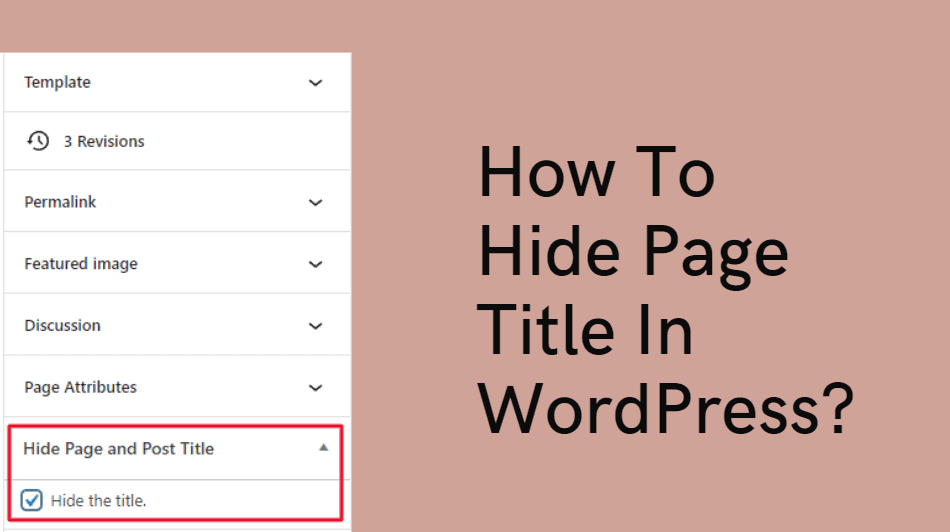
Many WordPress themes display category titles by default. Hiding category titles can make your website look cleaner. It helps users focus on content. Without extra titles, pages feel less cluttered. This can improve user experience.
SEO benefits may follow. Fewer distractions can lead to longer visits. Visitors stay longer when they find content easily. With longer stays, your site may rank higher. This can increase traffic.
Design flexibility is another advantage. Hiding titles gives more control over layout. You can create a unique design. It allows creativity in arranging content. Your website stands out more.
Credit: woostify.com
Choosing The Right Theme
Check if the theme supports category changes. Some themes may not allow this. Look for a theme that is flexible. It should let you make changes easily. Read the theme’s details before using it. This will save you time.
Customization options help in hiding category titles. Use the WordPress customizer. It is built-in and easy to use. Some themes have extra settings. These settings allow more changes. Try different options to see what works best.
Using Custom Css
Custom CSS offers a simple way to hide category titles in WordPress free themes. Add specific code to your theme’s stylesheet to remove unwanted titles. This approach helps maintain a clean and organized website layout without altering the core theme files.
Locating The Category Title Class
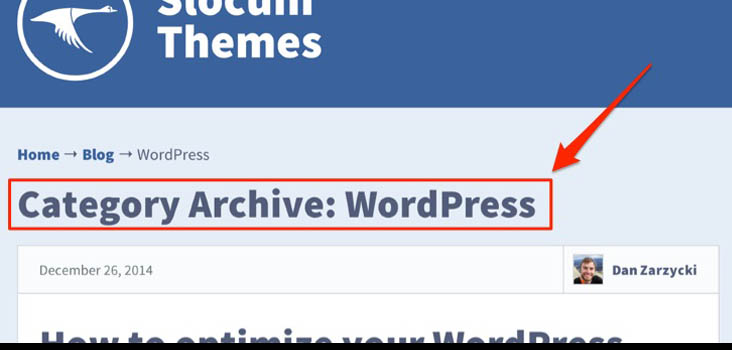
Find the class for the category title. Use the browser’s Inspect Tool. Right-click on the category title. Select “Inspect”. A panel will appear. Look for the class name. Write it down. This class name is important. It helps to hide the title.
Adding Custom Css In WordPress
Go to your WordPress dashboard. Find “Appearance” on the sidebar. Click on “Customize”. Look for “Additional CSS”. Click on it. A new box appears. Type the CSS code. Use the class name found earlier. Type: .your-class-name { display: none; }. Replace “your-class-name” with the right class. Click “Publish” to save.
Credit: slocumthemes.com
Using Theme Editor
Access the theme editor in WordPress to hide category titles in free themes. Navigate to the CSS section and add a simple code snippet. This quick change helps in creating a cleaner look for your website.
Accessing The Theme Editor
Start by logging into your WordPress dashboard. Navigate to the Appearance section. Click on Theme Editor. You might see a warning message. Ignore it for now. You are now inside the theme files.
Editing The Appropriate Files
Find the style.css file. This file controls the look of your site. Locate the category title code. It might look like .category-title. Add display: none; to hide the title. Save your changes. Refresh your website. The category title should be gone.
Utilizing Plugins
Many free plugins help hide category titles in WordPress. Category Specific RSS is a popular choice. Another is WP Hide Post. These plugins are free and easy to use. They save time and effort. No need to code.
First, go to the WordPress dashboard. Click on “Plugins”. Then, click “Add New”. Search for your chosen plugin. Click “Install Now”. After installing, click “Activate”. The plugin is now ready.
To configure, look for the plugin settings. Usually found under “Settings” in the dashboard. Adjust settings to hide the category title. Follow the plugin guide if needed. Enjoy a cleaner website!

Credit: gretathemes.com
Testing Changes
Before saving changes, check your site. Make sure the category title is hidden. Refresh your page often. Look for any errors or unexpected design changes. Keep checking the layout and color scheme. The goal is a clean appearance without category titles. If something looks wrong, fix it immediately.
Verifying Appearance
Review the site on different browsers. Each browser might show your site differently. Use Chrome, Firefox, and Safari. Ensure the site’s look is consistent across all browsers. Check the header and footer areas. These areas should remain unchanged without category titles.
Ensuring Mobile Responsiveness
Open your site on a mobile phone. The site should fit within the screen. Everything should be easily readable. Check all buttons and links. They should be easy to click. Test on different phones if possible. Make sure the site looks good on small screens. Mobile users should have a smooth experience.
Troubleshooting Common Issues
Easily hide category titles in WordPress free themes by tweaking theme settings or adding custom CSS code. This method improves your site’s appearance without altering core files, ensuring a seamless user experience.
Reverting Changes
Sometimes, changes don’t work well. If your site looks odd, try to undo. Go to your WordPress dashboard. Find “Appearance” and then “Customize.” Look for the “Additional CSS” box. Remove any codes you added. This should bring back the old look. Remember to save changes. Your website should now look normal again. Keep a backup next time to stay safe. It helps you avoid stress.
Seeking Support From Theme Developers
Can’t fix the problem? Ask your theme developers for help. Visit their website and find the support section. Send them a message with your issue. They know their theme best. They might have a quick solution. Be polite and clear in your message. Provide details of what you tried. This helps them understand better. They want you to have a good experience.
Frequently Asked Questions
How Do I Hide Category Titles In WordPress?
To hide category titles in WordPress, you can use custom CSS or a plugin. Navigate to Appearance > Customize > Additional CSS and enter your code. Alternatively, plugins like “Category Title Remover” offer a simple solution. Always preview changes to ensure they display as expected.
Can I Hide Category Titles Without A Plugin?
Yes, you can hide category titles without a plugin by using custom CSS. Go to Appearance > Customize > Additional CSS, then insert your CSS code. This method provides control and avoids potential plugin conflicts. Preview changes to ensure the titles are hidden correctly across your site.
Does Hiding Category Titles Affect Seo?
Hiding category titles typically doesn’t affect SEO if done correctly. Search engines focus on your content and meta information. Ensure your site structure and content remain intact. Use SEO plugins to manage meta data and improve your site’s visibility without worrying about hidden titles.
Is It Safe To Modify Theme Files?
Modifying theme files can be safe if done properly. Always create a child theme to prevent losing changes during updates. Backup your site before making edits. Use FTP or a file manager for access. Follow best practices to ensure your modifications don’t harm your site’s functionality.
Conclusion
Hiding category titles in WordPress free themes is simple. Follow the steps carefully. This makes your site look cleaner and more professional. You can create a better experience for your visitors. No coding skills? No problem. These steps are easy for everyone.
Customize your WordPress theme with confidence. Make your content stand out without the clutter. Try these methods today. Enjoy a tidy and organized website. Your audience will appreciate the clean look. Remember, a simple site often works best. Happy customizing and enjoy your WordPress journey!


