
Are you looking to launch your website but feel overwhelmed by the maze of web hosting options? Finding the right web hosting can make or break your online presence.
Imagine your website loading quickly, handling traffic smoothly, and remaining secure — that’s what good hosting can do for you. But how do you sift through the noise to find a service that truly meets your needs? You’re not alone in this quest, and that’s precisely why you’re here.
With countless options out there, you need a clear guide to help you make a decision. You’ll uncover the secrets to identifying reliable web hosting that aligns perfectly with your goals. We’ll simplify the complexities and arm you with the knowledge to make an informed choice. Ready to discover how to ensure your website’s success from the ground up? Let’s dive in!
Types Of Web Hosting
Shared hosting is where many websites share one server. It’s cheap and easy for beginners. Resources like CPU and memory are divided among all sites. If one site gets busy, it can slow others down. Ideal for small websites or blogs. It’s like sharing a bus with others; everyone uses the same space.
VPS stands for Virtual Private Server. It’s better than shared hosting. You get your own space. More control and power for your site. Not affected by other sites. Costs more than shared hosting. Perfect for growing sites. It’s like having your own cabin on a ship.
Dedicated hosting means you get a whole server just for you. It’s the best for big sites. Full control and high security. Expensive but very powerful. No sharing at all. It’s like owning a house, not sharing with anyone. Good for large businesses.
Cloud hosting uses many servers to host your site. Scalable and flexible. Can handle a lot of traffic. You pay for what you use. Reliable and fast. Good for websites with high traffic. It’s like having many people helping you at once.
Key Features To Consider
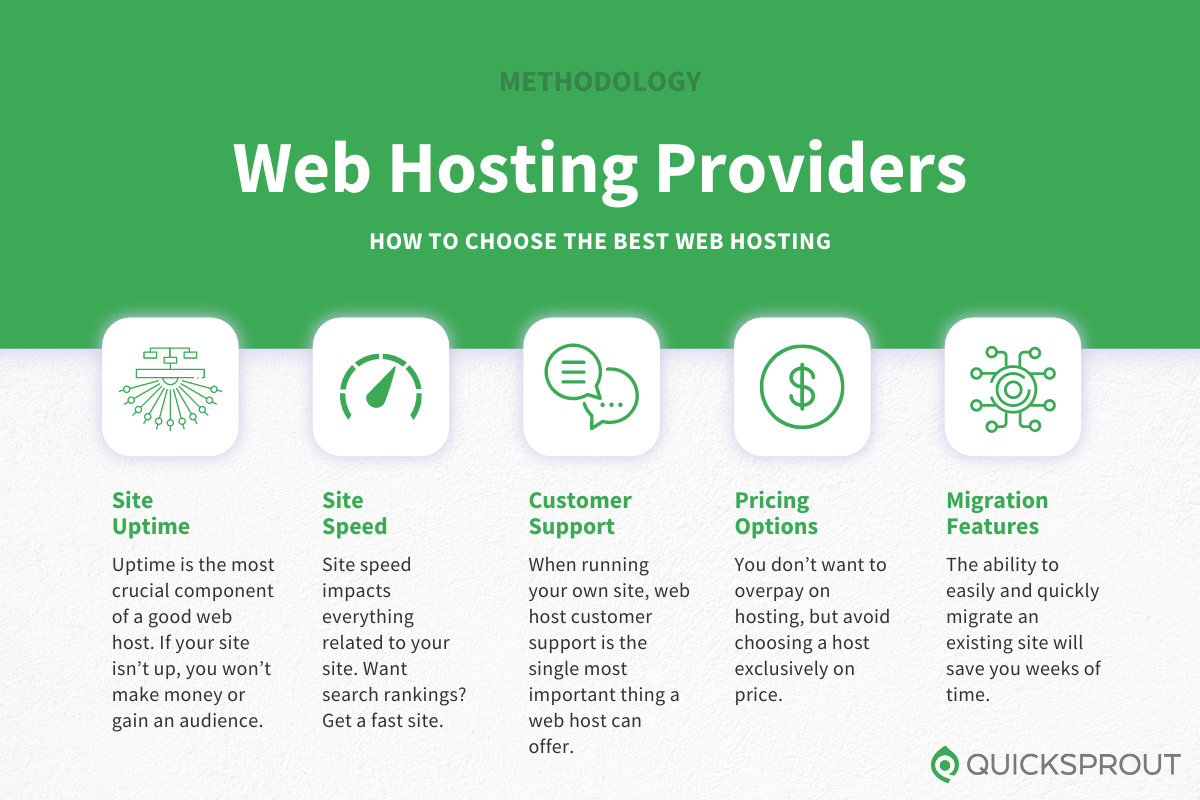
Always check the uptime of a web hosting service. Good hosts offer 99.9% uptime. This means your site is almost always online. Reliability is key for your visitors. A reliable host prevents site crashes.
Fast loading times keep visitors happy. Slow sites can make users leave quickly. Choose hosting with high performance. This ensures quick page loads and smooth browsing.
Good support helps solve issues fast. Look for 24/7 customer support. This means help is always there when needed. Friendly support teams are a big plus.
Websites grow and need more space. Scalability is important for future growth. Choose hosting that offers easy upgrades. This helps your website as it gets bigger.
Budget And Pricing
Web hosting costs can vary a lot. Some hosts offer low prices upfront. But read the details. Some prices go up after a year. Monthly payments might seem cheaper. But yearly plans often save money. Look for discounts and offers. Some hosts give extra services for free.
Watch out for hidden fees. Some hosts charge for setup. Others might charge for backups. Check if there are renewal fees. These fees can be high. Some hosts charge for extra storage. Or for more email accounts. Make sure to read the terms. Ask the host about all costs.
Low cost isn’t always best. Check the features offered. Some hosts give more for a bit more money. You might get better support. Or more storage and bandwidth. Look for a balance. A little extra can mean better quality. Choose what’s important for your site.

Credit: www.godaddy.com
Security Measures
SSL certificates are crucial for a secure website. They encrypt data, keeping user information safe. This builds trust with visitors. Browsers show a padlock icon for SSL-enabled sites. This reassures users their data is protected.
Firewalls block unwanted traffic. They act like a security guard. Firewalls stop hackers from accessing your site. They also filter harmful content. This keeps your website safe and sound.
Backups save copies of your site. If a problem happens, you can restore it. Regular backups mean your data is never lost. They are essential for disaster recovery. Make sure backups are done frequently.
User-friendly Control Panels
cPanel and Plesk are easy to use. They help in managing websites. Both have simple interfaces. With cPanel, you can manage files, emails, and databases. It is very popular among users. Plesk is another choice. It supports both Linux and Windows. You can control many sites with it. Both offer great features. They make tasks easier for users. Learning them is simple. Many guides are available online.
Some hosts create custom panels for users. They are unique to each company. These panels are designed to be easy. They may lack some features of cPanel or Plesk. But they still work well. They can be good for beginners. Custom panels often include help guides. They are built to make hosting simple. You can explore them without much trouble.

Credit: www.accuwebhosting.com
Performance Optimization
Content Delivery Networks, or CDNs, help websites load faster. They store website files in many places. This way, users get them from a nearby server. CDNs make websites quick and smooth. Users don’t like waiting for pages to load. Faster websites keep visitors happy and engaged. Popular CDNs include Cloudflare and Akamai. They help distribute content efficiently. This reduces load times for global users.
Caching mechanisms store parts of web pages. This makes them load faster later. They keep data handy for quick access. This saves time and resources. Cached data reduces server load. Websites perform better this way. Visitors enjoy faster navigation. Caching is essential for large sites. It helps manage heavy traffic. Different types of caching exist. Browser caching and server caching are common examples.
Reputation And Reviews
Customer reviews show the truth about a company’s service. Happy clients often leave positive feedback. Negative reviews reveal problems. Consistent complaints are a warning sign. Check multiple websites for reviews. Look for repeated issues in the comments. Reliable hosts usually have many good reviews.
Industry awards show a host’s quality. Awards mean experts trust the host. Recognitions are given for good service. Popular hosts often win more awards. Look for awards in service and support. Awards for innovation show a host is modern. Check the award dates. Recent awards are more meaningful.
Credit: www.quicksprout.com
Trial Periods And Money-back Guarantees
Many hosting companies offer trial periodsmoney-back guarantee
It’s wise to check customer reviews. These show real experiences. See if others found the trial helpful. Ensure the company has a good reputation
Technical Specifications
Storage is where your website files live. It should be enough for your needs. Most sites need at least 10 GB. More is better for growth. Bandwidth is the data transferred from your site to users. High traffic needs more bandwidth. Unlimited plans are best if you expect lots of visitors.
Web hosting must support common languages. These include PHP, Python, and JavaScript. They help your website work well. Check if your host supports the languages you need. It is important for your site’s function.
Most sites need a database to store information. MySQL is a popular choice. Some hosts offer other options like PostgreSQL or SQLite. Choose a host with the database your site requires. This ensures it runs smoothly.
Frequently Asked Questions
How To Choose The Best Web Hosting?
Consider uptime reliability, customer support, and pricing. Evaluate bandwidth, storage, and scalability options. Read user reviews and check for security features.
How Much Should I Pay Someone To Host My Website?
Website hosting costs vary between $5 to $300 monthly. Shared hosting is cheaper, while dedicated servers cost more. Choose based on your needs and budget. Consider factors like storage, bandwidth, and support. Compare prices across providers to find the best deal.
Which Web Hosting Is Best For Beginners?
Bluehost is ideal for beginners, offering user-friendly interfaces and 24/7 support. It provides free domain registration, one-click WordPress installation, and competitive pricing. Their intuitive dashboard makes website management easy for newcomers. Bluehost’s reliability and performance make it a top choice for starting your online journey.
Is Godaddy A Good Website Host?
GoDaddy offers reliable hosting with various plans. It’s suitable for beginners and small businesses. Users appreciate its uptime and customer support. Some find it slightly expensive compared to competitors. It provides easy-to-use tools and a user-friendly interface. Assess your specific needs to determine if it’s the right fit.
Conclusion
Choosing the right web hosting is crucial for your website’s success. Good hosting means fast loading times and reliable service. It helps your site rank better on search engines. Don’t rush the decision. Consider your website needs and budget. Research different hosting providers.
Read reviews and compare features. Look for good customer support and uptime guarantees. A solid hosting choice can improve your site’s performance and user experience. Make an informed decision and watch your website grow. Your effort in finding good web hosting will pay off in the long run.


