
Are you ready to turn your passion for web hosting into a thriving business? With WordPress, you can.
Imagine having the power to create and manage your own web hosting company, all from the comfort of your home. It’s not just a dream; it’s a reality that you can achieve. Whether you’re a tech enthusiast or a budding entrepreneur, starting a web hosting business with WordPress is simpler than you think.
By the end of this article, you’ll discover how easy it is to set up, manage, and grow your hosting business. You’ll gain insights into the tools and strategies you need to succeed. So, why wait? Dive in and unlock the potential to transform your skills into a profitable venture. Let’s get started on this exciting journey together!
Choosing The Right Hosting Provider
Shared hosting is cheap and good for beginners. VPS hosting gives more control and is faster. Dedicated hosting is pricey but offers full control. Cloud hosting is flexible and scalable. Each type has its benefits and drawbacks.
Think about cost and your budget. Consider speed and performance. Check for security features. Look at customer support quality. Evaluate the ease of use of their control panel. Consider the scalability options for growth.
| Provider | Features |
|---|---|
| Bluehost | Great support, easy setup |
| SiteGround | Reliable, strong security |
| HostGator | Affordable, scalable plans |
| DreamHost | Customizable, good uptime |
Setting Up WordPress
First, download WordPress from the official site. Make sure to choose the latest version. Upload it to your web server. Use an FTP client for this step. Next, create a database for WordPress on your server. Now, run the installation script by accessing the URL in your web browser. Follow the on-screen instructions. Fill in details like site title and admin username. Keep your password safe and secure.
Start by visiting the settings menu in the dashboard. Set your site title and tagline. Choose the right time zone for your location. Pick a format for dates and times. Enable or disable comments based on your preference. Check your permalink settings for URL structure. This helps with SEO. Save changes to apply your settings.
Install plugins to enhance your site. Use plugins like Yoast SEO for search engine optimization. Add security plugins like Wordfence. Consider a caching plugin like W3 Total Cache for speed. Contact Form 7 is great for forms. Choose plugins wisely, as too many can slow down your site. Keep them updated for best performance.
Designing Your Website
Starting a web hosting business with WordPress offers simplicity and flexibility. Choose reliable hosting providers for seamless performance. Customize your site with user-friendly themes and plugins to enhance functionality and design.
Choosing A Theme
Pick a theme that matches your brand. Many themes are free. Some themes cost money. A good theme is simple and clean. It makes your site look nice. Look for themes that are easy to use. You can change themes later if needed.
Customizing The Layout
Make your site look the way you want. Use the customize option in WordPress. Change colors and fonts. Move things around. Add or remove widgets. Keep the layout neat and tidy. It helps visitors find what they need.
Branding And Visual Elements
Add your logo and brand colors. This helps people know your site. Use the same colors everywhere. Add nice pictures to your site. Pictures should match your brand. Keep the style consistent across all pages.
Building Service Packages
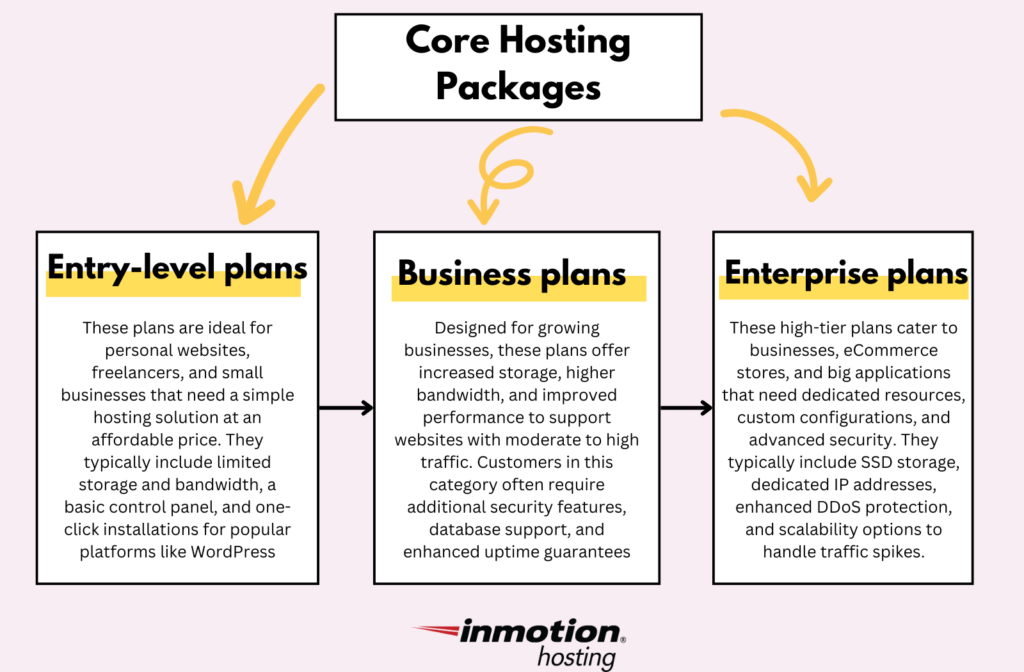
Web hosting plans come in many types. Shared hosting is for small sites. VPS hosting is for medium sites. Dedicated hosting is for big sites. Each type serves different needs. Choose based on site size and traffic. Consider the budget too.
Pricing is important for a hosting business. Start with simple prices. Offer a basic plan at a lower cost. Add a premium plan for more features. Think about discounts for longer terms. Monthly and yearly options can attract more customers.
Extra services can make your offer better. SSL certificates keep data safe. Daily backups protect site content. Offer 24/7 support for quick help. These services add value. Customers like extras with their hosting plans.
Marketing Your Hosting Business
Starting a web hosting business with WordPress is straightforward and efficient. WordPress offers user-friendly tools to manage hosting services easily. Customize your website and attract clients with its versatile features.
Creating An Online Presence
Building a strong online presence is vital. Start by designing a clean website. Use WordPress for easy management. Add engaging content regularly. Include a blog section. Share hosting tips and news. This attracts visitors and keeps them coming back. Optimize your site for search engines. This helps people find your business easily. Use keywords wisely.
Seo Strategies
SEO is key for visibility. Use clear and simple keywords. They should match what people search. Add these to your website content. Include them in titles and descriptions. This improves search rankings. Also, focus on site speed. Fast websites rank better. Make sure your site is mobile-friendly. More users use phones to browse. Check your website’s security too.
Social Media Engagement
Engage with users on social media. Create profiles on popular platforms. Share content from your blog. Respond to comments quickly. Ask questions to encourage interaction. This builds a community around your brand. Use social media ads to reach more people. They help grow your audience. Monitor social media trends. Adapt your strategy accordingly.
Credit: www.isitwp.com
Managing Client Relationships
Building strong client relationships is key in a web hosting business using WordPress. Ensure reliable service and clear communication. Address client needs quickly to maintain trust and satisfaction.
Customer Support Tools
Effective tools help clients. Use live chat for quick help. Email is great for detailed questions. FAQs can solve common issues. Support tickets keep track of problems. These tools build strong connections. Clients feel heard and valued.
Building Trust And Reliability
Trust comes from being reliable. Always deliver on promises. Keep communication open and honest. Share updates regularly. Clients appreciate transparency. Trust grows with each positive interaction. Reliability is key to long-term success.
Handling Feedback
Feedback helps improve services. Listen carefully to client opinions. Thank them for their thoughts. Use their suggestions wisely. Make changes if needed. Show clients you care about their ideas. Happy clients will stay loyal.
Scaling Your Business
Starting a web hosting business with WordPress involves selecting a reliable hosting provider. Install WordPress for easy website management. Customize your platform to attract clients.
Expanding Service Offerings
Adding new services can help your business grow. You could offer domain registration. Or maybe site maintenance. Clients may need custom website designs. Think about their needs. Offer what they find valuable. This can attract more customers. Happy clients often tell others. This can bring even more business.
Automating Processes
Automation saves time. Use tools to manage client billing. Automate email responses to common questions. It helps in reducing errors. This means more time for important tasks. Automate backups to keep sites safe. This makes work easier and faster. Your team can focus on other tasks.
Partnership Opportunities
Working with others can be beneficial. Partner with web designers. They may send clients your way. Team up with software companies. Offer their products to your clients. It can be a win-win. Both businesses can grow together. Always choose partners that align with your goals.

Credit: www.youtube.com
Credit: www.inmotionhosting.com
Frequently Asked Questions
How To Start A WordPress Hosting Business?
Choose a reliable hosting provider and purchase a reseller hosting plan. Set up a WordPress hosting platform with WHMCS. Customize your plans, pricing, and branding. Use marketing strategies to attract customers. Offer excellent customer support to retain clients.
How Do You Start Your Own Web Hosting Company?
To start a web hosting company, research the market and choose a niche. Secure reliable server infrastructure. Develop a user-friendly website. Offer competitive pricing and robust customer support. Market your services effectively to attract clients.
How Much Does It Cost To Host A Website With WordPress?
Hosting a WordPress website costs between $3 to $25 per month. Prices vary based on hosting providers and features. Shared hosting is cheaper, while managed hosting is pricier. Additional costs may include domain registration and premium themes or plugins. Always compare providers to find the best deal for your needs.
Can I Use WordPress For A Business Website?
Yes, WordPress is perfect for business websites. It offers customizable themes, plugins, and SEO-friendly features. Easily manage content, enhance functionality, and improve visibility. WordPress supports e-commerce, blogs, portfolios, and more, ensuring a professional online presence. It’s user-friendly and scalable, suitable for small businesses and large enterprises alike.
Conclusion
Starting a web hosting business with WordPress is achievable. WordPress offers flexibility and ease. You can manage websites efficiently. Choose reliable hosting services. Ensure your site loads quickly. Focus on user-friendly designs. Offer responsive support to customers. Keep your business secure with updates.
Market your services wisely. Use SEO to reach more clients. Build trust with quality service. Grow your business steadily. Success takes time and effort. Stay committed to your goals. Enjoy the journey of entrepreneurship.


