Transferring your web hosting and domain can seem daunting at first, but with the right guidance, it becomes a smooth process. Imagine having complete control over your website’s performance, security, and reliability.
You might be dissatisfied with your current hosting service or perhaps you’re searching for better features and pricing. Whatever the reason, understanding how to effectively transfer your hosting and domain is crucial. This guide is here to help you navigate the complexities with ease, ensuring that your website experiences minimal downtime and remains accessible to your audience.
Ready to unlock the secrets to a seamless transition? Let’s dive in and discover how you can successfully transfer your web hosting and domain, empowering your online presence.
Choosing A New Web Host
Start by listing your website needs. How much storage does your site need? Consider the amount of traffic you expect. Think about any special features you need. Security is important too. This will help choose the best host.
Check different hosting providers online. Read reviews from other users. Look at the uptime they offer. A good host should have at least 99% uptime. Find out if they offer customer support. It should be available 24/7. Compare prices but don’t choose the cheapest right away.
Look at different hosting plans. Some offer shared hosting. Others offer dedicated servers. Shared hosting is cheaper. Dedicated servers give more control. Cloud hosting is a new option. It’s scalable and can grow with your needs. Choose a plan that fits your budget and needs.
Backing Up Website Data
cPanel is a great tool for backups. First, log into your cPanel account. Find the Backup Wizard or Backup section. Click on it. You can download a full backup. It saves all your website data. This includes files and databases. Save the backup file to your computer. It’s your website’s safety net.
Some people prefer manual backups. Use an FTP client like FileZilla. Connect to your server. Download all website files. Don’t forget your databases. Use phpMyAdmin to export them. Keep these files safe. Manual backups need more time. But they give you control.
Store backups in a safe place. Use an external hard drive. Or store them in the cloud. Google Drive or Dropbox are good options. Make sure they are secure. Protect your data. Keep backups updated. Check them regularly. This ensures you have the latest version.
Transferring Domain Name
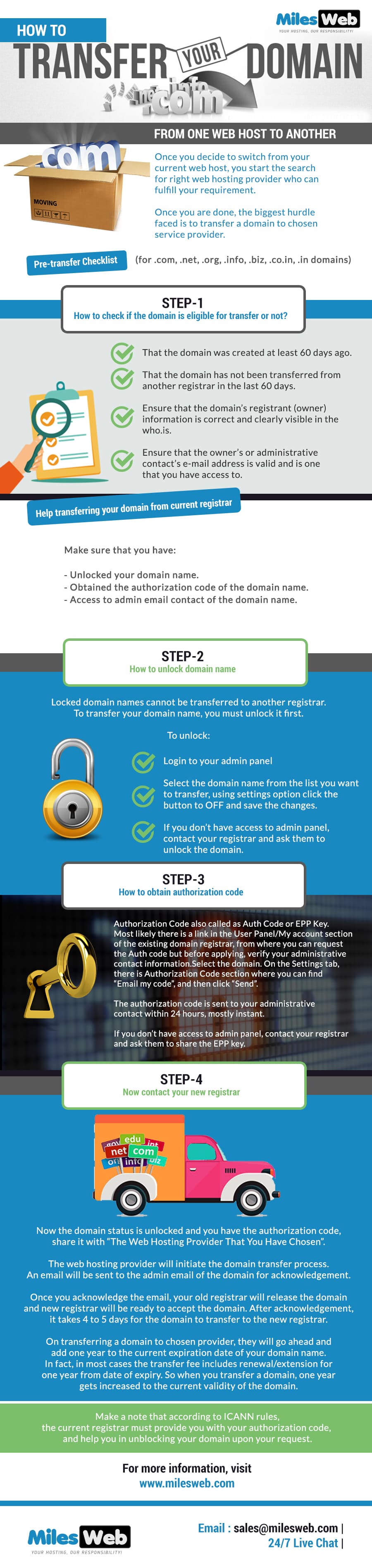
First, log into your domain registrar account. Find the domain you want to transfer. Look for the lock icon or option. Click to unlock the domain. This step allows the transfer process to start.
The EPP code is also called the authorization code. This code is essential for transfer. Check your account dashboard. Find the option to request the EPP code. Sometimes it is sent to your email. Keep this code safe and secure.
Visit the new registrar’s website. Start the transfer process there. Enter your domain name and EPP code. Follow the steps they provide. You might need to confirm by email. The process takes a few days. Be patient and check your email often.

Credit: www.seoclerk.com
Migrating Website Files
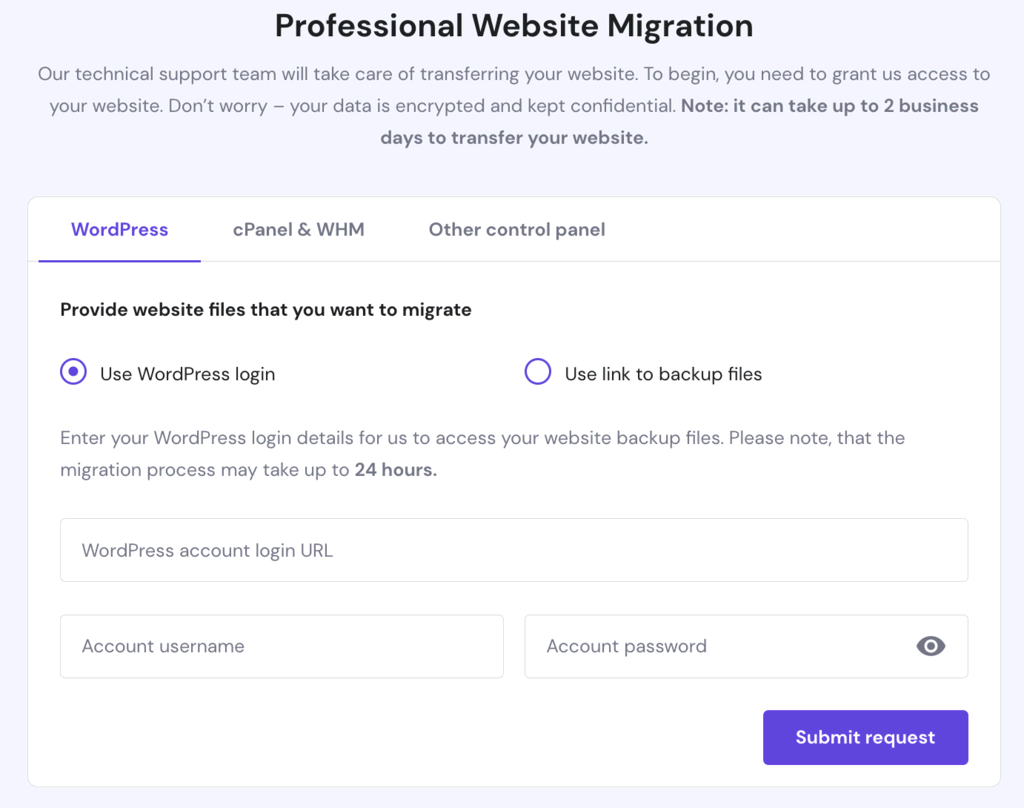
Start by gathering all the website files from the old host. Use an FTP client to download them. Once downloaded, connect to the new host using FTP. Upload the files to the new server. Make sure you place them in the correct directory. Double-check each file to ensure none are missing. File names should match exactly.
Create a new database on the new host. Use the same name as the old database. Import the database backup into the new database. Update the configuration file on the new server. Ensure it points to the new database. Check all settings like username and password. These must match the new database.
Visit your website on the new host. Check if pages load correctly. Click on all links and buttons. Ensure they work as expected. Verify images and videos display properly. Test forms and other interactive elements. Fix any errors or issues you find. Make sure the site looks the same as before.
Updating Dns Settings
Changing DNS records is easy. First, log into your hosting panel. Find the DNS section. Look for your current DNS records. Delete old records that point to the old server. Add new records that point to your new server. Always save changes after updates. It ensures DNS records are correct.
DNS changes need time to update. This process is called propagation. It can take up to 48 hours. Check frequently to see if changes are active. Use online tools for checking. They show if the DNS is active worldwide.
Verification is important. It tells if DNS changes are correct. Use DNS lookup tools to verify. Enter your domain name. Check if it shows the new server. If yes, the update is successful. If not, check your settings again. Make sure everything is correct.
Credit: www.milesweb.com
Checking Website Performance
Site speed is very important. A slow site can lose visitors. Fast websites keep users happy. Use tools to check speed. Look for load times. Aim for 3 seconds or less. Test regularly for changes.
Security keeps your site safe. Use strong passwords. Update software often. Monitor for threats and hacks. Look for strange activity. Secure connections are a must. Use SSL certificates.
Migrations can have issues. Check links and paths. Test all pages after moving. Fix broken links quickly. Check database for errors. Ensure all files are in place.
Canceling Old Hosting Service
Transferring web hosting and domain involves a few simple steps. First, back up your website files and databases. Then, update DNS settings to point to the new host. Cancel the old hosting service once the site is stable on the new platform.
Notifying Old Host
First, tell your old host about your plan. This means sending them an email or calling them. It’s important to be clear. Tell them the exact date you want to cancel. This helps avoid future bills. They might ask why you are leaving. Be honest but polite.
Ensuring Data Deletion
Check that all your data is safe. You should have backups of everything. Ask the host to delete your data from their servers. This keeps your information private. Deleting data is very important. It prevents unwanted access later.
Finalizing Cancellation
After notifying and ensuring data deletion, focus on canceling the service. Make sure you have no pending bills. Check if there’s a cancellation fee. Some hosts charge this fee. Confirm your account is closed. This stops any future payments. Double-check everything to avoid surprises.
Credit: www.hostinger.com
Frequently Asked Questions
How To Transfer Domain And Hosting?
To transfer a domain, unlock it, obtain the authorization code, and initiate the transfer with your new registrar. For hosting, back up your website, move files to the new host, and update DNS settings to point to the new server.
Ensure both transfers are complete before canceling old services.
How Do I Transfer My Web Hosting From One Company To Another?
Transfer web hosting by backing up files, updating DNS settings, and importing data to the new host. Confirm site functionality.
Can I Change My Host And Keep My Domain Name?
Yes, you can change your host and keep your domain name. Update your domain’s DNS settings to point to the new host. Contact your domain registrar for guidance. Ensure you backup your website data before the switch. This maintains your online presence seamlessly.
Can I Transfer My Domain Name To Another Provider?
Yes, you can transfer your domain name to another provider. Ensure your domain is unlocked and obtain an authorization code. Follow your new provider’s transfer instructions to complete the process. Check for any fees associated with the transfer before proceeding.
Conclusion
Transferring web hosting and domain can seem challenging. But with the right steps, it’s manageable. Start by choosing a reliable provider. Then, back up your data. Next, update domain settings with the new provider. Check everything twice. Ensure your website works perfectly.
Don’t rush the process. Patience is key. Remember, help is available online. Many guides and forums offer support. Follow instructions carefully. With time, you’ll master the transition. Your website will run smoothly. Enjoy the benefits of a successful transfer. Keep learning.
Stay informed. Your website deserves the best care.