
Have you ever wondered how websites like your favorite online store or news site are always available when you need them? The answer lies in something called web hosting services.
Understanding how these services work can feel a bit like deciphering a secret code. But don’t worry, I’m here to simplify it for you. Imagine a web hosting service as a virtual landlord, providing the space and technology your website needs to go live on the internet.
Curious about how this digital ecosystem supports your browsing experience? Stick around to uncover the fascinating mechanics that keep the web running smoothly, and you’ll find out why choosing the right web hosting service is crucial for your online presence.

Credit: blog.emb.global
Web Hosting Basics
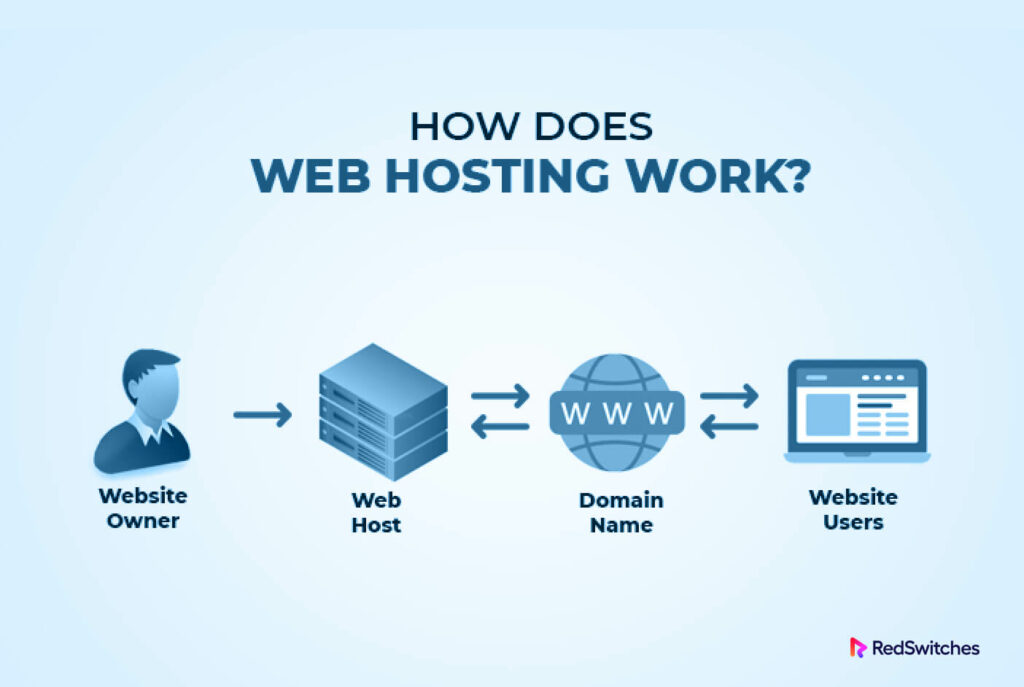
Web hosting lets websites be seen online. Imagine a big computer that stores your website files. This computer is called a server. Servers send files to people’s browsers. Every time someone visits a site, the server works hard. It delivers images, text, and videos.
Hosting companies own these big servers. People pay them to keep websites online. Hosting can be shared or dedicated. Shared hosting means many sites on one server. Dedicated hosting means one site per server. Dedicated is safer but costs more.
Hosting provides space and power. Space is measured in megabytes or gigabytes. More space means more room for files. Power affects site speed. Speed is important for visitors. Slow sites lose users. Hosting keeps sites fast and safe.
Types Of Web Hosting
In shared hosting, many websites use one server. This means you share resources like CPU and RAM. It is the most cost-effective option. It is perfect for small websites. But, it can be slow if traffic is high. Security might also be a concern. Ideal for beginners with low traffic.
VPS stands for Virtual Private Server. You get a part of a server just for you. This offers more control and better performance. It costs more than shared hosting. It is suitable for medium-sized websites. Customization is possible with VPS. You can manage your own software.
Dedicated hosting gives you a whole server. No sharing with others. It offers the best performance and security. It is ideal for large businesses. The cost is high, but worth it for big sites. You have full control over the server. Best for websites with heavy traffic.
Cloud hosting uses many servers. This means better reliability and scalability. If one server fails, another takes over. It is good for websites with changing traffic. Pay only for what you use. It is flexible and can handle big spikes in visitors. Ideal for growing businesses.
Key Components Of Web Hosting
Web hosting needs powerful servers to store your website. These servers are like big computers. They are kept in special buildings called data centers. Data centers have strong internet, cooling, and power. They keep the servers safe. Without them, websites can’t work.
A domain name is your website’s address. People type it to find your site. It’s like a home address but online. Each domain name is unique. It helps people remember your site. Without a domain name, your site is just numbers.
Websites need bandwidth to send information. It’s like a road for data. More bandwidth means more visitors can come. Storage is where your files live. Every picture, text, or video needs space. Enough storage keeps the site running smoothly.

Credit: www.hostinger.com
The Hosting Setup Process
Picking a hosting provider is the first step. Many companies offer hosting services. Look for reliability and good customer support. Cost is important too. Compare prices and features. Some providers offer extra benefits. These include free backups or security features.
Domain registration is crucial. You need a unique name for your website. Check if your desired name is available. Register it through your hosting provider. This connects your domain to your hosting account. Your website address is now ready for use.
Website deployment means uploading your files online. Use tools like FTP to transfer files. Hosting providers often have easy upload systems. After uploading, test your site. Ensure everything works well. Make changes if needed. Your site is now live for visitors.
Security Measures In Hosting
SSL Certificates make websites safe. They protect user data. Hackers cannot steal information easily. Your website shows a padlock symbol. This means it is secure. Users feel safe when they see this.
Firewalls act like a shield. They block unwanted traffic. They keep bad things out. Your website stays safe. Firewalls stop hackers from entering. They protect your data every day.
Regular Backups save copies of your data. If something goes wrong, you can restore it. You won’t lose important information. Backups help in emergencies. They are very important for safety.
Credit: blog.gotmyhost.com
Performance Optimization
Understanding web hosting services is crucial for performance optimization. Servers store your website’s files and data, enabling access online. Efficient hosting ensures quick load times and reliable user experiences, impacting site performance significantly.
Cdn Integration
CDN stands for Content Delivery Network. It helps websites load faster. CDNs store copies of your site in different places. This reduces the time it takes for users to access your site. Fast loading sites keep visitors happy. They also improve your site’s search rankings.
Caching Strategies
Caching saves data for future use. It makes sites load quickly. Browser caching stores data on your computer. Server caching keeps data on the server. Both methods help improve performance. They reduce the need to reload data each time.
Load Balancing
Load balancing spreads user requests across servers. It prevents any server from being overloaded. This ensures your site runs smoothly. Balanced loads mean better performance. It helps manage large amounts of traffic effectively.
Managing Hosting Services
Control panels are tools for managing hosting accounts. They help users organize files, set up email accounts, and manage databases. Popular control panels include cPanel and Plesk. These panels make tasks easier.
Technical support is crucial for hosting services. They assist with server issues and website problems. Support is available through phone, chat, or email. Quick help keeps websites running smoothly.
Scaling resources means adjusting server power. It helps handle more visitors or data. Users can add more RAM or storage. This ensures websites stay fast and efficient.
Future Trends In Web Hosting
Exploring how web hosting services operate reveals future trends in technology. Web hosting involves storing websites on servers, making them accessible online. Innovations like cloud computing and AI are shaping this digital landscape, promising faster and more efficient services.
Green Hosting
Green hosting uses less energy. It helps the planet. Renewable energy powers these servers. This means less pollution. Hosting companies plant trees too. This makes the air cleaner. Choosing green hosting is a smart move. It saves our environment. It’s good for future generations.
Ai And Automation
AI helps with many tasks. It fixes problems fast. Automation saves time. It runs updates by itself. No need for human help. This makes hosting smooth. It helps websites run better. Websites stay fast and safe with AI. It’s like having a robot helper.
Edge Computing
Edge computing is new. It brings data closer. This means faster loading. Devices talk to each other quickly. No more long waits. It’s great for games and videos. People see content instantly. Edge computing helps websites be speedy. It’s all about speed and efficiency.
Frequently Asked Questions
How Does A Web Hosting Service Work?
A web hosting service stores website files on servers, making them accessible via the internet. It ensures websites run smoothly and reliably. Hosting plans vary in storage, bandwidth, and features. Users choose plans based on their site’s needs. Hosting providers offer support and maintenance for optimal website performance.
How Much Does Web Hosting Cost Per Month?
Web hosting costs vary from $2 to $50 per month. Prices depend on hosting type, features, and provider. Shared hosting is cheaper, while VPS and dedicated servers cost more. Compare different options to find the best fit for your needs.
Consider reliability, customer support, and scalability when choosing.
Can I Run My Website Without Hosting?
You can’t run a website without hosting. Hosting provides the necessary storage and server space. Your website files need a server to be accessible online. Consider free or paid hosting options for your needs.
How Does Web App Hosting Work?
Web app hosting stores your app on servers, allowing users to access it via the internet. Hosts provide server space, manage security, and ensure uptime, enhancing user experience. Choose between shared, VPS, or dedicated hosting based on your app’s needs.
Reliable hosting supports scalability and performance.
Conclusion
Web hosting is the backbone of online presence. It stores website data securely. Without it, websites cannot be accessed online. Choosing the right hosting is crucial. It impacts speed, security, and reliability. Shared hosting suits beginners. Dedicated hosting offers more control.
Cloud hosting provides scalability. Each type has unique benefits. Consider your needs and budget. Research thoroughly before deciding. A good host ensures smooth performance. Keep your website accessible and secure. Understand hosting basics to make informed choices. Build a strong online foundation.
Your website’s success depends on solid hosting. Make the right choice today.


