
Are you looking to make your Web API accessible to users around the globe? Hosting your Web API on an IIS Server might be the perfect solution for you.
It’s reliable, scalable, and can handle multiple requests with ease. But if you’re unsure where to start, don’t worry. This guide will walk you through the entire process, step-by-step. You’ll discover the secrets to a smooth deployment and ensure your API runs seamlessly.
By the end of this article, you’ll feel confident in your ability to host a Web API on an IIS Server, unlocking new possibilities for your application and its users. Dive in and transform the way you deliver your services today.

Credit: www.dotnetcurry.com
Setting Up Iis
Install IIS through the Windows Features. Open Control Panel. Find Programs. Click Turn Windows features on or off. Check the Internet Information Services box. Click OK. Wait for the installation.
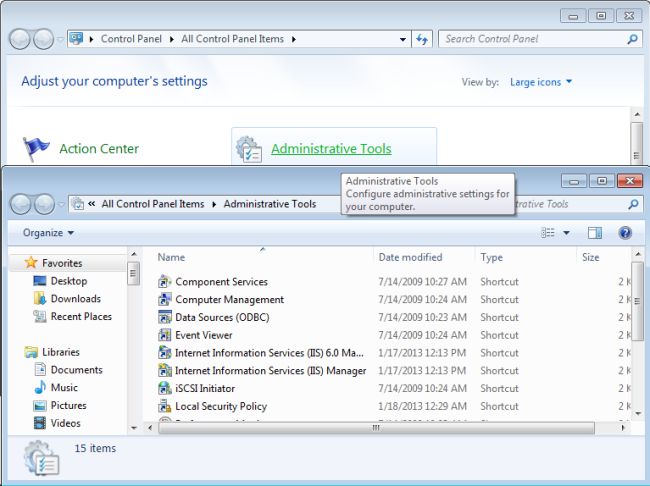
Open IIS Manager. Find the Sites section. Click on Add Website. Enter a name for the site. Set the physical path. Choose Binding type. Select IP Address and Port. Click OK to finish. Your site is now ready.
Preparing Web Api
Start by opening your favorite IDE. Visual Studio is a great choice. Create a new project. Choose Web API template. Follow the prompts to set up your project. Ensure all dependencies are installed. This will help your API run smoothly.
After building, publish the Web API. In Visual Studio, right-click the project. Select Publish. Choose the folder as the destination. This creates the necessary files. These files are needed for deployment. Make sure to check the settings before publishing. It ensures everything is configured right.
Deploying Web Api To Iis
First, open IIS Manager on your server. Find Sites in the sidebar. Right-click and select Add Website. A new window appears. Enter your website name. Set the physical path to your Web API folder. Choose a binding type, like HTTP or HTTPS. Enter your hostname, if needed. Click OK to create your site.
Navigate to Application Pools in IIS Manager. Right-click and select Add Application Pool. Type a name for your pool. Choose the .NET CLR version that matches your API. Set the pipeline mode to Integrated. Click OK to create the pool. Link the pool to your site under Basic Settings.
Configuring Iis For Web Api
URL routing helps direct requests to the right part of your web app. It’s like a map for your website. Set up routing in the web.config file. This file tells IIS how to handle different URLs. You can add rules to this file. Rules guide IIS on where to send each request. Make sure your rules are clear and simple. This helps IIS understand them easily.
HTTP bindings connect your website to a domain name. They also use ports to manage traffic. Open IIS Manager to set up bindings. Click on the site you want to manage. Choose “Edit Bindings” from the menu. Add new bindings for each domain or subdomain. Always check the port numbers. Make sure they are not already in use.
Testing Web Api On Iis
Accessing the Web API is simple. Open your browser. Type in the URL. Use the format http://localhost/WebApiName. Replace WebApiName with your API name. Press enter. Your API page should load. See your data or functions there. It’s like browsing a website.
Troubleshooting Common Issues can be tricky. Sometimes the API won’t load. Check if IIS is running. Make sure your application pool is active. Ensure the right framework is selected. Double-check your firewall settings. They might block requests. Use the IIS logs. They can show errors. Fix errors with correct settings. Restart IIS to see changes.
Credit: www.c-sharpcorner.com
Securing Web Api
Deploying a Web API on an IIS server enhances security and performance. First, configure IIS to host your API. Ensure SSL is active to protect data during transmission.
Implementing Ssl
SSL keeps your data safe. It uses strong encryption. Hackers can’t read your data. It travels securely over the internet. Always use SSL for web APIs. It is very important. SSL protects user information. It builds trust with users. Your API should have a valid SSL certificate. This ensures safety and security.
Setting Authentication Methods
Authentication checks who is accessing your API. It makes sure only the right people use it. You can use token-based authentication. This is popular and secure. Tokens are easy to handle. They are small and efficient. Users must have valid tokens. This ensures they are genuine. Another method is API keys. They are simple and effective. API keys are like passwords. Only people with keys can access the API. This keeps your API safe.
Optimizing Performance
Caching helps your Web API run faster. Store data that doesn’t change often. This saves time and resources. Use in-memory caching for quick data access. It keeps frequently-used data ready. For bigger data, use distributed caching. It helps when you have many servers. Always balance caching to avoid stale data.
Keep an eye on your Web API. Monitoring shows you how it works. Use tools to watch its performance. They alert you when things go wrong. Logging records important events. It helps find problems later. Logs store details about errors and requests. Use them to improve your API. Regular checks keep your API healthy.

Credit: learn.microsoft.com
Frequently Asked Questions
Can Web Api Be Hosted In Iis?
Yes, you can host a Web API in IIS. It provides a reliable and scalable environment for web applications. Ensure proper configuration to enable seamless API deployment and management.
How To Host A Web Service On Iis?
To host a web service on IIS, install IIS via Control Panel. Deploy your web application. Configure the application pool and site settings. Bind your site to a domain or IP. Ensure firewall settings allow access. Test the setup in a browser to confirm functionality.
How Do I Host My Web Api?
Host your Web API using a cloud service like AWS or Azure. Choose a server setup, configure settings, and deploy. Ensure security measures, monitor performance, and manage updates regularly for optimal functionality.
How To Deploy Api On Server?
Deploy an API on a server by installing necessary dependencies. Configure server settings for security. Use Git for version control. Deploy using Docker or similar tools. Test API endpoints thoroughly. Monitor performance and troubleshoot issues promptly.
Conclusion
Hosting a Web API on an IIS server is straightforward. Follow the steps in this guide. First, set up your server environment. Ensure all necessary configurations are correct. Next, deploy your Web API application. Use IIS Manager for this process.
Finally, monitor the server. Check for any issues that may arise. Regular maintenance is crucial for performance. Now, you’re ready to host your Web API efficiently. Implement these steps carefully. Enjoy the benefits of a well-hosted Web API. Your application will run smoothly on IIS.


