
Imagine having a brilliant web application ready to showcase to the world, but unsure of how to make it accessible to users. Hosting your web application is the key step that transforms your project from a local setup on your computer to a live platform available across the globe.
Have you ever wondered how Netflix, Amazon, or even your favorite online game becomes available at the click of a button? It’s all about hosting. Getting your web application hosted might seem daunting, but it’s simpler than you think. By understanding the hosting process, you can ensure that your application runs smoothly, efficiently, and securely.
You’ll discover the essential steps and options available for hosting your web application, empowering you to make informed decisions that align with your goals. Let’s dive in and unlock the potential of your digital creation.
Web Hosting Basics
Web applications are hosted on servers where they are stored and made available online. Hosting involves uploading files to a server, which then displays the application to users via the internet. This process ensures that web applications run smoothly and are accessible anytime.
Types Of Web Hosting
Web hosting is like renting space on the internet. Shared hosting means many websites use one server. It is often cheaper. But, it can be slower if many sites get busy. Dedicated hosting gives one website its own server. This means faster speeds. But, it costs more money. It’s good for big websites with lots of visitors.
Shared hosting is like sharing a bus ride. Dedicated hosting is like having a private car. Both have their own benefits. Choosing depends on your needs and budget. Think about how much traffic your site gets. And how much money you want to spend.
Domain Name System (dns)
DNS is like a phone book for the web. It helps find websites. Every website has a special number called an IP address. DNS matches names to these numbers. This makes it easy to find websites. Without DNS, we would need to remember long numbers. That would be hard.
Configuring DNS is setting it up correctly. First, you need a domain name. This is like a website’s name. Next, connect the domain to the web host. This is where your website lives. Use DNS settings to link them. This helps people find your web application easily. Always make sure the DNS settings are correct. Mistakes can make the website hard to find.
Server Configuration
Choosing the right operating system is key for hosting. Many choose between Linux and Windows. Linux is free and open-source. It is popular for web servers. Windows is user-friendly and has good support. Both systems have their own strengths. Consider the needs of the web application. Choose the one that fits best.
Server software helps run web applications. Apache and Nginx are common choices. Apache is powerful and flexible. Nginx is fast and uses fewer resources. Both are great for hosting websites. Match the software to the web app’s needs. Ensure smooth operation and performance.
Deployment Process
The code must be clean. It should be free of errors. Organize the files well. Use version control. It helps track changes. Test the code thoroughly. Ensure it works fine. Fix any bugs quickly. Optimize the code for speed. Keep it simple. Make it easy to read. Check compatibility with servers. Ensure it runs smoothly. Compress files if needed. This saves space. Double-check everything. Be sure it’s ready to go.
Start by choosing a server. It should be reliable. Upload the code there. Use FTP or SSH. Ensure all files are present. Configure the server settings. Set permissions correctly. Test the app again. Make sure it runs. Look for any errors. Fix them quickly. Set up a backup plan. Protect your data. Check the app’s performance. Ensure it is fast. Monitor it regularly. Keep it updated. This keeps users happy.
Security Measures
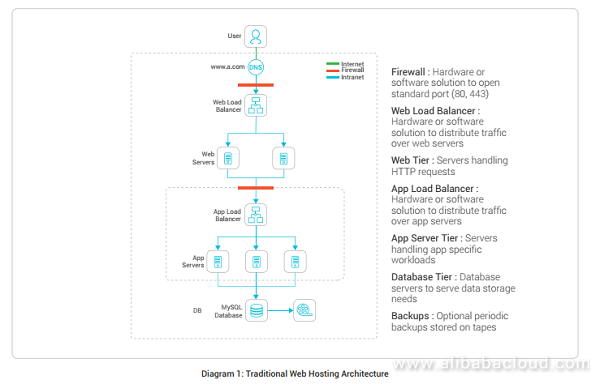
Web applications require robust security measures for safe hosting. Protect data with firewalls and encryption. Regular updates and backups enhance security.
Ssl Certificates
SSL Certificates are vital for web safety. They encrypt data between the server and user. This protects sensitive information from hackers. Websites with SSL show a padlock icon in the browser. Users feel safe with this icon. SSL certificates boost trust in your web application. They are crucial for secure transactions online.
Firewall And Security Protocols
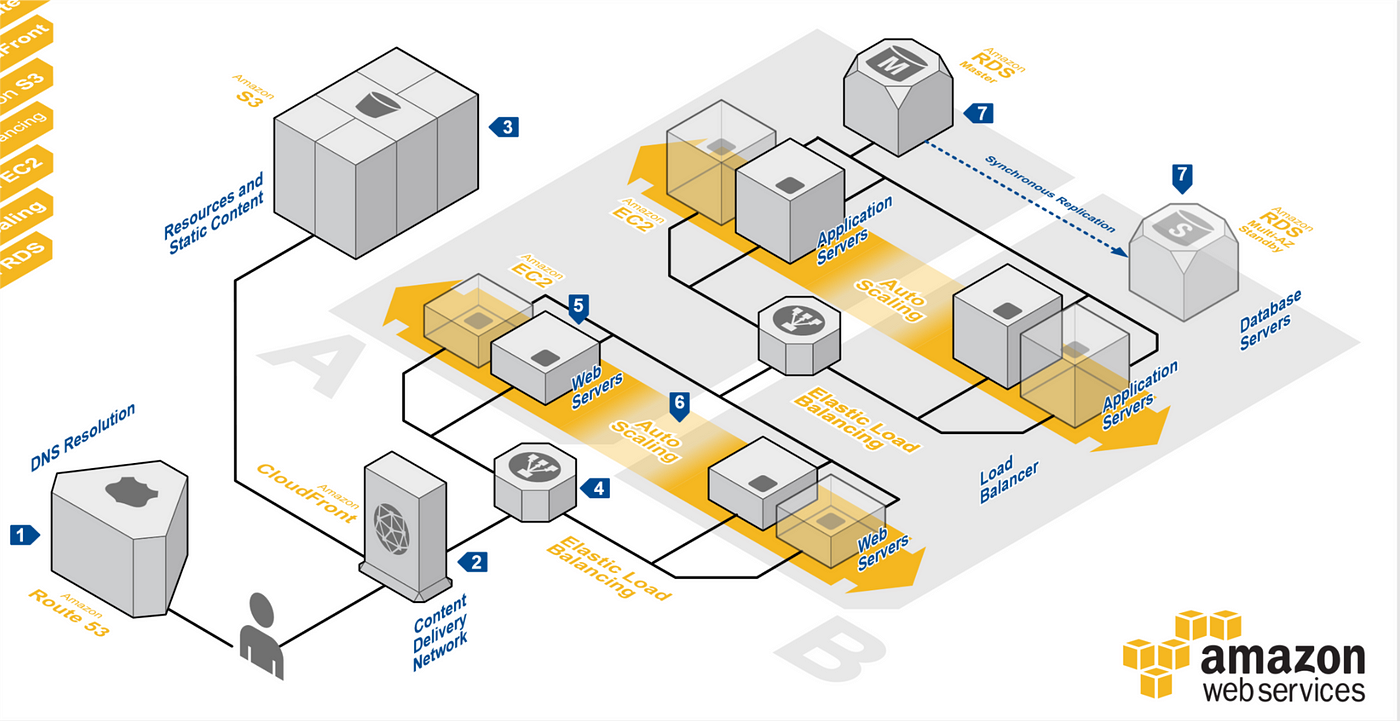
Firewalls act as barriers against harmful traffic. They block unauthorized access to your web application. Security protocols strengthen this protection. They ensure safe data transfer between users and the server. Regular updates keep firewalls effective. Strong security measures prevent data breaches. Protecting user data is a top priority.
Credit: medium.com
Performance Optimization
Web apps need speed. Caching helps save time. It stores data for quick access. Memory caching is fast. It keeps data close. Disk caching is larger. It saves more data. Both boost performance. Database caching reduces load. It speeds up queries. Page caching saves whole pages. Users get them faster. API caching stores responses. This saves server resources. Caching is like a shortcut. It makes web apps run smoothly.
Load balancing keeps apps running. It spreads work across servers. Round-robin method cycles requests. Each server gets a turn. Least connections sends requests to less busy servers. IP hash uses client IP. It connects them to the same server. Weight-based balance uses server power. Strong servers get more work. Balancing avoids overload. It makes apps fast and reliable.
Monitoring And Maintenance
Web applications require constant monitoring and maintenance to ensure smooth hosting. Regular updates help keep the application secure. Efficient troubleshooting minimizes downtime and enhances user experience.
Tracking Performance Metrics
Tracking is important. Web apps need to work fast. Slow apps lose users. Speed is key. Monitoring tools help track performance. They show how well the app runs. Errors must be fixed quickly. Downtime is bad. Users want apps that work all the time. Tracking tools send alerts. Alerts warn about problems. Fix problems fast. Happy users stay longer.
Regular Updates And Backups
Updates keep apps fresh. New features are added. Bugs are fixed. Security is improved. Backups save app data. Data loss is bad. Backups help recover lost data. Regular updates are good for apps. They keep apps safe. Updates make apps better. Backups protect data from being lost. Regular backups are important. Apps need both updates and backups.
Credit: www.alibabacloud.com
Scalability Considerations
Vertical scaling means adding more power to a single server. Think of it as upgrading your computer’s hardware. It is simple but has a limit. You can’t upgrade forever. Horizontal scaling is adding more servers. Like spreading work across many workers. This can handle more users. It is more flexible. Yet, it may need more management.
Cloud providers offer scalable solutions. They can add or remove servers as needed. This helps in handling more users smoothly. Services like AWS, Azure, and Google Cloud offer these options. They make scaling easy and fast. You pay for what you use. This is cost-effective. It helps businesses grow without much hassle.

Credit: medium.com
Frequently Asked Questions
What Is The Best Hosting For A Web Application?
The best hosting for a web application often includes options like AWS, Google Cloud, or Azure. These platforms provide scalability, reliability, and robust security. Consider your specific needs and budget to choose the most suitable option.
How Is A Website Hosted?
A website is hosted by storing its files on a server. Web hosting providers offer these servers and services. Choose a suitable hosting plan, upload your website files, and connect your domain. The server makes your website accessible on the internet, ensuring it runs smoothly and remains secure.
Where Are Web Applications Hosted?
Web applications are hosted on servers managed by cloud providers, data centers, or dedicated hosting services. Popular options include AWS, Google Cloud, and Azure. These platforms offer scalability, security, and reliability, ensuring optimal performance for web applications. Hosting choice depends on budget, performance needs, and user traffic expectations.
How To Host A Web Application Locally?
Install server software like XAMPP or WAMP. Configure settings for your web application. Place files in the server’s root directory. Start the server and access your application via localhost in a browser.
Conclusion
Hosting a web application involves several steps. Choose a reliable hosting provider. Ensure your server is secure and scalable. Use a domain name that’s memorable. Regularly update your application for security and performance. Monitor your server’s uptime and speed. Backup data to avoid loss.
These steps keep your application running smoothly. Understanding this process helps you make informed decisions. Your application’s success depends on smart hosting choices. With careful planning, your web app can reach its full potential. Stay focused and keep learning. Your journey in web hosting is just beginning.


