
Switching your web hosting company can feel like a daunting task. You might worry about losing your data or experiencing downtime.
But what if I told you it’s easier than you think? Imagine having a faster, more reliable website that enhances your user experience. This could lead to more visitors, more conversions, and ultimately, more success for your online presence. You deserve a hosting service that meets your needs without stress or hassle.
Ready to learn how to make the switch smoothly and efficiently? Let’s dive into the step-by-step process that will empower you to change web hosting companies with confidence.
Reasons To Switch Hosting Providers
Websites need fast loading times. Slow sites can lose visitors. Changing hosts can fix this. Some hosts have better customer service. Good support helps solve problems quickly.
Security is important. Some hosts offer more protection than others. A secure site keeps data safe. Pricing can vary. Finding a cheaper host saves money. Saving money is always good.
Sometimes, hosts offer more features. Extra tools can help manage your site. Better tools can make tasks easier. Switching can improve your website experience. Choosing the right host is key.
Evaluating New Hosting Options
Fast loading times matter. Websites should load in seconds. Slow sites lose visitors. Server speed is crucial. Reliable uptime keeps sites running. Check for 99% uptime or more. Bandwidth affects how much data flows. More visitors need more bandwidth. Storage is for files and data. Large sites need more storage. Choose hosting that meets these needs.
Good support helps solve issues fast. 24/7 service is best. Problems can happen anytime. Live chat and phone support are handy. Email support is good for less urgent issues. Check reviews for support quality. Happy customers mean good service.
Compare prices carefully. Cheaper plans may lack features. Monthly plans offer flexibility. Annual plans may save money. Check for hidden fees. Some hosts charge extra for features. Free trials help test services. Make sure the plan fits your budget.
Preparing For The Move
Always make sure to backup your website files and data. This is important to keep your content safe. You can use tools like cPanel or FTP to download your files. Save them on your computer or a cloud service. Check if you have all the files you need. Missing files can cause problems later. Remember, a good backup is your safety net.
Find out who your domain registrar is. This is the company where you registered your website name. You might need to update your DNS settings during the move. Write down the important details. Keep your domain registration information safe. It is like your website’s ID card. You need it to make changes and updates.
Credit: diggitymarketing.com
Choosing The Right Hosting Plan
Picking the right hosting plan is very important. You need enough storage for your website. Ensure bandwidth is high if you get many visitors. Check if the plan includes security features. Security keeps your data safe. Look for customer support. Good support helps if you have problems. Compare prices of different plans. Some are cheap but lack features. Others are expensive with many benefits.
Think about the type of website you have. Personal blogs need less storage. Business sites may need more. Consider how many email accounts you get. Some plans offer many. Others offer few. Always read reviews from other users. Reviews show if a plan is good or bad. Take your time and choose wisely.
Transferring Your Website
Start by saving your files. Use an FTP program. This helps move files from your old host. Download all files from the server. Don’t miss any. Next, back up your database. Use a database tool to export data. Save it safely. You will need it later. Check all files and data. Make sure nothing is missing.
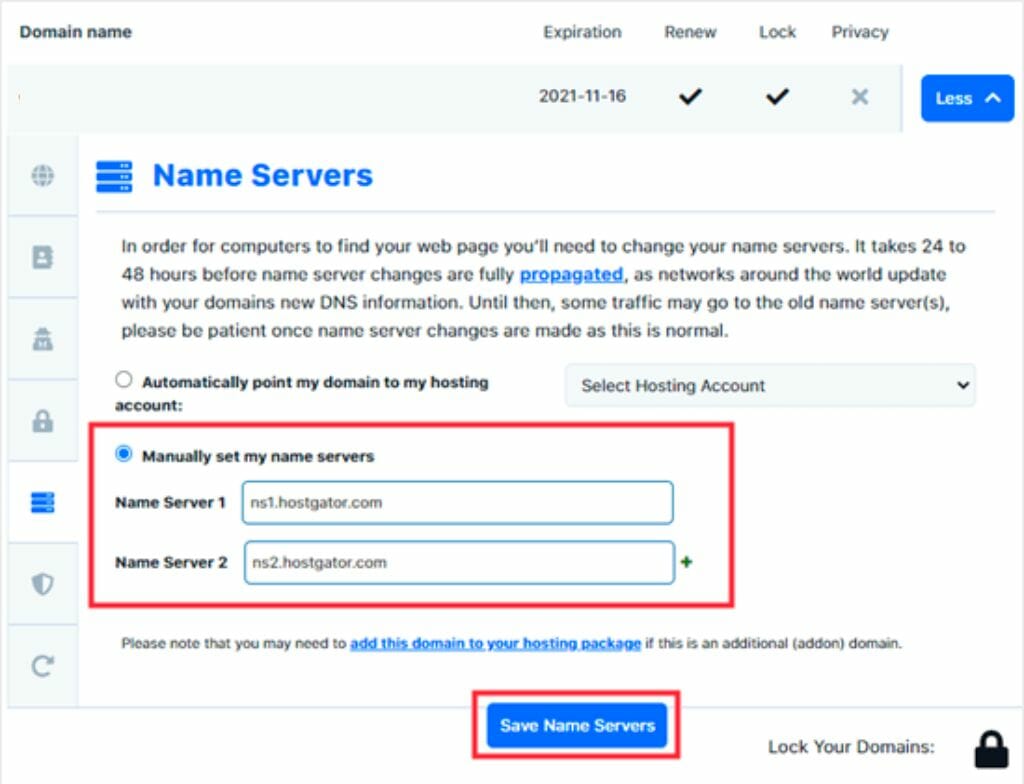
DNS settings tell the internet where your site is. Update these when you change hosts. Log into your domain account. Find the DNS settings. Change the nameservers to your new host’s servers. This connects your domain to your new host. Allow time for changes to take effect. Sometimes, it takes hours.

Credit: firstsiteguide.com
Testing The New Setup
Always check if your website works as expected. Click on all the links and see if they open the right pages. Test the forms to make sure they send information. Also, check if images and videos load quickly and correctly. If anything seems broken, it is important to fix it right away.
Keep an eye on your website’s speed. Use online tools to test how fast your site loads. Fast websites make visitors happy. Check if the website works well on phones and tablets too. If your site is slow, try to make the images smaller. Or, remove unnecessary plugins. This will help improve the performance.
Canceling Old Hosting
Canceling old hosting is an important step. First, back up your website data. Ensure you have all files and databases saved. Contact your old hosting provider for cancellation instructions. Follow their steps to end your service. Pay attention to any pending payments or charges. Confirm cancellation through email or their control panel. This ensures you won’t be billed again. Keep your backup safe. You might need it later. Check for any domain transfer needs. Domains may need a separate process. Check with your domain registrar for details. It’s crucial to complete all steps. Your site needs to stay online without issues. Double-check the process to avoid problems.

Credit: www.hostpapa.com
Tips For A Smooth Transition
Switching web hosting companies can be easy with careful planning. First, backup your website data. Next, choose a new host and move your files. Update your domain settings to point to the new server. Test your site thoroughly to ensure everything works.
Minimize Downtime
Keep your site online during the switch. Plan the move carefully. Transfer files at night or off-peak hours. Set up your new server before you change DNS settings. Test your site on the new server first. Make sure everything works well.
Communicate Changes
Tell your visitors about the switch. Send emails to your subscribers. Post updates on social media. Let them know the date of the change. Explain what to expect. Assure them that their data is safe. Be ready to answer questions. Keep your message simple and clear.
Frequently Asked Questions
Can I Switch Web Hosting Companies?
Yes, you can switch web hosting companies. First, choose a new host and plan. Then, backup your website data. Finally, transfer files and update domain settings. Ensure your site remains functional during the transition. Check compatibility with the new host to avoid issues.
Can I Transfer My Website From One Host To Another?
Yes, you can transfer your website to a new host. Backup your website files and database first. Choose a new host, then upload your files and database there. Update your domain’s DNS settings to point to the new host. Test your website to ensure everything works smoothly.
How Easy Is It To Change Website Hosting?
Changing website hosting is relatively simple. Choose a new host, backup your site, and transfer files. Update DNS settings for the domain. Most hosts offer migration support. Ensure minimal downtime by planning the transition carefully. Always verify the transfer process to avoid data loss.
How Long Does It Take To Change Website Hosting?
Changing website hosting typically takes 24 to 48 hours. The process includes migrating files, databases, and updating DNS settings. Some factors, such as the size of your website and technical expertise, can affect the duration. Ensure backups are made to prevent data loss during the transition.
Conclusion
Changing web hosting companies can be smooth with the right steps. Start by researching reliable options. Compare features and prices. Backup your website data carefully. Ensure your new host supports your needs. Update domain settings to point to the new host.
Check your site’s functionality post-transfer. Address any errors quickly. Communicate with your host for support. This transition might seem daunting. But with patience, you will succeed. Your website deserves a solid foundation. Make informed choices for a seamless hosting switch.
Remember, a reliable host boosts your site’s performance. Keep your focus on providing a great user experience.


