
Are you frustrated with slow-loading websites that drive visitors away? Your web hosting speed might be the culprit.
In this digital age, every second counts, and a sluggish website can mean lost opportunities and revenue. But how do you know if your web hosting is up to speed? You’ll discover simple yet effective methods to test your web hosting speed, empowering you to make informed decisions that could transform your online presence.
Dive in, and unlock the potential to captivate your audience with lightning-fast performance. Don’t let slow speeds hold you back—let’s get started!
Importance Of Hosting Speed
Hosting speed is very important for websites. It affects how fast pages load. Visitors love fast websites. Slow sites can make them leave quickly. This means fewer visitors stay. It can hurt your business. Search engines also care about speed. Fast websites rank higher. This helps more people find your site.
Fast hosting improves user experience. People don’t like waiting. They want information fast. Quick loading keeps them happy. It also helps with customer trust. Slow sites seem less reliable. Faster ones feel more professional. This builds confidence in visitors.
Factors Affecting Speed
The distance between the server and users matters. Closer servers mean faster load times. Choosing the right server location is crucial. It can improve user experience.
Bandwidth is the amount of data sent. Limited bandwidth can slow down sites. More visitors can cause delays. Adequate bandwidth ensures smooth performance. It’s important for busy websites.
Hardware includes CPU and RAM. Better hardware means faster speeds. Old hardware can cause slowdowns. Investing in good hardware is wise. It helps websites run efficiently.
Tools For Speed Testing
Pingdom is a popular tool for testing website speed. It shows how fast your website loads. You can see each element and its load time. This helps find slow parts of a website. It also provides a performance grade. Free and paid options are available.
GTmetrix gives detailed reports on your website’s speed. It shows load times, page sizes, and requests. You can also see a waterfall breakdown. This helps you understand which parts load slowly. GTmetrix also gives suggestions for improvement. It has both free and premium plans.
Google PageSpeed Insights is a tool by Google. It analyzes a website’s speed and gives scores. These scores are for both mobile and desktop. The tool also suggests ways to make your site faster. It’s free and easy to use. Great for beginners and experts alike.

Credit: cyberpanel.net
Conducting Speed Tests
First, choose a reliable speed test tool. Tools like GTmetrix or Pingdom work well. Next, prepare your website. Make sure it has no errors. Clear any caching plugins. This ensures accurate results. Lastly, pick a test location. Choose one close to your audience. This reflects real-world performance.
Look at the load time. Faster load times mean better performance. Check the page size too. Smaller pages load quicker. Pay attention to the requests number. Fewer requests lead to faster speeds. Compare results to previous tests. This shows if changes improve speed.
Improving Hosting Speed
Large images slow down websites. Shrink them for faster loads. Use tools like TinyPNG or JPEG Optimizer. These tools make images smaller. Smaller images are quicker to load. Fast load times make users happy. Always check image sizes before uploading. Good practice for web speed.
Caching stores website data for quick access. It reduces load time. Use plugins like WP Super Cache. They keep data ready for users. This makes pages open faster. Quick pages improve user experience. Set caching for your website. Better speed makes users stay longer.
Too many plugins slow down sites. Each plugin uses resources. Resource use affects speed. Keep only necessary plugins. Remove or disable unused ones. Check plugin impact on speed regularly. Fewer plugins mean faster loads. Fast sites attract more visitors.
Credit: www.dotcom-monitor.com
Regular Monitoring
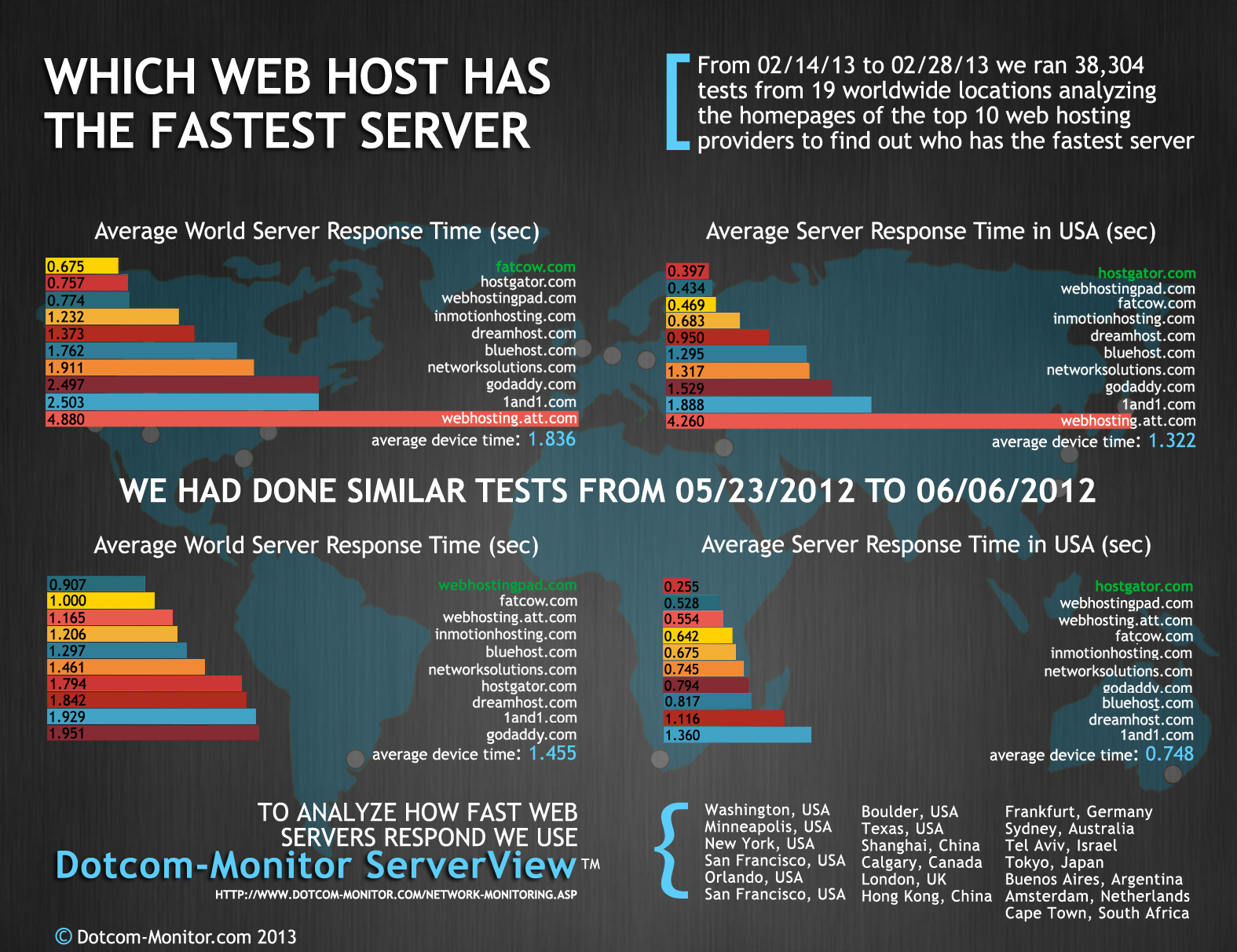
Testing web hosting speed is very important. It helps keep websites fast. Create a schedule for tests. This keeps things organized. Check speed at different times. Morning, afternoon, and night. This shows how speed changes.
Use different tools for testing. Each tool can give new info. Popular tools include GTmetrix and Pingdom. Try a mix of tools for the best results. Write down test results. This helps track changes over time. Look for patterns in the data.
Keep a log of all tests. This helps find problems. Compare new tests with old ones. See if speed gets better or worse. Make notes if you see big changes. This helps fix issues fast.
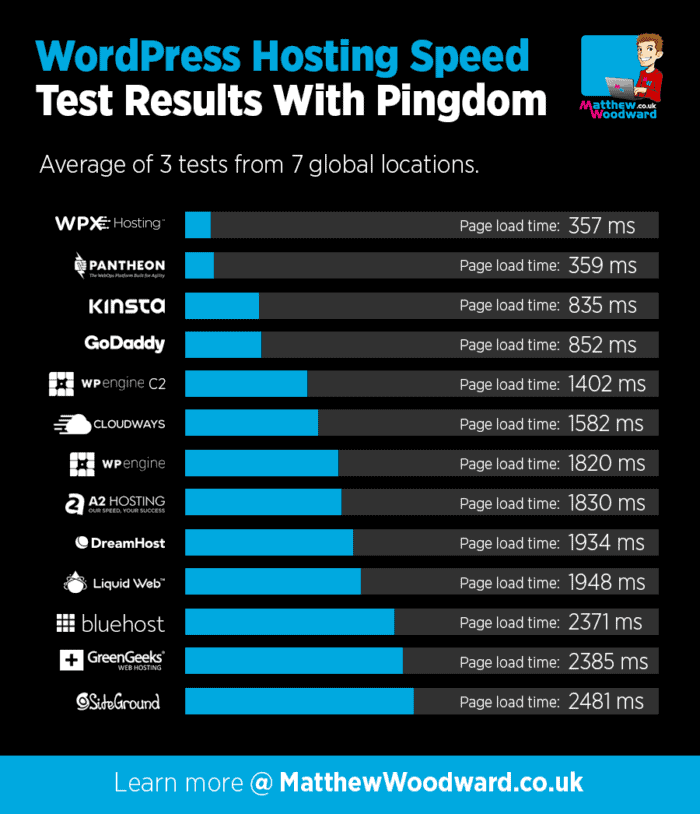
Use graphs to see results clearly. A picture makes data easy to understand. Share this data with your team. Everyone should know how the website is doing. Good tracking helps keep the site running smoothly.
Credit: davidlykhim.com
Frequently Asked Questions
How Do I Test The Speed Of My Website?
Use tools like Google PageSpeed Insights, GTmetrix, or Pingdom to test your website’s speed efficiently. Simply enter your website URL, and the tools will analyze and provide detailed performance reports. Optimize based on their recommendations to improve load times. Regular testing helps maintain optimal speed.
What Is The Best Website To Test Website Speed?
Google PageSpeed Insights is the best tool to test website speed. It provides detailed analysis and suggestions for improvement. Use it to optimize performance and enhance user experience.
What Is The Google Tool To Check Website Speed?
Google provides PageSpeed Insights to check website speed. It analyzes performance and offers optimization suggestions. This tool is essential for improving user experience and search rankings. Use it to assess both mobile and desktop performance effectively.
How To Check The Bandwidth Of A Website?
Use tools like Google Analytics or SEMrush to check website bandwidth. Monitor server logs for detailed data.
Conclusion
Testing web hosting speed is crucial. It ensures your site runs smoothly. Visitors expect fast loading times. Slow websites can frustrate users. Use tools like GTmetrix and Pingdom. They help measure speed effectively. Regular checks help maintain performance. Fast hosting improves user experience.
It keeps visitors happy and engaged. Don’t ignore this important task. Make it a routine practice. Your website deserves the best hosting speed. Remember, a speedy site benefits everyone. Keep monitoring. Stay ahead of issues. Aim for optimal performance. Your efforts will pay off.


