
Are you ready to transform your website with the Customizr WordPress theme? If you’re looking to give your site a unique edge that truly reflects your brand, customizing this popular theme is your golden ticket.
Imagine a site that not only looks stunning but also functions seamlessly, drawing in visitors and keeping them engaged. In this guide, you’ll discover the step-by-step process to tailor the Customizr theme to fit your exact needs. Whether you’re a seasoned developer or a WordPress newbie, you’ll find actionable insights and tips that make customization a breeze.
Dive in and unlock the potential to captivate your audience with a site that’s as unique as your vision. Stay with us, and let’s create something extraordinary together.
Getting Started With Customizr
First, log in to your WordPress dashboard. Find the Themes section on the side menu. Click on it to open. Here, you’ll see your current theme. Make sure Customizr is active. If not, activate it.
Next, click on Customize. This button is at the bottom of your theme’s thumbnail. You will now enter the customization screen. This screen lets you change things. You can adjust colors, fonts, and more. Explore the options. Try different settings.
Always remember to save your changes. Look for the save button on the screen. It’s usually at the top. Click it to keep your settings. Keep experimenting until you like the result. Customizing can be fun and creative.
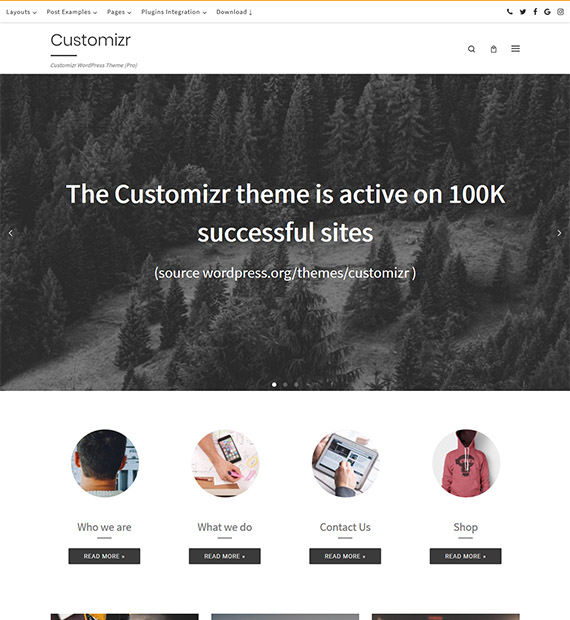
Credit: beautifulthemes.com
Theme Installation
Customizr is a popular theme for WordPress users. It offers many features. First, download the theme from the WordPress repository. Then, navigate to your WordPress dashboard. Click on “Themes” under “Appearance”. Now, select “Add New”. Upload the Customizr zip file. Click “Install Now”. Wait for the installation to complete.
After installation, activate the theme. This makes it live on your site. Now, you can start customizing. The theme is flexible. You can change colors and fonts. Customizr allows easy modifications. Explore all the settings. Make your site unique with Customizr.
Basic Settings
Start by setting your site title. This is your blog’s name. Next, add a catchy tagline. This tells what your site is about. Don’t forget your site’s logo. This is your brand’s face. Upload a clear image for it. Lastly, set a site icon. This shows on the browser tab. Make sure it’s clear too.
Create a navigation menu. This helps visitors find pages. Add important pages first. Examples are Home, About, and Contact. Use the drag-and-drop feature. It helps to reorder them. Make sure the menu is simple. Users should find things easily. Keep menu labels short and clear.
Widgets are small tools for your site. Add a search bar widget. This helps users find posts. Include a recent posts widget. It shows your latest content. Add a social media widget. This lets users follow your pages. Arrange widgets in the sidebar. This keeps the site tidy and user-friendly.
Design Customization
Choose colors that match your style. The Customizr theme has many options. You can pick from a palette or make your own. Bright colors catch the eye. Soft colors feel calm. Use colors to highlight important parts. Keep it simple. Too many colors can confuse. Stick to 2 or 3 main colors.
Fonts change how your site looks. Customizr lets you pick different fonts. Big fonts are easy to read. Small fonts fit more words. Try fun fonts for titles. Use plain fonts for text. This makes reading easy. Pick fonts that match your theme. Avoid mixing too many. It can look messy.
Background images make your site lively. Customizr allows you to add them easily. Choose images that fit your site’s mood. Nature images feel fresh. City images feel modern. Keep images simple. Busy images can distract. Ensure they don’t clash with text. Make sure they load fast. Slow images can annoy visitors.
Layout Adjustments
Change the header design by selecting different styles. You can make it big or small. Add your logo for a personal touch. The footer can also be changed. Include social media links. Add contact info for easy reach. Customize colors to match your brand. Make every section unique and attractive.
Choose where the sidebar appears. Left or right, it’s your choice. This affects how users see your site. Some themes let you hide it. This gives more space for content. Decide based on your site’s needs. Make sure it fits your layout.
Adjust the content width for better readability. Wider content allows more text. Narrow content focuses on specific areas. Balance is key for a neat look. Check how it appears on different devices. Responsive design is important. Ensure your content looks good everywhere.
Advanced Customization
Adding Custom CSS can make your website look unique. It helps change the style of your site. You can change colors, fonts, and more. Add your CSS in the WordPress customizer. It is very easy. First, go to your dashboard. Then, click on Appearance. Choose Customize. Find Additional CSS. Type your code there. Watch your changes happen live.
A child theme is like a copy of the parent theme. It lets you make changes without breaking the main theme. First, create a new folder. Name it something like customizr-child. Add two files: style.css and functions.php. Link it to the parent theme. This keeps your customizations safe. Even after updates.
Hooks are powerful tools in WordPress. They let you add or change code. Without editing the main files. Two types: actions and filters. Actions let you add new code. Filters change existing code. Use hooks to add new functions. Or change how things look. This makes your site flexible and dynamic.
Integrating Plugins
SEO Optimization: Plugins like Yoast can help. They make your site better for search engines. Use them to add keywords. You can also improve meta descriptions. Good SEO helps people find your site.
Performance Enhancements: Plugins can speed up your site. Fast sites make users happy. Use caching plugins. They save data and load pages quicker. Image optimization plugins reduce file size. This makes loading faster.
Social Media Integration: Share your posts with ease. Plugins help link to Facebook, Twitter, and more. Buttons let visitors share content. This brings more people to your site. Easy sharing can increase your audience.
Testing And Preview
Responsive Design Check is crucial. Make sure your site looks good on all devices. Use the Customizr theme’s built-in tools. Check on phones, tablets, and computers. Adjust layout if needed. Images should resize properly. Text must be easy to read. Buttons need to be clickable. This helps users have a great experience.
For Cross-Browser Compatibility, test on different web browsers. Try Chrome, Firefox, Safari, and Edge. Each browser may show things differently. Fix any display issues you find. Consistency is key. Update your theme regularly. This keeps it compatible with new browser versions. Happy users mean more visits to your site.
Troubleshooting Common Issues
Styling conflicts can cause your website to look strange. Different plugins or themes might use different styles. This can make your website messy. Check your CSS settings. Make sure there are no extra codes. A small change can fix the look. Use browser developer tools to see what affects the style. Look for solutions online if you get stuck. Many people face similar issues.
Plugins can sometimes not work well together. This can break your site. Always check if plugins are compatible with the theme. Read plugin reviews for any known issues. Updating plugins can help fix problems. If an update causes a problem, try using an older version. Backup your site before making changes. This way, you can restore it if something goes wrong.

Credit: wordpress.org
Best Practices
Keeping your Customizr theme updated is important. Updates fix bugs. They improve security. Always check for the latest version. Use the WordPress dashboard for updates. It’s easy and quick. Updates keep your website running smoothly.
Backups protect your data. Create backups regularly. Use plugins for easy backups. Store them safely. Use cloud storage or external drives. Backups help you recover lost data. Don’t forget to test your backups. Testing ensures they work well when needed. Backing up is like wearing a safety helmet. It protects you from accidents.
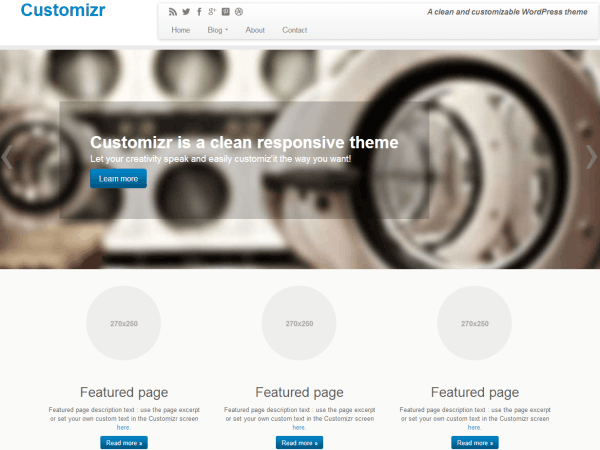
Credit: presscustomizr.com
Frequently Asked Questions
How To Install Customizr Theme In WordPress?
To install Customizr, log into your WordPress dashboard, navigate to “Appearance” and select “Themes. ” Click “Add New,” search for Customizr, and hit “Install. ” Once installed, activate the theme. Ensure your WordPress version is updated for compatibility. Installation is straightforward and enhances your site’s design.
Can I Change Customizr Theme Colors?
Yes, you can easily change colors in Customizr through the Customizer. Navigate to “Appearance” and select “Customize. ” Under “Colors,” you can adjust various elements like headers, footers, and backgrounds. This customization allows for unique branding and improves visual appeal, ensuring your site stands out.
Is Customizr Theme Mobile-friendly?
Yes, Customizr is mobile-friendly, providing responsive design for all devices. It automatically adjusts layouts for smartphones, tablets, and desktops. This ensures optimal viewing and navigation experience for users. Responsive design is crucial for SEO and user engagement, enhancing accessibility and interaction.
How To Add A Logo In Customizr?
To add a logo in Customizr, go to “Appearance” and click “Customize. ” Under “Site Identity,” upload your logo file. Adjust size and positioning as needed. This customization boosts brand recognition and professionalism, making your site visually appealing and cohesive.
Conclusion
Customizing the Customizr WordPress theme is simpler than you might think. Small tweaks can transform your site. Tweak colors and fonts to match your brand. Adjust layouts for better user experience. Add widgets for extra functionality. Keep experimenting to find what works best.
Remember, practice makes perfect. Explore different features and learn by doing. Personalize your site to reflect your unique style. Your creativity is the limit. Stay patient and enjoy the process. With time, your website will feel just right. Start customizing today and watch your website evolve beautifully.


