
Designing a home page can feel like a daunting task, especially when you want it to stand out. If you’re using the Neve WordPress theme, you’re in luck!
This theme offers flexibility and a sleek design that can make your site shine. But how do you make the most of it to grab your visitors’ attention? Imagine having a home page that’s not just visually appealing but also intuitive and engaging.
This is your chance to create a welcoming virtual doorway that invites users to explore further. With the right strategies, you can transform your home page into a powerful tool that not only captivates but also converts. Ready to discover how you can design an irresistible home page with Neve? Let’s dive in and unlock the potential of your website together!
Understanding Neve Theme
The Neve WordPress theme is light and fast. It works well on all devices. You can design it with ease. Start by looking at the customizer settings. These help you change the look. Choose a color scheme you like. Add a logo to make your site unique.
Use widgets to add more features. They make the page more engaging. Remember to keep the design simple. Too many colors can confuse visitors. Use clear and big fonts for easy reading. This helps everyone understand your content better.
Images are important too. Use high-quality images to catch the eye. Make sure they load fast. Slow images can make people leave. Keep the page balanced. Not too empty, not too crowded.
Setting Up Neve
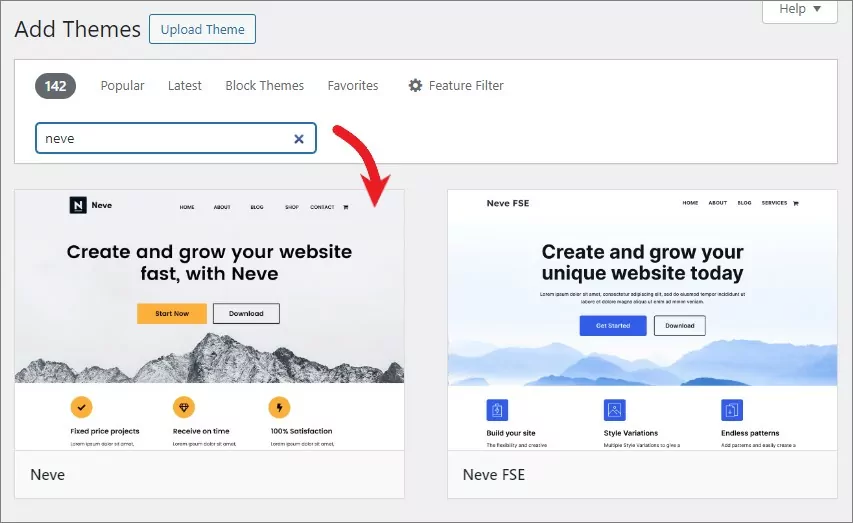
Start by installing the Neve theme. Go to your WordPress dashboard. Find the “Themes” section. Search for Neve. Click “Install” and then “Activate”. Next, access the Neve Options. Customize the header and footer. Choose a layout that suits your style. You can pick a color scheme that matches your brand. Adjust the typography for better readability. Add your logo for a personal touch. Ensure the navigation menu is easy to use. Users should find it simple to explore your site. Use the built-in page builder to design your home page. Drag and drop elements to create a unique look. Preview changes before publishing. Make sure everything looks perfect. Happy designing!
Choosing The Right Layout
Picking the perfect layout is crucial. It sets the stage for your site. Neve offers many layout options. Each layout has its own charm. You might like a minimalist look. Or perhaps a more dynamic design suits your needs. Consider what best represents your brand. Think about your audience too. A simple layout is often more inviting. Users find it easy to navigate. Busy layouts can confuse visitors. Keep it neat and tidy. Balance is key. Visuals should not overwhelm text. Remember to highlight key information. Make your homepage engaging and clear. This invites visitors to explore more.
Customizing Header And Footer
Place your logo at the top of the page. It helps people recognize your brand. Keep it simple and clear. Ensure your logo is easy to see. Use colors that match your brand. A good logo makes your site look professional.
Use a clear navigation menu. It helps visitors find information quickly. Include only important pages like Home, About, and Contact. Limit menu items to avoid confusion. Use simple words for each menu item. Visitors should feel comfortable navigating your site.
Display your contact information in the footer. This makes it easy for visitors to reach you. Include email, phone, and address if necessary. Make sure this information is always up-to-date. A clear contact section builds trust with your audience.
Selecting Color Schemes
Choosing the right color scheme is important for your home page. Colors can change how visitors feel. Neve theme lets you pick from many options. Use colors that match your brand. Bright colors grab attention. Soft colors feel calm.
Mix different colors for a balanced look. Avoid too many bright colors. They can make the page hard to read. Neve theme is easy to customize. Play with colors until you find the right fit. Check how colors look on mobile screens too.
Colors should be easy on the eyes. They should help people focus on your content. Good color schemes make your page nice to look at. Choose wisely for the best experience.

Credit: wpmarmite.com
Typography Choices
Choosing the right font style is important for your website. Simple fonts are often the best choice. They are easy to read. Sans-serif fonts work well for this. These fonts have a clean look. They fit many types of sites.
Text should be easy to read for everyone. Use a larger font size. This helps everyone read without straining their eyes. Keep the text color different from the background. This makes the words stand out more. Line spacing is also important. More space between lines can make the text easier to follow.
Incorporating Visual Elements
Choose bright and clear images for your home page. Images should relate to your topic. They need to be high quality but not too big. Big images slow down your page. Use graphics to make points easy to see. Try using icons. Icons help visitors understand fast. Infographics are fun and teach well. A balance of images and text keeps people interested.
Videos can show a lot in little time. They keep visitors on your page. Keep them short and interesting. Animations add fun to your page. They can make buttons move. Moving buttons catch the eye. Use animations sparingly. Too many can confuse visitors. Simple animations work best. Balance keeps the page tidy and easy to follow.
Organizing Content Blocks
The Hero Section is the first thing visitors see. Use a big, clear image. Add a short, catchy headline. This tells what your site is about. Use a simple button for actions like “Learn More.” Keep it neat and tidy. This helps users understand your site quickly.
Show your best products or services here. Use images to make them stand out. Add a short description for each. This helps people know what you offer. Use clear buttons for buying or learning more. Make it easy to explore.
Testimonials and reviews build trust. Show what happy customers say. Use short and true quotes. Add names and pictures if possible. This makes it more real. Keep it simple and believable. Let others know your good work.
Enhancing User Experience
A home page should look good on all devices. Neve theme is great for this. It adjusts to different screen sizes. This makes it easy to use on phones and tablets. Users will stay longer if the site is easy to read. Tap targets should be big enough for fingers. This helps in clicking links easily. Text should be readable without zooming.
Fast loading pages keep visitors happy. Neve theme is known for speed. Optimize images and scripts to load faster. Users leave if a page is slow. Use tools to check speed. Reduce file sizes to improve load time. Every second counts in keeping visitors.
Websites should be easy for everyone to use. Neve theme includes accessibility features. Add alt text to images. Use clear headings and lists. Keyboard navigation should be smooth. Ensure color contrast is strong. This helps users with vision issues.

Credit: wordpress.org
Testing And Tweaking
User feedback is very important for a good design. Talk to your users. Ask them what they like. Listen to their ideas. Make changes based on their thoughts. This will make your page better. Happy users will visit again.
Try A/B testing for your home page. Make two versions. Show them to different users. See which one they like more. Look at the results. Choose the best design. This helps find what works best. It’s like a fun game with your website.
Credit: translatepress.com
Frequently Asked Questions
How To Customize Neve Homepage Layout?
To customize Neve homepage layout, navigate to the WordPress dashboard. Select ‘Appearance,’ then ‘Customize. ‘ Use Neve’s built-in options to adjust layout settings. You can modify sections, colors, and fonts for a personalized look. Preview changes live and save when satisfied.
Can I Add Widgets To Neve Homepage?
Yes, you can add widgets to the Neve homepage. Access the WordPress dashboard, go to ‘Appearance,’ then ‘Widgets. ‘ Drag and drop desired widgets into the available sections. Customize widget settings to suit your design needs and enhance functionality.
What Are Neve Theme Homepage Design Tips?
Neve theme homepage design tips include prioritizing user experience. Keep navigation simple and intuitive. Use high-quality images that resonate with your brand. Ensure mobile responsiveness for all elements. Incorporate call-to-action buttons effectively to boost engagement.
How Do I Change Neve Homepage Colors?
Changing Neve homepage colors is easy. Go to ‘Customize’ from the WordPress dashboard. Select ‘Colors’ and adjust the palette to match your brand. Preview changes instantly and ensure color consistency across sections before publishing.
Conclusion
Designing a home page with Neve WordPress Theme is simple. Focus on user experience. Keep navigation clear and intuitive. Use engaging visuals to draw attention. Highlight key features and benefits. Ensure mobile responsiveness for wider reach. Optimize load times for better performance.
Customize easily with the flexible options Neve offers. Experiment with layouts to find your style. Remember, a clean design enhances user engagement. Regular updates keep your page fresh. With these steps, your Neve home page will be effective and inviting.
Aim for simplicity and clarity. Your visitors will appreciate it.


